1. 서론
This manual provides detailed instructions for the proper setup, operation, and maintenance of your Zerone USB Digital Microscope. This device is designed for various applications including industrial testing, laboratory research, educational purposes, and detailed examination of small objects. Please read this manual thoroughly before using the product to ensure optimal performance and longevity.
2. 안전 정보
- 기기를 극한의 온도, 습도 또는 부식성 물질에 노출시키지 마십시오.
- Avoid direct exposure of the LED lights to eyes.
- 기기를 어린이의 손이 닿지 않는 곳에 보관하세요.
- Use only the provided accessories or compatible replacements.
- 사용하지 않을 때나 청소할 때는 전원 콘센트에서 기기를 분리하십시오.
3. 패키지 내용
패키지에 모든 품목이 들어 있는지 확인하세요.
- Zerone USB Digital Microscope
- 조절 가능한 스탠드
- USB Cable with LED Dimming Knob
- 소프트웨어 설치 CD (또는 다운로드 링크)

Image 3.1: Contents of the Zerone USB Digital Microscope package, including the microscope, stand, USB cable, and software CD.
4. 제품 오버view
The Zerone USB Digital Microscope features a compact design with adjustable magnification and integrated LED illumination. Key components include:
- 현미경 본체: Contains the lens, sensor, and control buttons.
- Zoom/Focus Wheel: Located on the microscope body for adjusting magnification and focus.
- LED 조명: Eight adjustable LEDs surrounding the lens for illuminating the specimen.
- 스냅 버튼: 정지 이미지를 촬영하는 데 사용합니다.
- USB 케이블 : Connects the microscope to a computer.
- LED Dimming Knob: Integrated into the USB cable for brightness control.
- 조정 가능한 스탠드: 안정적인 지지대를 제공하며 현미경의 정확한 위치 조정을 가능하게 합니다.

Image 4.1: The Zerone USB Digital Microscope mounted on its adjustable stand, connected via USB cable.

이미지 4.2: 더 가까이 view of the Zerone USB Digital Microscope on its stand, highlighting its portable design and 1000X zoom capability.
5. 설정
5.1 소프트웨어 설치
- Insert the provided software installation CD into your computer's CD-ROM drive. If your computer does not have a CD-ROM drive, please refer to the manufacturer's web소프트웨어 다운로드 지침 사이트.
- Follow the on-screen prompts to install the digital microscope software.
- 설치가 완료되면 메시지가 표시될 경우 컴퓨터를 다시 시작하십시오.
5.2 현미경 연결하기
- Attach the microscope to the adjustable stand. Ensure it is securely fastened.
- Connect the USB cable from the microscope to an available USB port on your computer.
- The computer should automatically detect the device. If not, check your device manager for driver installation status.

Image 5.1: The Zerone USB Digital Microscope set up on a surface, demonstrating its use in a typical research or inspection environment.
6. 사용 설명서
6.1 소프트웨어 시작
Launch the digital microscope software installed on your computer. The live feed from the microscope should appear on your screen.
6.2 초점 및 줌 조정
- Place the object you wish to examine under the microscope lens.
- 회전하다 Zoom/Focus Wheel on the microscope body to adjust the magnification and bring the image into clear focus on your computer screen.
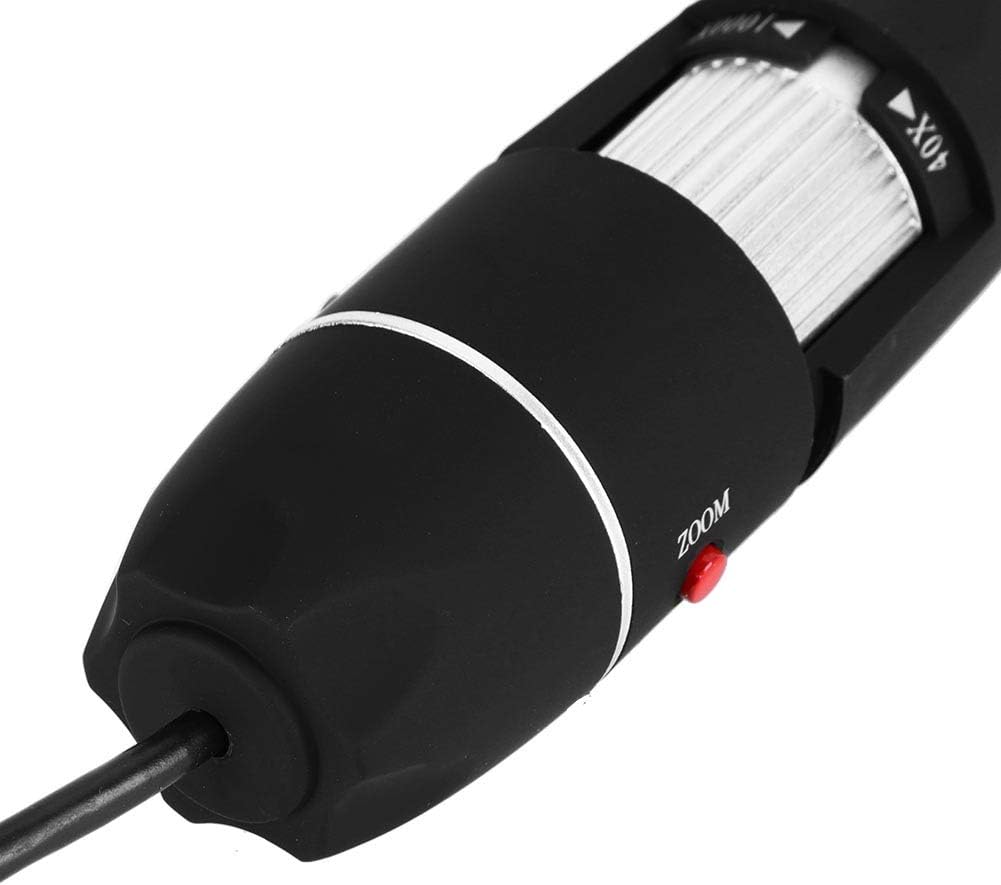
이미지 6.1: 자세한 view of the zoom and focus adjustment wheel on the microscope body, used for precise image clarity and magnification.
6.3 LED 밝기 조정
The microscope is equipped with 8 adjustable LED lights. Use the LED Dimming Knob located on the USB cable to increase or decrease the brightness. Adjust the lighting to achieve optimal visibility of your specimen.

Image 6.2: A close-up showing the arrangement of the 8 LEDs around the microscope lens, designed to provide even illumination.

Image 6.3: The front of the microscope with its 8 LEDs illuminated, demonstrating the lighting capability for viewing specimens.
6.4 이미지 및 비디오 캡처
To capture a still image, press the 스냅 버튼 on the microscope body or use the corresponding function within the software. To record video, select the video recording option in the software and follow the prompts.

Image 6.4: A hand holding the Zerone USB Digital Microscope, illustrating its ergonomic design and portability for handheld use.
6.5 제품 시연 영상
Watch this video for a visual guide on the features and operation of the Zerone USB Digital Microscope.
비디오 6.1: 시연 비디오asing the Zerone 1000X Zoom USB Digital Microscope, highlighting its features and how it functions as a digital magnifier and endoscope camera.
7. 유지관리
7.1 청소
- 부드럽고 마른 천으로 현미경 본체를 살살 닦아주세요.
- 렌즈의 경우, 긁힘을 방지하기 위해 특수 렌즈 세척 천과 세척 용액을 사용하세요.
- 연마성 세척제나 용제를 사용하지 마십시오.
7.2 보관
When not in use, store the microscope in a clean, dry place, away from direct sunlight and extreme temperatures. Use the original packaging or a protective case to prevent dust accumulation and physical damage.
8. 문제 해결
| 문제 | 가능한 원인 | 해결책 |
|---|---|---|
| 화면에 이미지가 없습니다. | Microscope not connected properly; Software not launched; Driver issue. | Ensure USB cable is securely connected. Launch the software. Reinstall drivers if necessary. |
| 이미지가 흐릿함 | Incorrect focus; Incorrect working distance. | Adjust the Zoom/Focus Wheel. Ensure the microscope is at an appropriate distance from the object. |
| LED가 켜지지 않습니다 | LED dimming knob set to minimum; Power issue. | Rotate the LED Dimming Knob to increase brightness. Check USB connection. |
| Software not detecting device | Driver not installed or corrupted; USB port issue. | Reinstall the software and drivers. Try a different USB port. |
9. 사양
| 특징 | 세부 사항 |
|---|---|
| 상표 | 제론 |
| 모델 번호 | SKIESOARtbx1zsgua2 |
| 확대 | 최대 1000배 |
| 광원 | 조정 가능한 LED 8개 |
| 연결성 | USB |
| 호환 장치 | 개인용 컴퓨터 |
| 재료 | 금속 |
| 색상 | 블랙, 실버 |
| 제품 치수 | 5.31 x 5.12 x 1.77 인치 |
| 품목 무게 | 7 온스 |
10. 보증 및 지원
For warranty information and technical support, please refer to the documentation included with your product or visit the official Zerone web사이트. 보증 청구에 대비해 구매 증빙 자료로 구매 영수증을 보관하세요.
