1. 서론
The LAUNCH CR319 is a handheld On-Board Diagnostics II (OBD2) code reader designed to assist in diagnosing vehicle engine issues. It provides access to various diagnostic functions to help users identify and clear trouble codes, monitor vehicle performance data, and check emission readiness status. This manual provides detailed instructions for the proper use and maintenance of your CR319 device.
2. 제품 오버view
2.1 주요 특징
- OBD2의 모든 기능: 10가지 OBD2 테스트 모드를 모두 지원합니다.
- DTC 조회 라이브러리: Built-in database with over 3000 code definitions.
- 다국어 지원: Available in English, Portuguese, Russian, Italian, Spanish, French, and German.
- 플러그 앤 플레이: No batteries or charger required; powered directly from the vehicle's OBD2 port.
- 컴팩트한 디자인: 취급 및 보관이 용이합니다.
2.2 장치 구성 요소
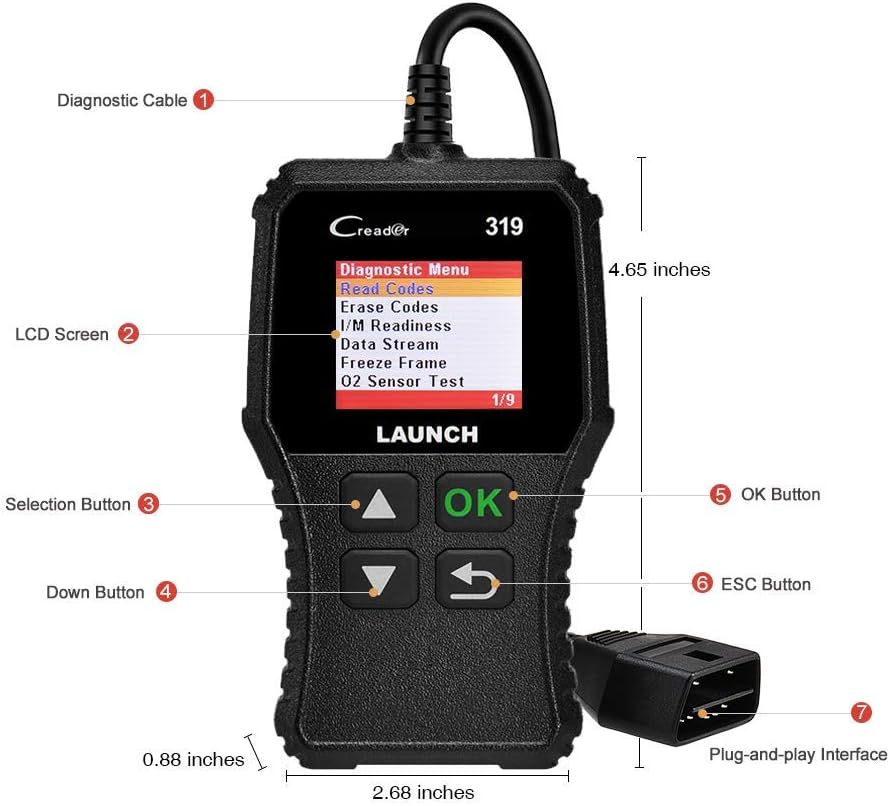
The image above illustrates the main components of the LAUNCH CR319 OBD2 Scanner. Key parts include the Diagnostic Cable (1) for connecting to the vehicle, the LCD Screen (2) for displaying information, Selection Buttons (3) for navigation, the Down Button (4), the OK Button (5) for confirmation, the ESC Button (6) to return to the previous screen, and the Plug-and-Play Interface (7) which is the OBD2 connector.
3. 설정
- OBD2 포트를 찾으세요: OBD2 포트는 일반적으로 차량 운전석 쪽 대시보드 아래에 있습니다. 찾을 수 없는 경우 차량 사용 설명서를 참조하십시오.
- 스캐너 연결: Plug the CR319's diagnostic cable connector firmly into the vehicle's OBD2 port. The device will power on automatically.
- 차량 시동: Turn the vehicle's ignition to the 'ON' position (engine off) or start the engine, depending on the diagnostic function you intend to perform.
4. 사용 설명서
After connecting the CR319 to your vehicle, the main menu will appear. Use the Up/Down selection buttons to navigate through the options and the OK button to confirm a selection. The ESC button returns to the previous screen.
4.1 코드 읽기
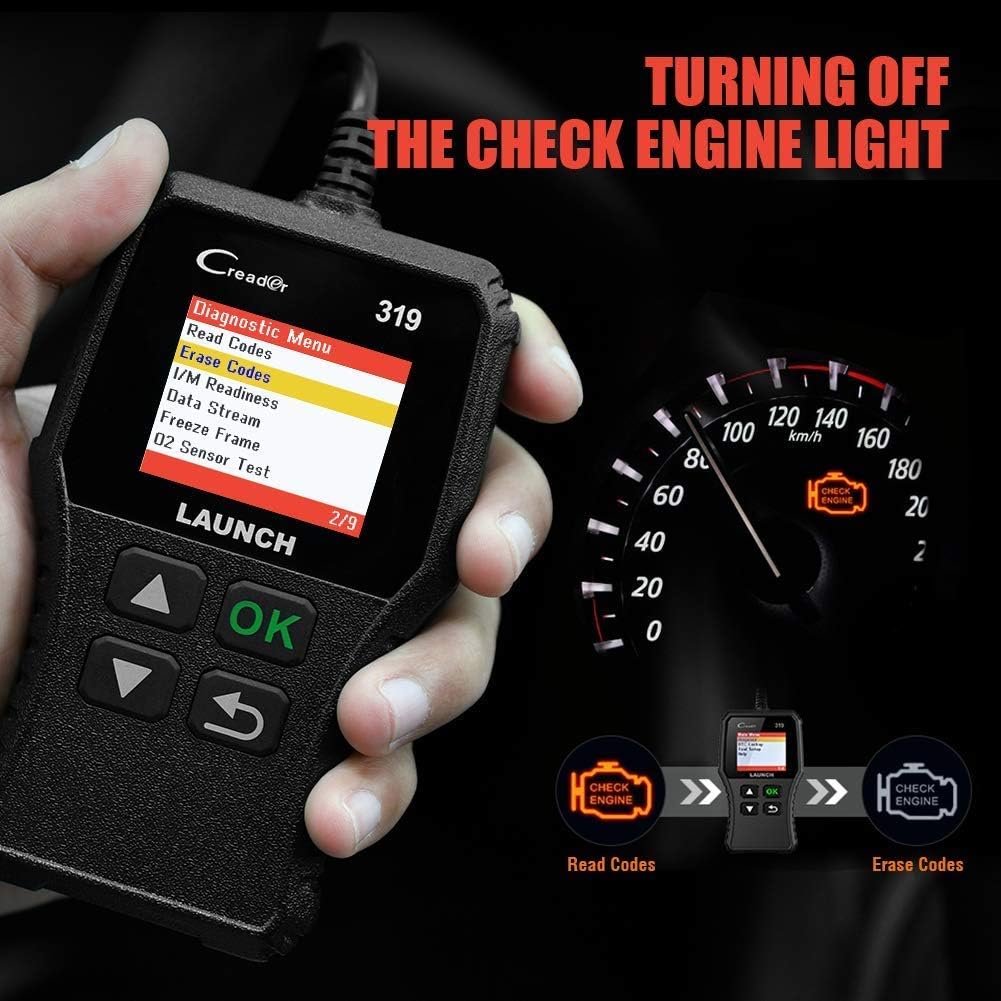
이 기능은 차량 컴퓨터에서 진단 문제 코드(DTC)를 검색합니다. 이 코드는 차량의 자가 진단 시스템에서 감지된 특정 문제를 나타냅니다.
- 메인 메뉴에서 선택하세요 'Diagnose'.
- 선택하다 'Read Codes'.
- The scanner will display any stored, pending, or permanent codes along with their descriptions.
4.2 명확한 코드
This function erases DTCs from the vehicle's computer and turns off the Check Engine Light (MIL). Ensure any underlying issues are resolved before clearing codes, as they may reappear.
- 메인 메뉴에서 선택하세요 'Diagnose'.
- 선택하다 'Erase Codes'.
- 안내 메시지가 나타나면 작업을 확인하십시오. 그러면 엔진 경고등이 꺼질 것입니다.
4.3 I / M 준비
이 기능은 차량의 배출가스 관련 모니터링 시스템의 상태를 점검하여 배출가스 검사를 받을 준비가 되었는지 여부를 판단합니다.
- 메인 메뉴에서 선택하세요 'Diagnose'.
- 선택하다 'I/M Readiness'.
- The screen will display the status of various monitors (e.g., Misfire Monitor, Fuel System Monitor). 'OK' or 'Complete' indicates the monitor has run and passed; 'INC' or 'Incomplete' means the monitor has not yet run or completed its diagnostic cycle.
4.4 Data Stream (Live Data)

This function displays real-time operational data from the vehicle's engine control unit (ECU). This data can include engine RPM, vehicle speed, oxygen sensor readings, coolant temperature, and more.
- 메인 메뉴에서 선택하세요 'Diagnose'.
- 선택하다 'Data Stream'.
- Use the Up/Down buttons to scroll through the various data parameters.
4.5 프레임 고정
When an emission-related fault occurs, the vehicle's computer records a snapshot of operating conditions at the time of the fault. This data is called Freeze Frame data.
- 메인 메뉴에서 선택하세요 'Diagnose'.
- 선택하다 'Freeze Frame'.
- Review 기록된 매개변수를 통해 오류가 발생한 조건을 파악합니다.
4.6 DTC 조회

This feature allows you to manually enter a Diagnostic Trouble Code and view its definition from the scanner's internal database.
- 메인 메뉴에서 선택하세요 'DTC Lookup'.
- Use the navigation buttons to input the desired DTC.
- 누르다 '좋아요' 에게 view the code definition.
4.7 Other OBD2 Functions
The CR319 also supports the following OBD2 functions, accessible through the 'Diagnose' menu:
- O2 센서 테스트 : Retrieves oxygen sensor monitor test results for the most recently completed tests.
- EVAP 시스템 테스트(모드 8): 증발가스 배출 제어 시스템 테스트를 시작합니다.
- 온보드 모니터 테스트(모드 6): 지속적으로 모니터링되지 않는 배출가스 관련 파워트레인 구성 요소 및 시스템에 대한 테스트 결과를 검색합니다.
- 차량 정보: 차량 식별 번호(VIN), 교정 ID(CALID) 및 교정 확인 번호(CVN)를 표시합니다.
5. 호환성

The LAUNCH CR319 OBD2 Scanner is compatible with most American, European, and Asian vehicles manufactured from 1996 and newer that are OBDII-compliant. It supports all standard OBDII protocols, including KWP2000, ISO9141, J1850 VPW, J1850 PWM, and CAN (Controller Area Network).
5.1 Supported Vehicles
- 12V Gasoline cars.
- Vehicles compliant with OBDII standards (1996 US-based, 2000 EU-based, and newer Asian cars).
5.2 Not Supported Vehicles
- Diesel cars.
- 24V Heavy duty vehicles.
- Hybrid vehicles.
- Electric vehicles.
6. 사양
| 특징 | 사양 |
|---|---|
| 모델 | CR319 |
| 표시하다 | 컬러 LCD |
| 운영 볼륨tage | 9-18V (OBD2 포트 경유) |
| 지원되는 프로토콜 | KWP2000, ISO9141, J1850 VPW, J1850 PWM, CAN |
| 치수(길이 x 너비 x 높이) | 1.5 x 6 x 10.8 인치 |
| 무게 | 7.4 온스 |
| 작동 온도 | 0°C ~ 50°C(32°F ~ 122°F) |
| 보관 온도 | -20°C ~ 70°C (-4°F ~ 158°F) |
| 지원 언어 | English, Portuguese, Russian, Italian, Spanish, French, German |
7. 문제 해결
7.1 장치 전원이 켜지지 않음
- 진단 케이블이 차량의 OBD2 포트에 제대로 연결되어 있는지 확인하십시오.
- Verify the vehicle's ignition is in the 'ON' position or the engine is running.
- 차량의 OBD2 포트 퓨즈를 확인하십시오(차량 사용 설명서를 참조하십시오).
7.2 차량과의 통신 오류
- Confirm the vehicle is OBDII-compliant (generally 1996 and newer for gasoline vehicles).
- Ensure the diagnostic cable is properly connected.
- Turn off the ignition, wait 10 seconds, then turn it back to 'ON' and try again.
- If possible, test the scanner on another compatible vehicle to rule out a device malfunction.
7.3 Codes Cannot Be Cleared
- 차량의 시동 스위치가 'ON' 위치(엔진 꺼짐)에 있는지 확인하십시오.
- If the underlying fault that triggered the code is still present, the code may not clear or will reappear immediately. Address the vehicle's issue first.
8. 유지관리
- 청소: 부드럽고 마른 천을 사용하여 기기를 닦으세요. 연마성 세척제나 용제는 사용하지 마세요.
- 저장: Store the scanner in a clean, dry environment away from extreme temperatures and direct sunlight.
- 케이블 관리: Do not pull the cable forcefully or bend it sharply. Inspect the cable for damage before each use.
9. 보증 및 지원
For warranty information, technical support, or service inquiries, please contact LAUNCH customer support. Refer to the product packaging or the official LAUNCH web최신 연락처 정보는 사이트에서 확인하세요.


