1. 이상view
The meross MSG100 Smart Wi-Fi Garage Door Opener Remote transforms your existing garage door into a smart, connected device. This manual provides detailed instructions for installation, operation, and troubleshooting to ensure a seamless experience with your new smart home integration.
2. 상자 안에 무엇이 들어있나요?
Upon unboxing your meross MSG100, you should find the following components:
- meross MSG100 Smart Wi-Fi Garage Door Opener
- Wired Door Sensor with Cable
- USB 전원 어댑터
- USB 전원 케이블
- Control Cables for Garage Door Opener
- Mounting Accessories (screws, adhesive pads)
- 사용 설명서 (본 문서)

3. 호환성 확인
Before installation, it is crucial to verify that your existing garage door opener is compatible with the meross MSG100. The device supports over 200 brands and 1600 models, including openers using Security+ 1.0 and Security+ 2.0 protocols (Security+ 3.0 is not supported).
Method 1: Online Compatibility Checker
The easiest way to check compatibility is by visiting the official meross compatibility checker web대지:
https://www.meross.com/en-gc/compatibility-check/garage-door-opener
Simply enter your garage door opener's brand and model, and the tool will confirm compatibility or indicate if an accessory is needed.

Method 2: Test Wire Verification
If you are unsure or wish to double-check, you can use the provided test wire:
- Locate the OSC (Open/Stop/Close) and GND (Ground) terminals on your garage door opener. These are typically where your wall button wires connect.
- Insert the two ends of the test wire into these terminals.
- If your garage door opens or closes, it is compatible. If the lights blink but the door does not operate, an accessory (such as RGR910 or RGR551C) is required.
If an accessory is needed, meross provides these for free. You can submit your order number and shipping address on the compatibility page to receive it.

4. 설치
Follow these steps to install your meross MSG100 Smart Wi-Fi Garage Door Opener:
- Meross 앱을 다운로드하세요: 검색 "Meross" in your smartphone's app store and download the application.
- 장치에 전원을 공급하세요: Plug the USB power adapter into a power outlet near your garage door opener. Connect the USB power cable to the meross MSG100 device.
- Connect the Wired Door Sensor: Attach the wired door sensor to the meross MSG100 unit. Mount the sensor and its magnet to your garage door and the adjacent wall/frame, ensuring they are aligned and within 1 inch of each other when the door is closed.
- Connect to Garage Door Opener: Connect the control cables from the meross MSG100 to the appropriate terminals on your garage door opener (OSC and GND). Refer to your garage door opener's manual for specific terminal locations.
- Mount the Meross Unit: Secure the meross MSG100 unit near your garage door opener using the provided mounting accessories. Ensure it has a stable Wi-Fi signal.
- 앱 페어링: Follow the in-app instructions to pair your meross MSG100 with your Wi-Fi network and complete the setup.
5. 사용 설명서
Control your garage door conveniently using the Meross app or voice commands.
5.1 앱 제어
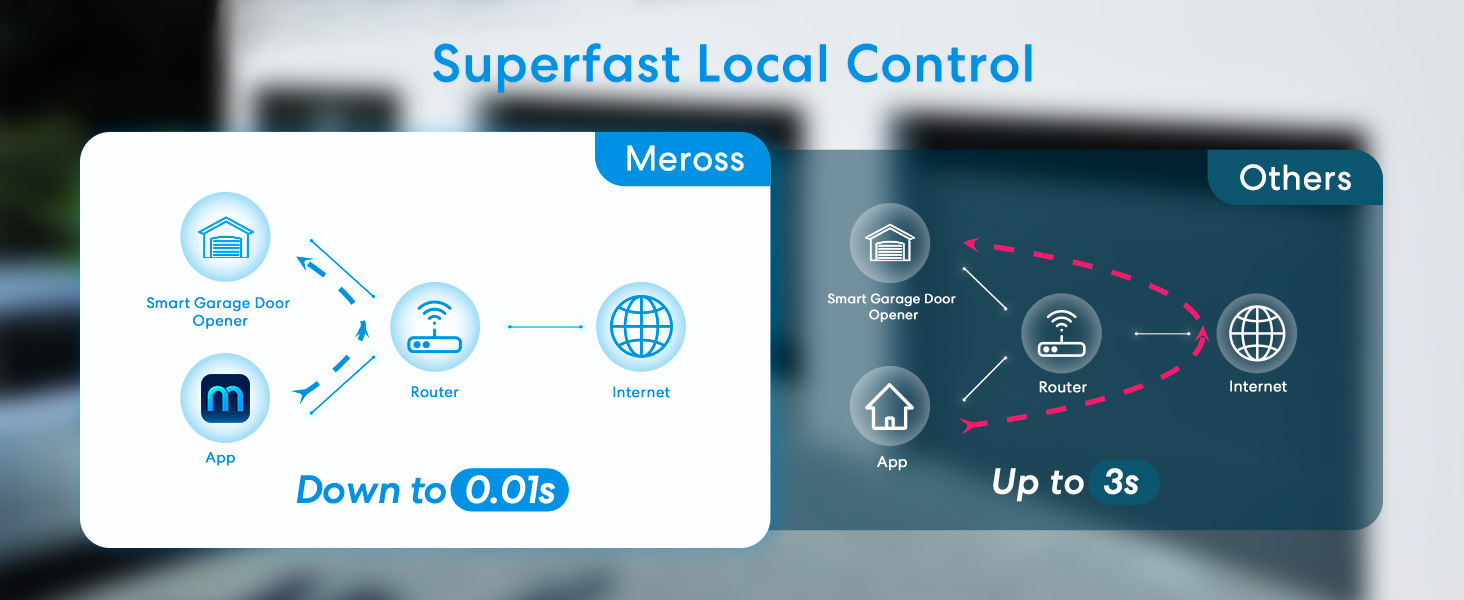
Open the Meross app on your smartphone. You will see your garage door listed. Tap the icon to open or close your garage door from anywhere with an internet connection. The app will display the current status (open/closed).

5.2 음성 제어
The meross MSG100 is compatible with Amazon Alexa, Google Assistant, and SmartThings. Link your meross account to your preferred voice assistant and use simple voice commands to operate your garage door.
- "Alexa, open my garage door."
- "Hey Google, is my garage door closed?"

5.3 알림 및 미리 알림
The Meross app provides multiple notification modes to keep you informed about your garage door's status:
- Open/Close Status: Receive alerts when the garage door opens or closes.
- Overtime Notification: Get reminders if the garage door has been left open for a specified duration.
- Overnight Notification: Be alerted if the garage door remains open overnight.
또한 다시 할 수 있습니다view the garage door's operation history through the app.

6. 주요 특징
- 원격 및 음성 제어: Operate your garage door from anywhere using the Meross app or voice commands with Alexa, Google Assistant, or SmartThings.
- 높은 호환성: Works with a wide range of garage door openers (200+ brands, 1600+ models) supporting Security+ 1.0 and 2.0 protocols.
- Multiple Notification Modes: Stay informed with real-time status updates, overtime, and overnight reminders.
- Precise and Stable Sensor: High-sensitivity wired sensor ensures accurate monitoring of the garage door status.
- 간편한 설치: Designed for straightforward setup, requiring acceptable Wi-Fi strength near the garage door.
- 월 수수료 없음 : Enjoy all smart features without any subscription costs.
- Separate Antenna: Provides a stronger Wi-Fi signal in the garage for reliable connectivity.

7. 사양
| 특징 | 세부 사항 |
|---|---|
| 제품 치수 | 3.7 x 1.8 x 0.9 인치 |
| 품목 무게 | 9.6 온스 |
| 모델 번호 | MSG100 |
| 상표 | 메로스 |
| 색상 | 하얀색 |
| 특징 | 범용 호환성 |
| 최대 지원 장치 | 1 (per MSG100 unit) |
| 호환 장치 | Alexa, Google Assistant, SmartThings, Chamberlain, LiftMaster, Craftsman |
| 연결성 | Wi-Fi(2.4GHz만 해당) |
8. 문제 해결
If you encounter issues with your meross MSG100, consider the following:
- Wi-Fi 연결: Ensure your Wi-Fi signal is strong and stable in the garage. The device operates on 2.4GHz Wi-Fi networks only.
- 센서 정렬: Verify that the wired door sensor and its magnet are correctly aligned and within the specified distance when the door is closed.
- 전원 공급 장치: Check that the meross unit is properly powered and the USB adapter is functioning.
- 앱 문제: Restart the Meross app or reinstall it if you experience persistent problems.
- 호환성: Re-verify your garage door opener's compatibility using the methods described in Section 3.
- 장치 재설정: If necessary, perform a factory reset on the meross MSG100 unit (refer to the in-app user manual for specific instructions).
For further assistance, please contact the meross support team.
9. 보증 및 지원
meross products typically come with a manufacturer's warranty. Please refer to the warranty information provided with your product packaging or visit the official meross website for details on warranty coverage and how to claim support.
For technical support, product inquiries, or accessory requests, please visit the meross support page or contact their customer service directly.


