1. 서론
This manual provides essential information for the safe and efficient operation of your Muse M-1990 DJ Bluetooth Party Speaker. Please read these instructions thoroughly before using the device and retain them for future reference.
The Muse M-1990 DJ is a powerful party speaker designed to deliver high-quality audio with dynamic light effects. It features multiple connectivity options including Bluetooth, CD player, USB, and AUX inputs, making it versatile for various audio sources.

Image 1.1: The Muse M-1990 DJ Bluetooth Party Speaker showcasing는 통합된 조명 효과를 가지고 있습니다.
2. 안전 정보
감전, 화재 또는 장치 손상을 방지하려면 다음 안전 예방 조치를 준수하세요.
- 본 제품을 비나 습기에 노출시키지 마십시오.
- c를 열지 마세요asing. 모든 서비스는 자격을 갖춘 담당자에게 의뢰하세요.
- 전원 공급 장치 볼륨을 확인하십시오.tage는 단위의 등급 라벨과 일치합니다.
- 직사광선, 열원 및 과도한 먼지로부터 제품을 멀리하십시오.
- 장치 주변에 적절한 환기가 이루어지도록 하세요.
- 기기 위에 무거운 물건을 올려 놓지 마십시오.
- 번개가 치거나 장기간 사용하지 않을 때에는 장치의 플러그를 뽑아 두십시오.
3. 패키지 내용
모든 품목이 포장에 들어 있는지 확인하세요.
- Muse M-1990 DJ Party Speaker Unit
- 리모컨 (AA 배터리 2개 필요, 포함)
- 유선 마이크
- AUX IN Cable (3.5mm jack)
- 전원 케이블 (AC 100-240V, 50/60Hz)

Image 3.1: Included accessories: remote control, wired microphone, and AUX cable.
4. 제품 오버view
Familiarize yourself with the main components and controls of your M-1990 DJ speaker.
4.1 상단 제어판
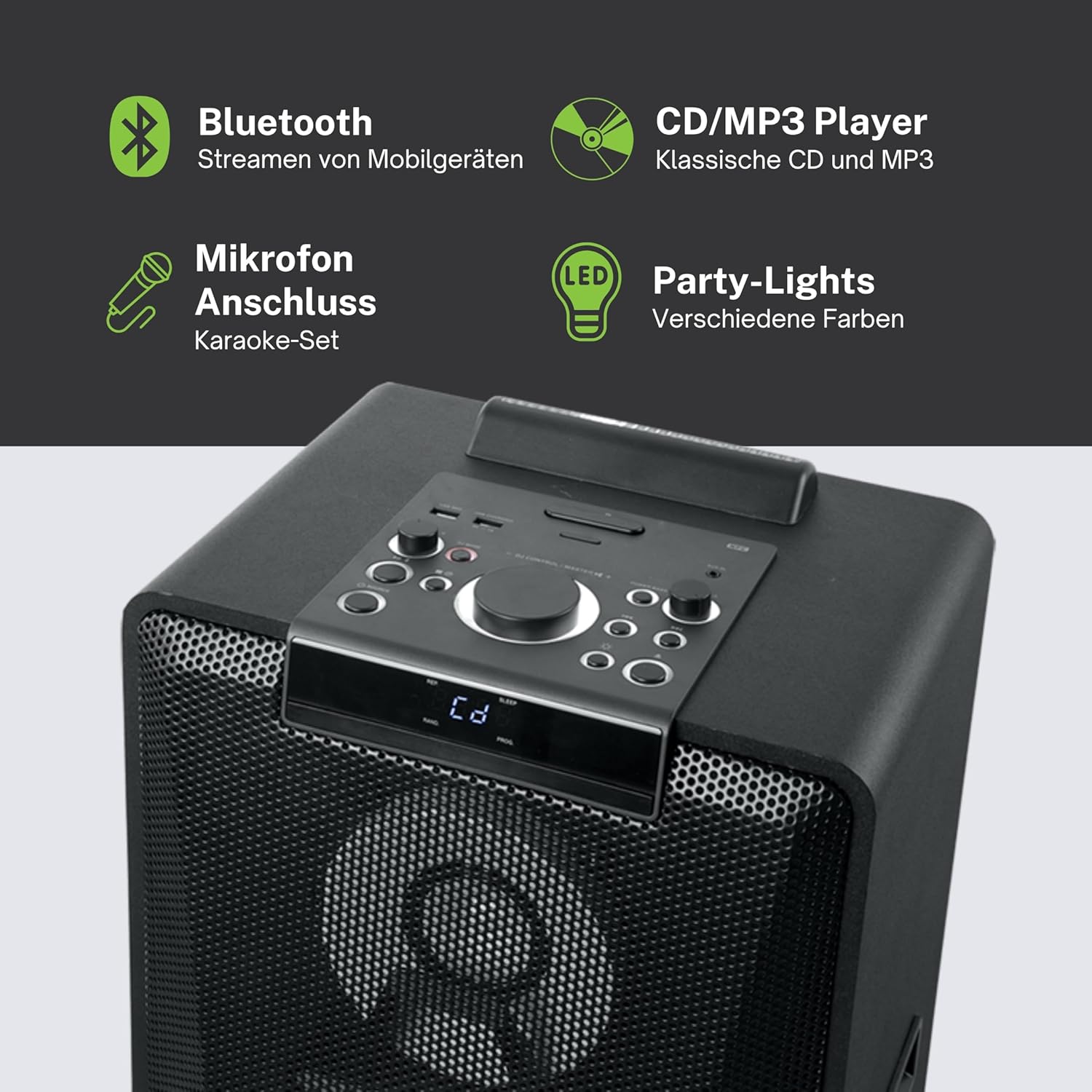
이미지 4.1: 상세 view of the top control panel, showing various buttons and the LED display.
The top panel features controls for power, volume, source selection, playback, light effects, and a white LED display. It also includes a built-in cradle for a tablet or smartphone.
4.2 Rear Connectivity Ports
후면 패널에는 다양한 입력 및 출력 옵션이 제공됩니다.
- USB 2.0 Port (for MP3 playback and charging)
- AUX IN 1 (2 x RCA jacks)
- AUX IN 2 (3.5mm jack)
- Microphone Inputs (2 jacks)
- Guitar Input (1 jack)
- AC Power Input (100-240V, 50/60Hz)
5. 설정
5.1 배치
Place the speaker on a stable, flat surface. Ensure there is adequate space around the unit for ventilation. The unit is designed for floor mounting.
5.2 전원 연결
- Connect the supplied power cable to the AC power input on the rear of the speaker.
- Plug the other end of the power cable into a standard wall outlet (AC 100-240V, 50/60Hz).
- The unit does not contain a rechargeable battery and must be connected to a power source for operation.
6. 사용 설명서
6.1 전원 켜기/끄기
Press the Power button on the top control panel or the remote control to turn the unit on or off.
6.2 블루투스 페어링
- Press the Source button to select Bluetooth mode. The LED display will show 'BT' and the Bluetooth indicator will flash.
- 스마트폰, 태블릿 또는 기타 호환 기기에서 Bluetooth를 활성화하세요.
- 검색 'M-1990 DJ' in your device's Bluetooth list and select it to pair.
- Once paired, the Bluetooth indicator will stop flashing, and you can begin streaming audio.
- For NFC-enabled devices, simply tap your device on the NFC area of the speaker for automatic pairing.
6.3 CD 재생
- 소스 버튼을 눌러 CD 모드를 선택하십시오.
- Open the CD tray and place a CD (CD, CD-R/RW, MP3 compatible) with the label side up.
- Close the CD tray. Playback will start automatically or can be initiated using the Play/Pause button.
6.4 USB 재생
- MP3가 포함된 USB 플래시 드라이브 삽입 files into the USB 2.0 port.
- Press the Source button to select USB mode.
- Playback will start automatically or can be controlled using the playback buttons.
- The USB port also functions as a charging port for external devices.
6.5 AUX 입력
- Connect your external audio device to either the AUX IN 1 (RCA jacks) or AUX IN 2 (3.5mm jack) using the appropriate cable.
- Press the Source button to select the corresponding AUX input.
- 연결된 기기에서 재생을 제어하세요.
6.6 마이크 및 기타 입력
- Plug your microphone(s) into the Microphone input jacks.
- Plug your guitar into the Guitar input jack.
- Adjust the microphone/guitar volume using the dedicated controls on the top panel.
6.7 조명 효과
The M-1990 DJ features color-changing lights and strobe effects. Use the dedicated Light Effects button on the control panel or remote to cycle through different modes or turn the lights off.
6.8 Stereo Pairing (Dual Bluetooth)
If you have two M-1990 DJ units, you can pair them wirelessly for a stereo sound experience. Refer to the specific instructions for stereo pairing in the full manual (if provided by manufacturer) or on the manufacturer's web대지.
7. 유지관리
7.1 청소
- 청소하기 전에 항상 전원 콘센트에서 장치의 플러그를 뽑으십시오.
- 부드럽고 마른 천을 사용하여 외부 표면을 닦으세요.
- 연마성 세척제, 왁스 또는 용제는 마감재를 손상시킬 수 있으므로 사용하지 마십시오.
7.2 보관
장시간 사용하지 않을 경우, 스피커를 직사광선과 극한의 온도를 피해 시원하고 건조한 곳에 보관하세요.
8. 문제 해결
If you encounter issues with your M-1990 DJ speaker, refer to the following common problems and solutions:
| 문제 | 가능한 원인 | 해결책 |
|---|---|---|
| 전원이 없습니다 | 전원 케이블이 연결되지 않았습니다. 전원 콘센트가 활성화되지 않았습니다. | Ensure power cable is securely connected; Try a different outlet |
| 소리가 나지 않습니다 | Volume too low; Incorrect source selected; Audio cable not connected | Increase volume; Select correct input source; Check audio cable connections |
| 블루투스가 페어링되지 않습니다 | Speaker not in pairing mode; Device Bluetooth off; Device too far | Ensure speaker is in BT mode and flashing; Enable Bluetooth on device; Move device closer (within 10m) |
| CD가 재생되지 않습니다 | CD inserted incorrectly; CD scratched/dirty; Incorrect format | Reinsert CD correctly; Clean CD; Ensure CD is audio CD or MP3 compatible |
| USB가 재생되지 않음 | USB 드라이브가 올바르게 삽입되지 않았습니다. Files not MP3 format; USB drive corrupted | USB 드라이브를 다시 삽입하십시오. files are MP3; Try a different USB drive |
이러한 해결 방법을 시도한 후에도 문제가 지속되면 고객 지원팀에 문의하세요.
9. 사양
Detailed technical specifications for the Muse M-1990 DJ Party Speaker:
- 모델 번호: M-1990 DJ
- 상표: 뮤즈 신
- 출력 전력: 1000 와트
- 채널 수: 2
- 연결 기술 : 블루투스 V4.2
- 호환 장치: 스마트폰, 태블릿
- 오디오 입력 : 2 x Microphone jacks, 1 x Guitar jack, 2 x RCA AUX IN, 1 x 3.5mm AUX IN
- USB 포트: 1 x USB 2.0 (for MP3 playback and charging)
- CD 플레이어: CD, CD-R/RW, MP3 호환
- 조명 효과: Color changing lights, Strobe effects, Light projection
- 전원: AC 100-240V, 50/60Hz (Electric Cable)
- 충전식 배터리: 아니요
- 재료: 나무(캐비닛)
- 색상: 검은색
- 품목 무게: 17.9 킬로그램
- 치수(길이 x 너비 x 높이): 35.6 x 34.8 x 105.7 센티미터
- 권장 사용: Party and entertainment
- 장착 유형: 플로어 마운트
- 포함된 배터리: 2 AA (for remote control)

Image 9.1: Dimensional drawing of the Muse M-1990 DJ speaker.
10. 보증 및 지원
10.1 보증 정보
Warranty terms and conditions for the Muse M-1990 DJ speaker are typically provided with the product packaging or can be found on the official Muse web사이트. 보증 청구를 위해 구매 증빙 자료를 보관해 주세요.
10.2 고객 지원
For further assistance, technical support, or service inquiries, please refer to the contact information provided in your product documentation or visit the official Muse customer support web대지.


