소개
This manual provides essential information for the safe and efficient use of your Sony HT-S350 2.1ch Soundbar System. Please read it thoroughly before operating the product and retain it for future reference.
The Sony HT-S350 system enhances your audio experience with a 2.1 channel soundbar and a powerful wireless subwoofer, delivering 320W total output. It features HDMI ARC for simplified connectivity and S-Force Pro Front Surround technology for an immersive soundstage.
상자 안에 무엇이 들어있나요?
- 사운드바 유닛
- 무선 서브우퍼
- 원격 제어기(RMT-AH500U)
- Batteries for Remote Commander (2 AAA)
- 광케이블
- 월 마운트 템플릿
설정
1. 배치
Place the soundbar centrally below your TV. The wireless subwoofer can be placed anywhere in the room where a power outlet is available, ideally near the soundbar for optimal bass integration.

Image: Sony HT-S350 Soundbar and Wireless Subwoofer positioned in a living room setup.
2. 연결
다음 방법 중 하나를 사용하여 사운드바를 TV에 연결하세요.
HDMI ARC(권장)
For optimal audio and control, connect an HDMI cable (not included) from the HDMI OUT (TV (ARC)) port on the soundbar to the HDMI ARC port on your TV. This allows for one-cable audio and control synchronization.
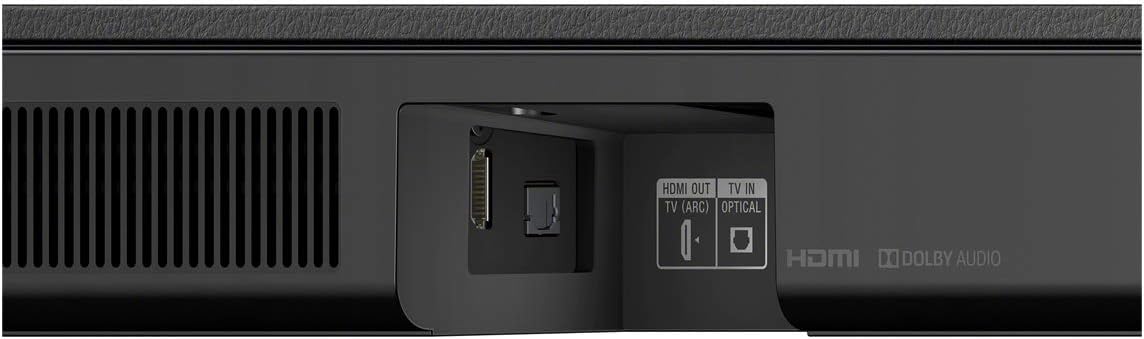
Image: Close-up of the soundbar's rear panel, highlighting the HDMI OUT (TV (ARC)) and TV IN (OPTICAL) ports.
광케이블
If your TV does not support HDMI ARC, connect the supplied optical cable from the TV IN (OPTICAL) port on the soundbar to the optical digital output port on your TV.
3. 전원 켜기
Plug the soundbar and wireless subwoofer into separate AC outlets. The subwoofer will automatically pair with the soundbar upon powering on.
작동 지침
원격 제어 기능
Use the supplied Remote Commander (RMT-AH500U) to control various settings:
- Power (TV/Soundbar): Turns the TV and soundbar on/off.
- 블루투스: 블루투스 페어링 모드를 활성화합니다.
- 영화: Optimizes sound for movies.
- Auto Sound: 콘텐츠에 따라 사운드 설정을 자동으로 조정합니다.
- 음악: Enhances audio for music playback.
- 목소리: Isolates and amplifies voices for clearer dialogue.
- 밤: Adjusts sound for late-night listening.
- SW +/-: 서브우퍼 볼륨 레벨을 조정합니다.
- 오디오: Selects audio input.
- 게임: 게임에 최적화된 사운드를 제공합니다.
- 소식: Enhances dialogue clarity for news programs.
- 스포츠: Optimizes sound for sports broadcasts.
- 기준: 균형 잡힌 사운드 프로를 제공합니다file.
- Secure Link Indicators: 연결 상태를 표시합니다.
블루투스 스트리밍
To stream audio from your smartphone or tablet:
- Press the Bluetooth button on the remote or soundbar to enter pairing mode.
- On your mobile device, search for and select "HT-S350" from the list of available Bluetooth devices.
- Once paired, audio from your device will play through the soundbar system.
Video: Official Sony Electronics overview of the HT-S350 Soundbar with Wireless Subwoofer, demonstrating its features and connectivity options.
유지
사운드바 시스템의 수명과 최적의 성능을 보장하려면:
- Keep the units clean by wiping them with a soft, dry cloth. Avoid using abrasive cleaners or solvents.
- Ensure proper ventilation around both the soundbar and subwoofer to prevent overheating.
- Protect the units from direct sunlight, extreme temperatures, and moisture.
문제 해결
소리가 나지 않습니다
- Check that both the soundbar and TV are powered on.
- Verify that the correct input source is selected on the soundbar (e.g., TV, Bluetooth).
- 모든 케이블(HDMI, 광케이블)이 단단히 연결되어 있는지 확인하십시오.
- HDMI ARC를 사용하는 경우 TV의 오디오 설정에서 ARC가 활성화되어 있는지 확인하십시오.
서브우퍼가 연결되지 않음
- Ensure the subwoofer is plugged into a working power outlet.
- The subwoofer should automatically pair. If not, refer to the full user manual for manual pairing instructions.
- Check for any obstructions or interference between the soundbar and subwoofer.
블루투스 연결 불량
- Ensure your Bluetooth device is within range (typically 10 meters) of the soundbar.
- 간섭을 일으킬 수 있는 다른 무선 장치 근처에 사운드바를 두지 마세요.
- Try unpairing and re-pairing your device.
명세서
| 특징 | 세부 사항 |
|---|---|
| 모델명 | HTS350 |
| 스피커 유형 | 사운드바 |
| 서라운드 사운드 채널 구성 | 2.1 |
| 스피커 최대 출력 전력 | 320 와트 |
| 서브우퍼 직경 | 6.3 인치 |
| 무선 통신 기술 | 블루투스 |
| 연결 기술 | Wired, Wireless (HDMI ARC, Optical, Bluetooth) |
| 제품 치수 | 3.5인치 깊이 x 35.5인치 너비 x 2.62인치 높이 |
| 품목 무게 | 22.5파운드(전체 시스템) |
| 포함된 구성 요소 | Remote Commander, Batteries, Optical Cable, Wall Mount Template |
보증 및 지원
This product comes with a limited warranty. For detailed warranty information, please refer to the warranty card included in the product packaging or visit the official Sony support web대지.
For further assistance, troubleshooting, or product inquiries, please visit the Amazon의 Sony Store 또는 소니 고객 지원팀에 문의하십시오.


