1. 제품 오버view
The radtel Bluetooth Headset is designed to provide hands-free communication for two-way radios, offering simultaneous connection to both your walkie-talkie and a mobile phone. It features noise cancellation for clear audio and a convenient wireless Push-To-Talk (PTT) button.
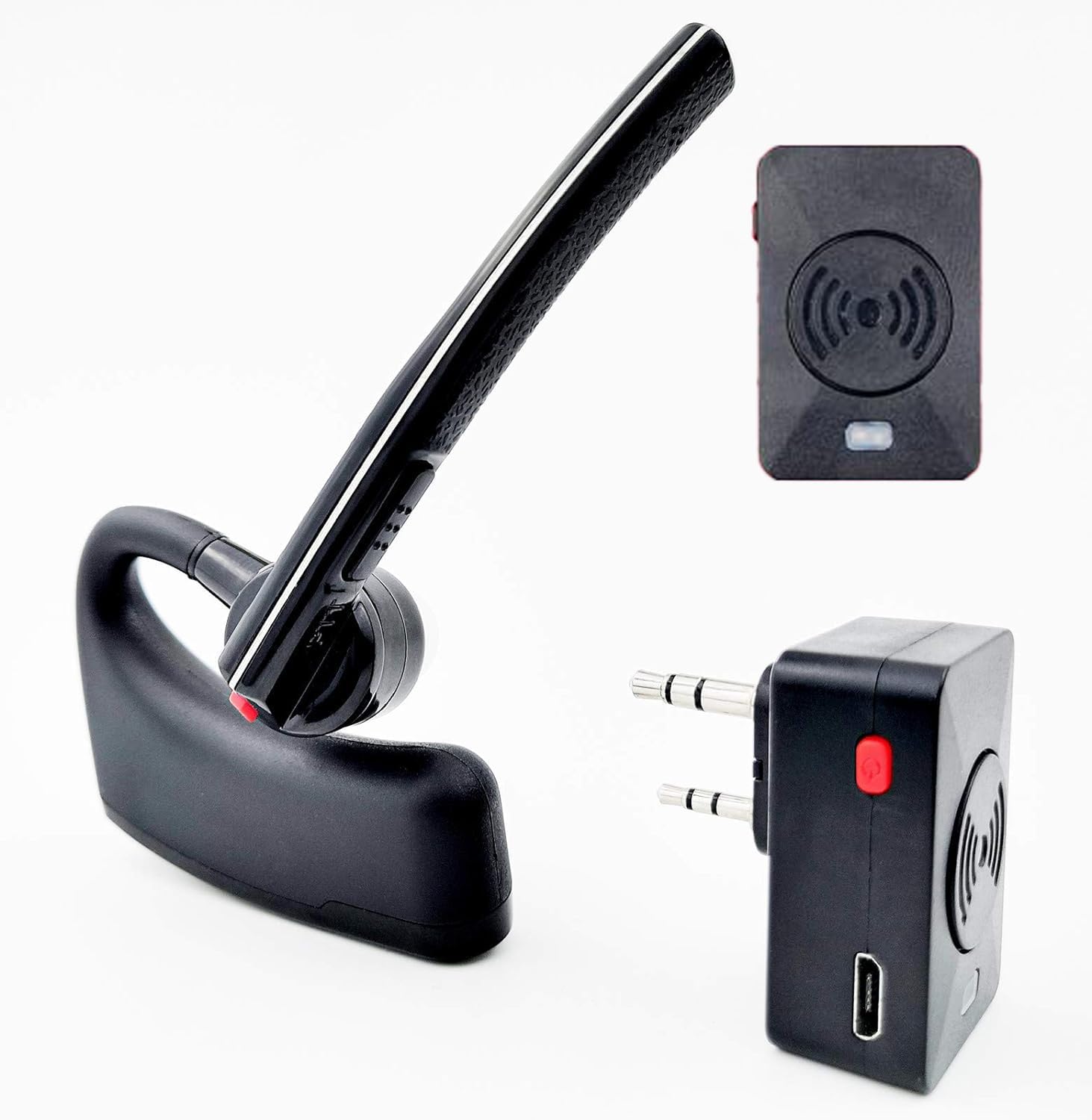
Image: The radtel Bluetooth Headset, Bluetooth adapter, and wireless finger PTT button.
2. 패키지 내용
패키지에 모든 품목이 들어 있는지 확인하세요.
- 1x Bluetooth Headset
- 1x Bluetooth Adapter for Radios
- 1x Wireless Finger PTT
- 1x 충전 케이블
- 1x Plastic Bander (for PTT)
- 2x Silicone Earbud Maps
- 1x 영어 사용자 설명서

Image: All components included in the package, numbered for easy identification.
3. 호환성
This headset is compatible with two-way radios featuring a K-type connector (two-pin plug with 3.5mm and 2.5mm connectors).
호환 라디오 모델:
- 바오펑: UV-5R, UV-82, BF-F8HP, UV-17R, BF-888S, AR-152, GM-15 (and almost all models)
- Radtel: RT-12, RT-590, RT-830, RT-890, RT-470X, RT-470, RT-630, RT-490
- 레테비스: RT22, RT22S, RT21, RT68, H777, RA79, RT-5R, RT-17, RT-29
- 켄우드: KPG27D, KPG29D, KPG48D, KPG49, KPG55D, KPG56D, TH-D7, TH-D7A, TH-D7AG, TH-D7E, TH-F6, TH-F6A
- TYT: MD-UV380, TH-UVF8D, TH-UVF9D, TH-UV8000D/E, MD-380, MD-390
- HYT: TC286/386/2685/3865/6685/278/378/388/2100/2088
- 우쑨: KG-UV8D, UV6D, UVD1PUV-899
- 푸싱: PX-777, PX-888, PX-888K, PX-325, PX-358
- Quansheng: UV-K5, UV-K5(99), UV-K6, UV-5R PLUS
Incompatible Brands:
이 헤드셋은 아니다 compatible with Motorola, Icom, Yaesu, Hytera, Midland, or similar radios that do not use the K-type connector.

Image: Visual guide to compatible radio brands and models, highlighting the K-type connector.
4. 구성 요소 및 제어
블루투스 헤드셋
The headset features an ergonomic design, suitable for both left and right ears with a 270-degree rotating earpiece. It includes integrated controls for power, volume, and PTT.

Image: The Bluetooth headset demonstrating its 270-degree rotating design for left or right ear use.
Wireless Finger PTT
The wireless finger PTT button allows for convenient push-to-talk functionality, especially useful for activities requiring hands-free operation.

이미지: 클로즈업 view of the wireless finger PTT button, showing its compact design.
5. 설정 가이드
5.1 충전 지침
The Bluetooth headset, adapter, and wireless PTT key each have internal rechargeable batteries. Use the provided USB charging cable to charge them via a standard DC 5V power supply (e.g., computer USB port, power bank).
- 충전 표시기: A red light will be on during charging.
- 충전 완료 표시기: The red light will turn off when fully charged.
- 충전 시간: Approximately 1-2.5 hours for the headset.
5.2 Bluetooth Adapter Installation
Insert the Bluetooth adapter into the K-type intercom port of your two-way radio.

Image: Diagram illustrating the correct method for installing the Bluetooth adapter into the radio's accessory port (Figure 1) and removal (Figure 2).
5.3 페어링 지침
Follow these steps to pair your devices:
- Bluetooth Adapter Power On/Off:
Press and hold the Multi-function button on the adapter for 2 seconds to power on (blue light glints). Press and hold for 3 seconds to power off (red light glints). - Bluetooth Adapter Pairing Mode:
When the adapter is OFF, press and hold the Multi-function button for approximately 7 seconds to enter pairing status. The red and blue lights will glint alternately. - Wireless PTT Key Pairing:
Ensure the wireless PTT key is charged. With the Bluetooth adapter in pairing mode, press the PTT button on the wireless PTT key for about 1 second. The adapter's red light will disappear, indicating successful pairing. - Bluetooth Headset Pairing:
Ensure the Bluetooth headset is charged and powered off. Press and hold the On/Off button on the headset for 6 seconds to enter Bluetooth pairing mode (blue and red lights glint alternately). Place the headset near the paired adapter. Wait approximately 40 seconds for the initial pairing. When the alternating red and blue lights disappear, and only the blue light glints, the headset is successfully paired with the adapter.
6. 사용 설명서
6.1 헤드셋 컨트롤
Refer to the diagram below for button identification:
Image: Detailed diagram showing the location and function of buttons on the Bluetooth headset (buttons 1-7) and indicator light.
- Walkie Talkie PTT Button: Press to transmit via the radio.
- 켜기/끄기 버튼:
- 2초 동안 길게 누르면 켜거나 끌 수 있습니다.
- Long press 6 seconds to enter Bluetooth pairing mode.
- Press to pause/continue music.
- 전화를 받거나 끊으려면 누릅니다.
- 볼륨 업 버튼:
- 볼륨을 높이려면 누릅니다.
- Long press 2 seconds for previous song (during music playback).
- 볼륨 낮추기 버튼:
- 볼륨을 줄이려면 누릅니다.
- Long press 2 seconds for next song (during music playback).
6.2 표시등 상태
- 파란색 표시등이 천천히 깜박입니다. Power on, in standby mode.
- Blue light flashes fast: Bluetooth connection is interrupted. Check if the earpiece is on or within range.
- 빨간불 켜짐: Device is transmitting (via radio).
- 빨간불 꺼짐: Transmission ended.
- Low battery tips: In standby mode, the red light flashes to indicate low battery. Charge promptly.
6.3 Dual Connection (Radio and Mobile Phone)
The headset can be paired with both the walkie-talkie (via the Bluetooth adapter) and a mobile phone simultaneously. When a radio transmission is received, it will take priority. After 8 seconds of radio inactivity, the headset will automatically return to the mobile phone pairing state, allowing you to listen to music or manage calls.

Image: Illustration of the headset's ability to connect to both a two-way radio and a smartphone simultaneously.
6.4 소음 감소 기능
To activate or deactivate the noise reduction function, press and hold the Volume + and Volume - buttons simultaneously. This feature helps to eliminate background noise for clearer communication.

Image: Visual representation of the noise cancelling function, showing sound wave reduction.
6.5 언어 전환
To switch the voice prompt language, press and hold the Power and Volume - buttons simultaneously.
6.6 Pairing Elimination (Reset)
To clear all previous pairings, press and hold the Power and Volume + buttons simultaneously. You will hear a beep indicating the reset is complete.
7. 유지관리
To ensure the longevity and optimal performance of your radtel Bluetooth Headset, follow these maintenance guidelines:
- 청소: Wipe the headset and adapter with a soft, dry cloth. Avoid using harsh chemicals or abrasive cleaners.
- 저장: 본 기기는 직사광선과 극한의 온도를 피해 시원하고 건조한 곳에 보관하세요.
- 배터리 관리 : For extended storage, charge the battery to about 50% every few months to prevent deep discharge.
- 방수 기능: The product is water resistant, but not waterproof. Avoid submerging it in water or exposing it to heavy rain.
8. 문제 해결
If you encounter issues with your radtel Bluetooth Headset, refer to the following common problems and solutions:
- 페어링 난이도:
- Ensure all devices (headset, adapter, PTT) are fully charged.
- Make sure the adapter and headset are in pairing mode (alternating red/blue lights).
- Keep devices within close proximity (within 1 meter) during pairing.
- Try resetting the headset's pairings (Power + Volume + simultaneously) and re-attempt the pairing process.
- Verify that the Bluetooth adapter is correctly inserted into the radio.
- 소리가 안 나거나 음질이 나쁨:
- Check volume levels on both the headset and the connected radio/phone.
- Ensure the headset and adapter are properly paired and connected.
- Verify that the radio is transmitting and receiving correctly.
- Move closer to the connected devices to ensure you are within the 10-meter Bluetooth range.
- Activate the noise reduction function if background noise is an issue (Power + Volume - simultaneously).
- 배터리 수명이 짧음:
- 사용하기 전에 장치가 완전히 충전되었는지 확인하십시오.
- Operating at maximum volume or in areas with weak signal can consume more power.
- Battery life is rated for approximately 5-8 hours of work time and less than 100 hours standby.
- PTT Function Not Working:
- Ensure the wireless PTT key is charged and correctly paired with the Bluetooth adapter.
- Verify that the PTT button on the headset itself is functioning.
- Confirm that the radio is powered on and set to a transmitting channel.
- Headset Disconnects Randomly:
- Ensure the headset and adapter are within the 10-meter Bluetooth range.
- 블루투스 신호를 방해할 수 있는 장애물을 피하십시오.
- Check for other strong wireless signals that might cause interference.
- Re-pair the devices if disconnections persist.
9. 사양
| 특징 | 사양 |
|---|---|
| 모델명 | 이어폰 |
| 연결 기술 | 블루투스 |
| 무선 통신 기술 | 블루투스 |
| 블루투스 버전 | 5.2 |
| 블루투스 범위 | 10 미터 |
| 소음 제어 | 능동 소음 제거 |
| 충전 시간 | 1-2.5시간 |
| 배터리 수명(작업 시간) | 5-8시간 |
| 대기 시간 | 100 시간 미만 |
| 주파수 범위 | 20Hz ~ 20,000Hz |
| 커넥터 유형 | K plug (2.5mm and 3.5mm) |
| 재료 | 플라스틱 |
| 품목 무게 | 0.12킬로그램(약 4.2온스) |
| 방수 레벨 | 방수 |
| 제어 방법 | 터치/미디어 제어 |
| 제조업체 | 샤먼 라드텔 전자 유한회사 |
10. 보증 및 지원
This radtel Bluetooth Headset comes with a 1년 보증 구매일로부터.
For technical support, warranty claims, or further assistance, please contact radtel customer service through their official channels or the retailer where the product was purchased.


