제품 끝view
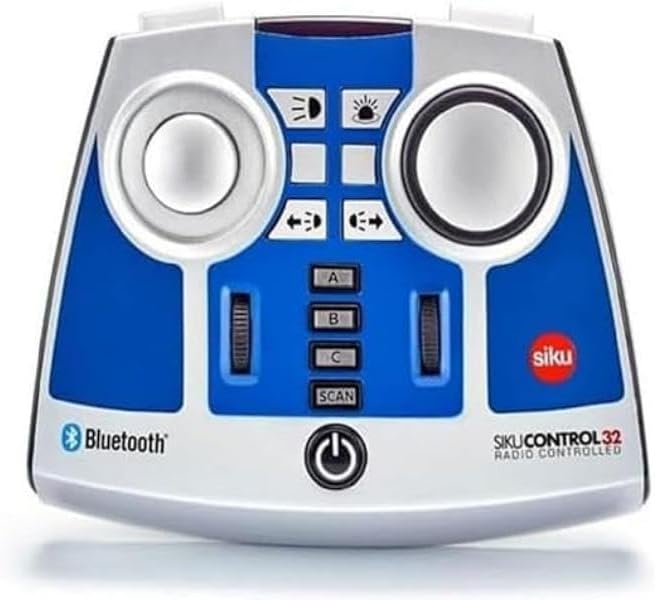
The Siku 6730 Bluetooth Remote Control is designed for precise operation of SIKU Control Bluetooth vehicles, including the John Deere 7310R (Art. No. 6792), Fendt 933 Vario (Art. No. 6793), and Claas Xerion 5000 TRAC VC (Art. No. 6791). This remote allows for comprehensive control over various vehicle functions, enhancing the interactive experience with your SIKU Control models.
주요 특징
- Compatible with SIKU Control Bluetooth vehicles: John Deere 7310R (Art. No. 6792), Fendt 933 Vario (Art. No. 6793), and Claas Xerion 5000 TRAC VC (Art. No. 6791).
- Enables control of multiple functions including steering, driving, electronic rear clutch, and lights.
- Features multi-session functionality, allowing simultaneous control of several vehicles with a single remote control.
- Powered by 4 AA batteries or equivalent rechargeable battery packs (batteries not included).
- 내구성이 뛰어난 플라스틱으로 제작되었습니다.
안전 지침
Please note: Choking hazard. Contains small parts. Not suitable for children under 3 years due to small parts that could be swallowed.
패키지 내용
- 1 x Siku 6730 Bluetooth Remote Control module
시작하기
배터리 설치
- Locate the battery compartment on the rear of the remote control.
- 배터리 덮개를 엽니다.
- Insert 4 AA batteries (or equivalent rechargeable battery packs) ensuring correct polarity (+/-) as indicated inside the compartment.
- 배터리 덮개를 단단히 닫으세요.
Pairing with SIKU Control Vehicles
- Ensure your SIKU Control Bluetooth vehicle is powered on and in pairing mode (refer to your vehicle's specific manual for details).
- Press and hold the power button on the Siku 6730 remote control until the indicator light begins to flash, indicating it is searching for a connection.
- Once the remote control connects to the vehicle, the indicator light will become solid.
- For multi-session control, repeat the pairing process for additional SIKU Control vehicles. Use the A, B, C, and SCAN buttons to manage multiple connections.
작업
제어 기능
- 조종: Use the left joystick to control the steering of the vehicle.
- 운전: Use the right joystick to control the forward and backward movement, and speed.
- Electronic Rear Clutch: Activate or deactivate the electronic rear clutch using the designated button.
- 허파: Control the vehicle's lights (headlights, taillights, etc.) using the light function buttons.
Multi-Session Control
The Siku 6730 remote control supports multi-session functionality, allowing you to control several SIKU Control vehicles simultaneously. Use the 'A', 'B', and 'C' buttons to switch between paired vehicles. The 'SCAN' button can be used to search for and connect to new vehicles or re-establish connections.
관리 및 유지 보수
- 리모컨은 부드럽고 마른 천으로 닦으십시오. 연마성 세제나 용제를 사용하지 마십시오.
- Avoid exposing the remote control to extreme temperatures, direct sunlight, or moisture.
- 리모컨을 장기간 사용하지 않을 경우, 누액을 방지하기 위해 배터리를 제거하십시오.
- Store the remote control in a dry, dust-free environment.
문제 해결
- 리모컨 전원이 켜지지 않음: 배터리 설치를 확인하고 배터리가 새 것인지 확인하세요.
- Cannot connect to vehicle: Ensure both the remote and vehicle are powered on and within range. Re-attempt the pairing process. Check the vehicle's manual for its specific pairing instructions.
- 조작이 작동하지 않습니다. Verify the connection. If controlling multiple vehicles, ensure you have selected the correct vehicle channel (A, B, or C).
- 간섭: Move away from other electronic devices that might cause signal interference.
기술 사양
| 사양 | 세부 사항 |
|---|---|
| 제품 치수 | 4.88 x 5.98 x 2.05 인치 |
| 품목 무게 | 7.4 온스 |
| 모델 번호 | 6730 |
| 제조업체 권장 연령 | 3세 이상 |
| 출시일 | 1년 2019월 XNUMX일 |
| 제조업체 | Sieper GmbH |
보증 및 고객 지원
For warranty information or technical support regarding your Siku 6730 Bluetooth Remote Control, please contact Sieper GmbH customer service directly. Refer to the packaging or the official Siku web최신 연락처 정보와 보증 조건은 사이트에서 확인하세요.


