1. 서론
This manual provides essential information for the safe and efficient operation of your Vonyx CDJ450 DJ Workstation. Please read it thoroughly before using the device and retain it for future reference. The Vonyx CDJ450 is a versatile DJ workstation featuring dual CD/MP3 players, Bluetooth connectivity, two USB ports, and a 2-channel mixer, designed for comprehensive audio control.
2. 안전 지침
- 전원 공급 장치가 볼륨과 일치하는지 확인하십시오.tage 장치에 지정되어 있습니다.
- 감전 사고를 방지하기 위해 제품을 비나 습기에 노출시키지 마십시오.
- 장치를 열원 근처나 직사광선에 노출시키지 마십시오.
- c를 열지 마세요asing; 모든 서비스는 자격을 갖춘 인력에게 의뢰하세요.
- 과열을 방지하려면 환기구를 깨끗하게 유지하십시오.
- 번개가 칠 때나 장기간 사용하지 않을 때는 전원 코드를 뽑아 두세요.
3. 제품 오버view
The Vonyx CDJ450 integrates two media players and a central mixer into a single unit, offering a compact and powerful solution for DJs.

그림 3.1: 위에서 아래로 view of the Vonyx CDJ450 DJ Workstation, showing the dual players and central mixer controls.

그림 3.2: 각진 view of the workstation, highlighting its compact design and accessible controls.

그림 3.3: Close-up of the central mixer and player controls, including jog wheels, pitch faders, and display screens.

그림 3.4: USB ports located on the top panel, demonstrating USB drive connectivity for MP3 playback.

그림 3.5: 앞쪽 view with both CD trays open, ready for disc insertion.

그림 3.6: 상세한 view of a player's display, showing track information, and associated playback controls.
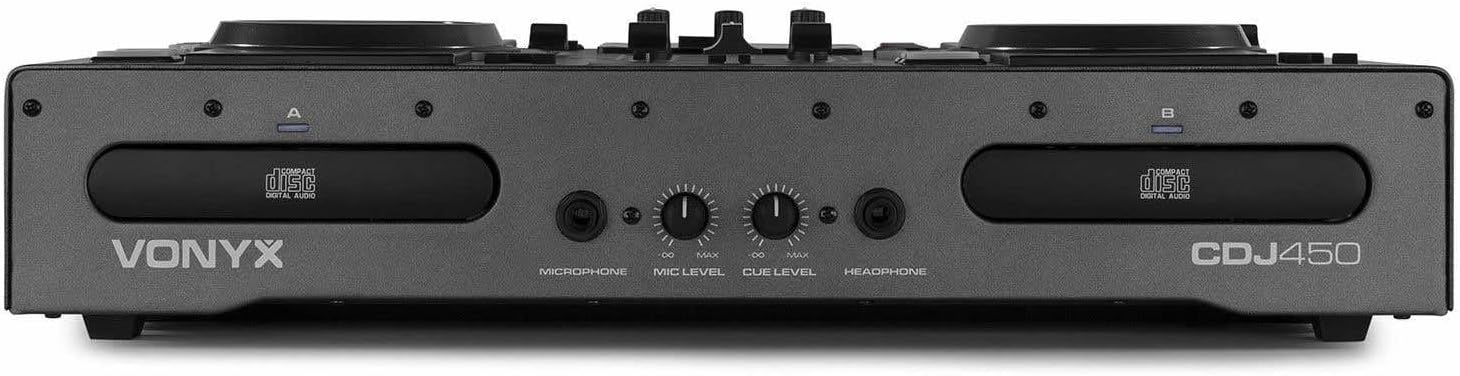
그림 3.7: Front panel featuring microphone input, microphone level control, cue level, and headphone output.

그림 3.8: Rear panel showing power input, main outputs (XLR, RCA), record output, USB Type-B port, and switchable Phono/Line inputs.
4. 설정
- 놓기: Place the CDJ450 on a stable, flat surface with adequate ventilation.
- 전원 연결: Connect the included power cable to the unit's power input and then to a suitable wall outlet. Ensure the power switch is in the OFF position before connecting.
- 오디오 출력: Connect the main outputs (XLR or RCA) to your amp앰프, 파워드 스피커 또는 PA 시스템.
- 외부 장치(선택 사항): Connect external audio sources (e.g., turntables, additional CD players) to the Phono/Line inputs on the rear panel. Use the switches to select the correct input type.
- Microphone/Headphones: Connect your microphone to the XLR-DJ input or the 6.3mm jack on the front. Plug your headphones into the 3.5mm jack on the front.
- USB 연결(선택 사항): For computer control or recording, connect a USB Type-B cable from the unit to your computer.
5. 사용 설명서
5.1. 전원 켜기/끄기
Flip the power switch on the rear panel to the 'ON' position. The displays will illuminate. To power off, flip the switch back to 'OFF'.
5.2. Media Playback (CD/USB)
- CD 재생 : Insert an audio CD or MP3 CD into one of the CD trays. The unit will automatically read the disc.
- USB 재생 : MP3가 포함된 USB 플래시 드라이브 삽입 files into one of the USB ports on the top panel.
- 소스 선택: Use the 'SOURCE' button above each player to switch between CD and USB input.
- 트랙 선택 : Use the navigation buttons or the numeric keypad to select tracks. The integrated folder search function allows quick access to fileUSB 드라이브에 저장.
- 재생 제어: Use the 'PLAY/PAUSE' and 'CUE' buttons for standard playback control.
5.3. 블루투스 연결
- 스마트폰, 태블릿 또는 노트북에서 블루투스를 활성화하세요.
- Select 'Bluetooth' as the source on the desired player.
- 검색 available devices on your external device and select 'Vonyx CDJ450'.
- Once paired, you can stream audio wirelessly to the workstation.
5.4. Mixer Functions
- 채널 페이더 : Adjust the volume level for each player (Channel A and B).
- EQ 컨트롤: Use the HIGH, MID, and LOW knobs for each channel to adjust the frequency response.
- Gain/Level: Adjust the input gain for each channel to match levels.
- 크로스 페이더 : Blend between Channel A and Channel B.
- 마스터 출력: Control the overall volume of the mix.
- 마이크로폰: Adjust microphone volume using the 'MIC LEVEL' knob on the front panel.
- 헤드폰: Use the 'CUE LEVEL' knob to adjust headphone volume and the 'CUE' buttons on each channel to monitor specific sources.
5.5. 특별 기능
- 할퀴다: Use the jog wheels for scratching effects.
- 뒤집다: Play audio in reverse.
- 부서지다: Create a brake effect on playback.
- 정점: Adjust the playback speed and pitch using the pitch faders.
- 고리: Use 'LOOP IN', 'LOOP OUT', and 'RELOOP' buttons to create and manage seamless loops.
6. 연결
The CDJ450 offers a variety of input and output options:
- 출력:
- 2 x XLR Speaker Outputs
- 1 x RCA Master Output
- 1 x RCA Recorder Output
- 입력:
- 2 x Switchable Phono/Line RCA Inputs (for external devices)
- 1 x XLR-DJ Microphone Input
- 1 x 6.3mm Jack Microphone Input (front)
- Digital/Control:
- 2 x USB Ports (Type-A, top panel, for media playback)
- 1 x USB Type-B Port (rear, for computer connection)
- 블루투스 연결
- 모니터링:
- 1 x 3.5mm Jack Headphone Output (front)
7. 유지관리
- 청소: 부드럽고 마른 천을 사용하여 기기 외부를 닦으세요. 연마성 세제나 용제를 사용하지 마세요.
- CD Trays: Keep CD trays free of dust and debris. Avoid touching the lens inside the CD player.
- 저장: 사용하지 않을 때는 직사광선과 극한 온도 변화를 피해 서늘하고 건조한 곳에 보관하십시오.
8. 문제 해결
| 문제 | 가능한 원인 | 해결책 |
|---|---|---|
| 전원이 없습니다 | 전원 케이블이 분리됨; 전원 스위치가 꺼짐; 콘센트 고장. | 전원 케이블 연결 상태를 확인하고, 전원 스위치가 켜져 있는지 확인하고, 다른 콘센트에 연결해 보세요. |
| 사운드 출력이 없습니다 | Volume levels too low; incorrect input/output connections; external amp리퍼 꺼. | Increase master/channel volumes; verify all audio connections; ensure external amp리파이어가 켜져있습니다. |
| CD가 재생/읽히지 않음 | Disc dirty or scratched; incorrect disc format; source not selected. | Clean or replace disc; ensure disc is audio CD or MP3 CD; select 'CD' source. |
| USB가 재생되지 않음 | USB 드라이브가 올바르게 포맷되지 않았습니다. 지원되지 않습니다. file type; source not selected. | USB 드라이브가 FAT32 형식으로 포맷되어 있는지 확인하십시오. (MP3 전용) files supported; select 'USB' source. |
| 블루투스가 연결되지 않습니다 | Bluetooth not enabled on external device; unit not in pairing mode; interference. | Enable Bluetooth on your device; select 'Bluetooth' source on CDJ450; try re-pairing. |
9. 사양
- 모델 이름: CDJ450
- 연결 기술 : 블루투스, USB
- 디스크 수: 2
- 지원되는 오디오 형식: CD, MP3, USB, AAC (Bluetooth)
- 커넥터 유형: Bluetooth, Jack 6.35 mm, RCA, USB, XLR 3-pin
- 채널 수: 2
- 품목 무게: 7.8 킬로그램
- 호환 장치: 헤드폰, 스피커
- 제조업체: 보이스
10. 보증 및 지원
For warranty information, please refer to the documentation provided at the time of purchase or contact your retailer. For technical support, please visit the official Vonyx web사이트 또는 고객 서비스 부서에 문의하십시오.


