1. 서론
The Donner Dark Mouse Distortion Pedal is an effect unit designed for electric guitar, providing a range of distortion tones. It features two distinct distortion modes and a true bypass design to maintain signal integrity when the effect is disengaged. This manual provides essential information for setting up, operating, and maintaining your pedal.

Figure 1: The Donner Dark Mouse Distortion Pedal, designed to deliver classic distortion sounds.
2. 제품 오버view
The Dark Mouse pedal features intuitive controls for shaping your sound. Understanding these controls is key to utilizing the pedal's full potential.

Figure 2: Control layout of the Dark Mouse Distortion Pedal.
통제 수단:
- 1. DC 9V Jack: 9V DC 어댑터용 전원 입력 단자(중앙 음극).
- 2. Mode Switch (CLASSIC/HYPER): Toggles between two distinct distortion characteristics.
- 3. 레벨 조절 노브: 이펙트의 전체 출력 볼륨을 조절합니다.
- 4. FILTER Knob: Controls the tone or brightness of the distortion. Turning clockwise increases treble.
- 5. DIST Knob: Adjusts the amount of distortion or gain.
- 6. 입력 잭: 기타 또는 기존 이펙트 페달을 여기에 연결하세요.
- 7. 출력 잭: 당신에게 연결 amp리파이어 또는 넥스트 이펙트 페달.
- 8. LED 표시기 : 효과가 활성화되면 불이 켜집니다.
- 9. 풋스위치: 효과를 활성화하거나 비활성화합니다.
3. 설정
Follow these steps to connect your Donner Dark Mouse Distortion Pedal:
- 귀하의 것을 확인하십시오 amp연결을 하기 전에 lifier를 꺼야 합니다.
- 일렉트릭 기타를 연결하세요 입력 잭 (6) of the pedal using a standard 1/4-inch instrument cable.
- 연결하다 출력 잭 (7) of the pedal to your amp앰프 입력단에 다른 표준 1/4인치 계측기 케이블을 사용합니다.
- Connect a 9V DC power adapter (center negative, 500mA minimum) to the DC 9V 잭 (1). Note: The power supply is not included. Using an incorrect power supply may damage the pedal.
- Once all connections are secure, you may turn on your amp리퍼.

Figure 3: Proper connection of the pedal to power and instrument cables.
4. 사용 설명서
The Dark Mouse pedal offers two distinct distortion modes and flexible controls to tailor your sound.
효과 활용하기:
를 누르세요 발 스위치 (9) to toggle the effect on or off. The LED 표시등 (8) will illuminate when the effect is active.
Selecting Distortion Modes:
사용하세요 모드 스위치 (2) to select between the two distortion modes:
- 권위 있는: 따뜻한 vin을 생성합니다.tage distortion sound with a subtle fuzz characteristic.
- HYPER: Offers a more powerful and aggressive sound with enhanced edges and low-end response.

Figure 4: The mode switch allows selection between Classic and Hyper distortion.
톤과 게인 조정:
Utilize the three control knobs to fine-tune your distortion sound:
- LEVEL Knob (3): Adjust this to set the overall output volume of the pedal. Start with it at a moderate level and adjust to match your bypassed signal volume.
- DIST Knob (5): Turn this knob clockwise to increase the amount of distortion, from subtle crunch to heavy saturation.
- FILTER Knob (4): This control acts as a tone shaping filter. Turning it clockwise will increase the brightness and treble content of the distortion, while turning it counter-clockwise will result in a darker tone.
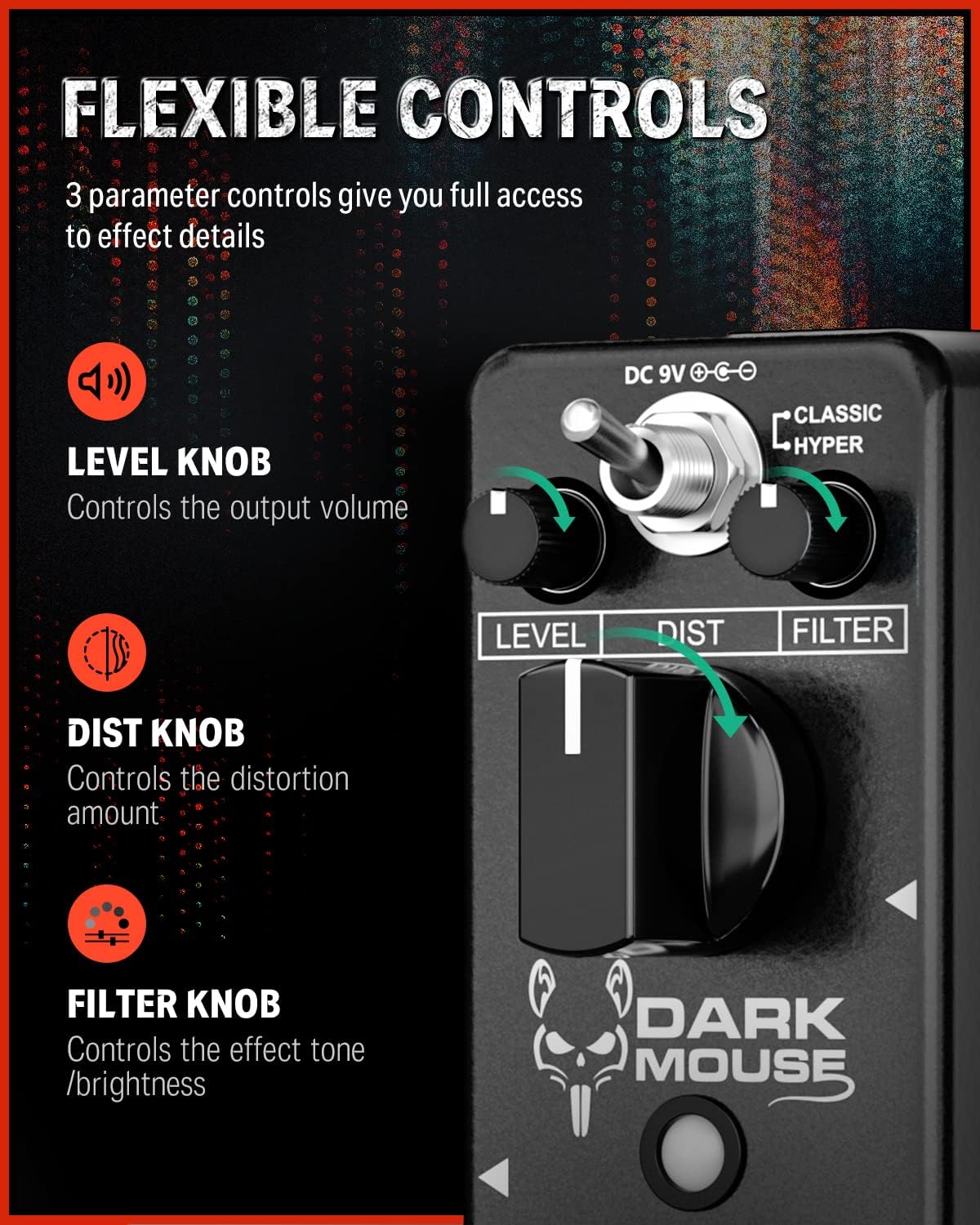
Figure 5: The Level, Dist, and Filter knobs provide flexible control over the effect.
트루 바이패스:
The pedal features true bypass circuitry. This means that when the effect is disengaged, your guitar signal passes directly through the pedal without any electronic interference, preserving your original tone. The LED indicator will be off when in true bypass mode.

Figure 6: True bypass ensures a clean signal when the effect is off.
5. 유지관리
- 청소: 부드럽고 마른 천으로 페달 외부를 닦으세요. 연마성 세제나 용제는 사용하지 마세요.
- 저장: 페달은 건조하고 온도 변화가 심한 곳이나 직사광선을 피해 보관하십시오.
- 전원 공급 장치: Always use a 9V DC center-negative power adapter with a minimum of 500mA current. Disconnect the power supply when the pedal is not in use for extended periods.
- 신체 관리: The pedal features a durable aluminum alloy casing. Avoid dropping the pedal or subjecting it to excessive force.
6. 문제 해결
- 소리 없음:
- 모든 케이블 연결 상태를 확인하십시오 (기타와 입력 단자, 출력 단자 등). amp).
- 전원 어댑터가 올바르게 연결되어 전원이 공급되고 있는지 확인하십시오.
- 기타와 amplifier가 정상적으로 작동하고 있습니다.
- If the LED is off, press the footswitch to engage the effect.
- Weak or Distorted Sound (when bypassed):
- This pedal features true bypass, so a weak or distorted bypassed signal usually indicates an issue with cables or other equipment in your signal chain, not the pedal itself.
- 원치 않는 소음/윙윙거림:
- Ensure you are using a regulated 9V DC center-negative power supply. Unregulated power supplies can introduce noise.
- 결함이 있는 케이블이 있는지 확인하세요.
- Move the pedal away from power transformers or other electronic devices that may cause interference.
7. 사양
| 특징 | 사양 |
|---|---|
| 모델 번호 | EC1178-FBA-US |
| 품목 무게 | 8.8온스(0.25킬로그램) |
| 제품 치수 | 3.7 x 1.69 x 2.01인치(3.7인치 길이 x 1.7인치 너비 x 2인치 높이) |
| 본체 소재 | 알루미늄 합금 |
| 전원 | 어댑터, 전기 |
| 권tage | 9볼트 직류(중심 음극) |
| 커넥터 유형 | 1/4" (6.35mm) mono jack |
| 신호 형식 | 비슷한 물건 |
8. 상자 안에 무엇이 들어있나요?
- 1 x Donner Dark Mouse pedal
9. 보증 및 지원
보증 정보 또는 기술 지원에 대해서는 Donner 공식 웹사이트를 참조하십시오. web해당 웹사이트를 방문하거나 Donner 고객 서비스 센터에 직접 문의하십시오. 보증 청구를 위해 구매 영수증을 보관하십시오.


