중요 안전 지침
본 제품을 사용하기 전에 설명서를 주의 깊게 읽고 나중에 참조할 수 있도록 보관하십시오. 잘못 사용하면 감전, 화재 또는 심각한 부상을 입을 수 있습니다.
- 전원 공급 장치 볼륨을 확인하십시오.tage는 기기의 정격 라벨과 일치합니다.
- 기기, 전원 코드 또는 플러그를 물이나 다른 액체에 담그지 마십시오.
- Unplug the appliance from the power outlet when not in use, before filling water, or before cleaning.
- 손상된 코드나 플러그를 사용하거나, 기기가 오작동하거나 어떤 방식으로든 손상된 후에는 기기를 작동하지 마십시오.
- 어린이의 손이 닿지 않는 곳에 보관하세요.
- 공기 흡입구나 배출구를 막지 마십시오.
- 제품을 안정적이고 평평한 표면에 놓으십시오.
- 물탱크에는 깨끗한 물만 사용하십시오.
제품 끝view
주요 특징
- 3-in-1 기능: Air Cooler, Humidifier, and Purifier.
- 물탱크 용량: 4리터.
- 팬 속도: 3 adjustable speeds.
- 진동: Oscillating ventilation grille for wide air distribution.
- 시간제 노동자: 7시간 프로그래밍 가능 타이머.
- 제어: Operable via control panel and remote control.
- 유동성: 이동이 편리하도록 바퀴 4개가 장착되어 있습니다.
제품 구성 요소
Familiarize yourself with the main parts of your LIVOO Mobile Air Cooler.

영상: 앞쪽 view of the LIVOO Mobile Air Cooler, displaying the air outlet grille and the transparent water level indicator at the bottom.

영상: 옆 view of the LIVOO Mobile Air Cooler, highlighting its compact design and the four castor wheels for portability.
설정
짐 풀기
- 에어쿨러를 포장에서 조심스럽게 꺼내세요.
- 모든 포장재를 제거하고 부품이 빠지거나 손상되지 않았는지 확인하세요.
- 포장재료를 어린이의 손이 닿지 않는 곳에 보관하세요.
물탱크 채우기
- 어플라이언스가 전원 콘센트에서 분리되어 있는지 확인하십시오.
- Locate the water tank. For this model, the tank is typically accessed from the rear or bottom.
- Fill the tank with clean, cool water. Do not exceed the maximum fill line indicated on the tank. The capacity is 4 liters.
- For enhanced cooling, you may add ice packs (not included) to the water tank if a dedicated compartment is available.
- 물탱크 덮개를 단단히 닫으십시오.
단위 위치 지정
Place the air cooler on a firm, level surface. Ensure there is adequate space around the unit (at least 20 cm) for proper air circulation. The integrated wheels allow for easy repositioning.
작업
Once the unit is set up and the water tank is filled, plug the power cord into a suitable electrical outlet.
제어판 이상view
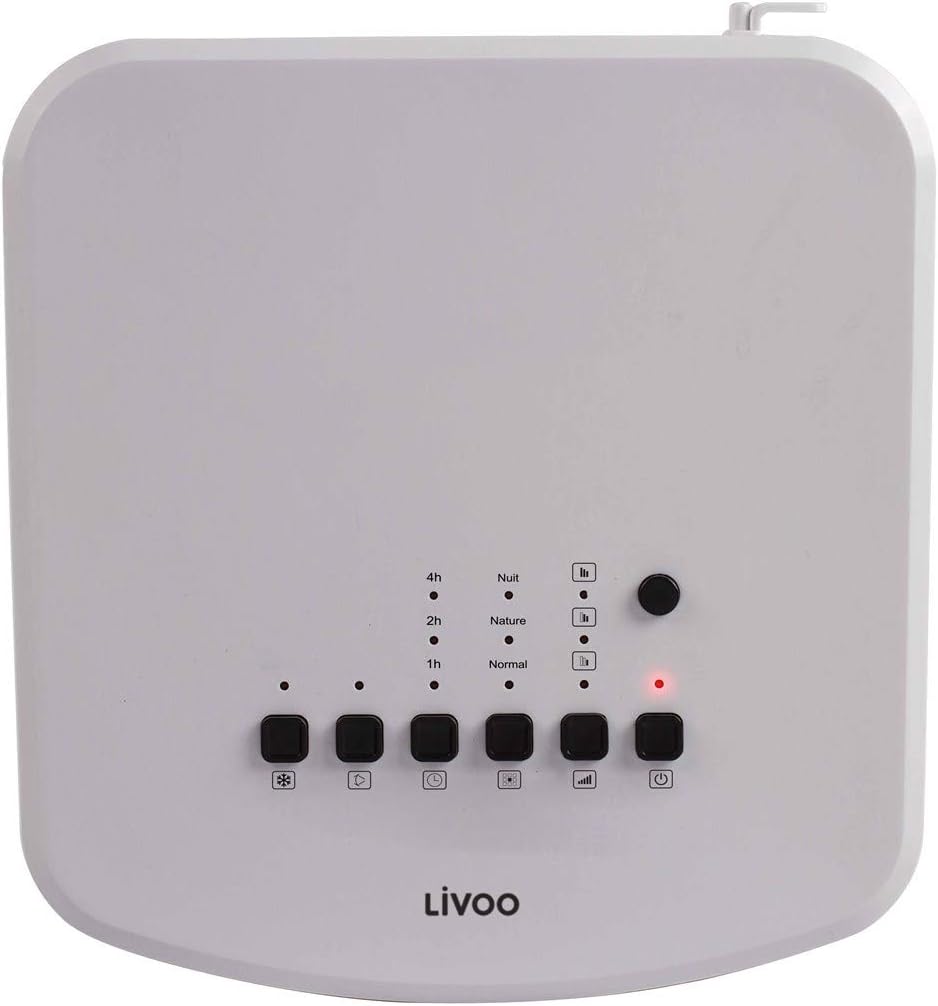
영상: Top-mounted control panel of the air cooler, featuring buttons for power, mode, speed, oscillation, and cooling function, along with indicator lights for timer and mode settings.
- 전원 버튼 (⏻): 장치를 켜거나 끕니다.
- 모드 버튼(□□□): 일반, 자연, 야간 모드를 순환합니다.
- 속도 버튼(|||): 팬 속도를 조절합니다(낮음, 중간, 높음).
- 진동 버튼(⟳): Activates or deactivates the oscillating grille.
- Cooling/Humidifier Button (❄): Engages the cooling and humidifying function.
- 타이머 버튼(L): Sets the operating timer (1h, 2h, 4h, up to 7 hours).
원격 제어view

영상: The remote control for the air cooler, featuring buttons for power, mode, speed, oscillation, cooling, and timer functions, mirroring the main control panel.
The remote control provides the same functionality as the control panel for convenient operation from a distance. Ensure batteries are correctly inserted.
기능
- 공기 냉각기: Uses water evaporation to cool the air. Activate by pressing the 'Cooling' button.
- 가습기: Adds moisture to the air, beneficial in dry environments. This function is integrated with the cooling feature.
- 정수기: Filters dust and other particles from the air as it passes through the unit. This function operates whenever the fan is on.
속도 설정
Press the 'Speed' button to cycle through Low, Medium, and High fan speeds to adjust airflow intensity.
진동 기능
Press the 'Oscillation' button to activate the automatic swing of the vertical louvers, distributing cool air over a wider area. Press again to stop oscillation.
타이머 기능
Press the 'Timer' button repeatedly to set the desired operating time (1, 2, 4 hours, or combinations up to 7 hours). The unit will automatically turn off after the set time.
모드
- 일반 모드: 선택한 속도로 일정한 공기 흐름이 유지됩니다.
- 자연 모드: 팬 속도를 변화시켜 자연스러운 바람을 시뮬레이션합니다.
- 야간 모드: 방해받지 않는 수면을 위해 더 낮고 조용한 속도로 작동합니다.
유지
정기적인 유지관리를 통해 최적의 성능을 유지하고 에어쿨러의 수명을 연장하세요. 청소하기 전에는 항상 전원 플러그를 뽑아주세요.
장치 청소
- 부드러운 d로 외부 표면을 닦으십시오.amp 천. 연마성 세척제나 용매를 사용하지 마십시오.
- Clean the air inlet and outlet grilles with a soft brush or vacuum cleaner to remove dust accumulation.
물 탱크 청소
To prevent mold and mildew growth, clean the water tank regularly, especially if the unit is used frequently.
- 탱크에 남아있는 물을 모두 배출하십시오.
- Remove the water tank (if detachable) and wash it with mild soap and water. Rinse thoroughly.
- For stubborn deposits, use a solution of white vinegar and water, let it sit for 30 minutes, then scrub and rinse.
- 탱크를 완전히 자연 건조시킨 후 다시 조립하세요.
필터 청소
The air cooler includes a filter for air purification. This filter should be cleaned periodically.
- Locate the air filter, usually at the back of the unit.
- 필터를 조심스럽게 제거하세요.
- Rinse the filter under running water to remove dust and debris. For deeper cleaning, use a soft brush.
- 필터를 완전히 건조시킨 후 제품에 다시 장착하십시오. 필터가 젖은 상태로 제품을 사용하지 마십시오.
저장
장기간 보관 시:
- Ensure the water tank is empty and clean.
- 위에 설명한 대로 전체 장치를 청소하세요.
- 본 제품은 직사광선과 극한의 온도를 피해 서늘하고 건조한 곳에 보관하세요.
문제 해결
에어컨 사용 중 문제가 발생하면 다음의 일반적인 문제 및 해결 방법을 참조하십시오.
| 문제 | 가능한 원인 | 해결책 |
|---|---|---|
| 장치가 켜지지 않습니다 | 전원 공급이 없습니다 전원 버튼이 눌리지 않음 | Check if the power cord is securely plugged in. Check the power outlet. 전원 버튼 (⏻제어판이나 리모컨에서. |
| 냉각 효과가 없습니다 | 물탱크가 비어있습니다 냉각 기능이 작동하지 않습니다 실내 온도가 너무 높습니다 | 물탱크를 채우세요. Press the Cooling/Humidifier button (❄). Evaporative coolers are most effective in dry climates. For very hot and humid conditions, cooling effect may be limited. |
| 약한 기류 | 팬 속도가 너무 낮음 공기 흡입구/배출구가 막혔습니다 더러운 필터 | Increase fan speed using the Speed button (|||). 그릴을 막는 것이 없는지 확인하십시오. 유지관리 지침에 따라 공기 필터를 청소하세요. |
| 불쾌한 냄새 | Stag탱크의 난트 물 더러운 필터 | Drain and clean the water tank thoroughly. Use fresh water. 공기 필터를 청소하세요. |
| 리모컨이 작동하지 않습니다 | 배터리가 방전되었거나 잘못 삽입됨 원격 제어 장치와 본체 사이에 장애물이 있습니다. | 배터리를 교체하고 극성이 올바른지 확인하세요. 신호 경로를 막고 있는 물체를 제거하세요. |
명세서
Technical details for the LIVOO Mobile Air Cooler DOM389.
| 특징 | 세부 사항 |
|---|---|
| 상표 | 리부 |
| 모델 번호 | DOM389 |
| 색상 | 흑백 |
| 제품 크기(L x W x H) | 26 x 24 x 57cm |
| 품목 무게 | 5.3 킬로그램 |
| 용량(물탱크) | 4리터 |
| 소음 수준 | 65데시벨 |
| 제어 유형 | 원격 제어, 제어판 |
| 특징 | Air Cooler, Humidifier, Purifier |
| 장착 유형 | 플로어 마운트 |
| 재료 | Metal (and plastic components) |

영상: Dimensional diagram of the air cooler, indicating a height of 57cm, width of 24cm, and depth of 26cm.
보증 및 지원
This product is covered by a manufacturer's warranty. For specific warranty terms and conditions, please refer to the warranty card included with your purchase or contact your retailer.
For technical support, spare parts, or service inquiries, please contact the Livoo customer service department or your local distributor. Contact information can typically be found on the Livoo official web사이트 또는 구매 문서.


