1. 서론
This manual provides essential information for the safe and efficient operation, setup, maintenance, and troubleshooting of the Keba KeTop T50-xxx/67641/06 industrial control panel. The KeTop T50-xxx/67641/06 is designed for robust performance in industrial environments, serving as a human-machine interface (HMI) for various control applications.
기기를 올바르게 사용하고 손상이나 부상을 방지하기 위해 기기를 작동하기 전에 이 설명서를 자세히 읽어주세요.
2. 안전 정보
신체 부상이나 장비 손상을 방지하려면 항상 다음 안전 예방 조치를 준수하세요.
- 적격 직원: Installation, operation, and maintenance should only be performed by qualified and authorized personnel.
- 전원 차단: 설치, 유지보수 또는 수리 작업을 수행하기 전에 항상 전원을 차단하십시오.
- 환경 조건: Operate the device within specified environmental limits (temperature, humidity, etc.).
- 비상 정지 : Familiarize yourself with the location and operation of the emergency stop button on the device and the connected system.
- 케이블 관리 : 케이블이 걸려 넘어지거나 손상되는 것을 방지하기 위해 모든 케이블이 올바르게 배선되고 고정되었는지 확인하십시오.
3. 제품 오버view
The Keba KeTop T50-xxx/67641/06 is a robust handheld control panel designed for industrial applications. It features a display screen, various control buttons, and an emergency stop button, all integrated into an ergonomic housing.

그림 1: 전면 view of the KeTop T50-xxx/67641/06 control panel, showing the display, control buttons, and the attached red connection cable.
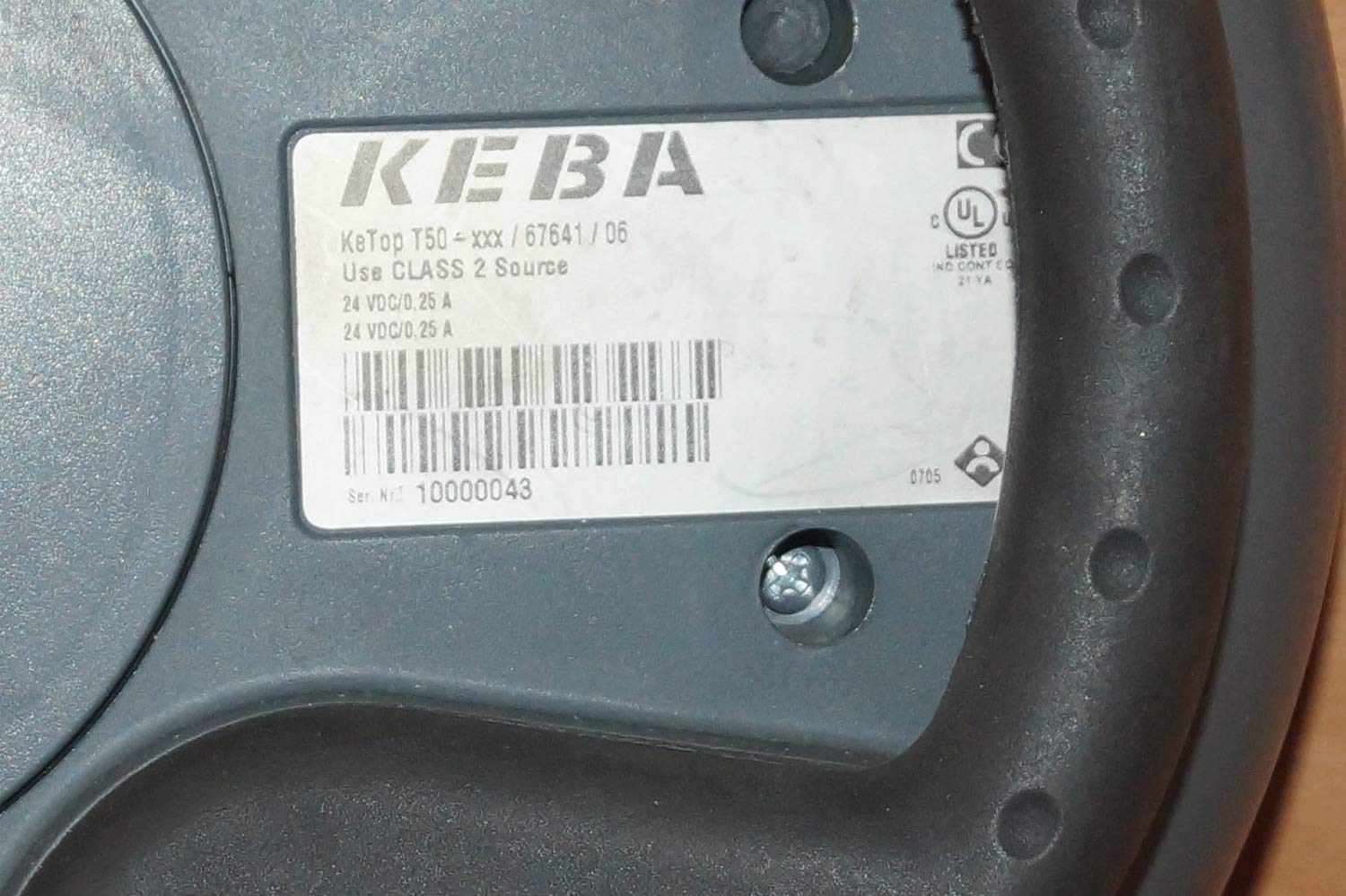
Figure 2: Rear label of the KeTop T50-xxx/67641/06, indicating model details and power requirements.
4. 설정 및 설치
Before connecting the KeTop T50-xxx/67641/06, ensure the host system is powered off and secured.
- 장치를 검사하십시오: Unpack the control panel and inspect it for any visible damage during transit.
- 케이블 연결: Connect the red multi-pin cable from the KeTop T50-xxx/67641/06 to the corresponding port on your industrial control system. Ensure the connection is secure and properly seated.
- 전원 공급 장치: Verify that the power supply for the control system meets the specifications required by the KeTop T50-xxx/67641/06 (24 VDC/0.25 A).
- 장착(선택 사항): If applicable, use the integrated mounting points to secure the panel in a convenient location, or ensure it is placed on a stable surface when not handheld.
- 초기 전원 켜기: Once all connections are secure, power on the host system. The KeTop T50-xxx/67641/06 display should illuminate, indicating successful power-up.
5. 사용 설명서
The KeTop T50-xxx/67641/06 serves as an interface for controlling industrial machinery. Specific operations will depend on the programming of the connected system.
- 디스플레이 탐색: Use the directional buttons (if present) or touch screen (if applicable) to navigate through menus and display information.
- 기능 버튼: The various buttons around the display are typically assigned specific functions by the system integrator. Refer to your system's documentation for button assignments.
- 비상 정지 : In case of an emergency, press the large red emergency stop button immediately. This will typically halt all connected machine operations. Ensure the button is reset before resuming operations.
- 데이터 투입: Use the integrated keypad or on-screen keyboard for data entry as required by the application.
- 피드백: Pay attention to visual cues on the display and any audible signals from the device or connected system.
6. 유지관리
Regular maintenance ensures the longevity and reliable operation of your KeTop T50-xxx/67641/06.
- 청소:
- 청소하기 전에 전원을 분리하세요.
- 부드러운 d로 외부 표면을 닦으십시오.amp 옷감.
- 연마성 세척제, 용제 또는 과도한 습기를 사용하지 마십시오.
- 기기에 액체가 들어가지 않도록 하십시오.
- 케이블 검사: Periodically inspect the connection cable for signs of wear, cuts, or damage. Replace damaged cables immediately.
- 버튼 기능: Regularly test all buttons, including the emergency stop, to ensure they respond correctly.
- 저장: When not in use, store the device in a clean, dry environment, away from extreme temperatures and direct sunlight.
7. 문제 해결
이 섹션에서는 일반적인 문제에 대한 해결책을 제공합니다. 더 복잡한 문제의 경우, 자격을 갖춘 서비스 담당자에게 문의하십시오.
| 문제 | 가능한 원인 | 해결책 |
|---|---|---|
| 장치의 전원이 켜지지 않습니다. | No power from host system; loose cable connection; faulty power supply. | Check host system power; ensure cable is securely connected; verify power supply output. |
| 디스플레이가 비어 있거나 깜빡입니다. | Insufficient power; cable issue; internal fault. | Verify power supply; check cable integrity; if problem persists, contact support. |
| 버튼이 반응하지 않습니다. | Software issue on host system; physical button damage. | Restart the host system; inspect buttons for physical damage. |
| Emergency Stop button is stuck. | Button mechanism issue. | Do not force. Contact qualified service personnel immediately. |
8. 사양
| 특징 | 세부 사항 |
|---|---|
| 모델 | KeTop T50-xxx/67641/06 |
| 상표 | Keba |
| 전원 입력 | 24 VDC / 0.25 A (as per device label) |
| ASIN | B07NSF65HM |
| 제조업체 참조 | 2186 |
| 첫 번째 가능한 날짜 | 10년 2019월 XNUMX일 |
| 예비 부품 가용성 | 정보를 사용할 수 없습니다 |
9. 보증 및 지원
Information regarding specific warranty terms and conditions for the Keba KeTop T50-xxx/67641/06 is not provided in the product details. Please refer to the original purchase documentation or contact your supplier for warranty details.
For technical support or service inquiries, please contact the manufacturer, Keba, or your authorized distributor. Ensure you have the model number (KeTop T50-xxx/67641/06) and serial number (if applicable) ready when contacting support.


