
1. 서론
Welcome to the instruction manual for your Sygonix SY-RSL-T3 Wireless Wall Switch. This manual provides essential information for the safe and efficient use of your device. Please read it thoroughly before installation and operation, and keep it for future reference.
2. 안전 지침
부상이나 장치 손상을 방지하려면 항상 다음 안전 예방 조치를 준수하세요.
- 장치를 열지 마십시오.asing. 내부에는 사용자가 수리할 수 있는 부품이 없습니다.
- 기기를 습기, 물, 그리고 극한 온도로부터 멀리하십시오.
- Use only the specified battery type (12V, not included) and ensure correct polarity during installation.
- 사용한 배터리는 지역 규정에 따라 폐기하십시오. 배터리를 일반 생활 쓰레기와 함께 버리지 마십시오.
- This device is designed for indoor use. If used outdoors, ensure it is protected from direct weather exposure.
- 포장재료를 어린이의 손이 닿지 않는 곳에 보관하세요.
3. 제품 오버view
3.1. 구성 요소
The Sygonix SY-RSL-T3 Wireless Wall Switch consists of the following main components:
- Wireless Wall Switch Unit (1 piece)
- Mounting Hardware (screws, if included with purchase)
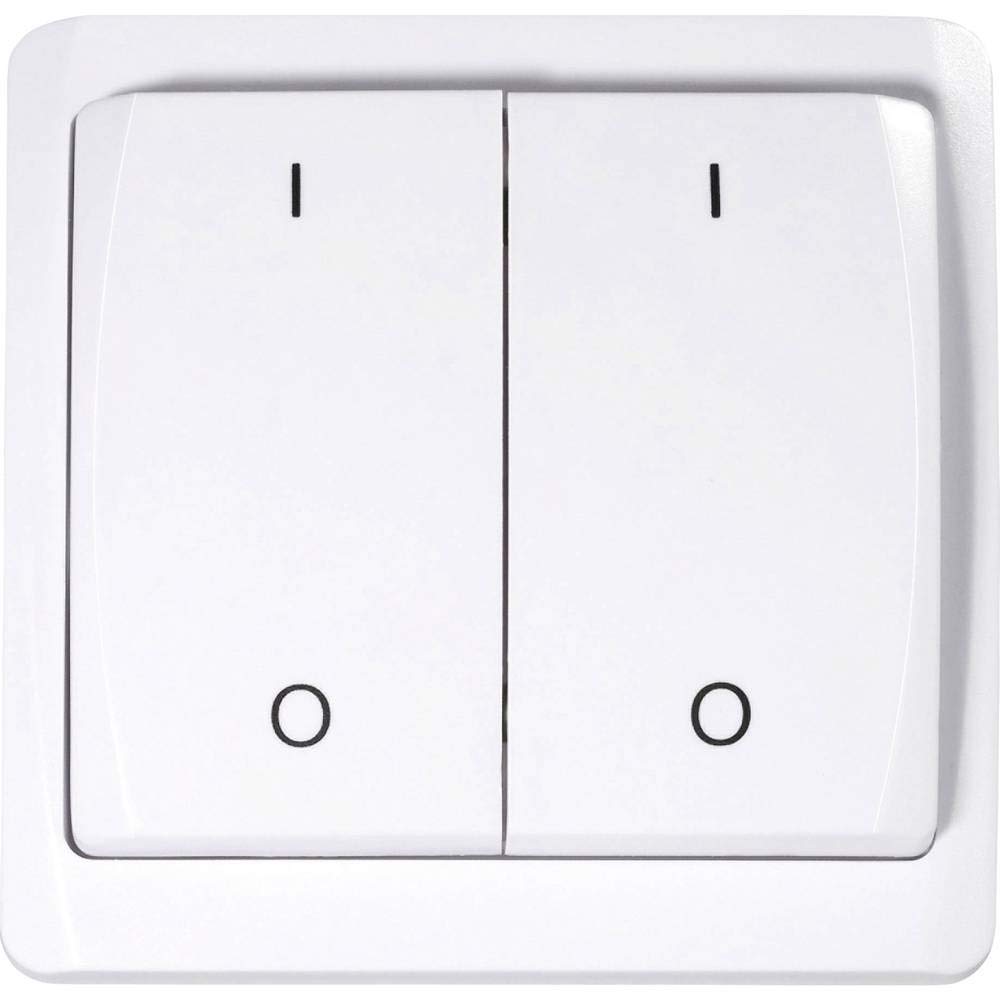
This image shows the front of the Sygonix SY-RSL-T3 wireless wall switch. It is white with two large push-buttons. The left button is marked with an 'I' (for ON) and a circle (for OFF), and the right button is similarly marked. The switch has a slightly curved, modern design.
3.2. 특징
- Surface-mounted RSL wall switch
- Maximum wireless range: 70 meters (in open field)
- Push-button style operation (ON-OFF mode)
- 12V 배터리가 필요합니다 (배터리 미포함).
- 소재 : 플라스틱
4. 설정 및 설치
4.1. 풀기
Carefully remove all components from the packaging. Ensure all parts are present and undamaged. Retain the packaging for future transport or storage.
4.2. 배터리 설치
The device requires a 12V battery (not included). To install the battery:
- Locate the battery compartment on the back of the switch.
- 배터리 덮개를 엽니다.
- Insert the 12V battery, ensuring correct polarity (+ and - terminals match the markings).
- 배터리 덮개를 단단히 닫으세요.
4.3. 벽 스위치 설치
The SY-RSL-T3 is a surface-mounted switch. Choose a suitable, flat location for installation, free from excessive moisture or heat. Use appropriate screws or adhesive (not specified if included) to secure the switch to the wall. Ensure the mounting surface is clean and dry before installation.

각진 view of the white Sygonix SY-RSL-T3 wireless wall switch, highlighting its two push-buttons and sleek profile.

측면 view of the Sygonix SY-RSL-T3 wireless wall switch, showing its depth and how it would sit on a surface.
5. 사용 설명서
5.1. Pairing with an RSL Receiver
To operate the switch, it must first be paired with a compatible Sygonix RSL receiver (sold separately). The SY-RSL-T3 uses the RSL wireless protocol.
- Refer to your RSL receiver's instruction manual for specific pairing instructions.
- Typically, you will need to put the RSL receiver into a pairing or learning mode.
- Within the specified time frame (usually a few seconds), press one of the buttons (e.g., 'I' or 'O') on the SY-RSL-T3 wall switch.
- The receiver should indicate successful pairing (e.g., by flashing an LED or clicking).
- Repeat the process if you wish to pair the other button to a different receiver or channel, if supported by your receiver.
5.2. 기본 동작
Once successfully paired with an RSL receiver:
- Press the button marked with 'I' to send an ON signal to the paired receiver.
- Press the button marked with 'O' to send an OFF signal to the paired receiver.
The switch operates in a simple ON-OFF mode, controlling the connected device via the RSL receiver.
6. 유지관리
6.1. 청소
Clean the surface of the switch with a soft, dry, lint-free cloth. Do not use abrasive cleaners, solvents, or harsh chemicals, as these can damage the plastic surface.
6.2. 배터리 교체
When the switch's wireless range decreases significantly, or it stops responding to button presses, the battery may need replacement. Follow the steps in section 4.2 (Battery Installation) to replace the 12V battery.
7. 문제 해결
| 문제 | 가능한 원인 | 해결책 |
|---|---|---|
| 버튼을 눌러도 장치가 응답하지 않습니다. | 배터리가 없거나 부족합니다. 수신기와 페어링되지 않았습니다. Receiver is out of range or not powered. | 12V 배터리를 교체하십시오. Perform the pairing procedure (see section 5.1). Ensure the RSL receiver is powered and within the 70m range. |
| 무선 범위가 줄어들었습니다. | 배터리가 부족합니다. Obstructions between switch and receiver. | 12V 배터리를 교체하십시오. Minimize physical obstructions (e.g., thick walls, metal objects) between the switch and the receiver. |
8. 사양
| 특징 | 세부 사항 |
|---|---|
| 제조업체 | 시고닉스 |
| 모델 번호 | SY-3523488 |
| 제품 크기(L x W x H) | 1.9 x 8 x 8cm(19 x 80 x 80mm) |
| 무게 | 100그램 |
| 재료 | 플라스틱 |
| 전원 | 배터리 구동 |
| 배터리 필요 | Yes (12 Volts, not included) |
| 스위치 스타일 | 푸시 버튼 |
| 작동 모드 | 온-오프 |
| 현재 평가 | 1아 |
| 무선 프로토콜 | 영어: |
| Max. Range (open field) | 70 미터 |
| 패키지 당 수량 | 1개 단위 |
| 예비 부품 가용성(EU) | 1년 |
9. 보증 및 지원
Sygonix provides a 1-year warranty for spare parts availability within the EU. For further support, technical assistance, or warranty claims, please contact your retailer or Sygonix customer service. Please have your model number (SY-3523488) and ASIN (B07NLBNPTF) ready when contacting support.
제조업체: 시고닉스
모델 번호: SY-3523488
ASIN: B07NLBNPTF


