1. 서론
구매해주셔서 감사합니다asing the Promate Silox True Wireless Stereo Speaker. This manual provides detailed instructions for setting up, operating, and maintaining your speaker. Please read this manual thoroughly before use to ensure optimal performance and safety.

Image 1.1: Promate Silox True Wireless Stereo Speaker. This image displays the cylindrical blue speaker from a front-side angle, highlighting its mesh fabric exterior and rubberized ends.
2. 안전 정보
- 스피커를 극한 온도나 직사광선에 노출시키지 마십시오.
- 스피커를 떨어뜨리거나 강한 충격을 주지 마십시오.
- 스피커는 IPX6 등급을 받았더라도 내부 부품 손상을 방지하기 위해 물이나 액체에 닿지 않도록 하십시오.
- Do not attempt to disassemble or repair the speaker yourself. Contact authorized service personnel.
- 제공된 충전 케이블과 어댑터만 사용하세요.
- 어린이의 손이 닿지 않는 곳에 보관하세요.
3. 패키지 내용
다음 품목이 패키지에 포함되어 있는지 확인하세요.
- Promate Silox True Wireless Stereo Speaker
- 충전 케이블(USB)
- 보조 오디오 케이블
- 사용자 설명서

Image 3.1: Promate Silox Speaker Packaging. This image shows the retail box of the Promate Silox speaker, illustrating the speaker itself and icons representing its key features like Bluetooth, TWS, IPX6 water resistance, and multiple connectivity options.
4. 제품 오버view
4.1 컨트롤 및 표시기

Image 4.1: Promate Silox Speaker Controls. This image shows the top panel of the speaker with clearly labeled buttons for power, play/pause, volume up/next track, volume down/previous track, mode, and EQ.
- 전원 버튼: 전원을 켜거나 끄려면 길게 누릅니다.
- 재생/일시 정지 버튼: 음악을 재생하거나 일시 정지하려면 누릅니다.
- 볼륨 높이기 / 다음 트랙 버튼: 누르면 볼륨이 커지고, 길게 누르면 다음 곡으로 넘어갑니다.
- 볼륨 낮추기/이전 트랙 버튼: 누르면 볼륨이 줄어듭니다. 길게 누르면 이전 트랙으로 이동합니다.
- 모드(M) 버튼: Press to switch between Bluetooth, FM Radio, Micro SD, USB, and AUX modes.
- EQ 버튼: 눌러서 이퀄라이저 프리셋을 순환하세요.
- 호출 버튼: Press to answer/end calls. Hold to reject calls.
- LED 표시등: 전원 상태, 충전 상태, 블루투스 페어링 상태를 표시합니다.
4.2개 포트

Image 4.2: Promate Silox Speaker Connectivity Ports. This image highlights the various input ports on the speaker, including Bluetooth, 3.5mm Audio Jack (AUX), Micro SD Card Slot, and USB Slot, all protected under a rubber flap.
- 마이크로 USB 충전 포트: 스피커를 충전합니다.
- AUX 입력(3.5mm): 오디오 케이블을 통해 외부 오디오 장치를 연결하는 데 사용합니다.
- 마이크로 SD 카드 슬롯: Micro SD 카드에서 직접 음악을 재생합니다.
- USB 포트: USB 플래시 드라이브에서 음악을 직접 재생하기 위한 기능입니다.
5. 설정
5.1 스피커 충전
- 충전 케이블의 마이크로 USB 단자를 스피커의 충전 포트에 연결하세요.
- USB-A 단자를 USB 전원 어댑터(별도 구매) 또는 컴퓨터의 USB 포트에 연결하십시오.
- The LED indicator will illuminate to show charging status. It will turn off or change color when fully charged.
- 완충 시 약 7시간 동안 재생할 수 있습니다.

Image 5.1: Promate Silox Speaker Long Playback Time. This image illustrates the speaker's 7-hour playback capability, showing the speaker with a clock icon indicating extended battery life.
5.2 전원 켜기/끄기
- 전원을 켜려면 LED 표시등이 켜질 때까지 전원 버튼을 길게 누르세요.
- 전원을 끄려면 LED 표시등이 꺼질 때까지 전원 버튼을 다시 길게 누르십시오.
5.3 블루투스 페어링
- Ensure the speaker is powered on and in Bluetooth mode (the LED indicator will flash, indicating it's ready for pairing). If not, press the 'M' button to switch to Bluetooth mode.
- 스마트폰, 태블릿 또는 기타 Bluetooth 지원 기기에서 Bluetooth를 활성화하세요.
- 검색 "Promate Silox" in the list of available devices.
- Select "Promate Silox" to connect. Once connected, the LED indicator will stop flashing and remain solid.
- 이제 스피커를 통해 기기의 오디오를 재생할 수 있습니다.
5.4 True Wireless Stereo(TWS) 페어링
TWS allows you to pair two Promate Silox speakers together for a true stereo sound experience.
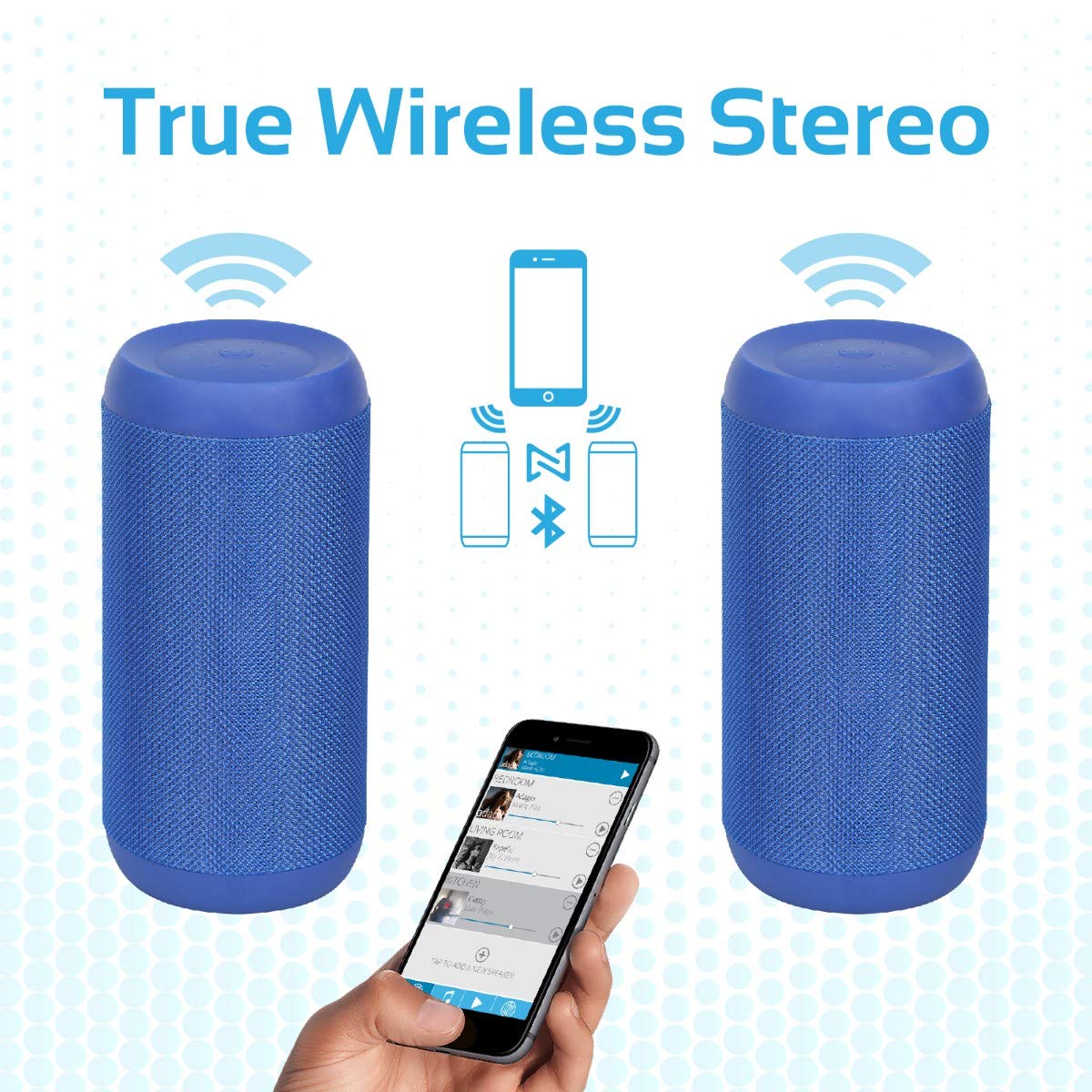
Image 5.2: Promate Silox True Wireless Stereo Pairing. This image visually explains the TWS function, showing two Promate Silox speakers wirelessly connected to a single smartphone, creating a stereo sound setup.
- Ensure both Promate Silox speakers are powered on and in Bluetooth pairing mode (LED flashing).
- On one of the speakers (this will be the primary speaker), double-press the Power button. The speaker will emit a sound indicating it's searching for another TWS speaker.
- The two speakers will automatically connect to each other. Once connected, the primary speaker's LED will flash slowly, and the secondary speaker's LED will remain solid.
- Now, connect your Bluetooth device to the primary speaker as described in "5.3 Bluetooth Pairing".
- 이제 두 스피커를 통해 오디오가 스테레오로 재생됩니다.
6. 사용 설명서
6.1 블루투스 모드
- After successful pairing (see 5.3), play music from your connected device.
- 스피커의 재생/일시정지 버튼을 사용하여 재생을 제어하세요.
- Press Volume Up/Down buttons to adjust volume.
- Hold Volume Up/Down buttons to skip tracks.

Image 6.1: Promate Silox Speaker Music Amplified. This image shows the speaker placed on a sofa armrest, playing music from a tablet, illustrating its use in a home environment.
6.2 FM 라디오 모드
- Press the 'M' (Mode) button repeatedly until you hear the FM radio prompt.
- 재생/일시정지 버튼을 한 번 누르면 사용 가능한 FM 방송국을 자동으로 검색하고 저장합니다.
- 볼륨 높이기/낮추기 버튼을 사용하여 저장된 방송국 사이를 이동하세요.
- Press and hold Volume Up/Down buttons to fine-tune the frequency.
6.3 마이크로 SD 카드 재생
- Insert a Micro SD card (with MP3/WMV audio files) 마이크로 SD 카드 슬롯에 삽입하십시오.
- The speaker will automatically switch to Micro SD mode and begin playing music. If not, press the 'M' button to select Micro SD mode.
- Use the Play/Pause, Volume Up/Down, and track skip buttons as in Bluetooth mode.
6.4 USB 재생
- Insert a USB flash drive (with MP3/WMV audio files) USB 포트에 연결합니다.
- The speaker will automatically switch to USB mode and begin playing music. If not, press the 'M' button to select USB mode.
- Use the Play/Pause, Volume Up/Down, and track skip buttons as in Bluetooth mode.
6.5 AUX 입력
- Connect one end of the 3.5mm audio cable to the speaker's AUX input port.
- 다른 쪽 끝을 외부 장치(예: MP3 플레이어, 노트북)의 오디오 출력 잭에 연결합니다.
- 'M' 버튼을 눌러 AUX 모드로 전환하세요.
- 외부 기기에서 재생과 볼륨을 제어하세요.
6.6 핸즈프리 통화
- 블루투스로 연결된 상태에서 전화가 오면 음악이 일시 정지됩니다.
- Press the Call button once to answer the call.
- 통화를 종료하려면 통화 버튼을 다시 누르세요.
- Press and hold the Call button to reject an incoming call.
- 내장 마이크를 통해 선명한 통신이 가능합니다.
7. 유지관리
- 청소: 부드럽고 마른 천으로 스피커를 닦으세요. 연마성 세제나 용제를 사용하지 마세요.
- 저장: 장시간 사용하지 않을 때는 스피커를 시원하고 건조한 곳에 보관하세요.
- 배터리 관리 : To prolong battery life, charge the speaker fully before storing it for a long time and recharge it every 3-6 months.
- 방수 기능: The speaker is IPX6 water-resistant, meaning it can resist gentle water spray and splashes. Do not submerge it in water. Ensure the port cover is securely closed to maintain water resistance.

Image 7.1: Promate Silox Speaker IPX6 Water-Resistant. This image shows the speaker with water splashing on it, accompanied by an IPX6 water-resistant logo, demonstrating its durability against splashes.
8. 문제 해결
| 문제 | 가능한 원인 | 해결책 |
|---|---|---|
| 스피커의 전원이 켜지지 않습니다. | 배터리가 부족합니다. | 스피커를 완전히 충전하세요. |
| 블루투스로 페어링할 수 없습니다. | 스피커가 페어링 모드가 아닙니다. 기기 블루투스가 꺼져 있습니다. 두 기기 사이의 거리가 너무 멉니다. | Ensure speaker is in Bluetooth pairing mode (flashing LED). Turn on Bluetooth on your device. Move device closer to speaker (within 10 meters). |
| 소리가 나지 않습니다. | Volume too low; incorrect mode selected; device not playing. | Increase speaker and device volume. Ensure correct mode (Bluetooth, AUX, SD, USB) is selected. Check if music is playing on the source device. |
| FM 라디오 수신이 좋지 않습니다. | 신호가 약함; 환경적 간섭. | Move the speaker to a different location. Perform auto-scan again. |
| TWS 페어링이 실패합니다. | 스피커 간의 간격이 너무 넓습니다. 스피커 하나는 이미 장치에 연결되어 있습니다. | Ensure both speakers are in pairing mode and close to each other. Disconnect any Bluetooth devices from both speakers before initiating TWS pairing. |
9. 사양
- 모델: Silox
- 스피커 유형: 야외, 휴대용
- 연결 기술 : Bluetooth 4.2, Auxiliary (3.5mm), USB, Micro SD Card
- 스피커 최대 출력: 20 와트
- 오디오 출력 모드: 스테레오(TWS 포함)
- 방수 기능: IPX6
- 배터리 수명: Approximately 7 hours (playback time)
- 제어 방법: 터치 버튼
- 내장 마이크: 예 (핸즈프리 통화용)
- FM 라디오 : 예
- 호환 장치: Laptop, Smartphone, Tablet, Music Players
- 제품 크기: 11.9 x 15.4 x 26.7cm
- 품목 무게: 1kg
- 색상: 파란색

Image 9.1: Promate Silox Speaker 20W Output. This image emphasizes the speaker's powerful 20-watt audio output, showing the speaker with visual effects representing sound waves and a "20 Watt Hi-Definition Stereo Quality Sound" label.
10. 보증 및 지원
The Promate Silox True Wireless Stereo Speaker comes with a 2년 보증 구매일로부터. 본 보증은 정상적인 사용 중에 발생한 제조상의 결함 및 제조상의 결함을 보장합니다.
For technical support, warranty claims, or further assistance, please visit the official Promate website or contact your local Promate customer service.
You can visit the Promate Store for more information: Promate Store on Amazon


