1. 서론
This manual provides essential instructions for the installation, operation, and maintenance of your EPEVER 80A MPPT Solar Charge Controller. This device is designed to manage the power flow from your solar panels to your battery bank, ensuring efficient charging and protecting your batteries from overcharge and over-discharge. It supports 12V, 24V, 36V, and 48V battery systems automatically and is compatible with various lead-acid battery types including Sealed, AGM, Gel, and Flooded batteries.
2. 안전 정보
설치 및 작동 전에 모든 지침과 경고를 주의 깊게 읽어 주십시오. 이 지침을 따르지 않을 경우 감전, 화재 또는 심각한 부상을 입을 수 있습니다.
- Ensure all wiring is correctly polarized and securely connected. Incorrect wiring can damage the controller and other components.
- Always disconnect the battery first, then the solar panel, before performing any maintenance or disconnection. Reconnect in reverse order: solar panel first, then battery.
- 컨트롤러는 통풍이 잘 되는 곳에 설치하고, 인화성 물질 및 부식성 가스로부터 멀리 떨어뜨려 놓으십시오.
- The controller is designed for indoor use. Protect it from direct sunlight, high temperatures, and moisture.
- Use appropriate circuit breakers or fuses for both the solar panel and battery circuits to prevent overcurrent.
- This device is a common negative ground controller. Ensure proper grounding.
- Do not attempt to disassemble or repair the controller yourself. Contact qualified service personnel.
3. 제품 오버view
3.1 주요 특징
- 자동 시스템 voltage identification: 12V/24V/36V/48V DC.
- Advanced MPPT technology with ultra-fast tracking speed (up to 99.5% efficiency).
- Maximum DC/DC transfer efficiency up to 98.7%.
- Automatic control system to limit charging power and current.
- Real-time energy recording and statistical functions.
- 배터리 온도 보상 기능.
- Isolated RS-485 communication interface with MODBUS protocol.
- Support for parallel operation of up to 8 units to expand system capacity.
- Compatible with Sealed, AGM, Gel, and Flooded lead-acid batteries.
3.2 물리적 치수

그림 3.2.1: Physical dimensions of the EPEVER 80A MPPT Solar Charge Controller. The controller measures approximately 394mm (L) x 240mm (W) x 134mm (H).
The controller has a robust design with integrated heat sinks for efficient thermal management. The overall dimensions are approximately 394mm in length, 240mm in width, and 134mm in height. The mounting holes are designed for secure installation.
3.3 구성 요소 식별
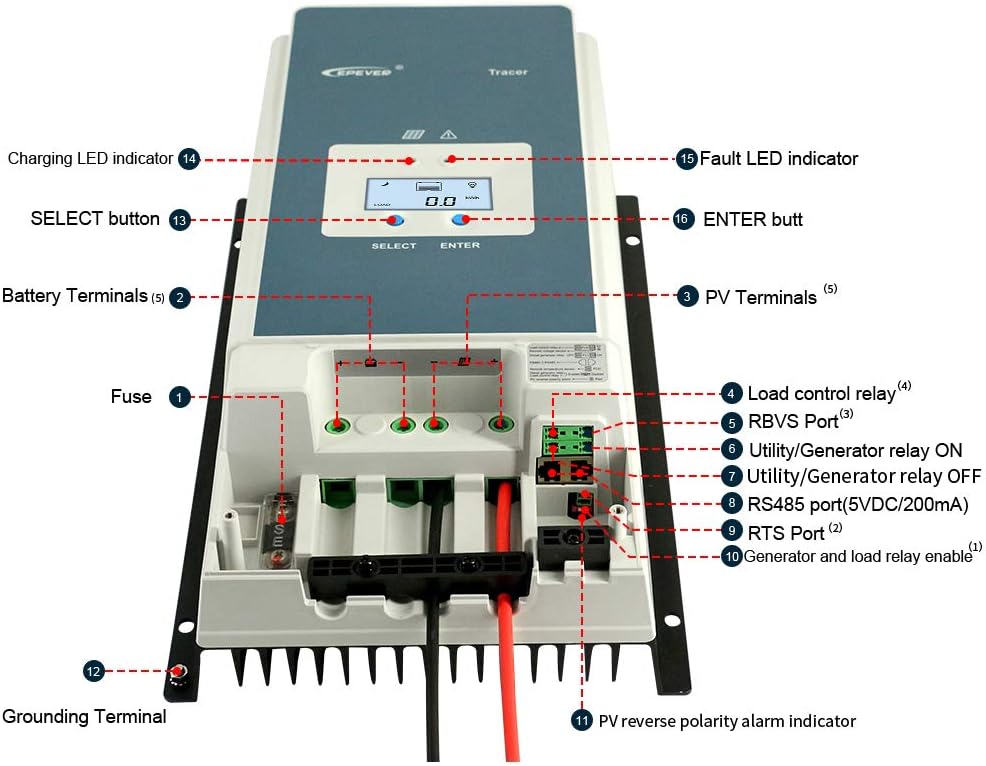
그림 3.3.1: 앞쪽 view of the EPEVER 80A MPPT Solar Charge Controller with labeled components.
- 퓨즈: 배터리 회로용 과전류 보호 장치.
- 배터리 단자: 보조 배터리에 연결하세요.
- PV 터미널: 태양광 패널 어레이에 연결하세요.
- Load Control Relay: Output for connecting DC loads (if applicable).
- RBVS 포트: 원격 배터리 볼륨tage 센서 포트.
- Utility/Generator Relay ON: Control signal for external utility/generator.
- Utility/Generator Relay OFF: Control signal for external utility/generator.
- RS485 Port (5VDC/200mA): Communication port for remote monitoring or parallel connection.
- RTS 포트: 원격 온도 센서 포트.
- Generator and Load Relay Enable: Control input for generator and load relays.
- PV Reverse Polarity Alarm Indicator: LED indicator for PV reverse polarity.
- 접지 단자: 시스템 접지용입니다.
- 선택 버튼: Used to navigate menu options.
- 충전 LED 표시기: 충전 상태를 나타냅니다.
- Fault LED Indicator: 시스템 오류를 나타냅니다.
- 입력 버튼: 선택을 확인하는 데 사용됩니다.
3.4 디스플레이 인터페이스

그림 3.4.1: Example screens of the LCD display showing various system parameters.
The integrated LCD provides real-time monitoring of system parameters such as PV voltage, 충전 전류, 배터리 용량tage, load status, and temperature. Use the "SELECT" and "ENTER" buttons to navigate through the display screens and adjust settings.
4. 설정 및 설치
태양광 충전 컨트롤러의 안전하고 효율적인 작동을 위해서는 올바른 설치가 매우 중요합니다. 다음 단계를 주의 깊게 따르십시오.
4.1 컨트롤러 장착
- Choose a vertical mounting location that is well-ventilated and protected from direct sunlight, high temperatures, and moisture.
- Ensure there is sufficient clearance around the controller for heat dissipation, especially above and below the heat sink fins.
- Mount the controller securely using appropriate fasteners for the mounting surface.
4.2 배선 연결
중요한: Always connect the battery first, then the solar panel. Disconnect in the reverse order: solar panel first, then battery. Ensure all connections are tight and secure to prevent loose connections and overheating.

그림 4.2.1: Standard connection diagram for the EPEVER 80A MPPT Solar Charge Controller with a single battery, PV panel, and AC load via an inverter.
- 배터리를 연결하십시오: Connect the positive and negative terminals of the battery bank to the controller's battery terminals. Observe correct polarity. Use recommended cable size (e.g., 16mm² / 6AWG).
- 태양광 패널 연결: Connect the positive and negative terminals of the solar panel array to the controller's PV terminals. Ensure the PV open circuit voltage는 150VDC를 초과하지 않습니다.
- 부하를 연결하세요(선택 사항): If using the load control feature, connect your DC load to the controller's load terminals.
- 원격 온도 센서(RTS) 연결: Plug the RTS cable into the RTS port. This ensures accurate battery temperature compensation.
- Connect Remote Battery Voltage Sensor (RBVS) (Optional): Plug the RBVS cable into the RBVS port for more accurate battery voltag측정.
- 접지: Connect the grounding terminal of the controller to an earth ground.
4.3 병렬 연결(옵션)
The EPEVER 80A MPPT controller supports parallel operation of up to 8 units to increase system capacity. This requires an RS485 communication cable and proper configuration.
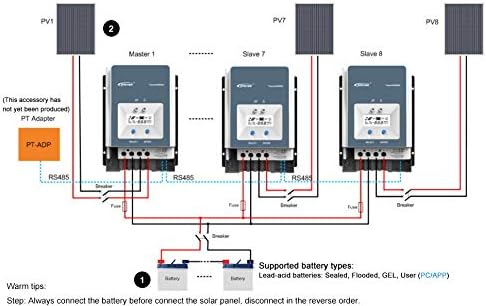
그림 4.3.1: Diagram illustrating the parallel connection of multiple EPEVER MPPT controllers to a single battery bank.
For parallel connection, ensure all controllers are connected to the same battery bank and configured correctly via the RS485 communication port. Refer to the advanced user manual for detailed instructions on parallel setup and master/slave configuration.
4.4 배터리 유형 선택
The controller supports various lead-acid battery types. It is crucial to select the correct battery type in the controller's settings to ensure optimal charging and battery longevity.
- 밀봉 : 밀폐형 납축전지용.
- 주주총회: AGM(흡수성 유리섬유 매트) 배터리용.
- 젤라틴: 젤 셀 배터리용입니다.
- 침수됨: For flooded (wet cell) lead-acid batteries.
- 사용자: Allows for custom charging parameters for specific battery types (e.g., non-standard lead-acid or user-defined settings). Note: This controller is not designed for Lithium batteries.
Refer to your battery manufacturer's specifications for recommended charging voltages and select the corresponding type in the controller's menu. Incorrect battery type selection can damage your batteries.
5. 운영
5.1 초기 전원 켜기
After all connections are made and verified, the controller will power on automatically. The LCD display will show the current system status. The Charging LED indicator will illuminate when charging is active.
5.2 모니터링 시스템 상태
Use the "SELECT" button to cycle through various display screens, showing parameters such as:
- PV 볼륨tage (V) and Current (A)
- 배터리 용량tage (V) and Charging Current (A)
- 부하량tage (V) and Current (A)
- Battery Temperature (°C)
- Total Charged Energy (kWh)
- Total Discharged Energy (kWh)
5.3 파라미터 설정
To enter the parameter setting mode, press and hold the "ENTER" button for a few seconds. Use the "SELECT" button to navigate through parameters and the "ENTER" button to confirm changes. Parameters that can be adjusted include:
- 배터리 유형
- 충전량tage Setpoints (Float, Boost, Equalization)
- Load Control Mode (e.g., always on, dusk to dawn, timer)
- LCD 백라이트 시간
- 온도 보상 계수
Refer to the detailed programming guide for specific values and advanced settings.
6. 유지관리
정기적인 유지보수는 충전 컨트롤러의 수명 연장과 최적의 성능을 보장합니다.
- 연결 확인: Periodically inspect all wiring connections for tightness, corrosion, or damage. Tighten any loose connections.
- 컨트롤러 청소: Keep the controller clean and free of dust and debris. Use a dry cloth to wipe the exterior. Ensure the heat sink fins are not obstructed.
- 손상 여부 검사: 제품에 물리적 손상이 있는지 확인하십시오.asing, 케이블 또는 단자.
- 모니터 성능: Regularly check the display for normal operation and compare readings with expected values.
- 배터리 유지 관리: Follow your battery manufacturer's maintenance guidelines.
7. 문제 해결
This section outlines common issues and their potential solutions. If the problem persists, contact customer support.
7.1 Common Protections and Indicators
The controller includes several protection mechanisms. The Fault LED indicator will illuminate or flash to indicate a fault condition.
- PV Over Current/Power: The solar input power or current exceeds the controller's rated limits. The controller will automatically limit the charging. Check PV array size.
- 태양광 패널 단락 회로: A short circuit in the solar panel wiring. Disconnect PV, check wiring, and reconnect.
- PV 역극성: Solar panel connected with incorrect polarity. Disconnect PV, correct wiring, and reconnect. The PV reverse polarity alarm indicator will be active.
- 야간 역충전: Current flowing from battery to PV at night. This is usually prevented by the controller; if it occurs, check PV wiring.
- 배터리 오버 볼륨tage: 배터리 용량tage exceeds the overcharge protection setting. The controller will stop charging.
- 배터리 과방전: 배터리 용량tage drops below the over-discharge protection setting. The load output will be disconnected.
- 배터리 과열: Battery temperature is too high. Charging current will be reduced or stopped. Ensure proper battery ventilation.
- 컨트롤러 과열: Internal temperature of the controller is too high. Charging current will be reduced. Ensure adequate ventilation around the controller.
- TVS 하이볼tage 과도 현상: Internal protection against voltag전자 스파이크.
7.2 일반적인 문제 해결 단계
- 디스플레이 없음/전원 없음: Check battery connections and fuse. Ensure battery voltage is within the operating range (8V~68V).
- 충전 안함: Check PV connections, ensure solar panels are receiving sunlight, and verify PV voltage is sufficient (above battery voltage). Check for PV short circuit or reverse polarity.
- 낮은 충전 전류: Check PV array size, shading, and battery state of charge. Ensure battery type settings are correct.
- 로드가 작동하지 않음: Check load connections, ensure battery voltage is above over-discharge protection, and verify load control settings.
8. 사양
| 매개변수 | 값 |
|---|---|
| 시스템 볼륨tage | 12V / 24V / 36V / 48V DC Auto |
| 정격 충전 전류 | 80A |
| 최대 PV 입력 전력 | 1000W(12V), 2000W(24V), 3000W(36V), 4000W(48V) |
| 최대 PV 개방 회로 Voltage | 150VDC |
| 배터리 유형 선택 | Lead-acid (Gel, Sealed, AGM, Flooded) and User |
| 접지 | Common Negative Ground |
| 배터리 입력 볼륨tag및 범위 | 8V ~ 68V |
| 온도 보상 | -3mV / ℃ / 2V (기본값) |
| 권장 케이블 크기 | 16mm²(6AWG) |
| 치수(길이 x 너비 x 높이) | 394mm × 236mm × 119mm |
| 무게 | 4.5kg(9.92파운드) |
| 의사소통 | Isolated RS-485 (5VDC/200mA) with MODBUS protocol |
| 최대 효율 | 98.7% |
9. 보증 및 지원
EPEVER products are designed for reliability and performance. This product comes with a standard manufacturer's warranty against defects in materials and workmanship. Please refer to the warranty card included with your product or visit the official EPEVER web자세한 보증 약관은 해당 사이트에서 확인하세요.
For technical support, troubleshooting assistance, or warranty claims, please contact EPEVER customer service through their official website or the contact information provided in your product packaging. When contacting support, please have your product model number and purchase date available.
Web대지: www.epever.com (Example link, 실제 링크는 다를 수 있습니다.)


