1. 제품 오버view
The SONRU 10W Qi Wireless Car Charger Mount provides convenient wireless charging for compatible smartphones while driving. It features an automatic gripping design and offers two installation options: an air vent clip and a dashboard suction cup mount. This charger supports 10W fast charging for compatible devices and 7.5W for iPhones, requiring a QC 3.0 car charger for optimal performance.

그림 1.1: 제품 구성 요소view
This image illustrates the main components of the wireless car charger mount, including the wireless charging area, air vent clips, USB input port, and the rotate ball mechanism for adjustment.
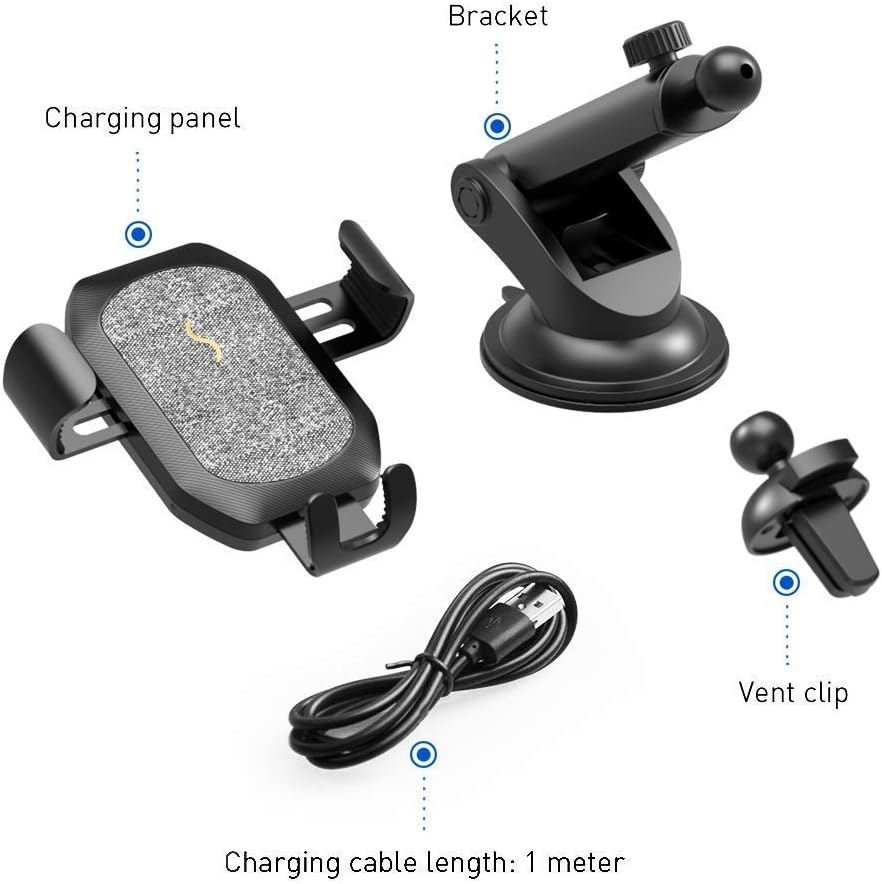
그림 1.2: 패키지 내용물
The package includes the charging panel, a bracket for dashboard mounting, an air vent clip, and a 1-meter charging cable.
2. 제품 특징
- 폭넓은 호환성: Supports 4"-6.5" phones.
- 빠른 충전: 10W for compatible Android devices (requires QC 3.0 car charger), 7.5W for iPhones (requires QC 3.0 car charger), and standard 5W charging.
- Automatic Gripping Design: Utilizes gravity and linkage for secure phone placement and removal with one hand.
- 조절할 수 있는 Viewing: 360° rotatable joint and free adjustment for optimal view각도를 나타냅니다.
- 친절한 케이스 : Supports cases up to 0.16 inches (4mm) thick. Not compatible with metal or magnetic cases.
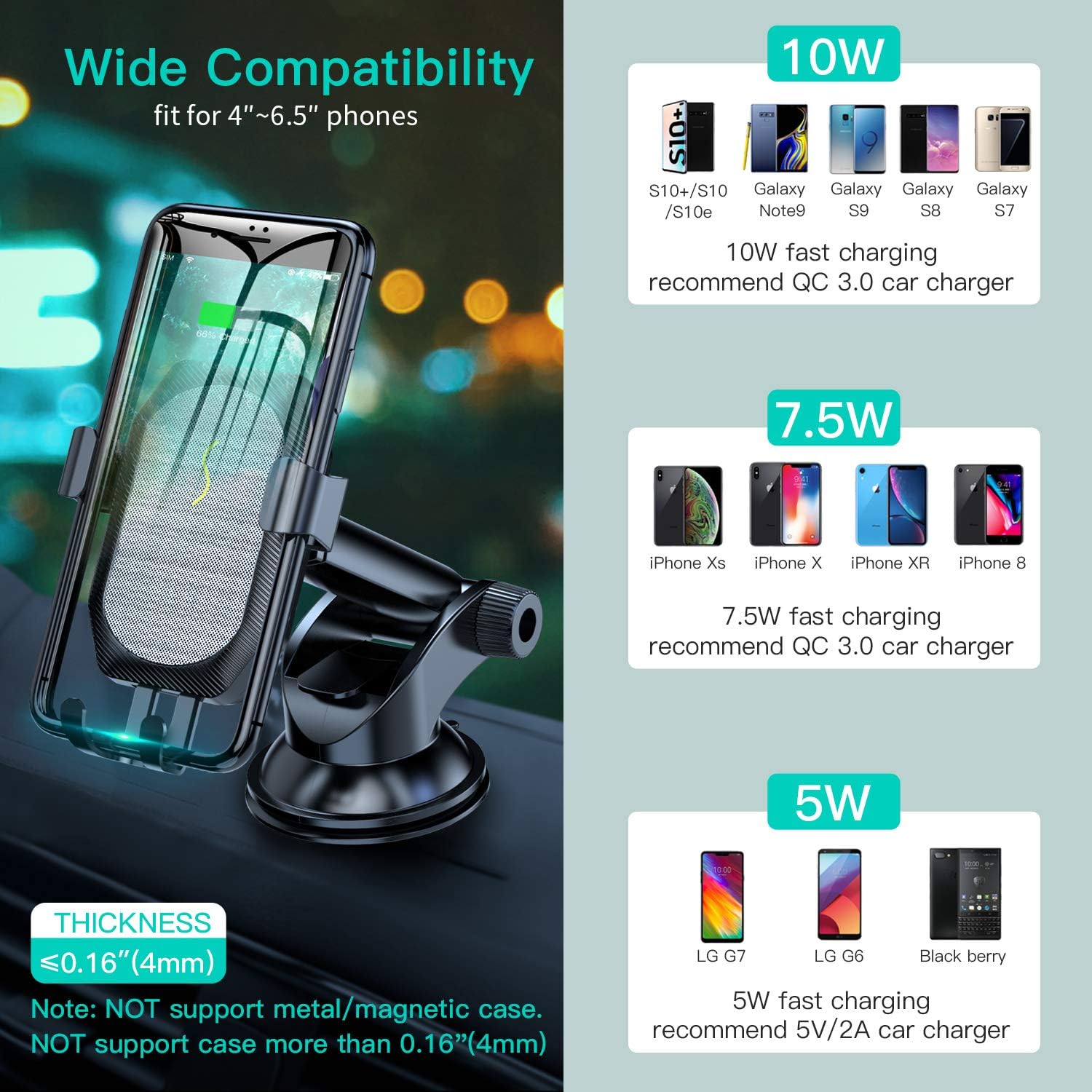
Figure 2.1: Compatibility and Case Thickness Guidelines
This image details the wattage output for various phone models and specifies that cases thicker than 0.16 inches (4mm) or metal/magnetic cases are not supported.

Figure 2.2: Automatic Gripping Mechanism
The charger features an auto-gripped design that uses gravity and linkage to firmly secure the phone, allowing for convenient one-hand operation.

그림 2.3: 조정 가능 View잉 앵글
The mount offers 360° rotation and free adjustment to achieve the best viewing angle, with a stretchable arm extending up to 5cm.
3. 설정 및 설치
The SONRU Wireless Car Charger Mount offers two installation methods: air vent mounting and dashboard mounting.
3.1 환기구 설치
- Unscrew the nut from the air vent clip.
- Place the nut over the ball joint on the back of the charger.
- Insert the ball joint into the socket on the air vent clip.
- 너트를 단단히 조이십시오.
- Attach the air vent clip to a horizontal air vent in your vehicle. Ensure it is firmly clipped.
3.2 대시보드 설치
- Unscrew the nut from the dashboard suction cup mount.
- Place the nut over the ball joint on the back of the charger.
- Insert the ball joint into the socket on the dashboard mount.
- 너트를 단단히 조이십시오.
- Clean the desired dashboard surface thoroughly.
- Press the suction cup firmly onto the dashboard and engage the locking lever to create a strong seal.

Figure 3.1: Installation Options: Air Vent and Dashboard
This image visually demonstrates the two methods for installing the car charger mount: using the air vent clip or the dashboard suction cup mount.
3.3 전원 연결
- Connect the provided USB charging cable to the USB input port on the bottom of the charger.
- Plug the other end of the USB cable into a car charger (a QC 3.0 car charger is recommended for fast charging).
중요 참고 사항: The charger is designed for vertical phone placement only. Horizontal installation is not supported and may affect stability and charging performance.

Figure 3.2: Important Note: Vertical Installation Only
This image highlights that the charger does not support horizontal phone installation.
4. 사용 설명서
4.1 휴대폰 놓기
- Gently slide your Qi-compatible smartphone into the mount from the top.
- The bottom support will trigger the side arms to automatically close and securely grip your phone.
- Ensure the phone is centered on the charging pad for optimal wireless charging.
4.2 휴대폰 제거
- Simply lift your phone upwards to release it from the automatic gripping arms.
4.3 충전 표시기
- The LED indicator on the charger will illuminate to show charging status. (Specific LED colors/patterns for charging/fully charged are not detailed in the provided information, refer to the included physical manual for exact details).
5. 문제 해결
- 휴대전화가 충전되지 않거나 충전 속도가 느립니다.
- Ensure your phone is Qi-compatible and properly centered on the charging pad.
- Verify that the charging cable is securely connected to both the charger and a functioning car adapter.
- For fast charging, use a QC 3.0 compatible car charger. Standard car chargers may result in slower charging speeds.
- Check your phone case. Cases thicker than 0.16 inches (4mm) or those made of metal/magnetic materials can interfere with wireless charging. Remove the case to test.
- Phone not held securely:
- Ensure the phone is correctly placed, allowing the bottom support to activate the gripping arms.
- Verify that the mount is securely attached to the air vent or dashboard. Tighten any loose connections.
- Mount becoming loose:
- For air vent mounts, ensure the clip is fully engaged with the vent louver.
- For suction cup mounts, re-clean the dashboard surface and re-apply the suction cup, ensuring the locking lever is fully engaged.
- 충전기 전원이 켜지지 않음:
- Check the USB cable and car charger connection. Try a different USB cable or car charger to rule out component failure.
6. 사양
- 제품 크기: 6.69 x 3.8 x 4.5 인치
- 품목 무게: 8 온스
- ASIN: B07MV2CCJR
- 제조업체: 손루
- 커넥터 유형: USB 타입 C
- 호환 장치: Smartphones (Qi-enabled)
- 호환되는 전화 모델: iPhone (XS/X/8/8Plus), Samsung (S9/S9+, S8/S8+, S7/S7 Edge, S6/S6 Edge, Note 8/59), and other Qi-enabled phones.
- 특징: Fast Charging, Wireless Fast
- 왓tage: 10와트(최대)
- 사양 충족: Qi
- 전원: Battery Powered (refers to the phone's battery being charged, the unit itself is powered by the car's USB port)
7. 안전 정보
- 기기를 극한의 온도, 직사광선 또는 습기에 노출시키지 마세요.
- 장치를 떨어뜨리거나 강한 충격을 가하지 마십시오.
- 어린이의 손이 닿지 않는 곳에 보관하세요.
- 장치를 직접 분해하거나 수리하려고 하지 마십시오.
- 제공되거나 인증된 호환 충전 케이블과 어댑터만 사용하세요.
8. 보증 및 지원
For warranty information or technical support, please refer to the documentation included with your product or contact SONRU customer service through their official channels. Keep your purchase receipt for warranty claims.


