소개
구매해주셔서 감사합니다asing the Supersonic IQ-1525BT Wireless Bluetooth Speaker. This manual provides essential information for the safe and efficient operation of your device. Please read it thoroughly before use and retain it for future reference.

그림 1: 전면 view of the Supersonic IQ-1525BT Wireless Bluetooth Speaker.
패키지 내용
아래 나열된 모든 품목이 패키지에 포함되어 있는지 확인하세요.
- Supersonic IQ-1525BT Wireless Bluetooth Speaker
- USB 케이블
- AUX 케이블
- 운반 스트랩
- 사용 설명서(본 문서)
제품 끝view
제어판 및 포트

그림 2: 상세 view of the control panel, showing input ports and control knobs.
The front panel of the speaker features the main controls and input ports:
- IQ Sound Display: Digital display for mode, frequency, and other indicators.
- 마이크로 SD 카드 슬롯: Micro SD 카드에서 오디오를 재생합니다.
- USB 포트: USB 플래시 드라이브에서 오디오를 재생합니다.
- 보조 입력: 외부 오디오 장치를 연결하기 위한 3.5mm 잭입니다.
- 마이크 입력: 마이크를 연결하기 위한 6.35mm 잭입니다.
- DC 5V 입력: 스피커를 충전하기 위한 전원 입력.
- 베이스 노브: 저음 레벨을 조정합니다.
- Volume Knob (OFF/VOL/ON): 스피커를 켜거나 끄고 전체 볼륨을 조절합니다.
- 모드 버튼(M): Switches between input modes (Bluetooth, FM, USB, Micro SD, AUX).
- 이전/되감기 버튼: 이전 트랙으로 건너뛰거나 되감기합니다.
- 재생/일시 정지 버튼: 오디오를 재생하거나 일시 정지합니다.
- 다음/빨리 감기 버튼: 다음 트랙으로 건너뛰거나 빨리 감기를 합니다.
Speakers and LED Lighting
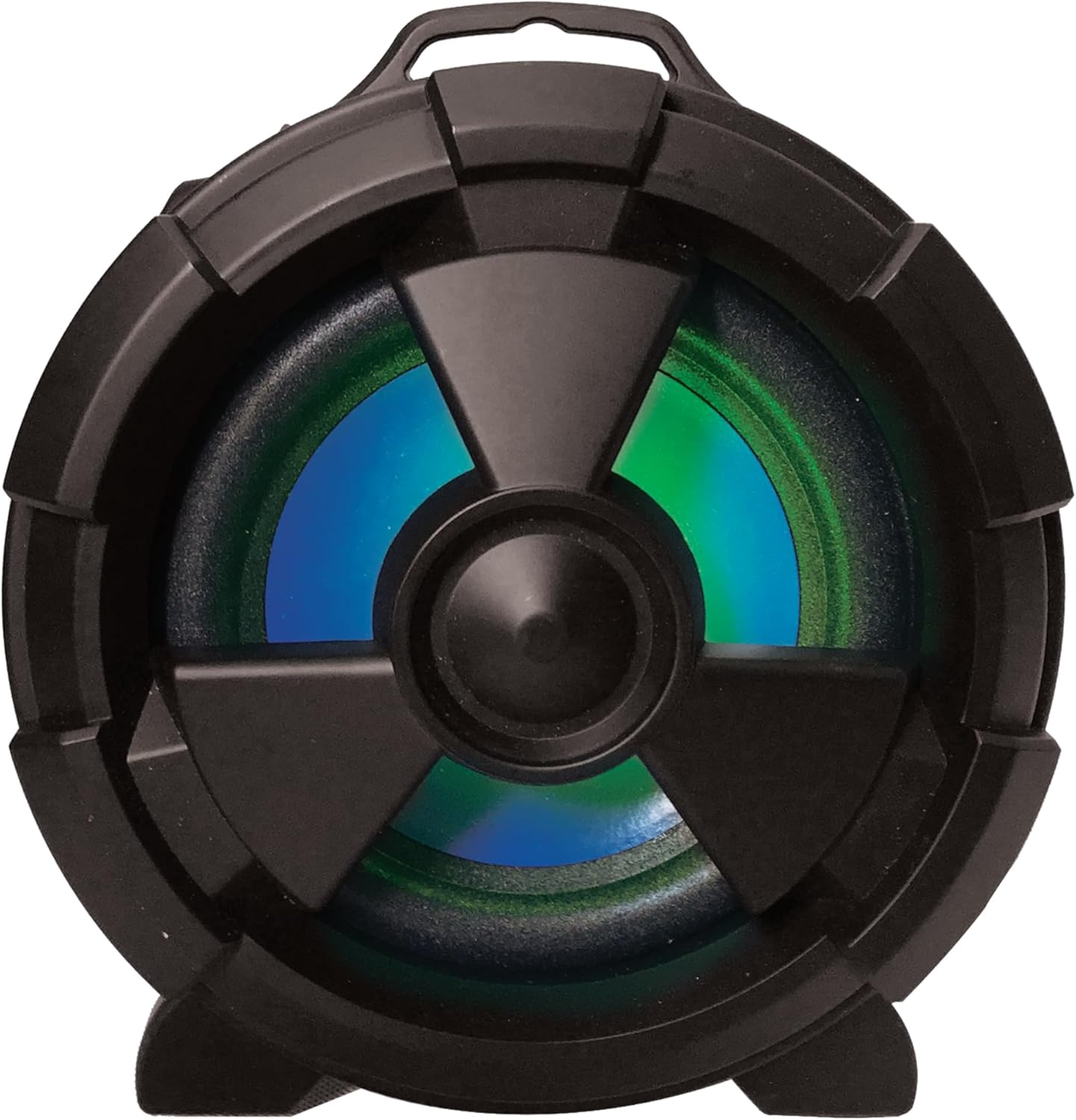
그림 3: 측면 view highlighting the main speaker and its integrated LED lighting.
The speaker features one 5-inch main speaker and two 2-inch built-in speakers for stereo sound. The main speaker on the side includes integrated LED lighting that changes colors during operation.
휴대성 기능

Figure 4: The speaker's design allows for easy transport and use in various settings.
The IQ-1525BT is designed for portability, featuring a lightweight construction and a carrying strap for convenient transport.
설정
스피커 충전하기
- Connect the provided USB cable to the DC 5V input port on the speaker.
- Connect the other end of the USB cable to a compatible USB power adapter (not included) or a USB port on a computer.
- The charging indicator will illuminate. Allow sufficient time for a full charge before first use.
전원 켜기/끄기
- To turn on the speaker, rotate the Volume knob clockwise until it clicks and the display illuminates.
- To turn off the speaker, rotate the Volume knob counter-clockwise until it clicks and the display turns off.
작동 지침
블루투스 페어링

Figure 5: Illustrates connecting a device via Bluetooth to the speaker.
- Turn on the speaker. It will automatically enter Bluetooth pairing mode, indicated by a flashing "BLUE" on the display and an audible prompt.
- Bluetooth가 활성화된 기기(예: 스마트폰, 태블릿)에서 Bluetooth를 활성화하고 사용 가능한 기기를 검색하세요.
- Select "IQ-1525BT" from the list of devices.
- Once paired, the speaker will emit an audible confirmation, and "BLUE" on the display will stop flashing.
- 이제 스피커를 통해 기기의 오디오를 재생할 수 있습니다.
FM 라디오 작동
- Turn on the speaker. Press the "M" (Mode) button repeatedly until "FM" appears on the display.
- 재생/일시정지 버튼을 길게 누르면 FM 방송국 자동 검색이 시작됩니다. 스피커는 검색된 모든 방송국을 저장합니다.
- Use the Previous/Rewind and Next/Fast Forward buttons to navigate between saved stations.
USB/마이크로 SD 재생
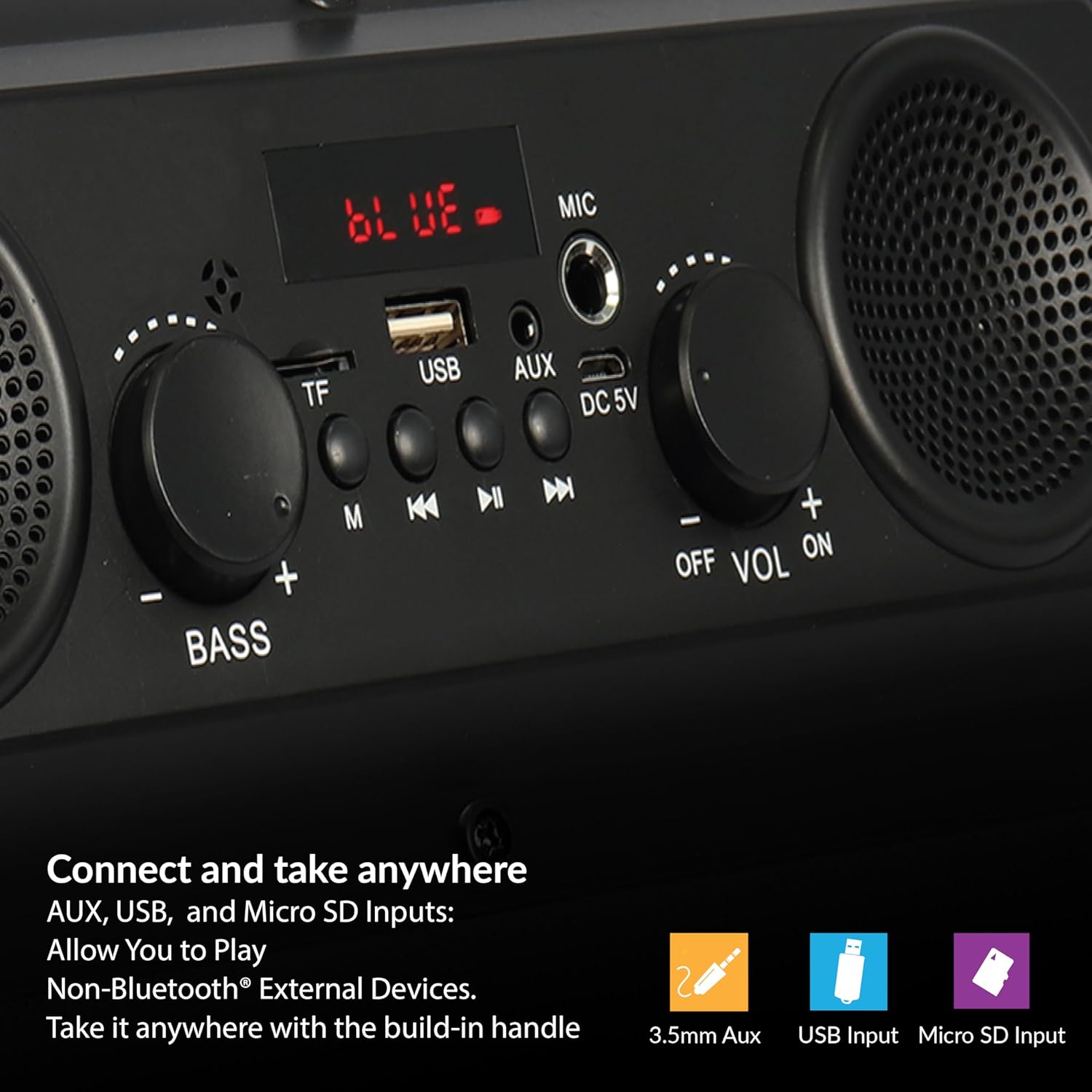
Figure 6: The speaker supports various input options for versatile audio playback.
- Insert a USB flash drive or Micro SD card (with pre-loaded audio files) 해당 포트로 입력합니다.
- The speaker will automatically switch to USB or Micro SD mode and begin playback. If not, press the "M" (Mode) button to select the correct mode.
- Use the Play/Pause, Previous/Rewind, and Next/Fast Forward buttons to control playback.
AUX 입력
- Connect one end of the provided AUX cable to the AUX input port on the speaker.
- Connect the other end of the AUX cable to the audio output jack of your external device.
- 디스플레이에 "AUX"가 나타날 때까지 "M"(모드) 버튼을 누르십시오.
- 외부 기기에서 오디오 재생을 제어하세요.
마이크 사용
- Connect a microphone (not included) to the MIC input port.
- Adjust the main volume using the Volume knob.
Adjusting Bass and Volume
- 회전하다 용량 전체 음량을 높이거나 낮추는 조절 노브입니다.
- 회전하다 베이스 knob to adjust the low-frequency sound output.
유지
- 청소: 부드럽고 마른 천을 사용하여 스피커 외부를 닦으세요. 액체 세척제나 연마재를 사용하지 마세요.
- 저장: 장시간 사용하지 않을 경우, 스피커를 직사광선과 극한의 온도를 피해 서늘하고 건조한 곳에 보관하세요.
- 배터리 관리 : 배터리 수명을 연장하려면 배터리를 자주 완전히 방전시키지 마십시오. 사용하지 않을 때에도 스피커를 정기적으로 충전하십시오.
- 물 노출: 이 스피커는 방수가 되지 않습니다. 물이나 과도한 습기에 노출되지 않도록 주의하세요.
문제 해결
| 문제 | 가능한 원인 | 해결책 |
|---|---|---|
| 스피커의 전원이 켜지지 않습니다. | 배터리가 소진되었습니다. | 제공된 USB 케이블을 사용하여 스피커를 충전하세요. |
| 소리가 나지 않습니다. | 볼륨이 너무 낮거나 음소거 상태입니다. 입력 모드가 잘못되었습니다. | Increase the volume. Press the 'M' button to select the correct input mode. |
| Bluetooth 장치가 페어링되지 않습니다. | 스피커가 페어링 모드가 아닙니다. 기기가 너무 멀리 떨어져 있습니다. | Ensure speaker is in Bluetooth mode (flashing 'BLUE'). Move device closer (within 10 meters). |
| FM 수신 상태가 좋지 않습니다. | 신호가 약합니다. | 신호 수신을 개선하려면 스피커 위치를 조정하십시오. |
| USB/Micro SD가 재생되지 않습니다. | 잘못된 file 형식이 손상되었습니다. 미디어가 손상되었습니다. | 오디오 확인 files are in a compatible format. Try a different USB drive or Micro SD card. |
명세서
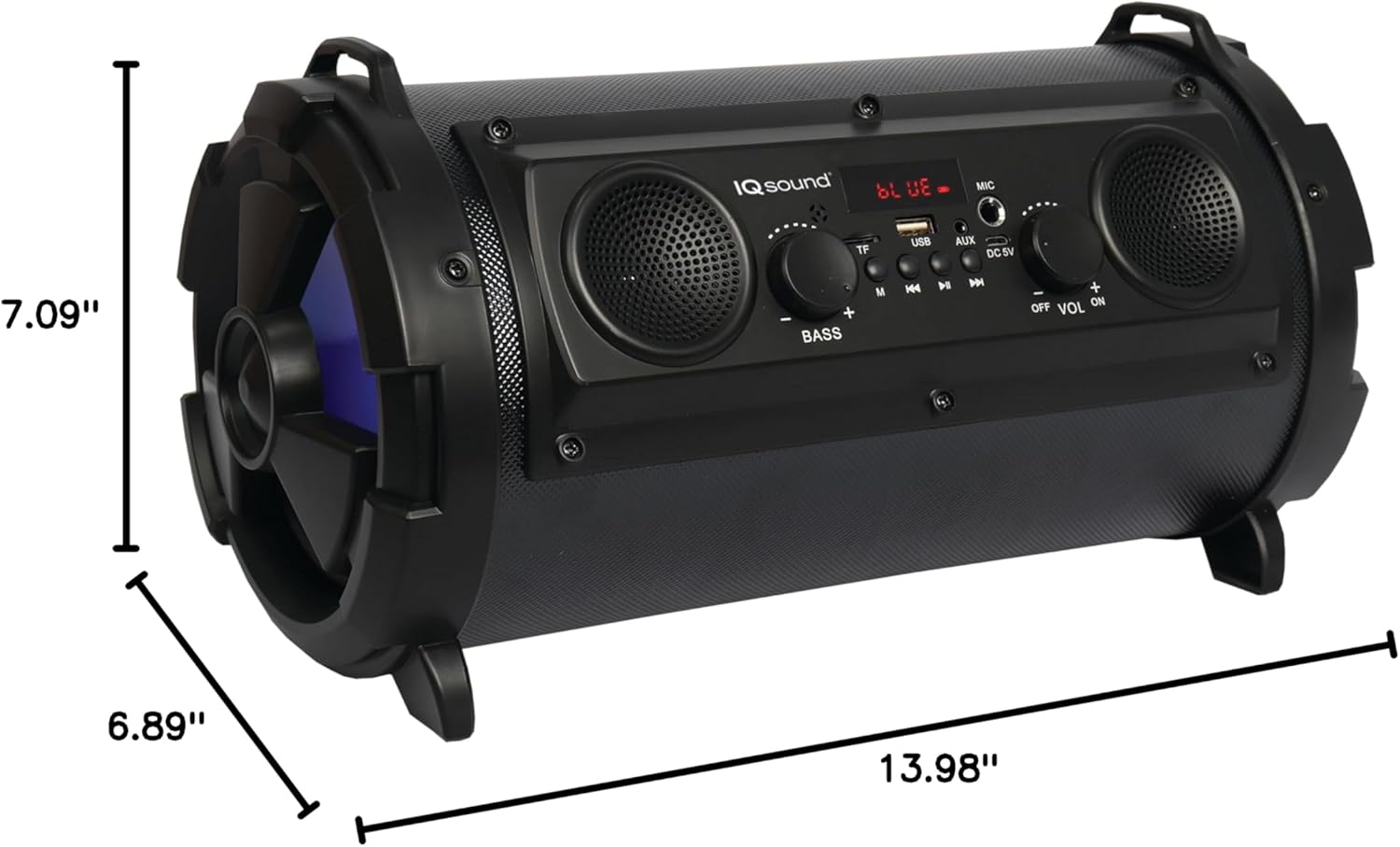
Figure 7: Product dimensions for the IQ-1525BT speaker.
| 특징 | 세부 사항 |
|---|---|
| 모델명 | IQ-1525BT |
| 상표 | 초음속 |
| 스피커 유형 | 휴대용 블루투스 스피커 |
| 출력 전력 | 16 와트 |
| 스피커 구성 | One 5-inch, Two 2-inch built-in speakers |
| 블루투스 버전 | V4.0 |
| 무선 범위 | 최대 10미터(32.8피트) |
| 주파수 응답 | 100Hz ~ 20kHz |
| 입력 Voltage | 직류 5볼트 |
| 배터리 | 3.7-volt, 2,400 mAh rechargeable battery |
| 입력 | USB, Micro SD, AUX, Microphone |
| 특별 기능 | FM Tuner (87.5 - 108.0MHz), Extra Bass (Passive Radiator), LED Lighting |
| 제품 크기(D x W x H) | 6.89인치 x 7.09인치 x 13.98인치 |
| 품목 무게 | 1 파운드 |
| 재료 | 플라스틱 |
보증 정보
This product comes with a Limited Warranty. For specific details regarding warranty coverage, terms, and conditions, please refer to the warranty card included in your product packaging or visit the official Supersonic web사이트. 보증 청구를 위해 구매 증빙 자료를 보관하세요.
지원하다
If you encounter any issues or have questions not covered in this manual, please contact Supersonic customer support for assistance. Contact information can typically be found on the product packaging or the official Supersonic web대지.


