1. 서론
This manual provides detailed instructions for the safe and proper installation, operation, and maintenance of your Mount Plus OB-600 Outdoor Weatherproof Tilt TV Wall Mount. Please read this manual thoroughly before installation and retain it for future reference.
The Mount Plus OB-600 is designed to securely mount most 37-inch to 86-inch televisions in outdoor environments. Its robust construction and weatherproof features ensure durability and reliable performance.
2. 안전 정보
경고: 이 지침을 읽고 따르지 않을 경우 심각한 부상, 재산 피해 또는 보증 무효화가 발생할 수 있습니다.
- 설치 표면이 마운트와 텔레비전의 총 무게를 안전하게 지탱할 수 있는지 확인하십시오.
- 최대 중량 용량은 176파운드(80kg)를 초과하지 마십시오.
- 설치 시에는 항상 눈 보호구를 포함한 적절한 안전 장비를 사용하십시오.
- 설치 과정 중 확실하지 않은 부분이 있으면 자격을 갖춘 전문가에게 문의하십시오.
- 설치하는 동안 어린이와 애완동물이 작업 구역에 접근하지 못하도록 하세요.
- 모든 연결부와 고정 장치를 정기적으로 점검하여 안전하게 고정되어 있는지 확인하십시오.
3. 패키지 내용
설치를 시작하기 전에 모든 구성품이 있는지, 손상되지 않았는지 확인하십시오. 누락되거나 손상된 부품이 있는 경우 Mount Plus 고객 지원팀에 문의하십시오.
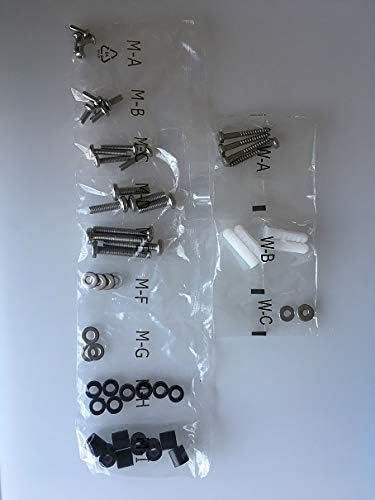
그림 3.1: Assorted hardware for the Mount Plus OB-600, including various screws, washers, and wall anchors, organized in labeled bags.
- 벽판 조립체
- TV 브래킷 암 (2개)
- 설치용 하드웨어 키트(나사, 와셔, 스페이서, 앵커)
- 사용 설명서
4. 사양
| 특징 | 세부 사항 |
|---|---|
| 모델 번호 | 오비-600 |
| 상표 | 마운트 플러스 |
| TV 크기 호환성 | Most 37" - 86" TVs |
| 최대 중량 용량 | 176파운드(80kg) |
| VESA 호환성 | 75x75, 100x100, 100x150, 150x100, 150x150, 200x100, 200x200, 300x200, 300x300, 400x200, 400x300, 400x400, 600x400 mm |
| 기울기 범위 | +5° ~ -10° |
| 찬성file (Distance from Wall) | 54mm(2.1인치) |
| 재료 | Stainless Steel, Powder-Coated Galvanized Steel |
| 품목 무게 | 8.98파운드 |
| 한국어: | 638845988612 |
5. 설정 및 설치
Before you begin, ensure you have the necessary tools: drill, stud finder (for wood studs), level, measuring tape, pencil, and a screwdriver.
5.1. 장착 위치 결정
Choose a suitable outdoor wall location. The mount is designed for patios, decks, and balconies. Ensure the wall structure can support the combined weight of the mount and your TV.

그림 5.1: Example of the Mount Plus OB-600 installed on an outdoor brick wall, demonstrating its intended use in an outdoor living space.
5.2. Attach TV Brackets to Television
- TV를 부드럽고 깨끗한 표면에 화면이 아래로 향하도록 조심스럽게 놓으십시오.
- TV 뒷면에 있는 VESA 장착 구멍을 확인하세요.
- Select the appropriate screws and spacers from the hardware kit that fit your TV's VESA pattern.
- Attach the two TV bracket arms to the back of your TV, ensuring they are centered and securely fastened. The arrows on the brackets should point upwards.
5.3. Install Wall Plate to Wall
- Hold the wall plate against the wall at your desired height and use a level to ensure it is perfectly horizontal. Mark the drilling locations with a pencil.
- Drill pilot holes at the marked locations. For wood studs, use a smaller drill bit. For concrete or brick, use a masonry drill bit and insert wall anchors.
- 제공된 나사못과 와셔를 사용하여 벽판을 벽에 고정하십시오. 모든 나사못을 단단히 조이되, 너무 세게 조이지 마십시오.
5.4. Mount Television to Wall Plate
- 다른 사람의 도움을 받아 부착된 브래킷을 이용해 TV를 조심스럽게 들어 올린 후, 브래킷을 벽면 고정판 상단 가장자리에 걸어주세요.
- Allow the TV to hang freely, ensuring the brackets are properly seated on the wall plate.
- Secure the TV to the wall plate using the safety screws or locking mechanism at the bottom of the TV bracket arms. This prevents accidental dislodgement.

그림 5.2: 클로즈업 view of the Mount Plus OB-600's anti-theft design, showing a padlock securing the TV bracket to the wall plate, preventing unauthorized removal.
6. 사용 설명서
6.1. 기울기 각도 조정
The Mount Plus OB-600 features a free-tilting design, allowing you to adjust the TV's vertical viewing angle. Loosen the tilt adjustment knobs on the sides of the TV bracket arms, adjust the TV to the desired angle (+5° to -10°), and then tighten the knobs to secure the position.
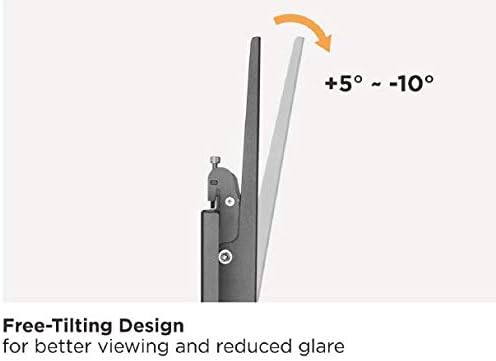
그림 6.1: Visual representation of the Mount Plus OB-600's tilt functionality, demonstrating the ability to adjust the screen angle from 5 degrees upward to 10 degrees downward for optimal view빛 반사 및 눈부심 감소.
6.2. 레벨 조정
After installation, if minor leveling adjustments are needed, the mount allows for a built-in level adjustment of ±5mm (±0.19"). This feature helps ensure your TV is perfectly horizontal.
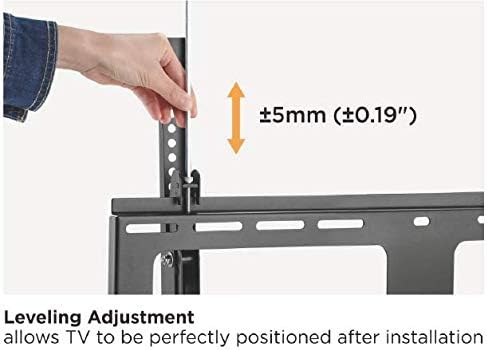
그림 6.2: A hand demonstrating the leveling adjustment feature of the Mount Plus OB-600, which allows for fine-tuning the TV's horizontal position by up to ±5mm after initial installation.
6.3. 도난 방지 기능
The mount includes an anti-theft design. Once the TV is mounted, a padlock (not included) can be inserted through the designated hole on the bottom of the TV bracket arms to deter unauthorized removal of the television.
7. 유지관리
To ensure the longevity and safe operation of your Mount Plus OB-600, regular maintenance is recommended, especially in outdoor environments.
- 청소: 부드러운 천으로 마운트를 닦아주세요.amp cloth to remove dust and debris. Avoid abrasive cleaners or solvents that could damage the powder-coated finish.
- 점검: Periodically check all bolts, screws, and connections to ensure they are tight and secure. Re-tighten if necessary.
- 부식 검사: Although designed for outdoor use with a powder-coated finish and stainless steel screws, regularly inspect for any signs of rust or corrosion, especially in coastal or harsh weather conditions. Address any issues promptly.
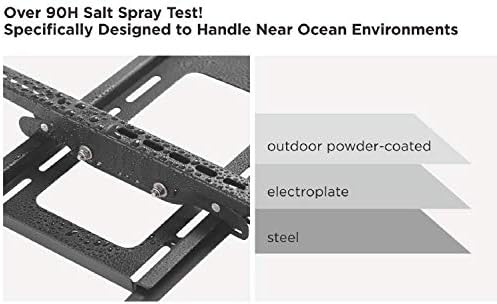
그림 7.1: Illustration of the Mount Plus OB-600's multi-layer construction, highlighting the outdoor powder-coated finish, electroplate, and steel base designed for enhanced weather resistance and durability.
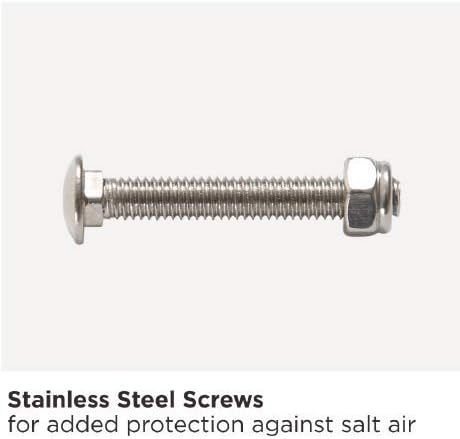
그림 7.2: A close-up image of a stainless steel screw, emphasizing its role in providing additional protection against salt air and corrosion in outdoor environments.
8. 문제 해결
| 문제 | 가능한 원인 | 해결책 |
|---|---|---|
| TV appears crooked after installation. | Wall plate not level, or TV not level on brackets. | Use the built-in level adjustment feature (±5mm) to fine-tune the TV's horizontal position. If the wall plate is significantly off, you may need to re-install it. |
| TV is difficult to tilt or does not stay in position. | Tilt adjustment knobs are too tight or too loose. | Loosen the tilt adjustment knobs to adjust the angle, then tighten them firmly to secure the TV in the desired position. |
| 산이 불안정하게 느껴집니다. | Loose fasteners, incorrect installation, or unsuitable wall material. | Immediately remove the TV. Check all wall plate and TV bracket fasteners for tightness. Ensure the wall material is appropriate and anchors are correctly installed. Consult a professional if unsure. |
| 구성품 중 일부가 누락되었습니다. | 포장 오류. | Contact Mount Plus customer support for replacement parts. |
9. 보증 정보
Mount Plus products are designed for durability and performance. For specific warranty details, please refer to the warranty card included with your product or visit the official Mount Plus web사이트. 보증 청구에 대비해 구매 증빙 자료로 구매 영수증을 보관하세요.
10. 고객 지원
If you have any questions, require assistance with installation, or need to report missing/damaged parts, please contact Mount Plus customer support:
- Web대지: Visit the Mount Plus Store on Amazon (일반적인 제품 정보)
- Refer to your product packaging or included documentation for direct contact information (phone/email).


