1. 서론
The Elekpia Universal Remote Control is a direct replacement remote designed for compatibility with a vast array of Toshiba LCD, LED, 3D, HDTV, 4K UHD, and Smart TV models. This remote requires no programming or pairing; simply insert batteries, and it is ready for immediate use.
It is compatible with many original Toshiba remote models, including CT-90325, CT-90326, CT-90329, CT-8037, CT-90302, CT-90275, CT-90366, and more.
2. 설정
To begin using your new universal remote control, follow these simple steps:
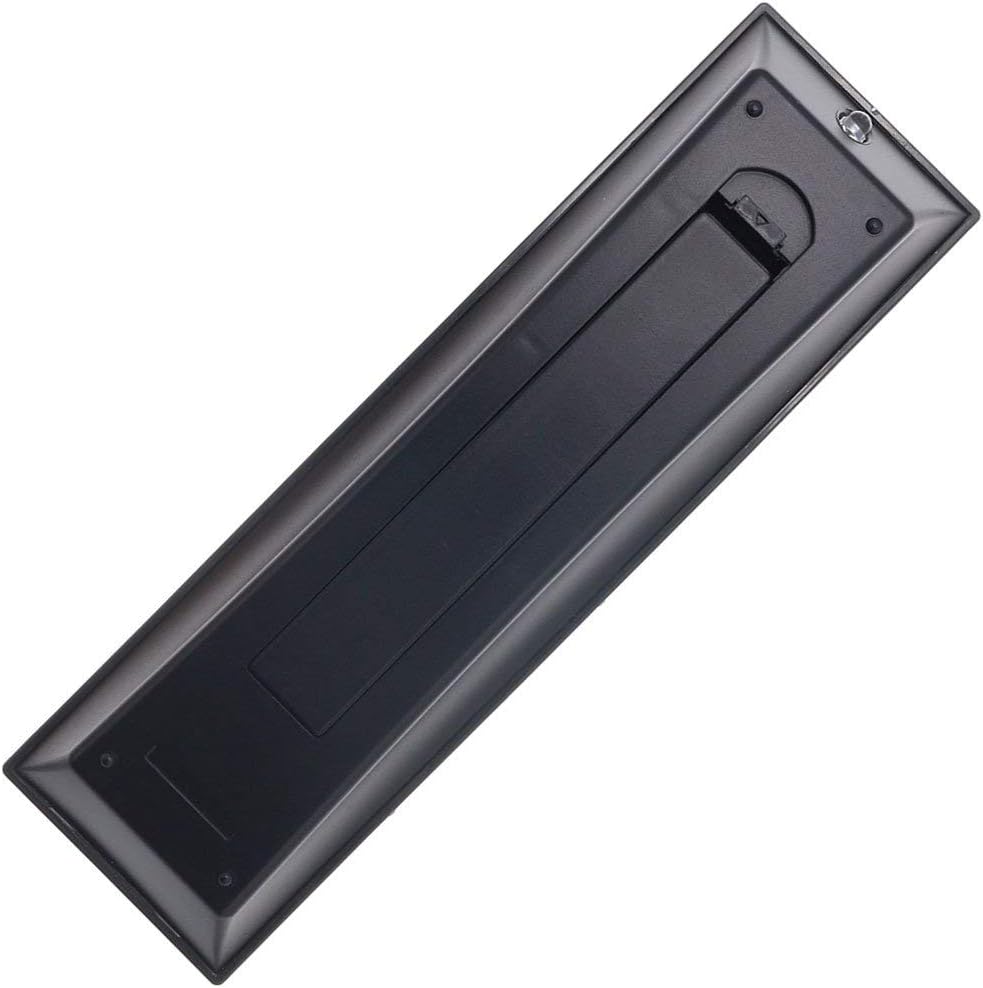
- 배터리 설치: Locate the battery compartment on the back of the remote control. Slide the battery cover downwards to open it. Insert two new AAA batteries (not included), ensuring the positive (+) and negative (-) terminals align correctly with the indicators inside the compartment. Close the battery cover by sliding it back into place until it clicks securely.
- 사용 가능: Once batteries are installed, the remote is ready for immediate operation with your compatible Toshiba TV. No additional programming, pairing, or code entry is required.

3. 사용 설명서
The Elekpia Universal Remote Control features a standard layout for easy navigation and control of your Toshiba television. Below is a guide to the primary functions:
- 전원 버튼 (ⓘ): 오른쪽 상단에 있는 버튼을 눌러 TV를 켜거나 끄세요.
- 입력 버튼: Cycles through available video input sources (HDMI, AV, Component, etc.).
- Number Buttons (0-9, 100, FAV): Used for direct channel selection. The "100" button may be used for three-digit channel numbers, and "FAV" for favorite channels if configured on your TV.
- 볼륨 조절 (VOL +/-): 오디오 볼륨을 높이거나 낮춥니다.
- Channel Control (CH +/-): 텔레비전 채널을 위아래로 바꿉니다.
- 음소거 버튼: Silences the TV audio. Press again to restore sound.
- 탐색 패드(위, 아래, 왼쪽, 오른쪽, ENTER): Used to navigate menus, select options, and confirm choices.
- 메뉴 버튼: Accesses the TV's main menu for settings and adjustments.
- 뒤로가기 버튼: 이전 화면 또는 메뉴로 돌아갑니다.
- 종료 버튼 : 현재 메뉴 또는 기능을 종료합니다.
- Playback Controls (EJECT, PAUSE/STEP, PLAY, STOP, SKIP, REW, FF): These buttons control media playback functions for connected devices (e.g., DVD player, USB drive) if supported by your TV.
- 정보 버튼: 현재 프로그램이나 입력에 대한 정보를 표시합니다.
- C.CAPTION Button: 자막 기능을 켜거나 끕니다.
- 리콜 버튼: 현재 상태와 이전 상태 사이를 전환합니다. view에드 채널.
- CH RTN Button: 이전 채널로 돌아갑니다.
- PIC MODE / PIC SIZE: Adjusts picture mode and aspect ratio settings.
- SLEEP / FREEZE: Sleep timer and freeze frame functions, if supported by your TV.
4. 유지관리
적절한 관리와 유지보수를 통해 리모컨의 수명을 연장할 수 있습니다.
- 청소: 리모컨은 부드럽고 마른 천으로 닦으세요. 잘 지워지지 않는 오염의 경우 가볍게 두드리세요.amp천에 물이나 순하고 연마성이 없는 세제를 묻혀 닦아주세요. 강한 화학 물질이나 연마재는 사용하지 마세요.
- 배터리 교체: Replace batteries when the remote's response becomes sluggish or stops working. Always replace both batteries at the same time with new ones of the same type (AAA). Remove batteries if the remote will not be used for an extended period to prevent leakage.
- 저장: 리모컨은 직사광선, 극한 온도, 높은 습도를 피해 서늘하고 건조한 곳에 보관하세요.
- 낙하 방지: 리모컨을 물리적 충격으로부터 보호하세요. 떨어뜨리면 내부 구성 요소가 손상될 수 있습니다.
5. 문제 해결
리모컨에 문제가 발생하면 다음의 일반적인 해결책을 참조하세요.
| 문제 | 가능한 원인 | 해결책 |
|---|---|---|
| 리모컨이 전혀 작동하지 않습니다. | 배터리가 방전되었거나 잘못 삽입되었습니다. 리모컨과 TV 사이에 장애물이 있습니다. | Check battery polarity and replace with fresh AAA batteries. Ensure a clear line of sight to the TV's IR receiver. |
| 일부 버튼이 작동하지 않습니다. | Low battery power. Button malfunction. | Replace batteries. If issue persists, the button may be faulty. |
| 원격근무는 간헐적으로 진행됩니다. | 배터리가 약해요. 간섭이 있어요. | Replace batteries. Remove any potential sources of infrared interference (e.g., strong lights). |
| 리모컨으로 TV를 제어할 수 없습니다. | TV is not a compatible Toshiba model. | Verify your TV is a Toshiba brand and model listed as compatible in the product description. This remote is specifically designed for Toshiba TVs. |
6. 사양
- 상표: 엘렉피아
- 모델 번호: CT-90325
- 호환 장치: Toshiba Televisions (LCD, LED, 3D, HDTV, 4K UHD, Smart TV)
- 전원: AAA 배터리 2개(포함되지 않음)
- 색상: 검은색
- 제품 크기: 6 x 1.8 x 0.7인치(대략)
- 품목 무게: 2.71온스(대략)
- 특징: Universal replacement for specified Toshiba TV remotes; No programming required.
7. 보증 및 지원
For information regarding warranty coverage or technical support, please refer to the documentation provided with your purchase or contact the manufacturer directly. This remote is designed for straightforward plug-and-play operation, and most issues can be resolved by following the troubleshooting steps outlined in this manual.


