1. 서론
This manual provides essential information for the setup, operation, and maintenance of your Blackweb BWC18SB001 2.0 Channel Google Assistant Smart Soundbar. Please read these instructions carefully before using the product to ensure proper functionality and to maximize your audio experience. This smart soundbar integrates speaker functionality with Google Assistant capabilities, enhancing your home entertainment system.
2. 상자 안에 무엇이 들어있나요?
포장을 풀 때 모든 구성품이 들어 있는지 확인하세요.
- 검은색web BWC18SB001 2.0 Channel Google Assistant Smart Soundbar
- 원격 제어
- 전원 어댑터
- Relevant Audio Cables (e.g., Optical, Aux)
- 사용 설명서 (본 문서)
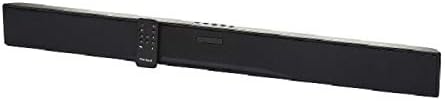
이미지: 더 블랙web BWC18SB001 Smart Soundbar, shown with its included remote control. The soundbar is black and rectangular, designed to sit beneath a television.
3. 제품 특징
- 2.0 채널 오디오: Delivers clear stereo sound for an enhanced listening experience.
- Google 어시스턴트 통합: 음성 명령으로 사운드바와 스마트 홈 기기를 제어하세요.
- 다중 연결 옵션: Supports HDMI, Optical, AUX, and Bluetooth for versatile audio input.
- 제어 방법: Features on-device buttons and a dedicated remote control for easy operation.
- 컴팩트한 디자인: Designed to fit seamlessly into your home theater setup.
4. 설정
4.1 배치
Place the soundbar on a stable, flat surface directly in front of your television or mount it on a wall (mounting hardware not included). Ensure there is adequate ventilation around the unit.
4.2 전원 연결
- 전원 어댑터를 사운드바 뒷면의 DC IN 포트에 연결하십시오.
- 전원 어댑터의 다른 쪽 끝을 벽면 콘센트에 꽂습니다.
4.3 오디오 연결
사운드바를 TV 또는 기타 오디오 소스에 연결하려면 다음 방법 중 하나를 선택하십시오.
- HDMI (권장): Connect an HDMI cable (not included) from the HDMI ARC port on your TV to the HDMI ARC port on the soundbar. This allows for high-quality audio and control via your TV remote.
- 광학: Connect an Optical cable (included) from the OPTICAL OUT port on your TV to the OPTICAL IN port on the soundbar.
- 보조: Connect a 3.5mm audio cable (included) from the AUX OUT port on your TV or audio device to the AUX IN port on the soundbar.
5. 사용 설명서
5.1 전원 켜기/끄기
- 전원 버튼 (U) on the soundbar or the remote control to turn the unit on or off.
- A green indicator light on the soundbar signifies that it is powered on.
5.2 볼륨 조절
- 볼륨 높이기 버튼을 사용하세요.볼륨+) 및 볼륨 낮추기(권) buttons on the soundbar or remote control to adjust the volume.
- 음소거 버튼(X) on the remote to mute or unmute the sound.
5.3 입력 선택
입력 버튼(M) on the soundbar or the corresponding input buttons (AUX, OPTICAL, HDMI, Bluetooth) on the remote control to switch between audio sources.
6. 구글 어시스턴트 연동
당신의 검은색web soundbar features integrated Google Assistant. To activate, ensure the soundbar is connected to your home Wi-Fi network (refer to the separate Google Home app setup guide for detailed instructions). Once connected, you can use voice commands:
- "헤이 구글" 또는 "오케이 구글"이라고 말한 다음 명령어를 입력하세요.
- Examples: "Hey Google, play music," "Ok Google, what's the weather?" "Hey Google, turn up the volume."
You can also mute the Google Assistant microphone using the dedicated button on the soundbar or remote control if you prefer privacy.
7. 블루투스 연결
블루투스 장치를 연결하려면:
- 블루투스 버튼(BT) on the remote control or cycle through inputs on the soundbar until "BT" is displayed or indicated. The soundbar will enter pairing mode.
- 모바일 기기(스마트폰, 태블릿, 노트북)에서 Bluetooth를 활성화하고 사용 가능한 기기를 검색하세요.
- Select "Blackweb BWC18SB001" from the list of devices.
- 페어링이 완료되면 사운드바에 연결 성공 메시지가 표시되고, 기기에서 오디오를 재생할 수 있습니다.
블루투스 연결 범위는 약 10미터(33피트)입니다.
8. 유지관리
사운드바의 수명 연장 및 최적의 성능을 보장하려면 다음 사항을 준수하십시오.
- 청소: Use a soft, dry cloth to wipe the exterior of the soundbar. Do not use liquid cleaners or abrasive materials.
- 통풍: 통풍구가 막히지 않았는지 확인하세요.
- 환경: 사운드바를 극한의 온도, 습도 또는 직사광선에 노출시키지 마십시오.
9. 문제 해결
- 전원 없음: Ensure the power adapter is securely connected to both the soundbar and a working wall outlet.
- 소리 없음:
- Check that the soundbar is powered on and not muted.
- 사운드바에서 올바른 입력 소스가 선택되었는지 확인하세요.
- Ensure audio cables (HDMI, Optical, AUX) are securely connected to both the soundbar and your TV/audio source.
- Adjust the volume on both the soundbar and your TV/audio source.
- 블루투스가 연결되지 않음:
- 사운드바가 Bluetooth 페어링 모드인지 확인하세요.
- 기기의 블루투스가 켜져 있고 블루투스 범위 내에 있는지 확인하세요.
- 기기의 페어링을 해제한 후 다시 페어링해 보세요.
- Google 어시스턴트가 응답하지 않음:
- Wi-Fi 연결을 확인하세요.
- Ensure the Google Assistant microphone is not muted.
- Verify the soundbar is properly set up in the Google Home app.
10. 사양
| 특징 | 사양 |
|---|---|
| 모델명 | BWC18SB001 |
| 스피커 유형 | 사운드바 |
| 서라운드 사운드 채널 구성 | 2.0 |
| 제어 방법 | Voice, Remote, On-device Buttons |
| 연결 기술 | HDMI, Optical, AUX, Bluetooth |
| 블루투스 범위 | 10 미터 |
| 스피커 최대 출력 전력 | 150 와트 |
| 오디오 출력 모드 | 스테레오, 서라운드 |
| 전원 | 코드식 전기 |
| 제품 치수 | 32 x 2.77 x 3.26 인치 |
| 품목 무게 | 3.97파운드 |
| 한국어: | 681131237703 |
11. 보증 및 지원
For warranty information and technical support, please refer to the documentation provided at the time of purchase or visit the official Blackweb web사이트. 보증 청구를 위해 구매 증빙 자료를 보관하세요.


