1. 서론
This user manual provides comprehensive instructions for the setup, operation, and maintenance of your Reloop RP-1000 MK2 Professional Belt Drive Turntable System. Please read this manual thoroughly before using the product to ensure proper function and to prevent damage.
The Reloop RP-1000 MK2 is designed for both aspiring DJs and HiFi enthusiasts, offering high-quality audio reproduction through its belt-driven mechanism. This design effectively isolates the platter from motor vibrations, ensuring clear, distortion-free sound. The MK2 version features an enhanced top panel construction, improved metallic buttons, and a pre-fitted Ortofon OM Black pick-up system for immediate playback.
2. 안전 지침
To ensure safe operation and prolong the life of your turntable, please observe the following safety guidelines:
- 전원 공급 장치: Connect the unit only to an AC outlet with the correct voltage as indicated on the product. Ensure the power cord is not pinched or walked on.
- 수분: 제품을 비, 습기 또는 과도한 습도에 노출시키지 마십시오. 꽃병과 같이 액체가 담긴 물건을 제품 위에 올려놓지 마십시오.
- 통풍: 장치 주변에 충분한 환기가 이루어지도록 하세요. 환기구를 막지 마세요.
- 열원: 라디에이터, 난방 장치, 스토브 또는 기타 장치(예: 열원)에서 장치를 멀리 두십시오. amp열을 생성하는 발전기.
- 청소: 마른 천으로만 닦으십시오. 액체 세제나 스프레이형 세척제 사용은 피하십시오.
- 서비스: Do not attempt to service the unit yourself. Refer all servicing to qualified service personnel. Servicing is required when the apparatus has been damaged in any way, such as power-supply cord or plug is damaged, liquid has been spilled or objects have fallen into the apparatus, the apparatus has been exposed to rain or moisture, does not operate normally, or has been dropped.
- 놓기: Place the turntable on a stable, level surface to prevent vibrations and ensure proper tracking.
3. 패키지 내용
아래 나열된 모든 품목이 패키지에 포함되어 있는지 확인하세요.
- 턴테이블 플래터
- OM Black pick-up system (by Ortofon)
- 헤드 쉘
- 슬립매트
- 균형추
- 전원 코드
- Operating Instruction Manual (this document)
누락되거나 손상된 품목이 있는 경우 즉시 판매점 또는 Reloop 고객 지원팀에 문의하십시오.
4. 제품 오버view
Familiarize yourself with the main components of your Reloop RP-1000 MK2 turntable.

그림 4.1: 각도 view of the Reloop RP-1000 MK2 turntable, showcasing the platter, tonearm, and control panel.
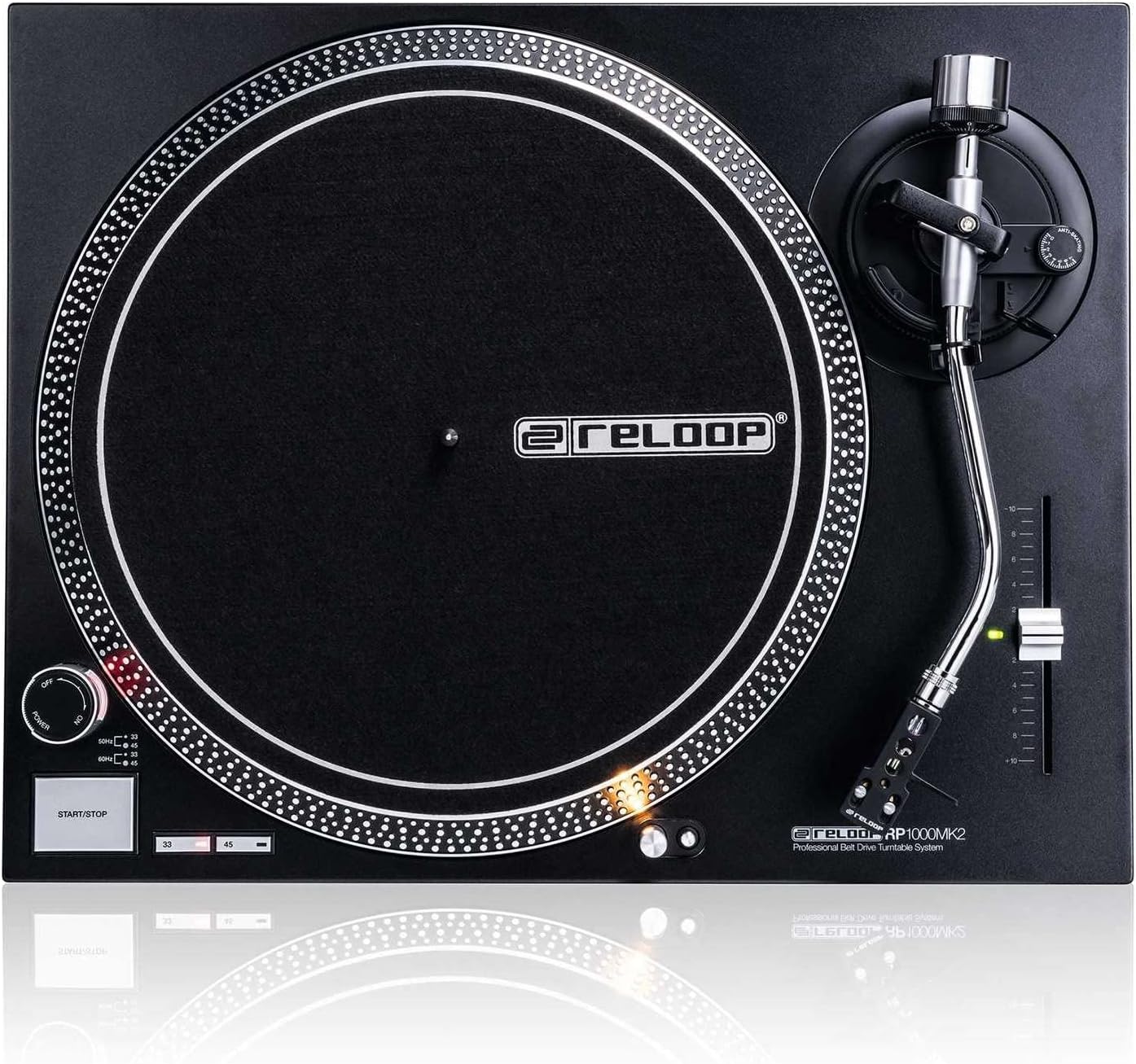
그림 4.2: 상향식 view highlighting the platter, slipmat with Reloop logo, S-shaped tonearm, and pitch control slider.

그림 4.3: 상세 view of the S-shaped tonearm, headshell, and the pre-fitted Ortofon OM Black pick-up system.
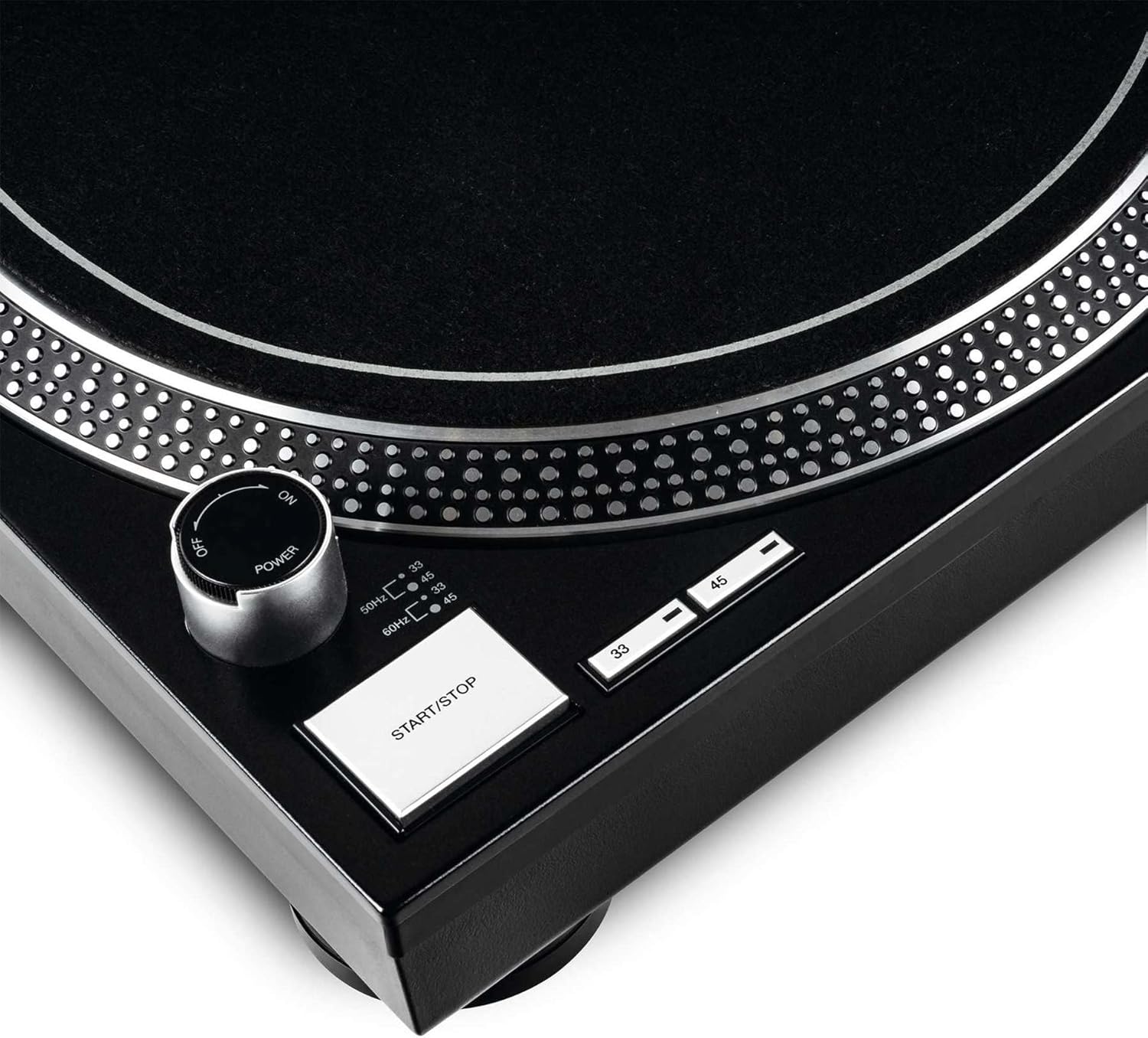
Figure 4.4: Close-up of the power knob, start/stop button, and speed selection buttons (33/45 RPM).
주요 구성 요소:
- 플래터: Precision-engineered, die-cast aluminum platter for stable rotation.
- 톤암 : Statically balanced S-shaped tonearm with hydraulic lift and anti-skating mechanism.
- 탄약통: High-quality OM Black pick-up system by Ortofon, pre-fitted to a headshell.
- 피치 컨트롤: Adjustable slider with a range of +/-10% for fine speed adjustments.
- Speed Select Buttons: Buttons for selecting 33 1/3 RPM and 45 RPM playback speeds.
- 시작/중지 버튼: Controls the rotation of the platter.
- 타겟 라이트: Extendable aluminum target light to illuminate the needle position in dark environments.
- Shock-absorbing Feet: Improve isolation from unwanted vibrations.
5. 설정
5.1 포장 풀기 및 배치
- 모든 구성품을 포장에서 조심스럽게 꺼내세요. 나중에 운반하거나 보관할 수 있도록 포장을 보관하세요.
- Place the turntable on a flat, stable, and level surface, away from direct sunlight, heat sources, and strong magnetic fields.
- Ensure there is sufficient space around the unit for ventilation.
5.2 플래터 및 벨트 설치
- Place the platter onto the center spindle. Ensure it sits securely.
- Locate the drive belt. Carefully stretch the belt around the inner rim of the platter and hook it onto the motor pulley, which is visible through one of the platter's openings.
- 펠트 깔개를 접시 위에 올려놓으세요.
5.3 Tonearm Setup
The OM Black pick-up system is pre-fitted to the headshell. Follow these steps to balance the tonearm:
- Attach the headshell with the pre-fitted cartridge to the front end of the tonearm. Secure it by turning the locking ring clockwise.
- Place the counterweight onto the rear of the tonearm and rotate it until it is approximately centered.
- 톤암 cl 해제amp and lower the tonearm lift.
- Carefully adjust the counterweight by rotating it forwards or backwards until the tonearm is perfectly balanced and floats horizontally.
- Once balanced, hold the counterweight steady and rotate only the numbered ring on the front of the counterweight to '0' (zero).
- Rotate the entire counterweight (including the numbered ring) counter-clockwise to set the recommended tracking force for the Ortofon OM Black cartridge, typically between 1.5 to 2.0 grams. Refer to the cartridge manufacturer's specifications for the precise recommended tracking force.
- Set the anti-skating dial to the same value as your tracking force.
- Return the tonearm to its rest and secure it with the clamp.
5.4 오디오 및 전원 연결
- 턴테이블 출력과 오디오 인터페이스의 포노 입력 단자에 RCA 오디오 케이블을 연결하세요. amp앰프 또는 믹서. 왼쪽(흰색) 및 오른쪽(빨간색) 채널 연결이 올바른지 확인하십시오.
- 턴테이블의 접지선을 본체의 접지 단자에 연결하세요. amp험 노이즈를 최소화하기 위한 증폭기 또는 믹서.
- Plug the power cord into the turntable's power input and then into a suitable AC power outlet.
6. 사용 설명서
6.1 기본 작업
- 전원 켜기: Turn the power knob clockwise to the "ON" position. The platter will not start spinning until the START/STOP button is pressed.
- 속도 선택: Press the "33" or "45" button to select the desired playback speed according to the record you are playing. The corresponding LED will illuminate.
- 장소 기록: Carefully place a vinyl record onto the platter.
- 스타터 플래터: Press the START/STOP button. The platter will begin to rotate.
- 톤암 위치 지정: 톤암 cl 해제amp. Use the tonearm lift lever to raise the tonearm. Carefully move the tonearm over the desired track on the record.
- 하단 톤암: Gently lower the tonearm lift lever to allow the stylus to descend onto the record groove.
- 재생 중: The audio will now play through your connected audio system.
- 재생 중지 : At the end of the record, or when you wish to stop, use the tonearm lift lever to raise the tonearm, return it to its rest, and secure it with the clamp. Press the START/STOP button to stop the platter rotation.
- 전원 끄기 : Turn the power knob counter-clockwise to the "OFF" position when not in use.
6.2 Using Pitch Control
The pitch control slider allows you to finely adjust the playback speed by +/-10%. Move the slider up or down to increase or decrease the speed. The center detent indicates 0% pitch adjustment (nominal speed).
6.3 Target Light
Press the aluminum target light button to extend the light, illuminating the needle position. This is particularly useful in low-light environments. Press it again to retract the light.
7. 유지관리
7.1 장치 청소
- 청소하기 전에 항상 전원 코드를 분리하십시오.
- Use a soft, dry, lint-free cloth to wipe the surface of the turntable.
- 완고한 자국의 경우 약간 damp 천을 사용한 후 바로 마른 천으로 닦아주세요. 연마성 세척제나 용제는 사용하지 마세요.
7.2 스타일러스 관리
- 스타일러스(바늘)는 섬세한 부품입니다. 최대한 조심스럽게 다루십시오.
- Clean the stylus regularly using a soft brush designed for stylus cleaning, brushing gently from back to front.
- A worn or dirty stylus can damage your records and degrade sound quality. Replace the stylus when signs of wear are apparent (e.g., distorted sound, skipping).
7.3 벨트 교체
The belt is a wear-and-tear part. If you notice inconsistent speed or the platter not spinning, the belt may need replacement. Contact Reloop support or an authorized service center for replacement belts and instructions.
7.4 Dust Cover Care (if applicable)
If your turntable includes a dust cover, clean it with a soft, damp cloth. Avoid using dry cloths as they can scratch the acrylic surface. Do not use harsh chemicals.
8. 문제 해결
Before contacting support, please refer to the following common issues and their solutions:
| 문제 | 가능한 원인 | 해결책 |
|---|---|---|
| 전원이 켜지지 않음 / 턴테이블이 회전하지 않음 | Power cord not connected; Power switch off; Belt not installed or broken. | Ensure power cord is securely plugged in. Turn power switch ON. Check if the drive belt is correctly installed around the platter and motor pulley. Replace belt if broken. |
| 소리가 안 나거나 아주 작게 들린다. | RCA 케이블이 올바르게 연결되지 않았습니다. Amplifier/mixer input incorrect; Stylus damaged or dirty; Cartridge not properly seated. | Check RCA connections to amplifier/mixer (PHONO input). Ensure ground wire is connected. Clean stylus. Re-seat cartridge in headshell. |
| 소리 왜곡 / 끊김 | Stylus dirty or worn; Tracking force incorrect; Anti-skating incorrect; Turntable not level; Record dirty or damaged. | Clean or replace stylus. Re-adjust tracking force and anti-skating. Ensure turntable is on a level surface. Clean record. |
| 속도가 일정하지 않음 | Worn or stretched belt; Motor issue. | Inspect the drive belt for wear and replace if necessary. If the issue persists, contact service. |
9. 사양
| 특징 | 설명 |
|---|---|
| 모델명 | RP-1000 MK2 Professional Belt Drive Turntable System |
| 드라이브 유형 | 벨트 드라이브 |
| 모터 시스템 | Powerful belt-drive motor system absorbs unwanted vibration and noise |
| 플래터 | Precision-engineered, die-cast aluminum platter with stable rotation |
| 속도 | 2 selectable speeds (33 1/3 & 45 RPM) |
| 피치 제어 | Adjustable range of +/-10% |
| 톤암 | Statically balanced S-shaped tonearm with hydraulic lift and anti-skate |
| 건설 | Redesigned metal top panel, tactile buttons, reinforced housing construction, optimized damping features, shock-absorbing feet |
| 치수(폭 x 깊이 x 높이) | 17.72 x 13.86 x 5.67인치(약 45 x 35.2 x 14.4cm) |
| 무게 | 16.06파운드(약 7.3kg) |
| 연결성 | Analog RCA output, Ground terminal |
| 전원 | Corded Electric, 220 Volts (check local voltag전자 요구 사항) |
10. 보증 및 지원
10.1 보증 정보
Reloop products are manufactured to the highest quality standards. This product comes with a manufacturer's warranty. Please refer to the warranty card included in your package or visit the official Reloop web해당 지역에 적용되는 자세한 보증 약관 및 조건은 해당 사이트를 참조하세요.
보증 청구에 필요하므로 구매 증빙서(영수증 또는 송장)를 보관하세요.
10.2 고객 지원
Should you encounter any issues not covered in the troubleshooting section, or require further assistance, please contact Reloop customer support or your authorized dealer. Contact information can typically be found on the official Reloop web사이트 또는 제품 포장에 표시하세요.
For the latest information, FAQs, and support resources, please visit the official Reloop web대지: www.reloop.com


