소개
This manual provides detailed instructions for the installation, operation, and maintenance of the Gree XK-60 Wired Programmable Controller. This controller is designed to interface with Gree U-Match air conditioning systems, offering precise control over your indoor climate. Please read this manual thoroughly before installation and operation to ensure proper use and optimal performance.
제품 끝view
The Gree XK-60 is a wired, programmable controller featuring a backlit LCD display and intuitive button controls. It allows users to manage various functions of their U-Match system, including operating modes, temperature settings, fan speeds, and programmable timers.
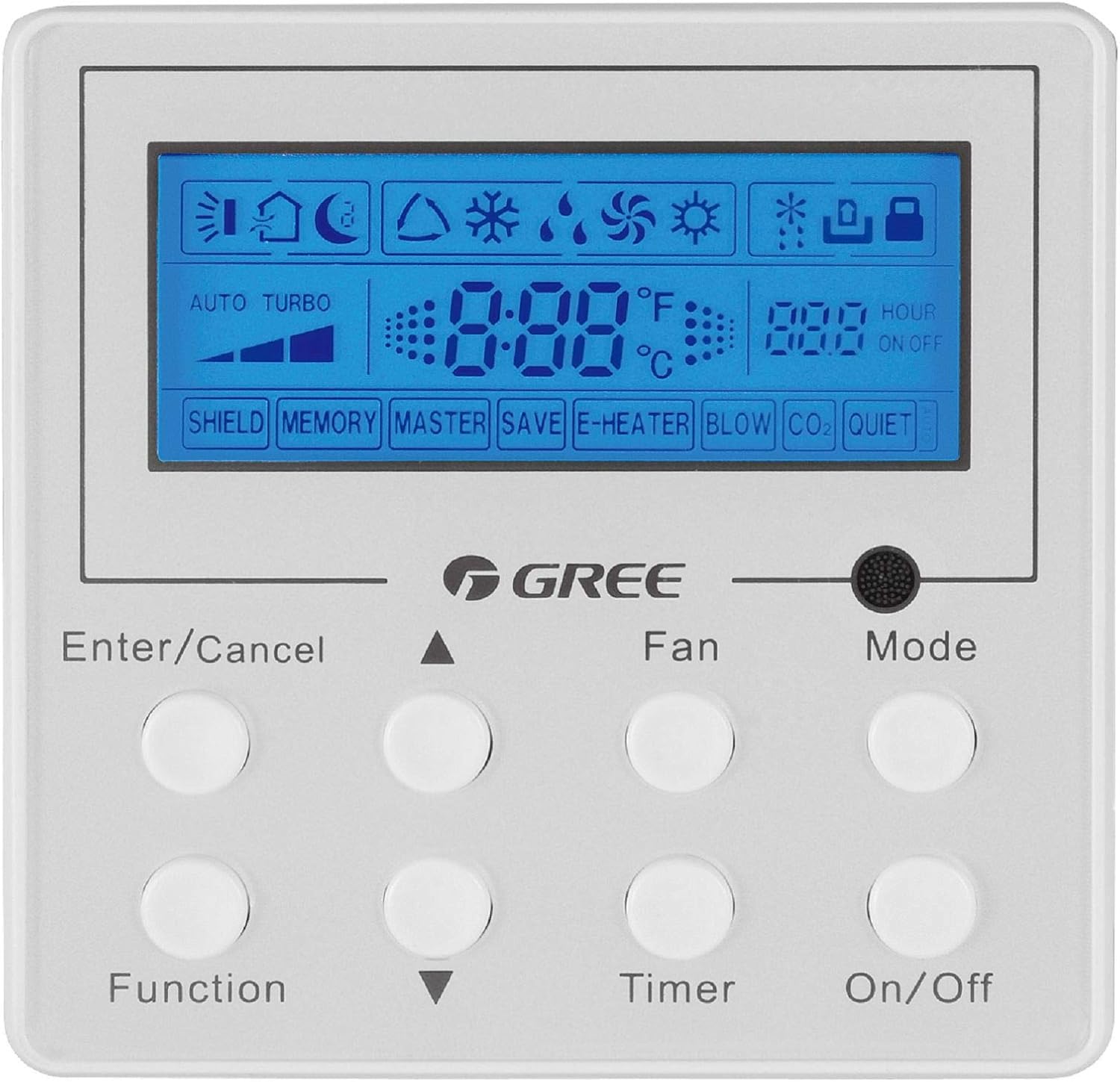
이미지 설명: 정면 view of the Gree XK-60 wired programmable controller. The controller is white with a blue backlit LCD screen at the top. Below the screen are eight circular white buttons arranged in two rows of four. Text labels are printed below each button or pair of buttons. The GREE logo is centered between the screen and the buttons. The screen displays various icons for operating modes, fan speed, temperature, and timer settings.
안전 정보
- Installation must be performed by a qualified and licensed HVAC technician.
- Disconnect all power to the indoor and outdoor units before performing any wiring or maintenance.
- 모든 배선 연결이 지역 및 국가 전기 규정을 준수하는지 확인하세요.
- Do not attempt to repair or modify the controller yourself. Contact qualified service personnel.
- Keep the controller away from water and excessive humidity.
설치 및 설정
컨트롤러 장착
The XK-60 controller is designed for wall mounting. Choose a location that is easily accessible, away from direct sunlight, heat sources, and drafts, which could affect temperature readings.
배선 지침
The controller connects to the indoor unit via a wired connection.
- Turn off the main power supply to the U-Match system.
- Open the wiring cover on the indoor unit and locate the control terminal block.
- Connect the communication wires from the XK-60 controller to the designated terminals on the indoor unit's control board. Refer to the U-Match system's indoor unit installation manual for specific wiring diagrams.
- 모든 연결이 안전하고 올바르게 극성이 설정되어 있는지 확인하세요.
- Close the wiring cover and restore power to the system.
메모: Incorrect wiring can damage the controller or the U-Match system. If you are unsure, consult a professional technician.
작동 지침
The Gree XK-60 controller features an LCD display and eight control buttons.
버튼 기능
- 입력/취소: 선택 사항을 확인하거나 현재 작업을 취소합니다.
- 위쪽 화살표(▲): Increases temperature, fan speed, or navigates menu options upwards.
- 아래쪽 화살표(▼): Decreases temperature, fan speed, or navigates menu options downwards.
- 기능: Accesses advanced settings or special functions.
- 팬 : 팬 속도를 조절합니다(자동, 낮음, 중간, 높음).
- 시간제 노동자: 켜기/끄기 타이머를 설정합니다.
- 방법: Cycles through operating modes (Auto, Cool, Dry, Heat, Fan).
- 켜기/끄기: 장치의 전원을 켜거나 끕니다.
LCD 디스플레이 표시기
- 온도 표시 : Shows the current room temperature or set temperature in °F or °C.
- 작동 모드 아이콘:
- Sun (Heat)
- Snowflake (Cool)
- Water Drop (Dry)
- Fan Blade (Fan Only)
- Auto (Automatic mode)
- 팬 속도 표시기: Bar graph or specific icon showing current fan speed.
- 타이머 표시기: "HOUR ON OFF" with numerical display for programmed times.
- Special Function Indicators: "SHIELD", "MEMORY", "MASTER", "SAVE", "E-HEATER", "BLOW", "CO2", "QUIET" indicate active special features.
기본 동작
- 전원 켜기/끄기: 를 누르세요 켜기/끄기 버튼을 눌러 시스템을 켜거나 끕니다.
- 모드 선택: 를 누르세요 방법 button repeatedly to cycle through available operating modes (Auto, Cool, Dry, Heat, Fan).
- 설정 온도: 냉방 또는 난방 모드에서는 다음을 사용하십시오. 위쪽 화살표(▲) or 아래쪽 화살표(▼) 버튼을 눌러 원하는 온도를 조절하세요.
- 팬 속도 조정: 를 누르세요 팬 button repeatedly to select the desired fan speed (Auto, Low, Medium, High).
- 타이머 설정 : 를 누르세요 시간제 노동자 button to enter timer setting mode. Use the 위쪽 화살표(▲) or 아래쪽 화살표(▼) buttons to set the desired ON or OFF time, then press 입력/취소 확인합니다.
고급 기능
To access advanced functions like "SHIELD" or "QUIET" mode, press the 기능 button. Use the arrow buttons to navigate through options and 입력/취소 to select or confirm. Refer to the U-Match system's specific feature documentation for detailed explanations of each advanced function.
유지
컨트롤러 청소
- 컨트롤러 표면을 부드럽고 마른 천으로 닦으세요.
- 연마성 세척제, 용제 또는 화학 스프레이는 플라스틱 및 전자 부품을 손상시킬 수 있으므로 사용하지 마십시오.
- 컨트롤러 c에 액체가 들어가지 않도록 하십시오.asing.
System Filter Maintenance
While the controller itself does not require filter maintenance, regular cleaning or replacement of the U-Match indoor unit's air filters is crucial for optimal system performance and air quality. Refer to your U-Match indoor unit manual for filter maintenance instructions.
문제 해결
If you encounter issues with your Gree XK-60 controller, refer to the following common problems and solutions.
| 문제 | 가능한 원인 | 해결책 |
|---|---|---|
| 컨트롤러 디스플레이가 비어 있습니다. | No power to the unit or controller. | Check the main power supply to the U-Match system. Ensure wiring connections are secure. |
| Controller not responding to button presses. | Temporary software glitch or communication error. | Turn off power to the system for a few minutes, then restore power. If the issue persists, check wiring. |
| 온도 측정값이 잘못되었습니다. | Controller located near a heat source or draft. | Relocate the controller if possible, or ensure no external factors are influencing the sensor. |
| System not operating in selected mode. | Communication error with indoor unit or system fault. | Check for error codes on the indoor unit. Consult a qualified technician if the problem persists. |
For complex issues or error codes not listed, contact a qualified HVAC technician or Gree customer support.
명세서
- 모델: Gree XK-60
- 제어 유형: 유선 프로그래밍 컨트롤러
- 호환성: Gree U-Match Systems
- 권tage: 230 볼트
- 특징: Programmable, Backlight
- 제어 방법: 버튼 제어
- 패키지 크기: 약 13.62 x 1.54 x 0.98인치
- 품목 무게: 약 6.7온스
보증 및 지원
For warranty information and technical support, please refer to the documentation provided with your Gree U-Match system or contact Gree customer service directly. Keep your purchase receipt as proof of purchase for warranty claims.
Gree Customer Support: Visit the official Gree web웹사이트를 방문하거나 지역 대리점에 문의하여 지원을 받으세요.