1. 서론
The Zerone Sport Action DV Camera is a compact and portable device designed for capturing high-definition video during various outdoor activities. Featuring 1080P and 720P recording options, a 120-degree wide-angle lens, and an IPX-4 waterproof aluminum alloy shell, this camera is built for durability and ease of use. It includes a built-in microphone for audio recording and provides vibration feedback for operational status.
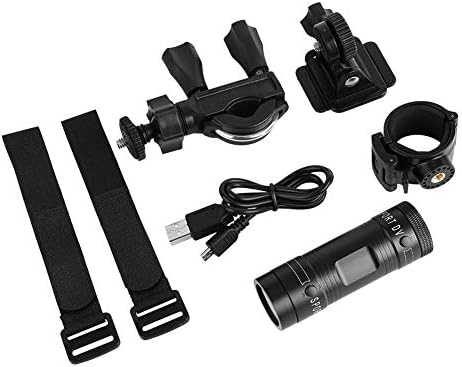
Image 1.1: The Zerone Sport Action DV Camera unit.
2. 안전 정보
- 카메라를 극한 온도나 직사광선에 장시간 노출시키지 마십시오.
- While the camera features an IPX-4 waterproof rating, it is designed to withstand splashes and light rain. Do not submerge or soak the camera in water.
- 장치를 강한 자기장에서 멀리 두십시오.
- 손상을 방지하기 위해 지정된 충전 케이블과 전원 어댑터만 사용하십시오.
- 카메라를 분해하거나 개조하지 마십시오. 그렇게 하면 보증이 무효화되고 손상이 발생할 수 있습니다.
- 카메라를 사용하지 않을 때는 건조하고 서늘한 곳에 보관하십시오.
3. 패키지 내용
모든 품목이 들어 있는지 확인하려면 패키지를 확인하세요.
- Zerone Sport Action DV Camera Unit
- USB 충전 케이블
- Mounting Accessories (e.g., bike mount, helmet mount, strap mounts)
- 충전식 배터리(사전 설치되어 있을 수 있음)
- 사용 설명서 (본 문서)
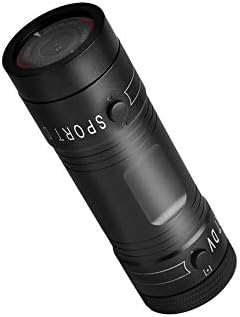
Image 3.1: Contents of the Zerone Sport Action DV Camera package, showing the camera, USB cable, and various mounting options.
4. 카메라 오버view
카메라의 구성 요소와 제어 장치에 대해 알아보세요.
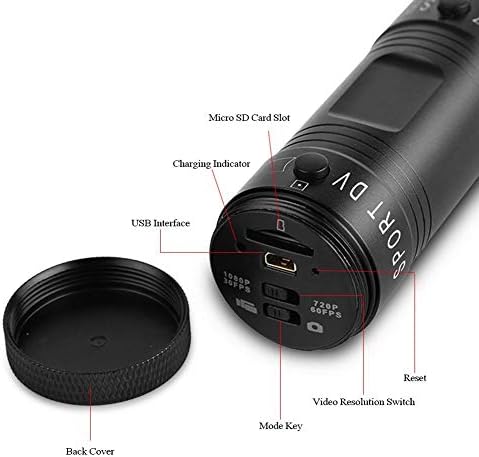
이미지 4.1: 상세 view of the camera's rear end, highlighting the Micro SD card slot, USB interface, charging indicator, mode key, video resolution switch (1080P 30fps / 720P 60fps), and reset button.
- 마이크로 SD 카드 슬롯: Insert your Micro SD card here. A card is required for operation.
- 충전 표시기: Displays charging status. A red light indicates charging; it turns off when fully charged.
- USB 인터페이스: 충전 및 컴퓨터 연결용.
- 모드 키: Used to switch between recording modes (e.g., video, photo).
- 동영상 해상도 전환: Selects between 1080P 30fps and 720P 60fps recording resolutions.
- 재설정 버튼: Used to reset the device if it becomes unresponsive.
- Power Button (Front): Located on the front side of the camera.
- Record/Stop Button (Back): Located on the back side of the camera.
5. 설정
5.1 배터리 충전
- 제공된 USB 케이블을 사용하여 카메라를 USB 전원(예: 컴퓨터, 벽면 어댑터)에 연결하십시오.
- 그만큼 빨간불 on the back of the camera will illuminate, indicating that it is charging.
- 완전히 충전되면 빨간색 표시등이 꺼집니다.
- Note: If the camera blinks red and blue when plugged in, it indicates that an SD card is not inserted. This is not a charging indicator.
5.2 마이크로 SD 카드 삽입
A Micro SD card (not included) is required for recording video and photos. The camera supports Micro SD cards up to a certain capacity (check product packaging for maximum supported size, typically 32GB or 64GB for similar devices).
- 카메라 뒷면 덮개를 풉니다.
- Locate the Micro SD card slot (refer to Image 4.1).
- Micro SD 카드를 슬롯에 딸깍 소리가 날 때까지 조심스럽게 삽입하세요. 카드의 방향이 올바른지 확인하세요.
- Replace the back cover, ensuring it is securely tightened to maintain water resistance.
5.3 카메라 장착
The camera comes with various mounting accessories for different applications.
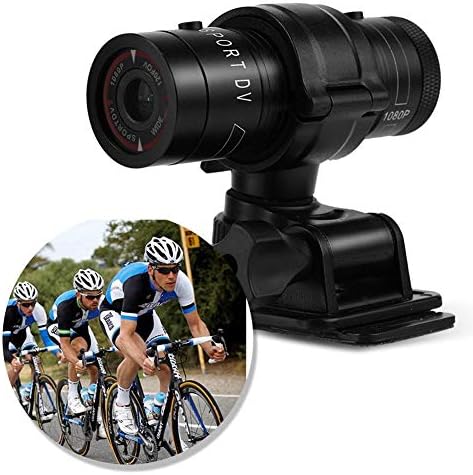
Image 5.1: The camera attached to a bicycle handlebar, demonstrating one of its mounting options.
- 자전거 거치대: cl을 사용하세요amp mount to attach the camera securely to bicycle handlebars or other tubular structures.
- 헬멧 마운트: Utilize the adhesive or strap mounts to fix the camera to a helmet.
- Strap Mounts: For attaching to various gear or body parts.
Ensure all mounts are securely fastened before engaging in activities to prevent the camera from falling.
6. 카메라 작동
6.1 전원 켜기/끄기
- 전원을 켜려면 전원 버튼 (front switch) until the camera vibrates.
- 전원을 끄려면 전원 버튼 again until the camera vibrates once.
6.2 Selecting Video Resolution
Before recording, select your desired video resolution using the switch on the back of the camera (refer to Image 4.1).
- 스위치를 "1080P 30fps" for Full HD video at 30 frames per second.
- 스위치를 "720P 60fps" for HD video at 60 frames per second.
6.3 비디오 녹화
- 카메라의 전원이 켜져 있는지 확인합니다.
- 를 누르세요 녹음/중지 버튼 (back switch) to start recording. The camera will vibrate three times to indicate recording has started.
- 녹음을 중지하려면 녹음/중지 버튼 again. The camera will vibrate once to indicate recording has stopped.
6.4 컴퓨터에 연결하기
전송하려면 files or access recorded content:
- 카메라의 전원이 꺼져 있는지 확인하세요.
- 제공된 USB 케이블을 사용하여 카메라를 컴퓨터에 연결합니다.
- The camera will be recognized as a removable storage device.
- You can then access and transfer your video files.
7. 유지관리
- 청소: 카메라 본체는 부드럽고 마른 천으로 닦으십시오. 렌즈는 렌즈 전용 클리닝 천과 세척액을 사용하십시오. 마모성이 있는 재질은 사용하지 마십시오.
- 저장: When not in use for extended periods, store the camera in a cool, dry place. Ensure the battery is partially charged (around 50%) to prolong its lifespan.
- 방수 기능: Regularly check that the back cover is securely tightened to maintain the IPX-4 water resistance. Avoid exposing the USB port or SD card slot to moisture when the cover is open.
- 배터리 관리 : Avoid fully discharging the battery frequently. Recharge it when the low battery indicator appears.
8. 문제 해결
| 문제 | 가능한 원인 | 해결책 |
|---|---|---|
| 카메라의 전원이 켜지지 않습니다. | 배터리가 소진되었습니다. | 카메라를 완전히 충전하세요. |
| Camera blinks red and blue, then turns off. | No Micro SD card inserted or card is faulty. | Insert a functional Micro SD card. Ensure it is properly seated. |
| 동영상 녹화가 불가능합니다. | 마이크로 SD 카드가 없거나, 카드 용량이 부족하거나, 카드 오류가 발생했습니다. | Insert a Micro SD card, delete old file또는 카드를 포맷하세요(이렇게 하면 모든 데이터가 삭제됩니다). |
| 비디오 품질이 좋지 않습니다. | 렌즈가 더럽거나, 조명이 부족하거나, 해상도 설정이 잘못되었을 수 있습니다. | Clean the lens. Ensure adequate lighting. Select 1080P resolution for higher detail. |
| 카메라가 반응하지 않습니다. | 소프트웨어 오류. | 종이 클립과 같은 얇은 물체를 사용하여 누르세요. 재설정 버튼 (refer to Image 4.1). |
9. 사양
| 특징 | 세부 사항 |
|---|---|
| 상표 | 제론 |
| 모델 번호 | Zeronefg3h149y2s |
| 비디오 캡처 해상도 | 1080p(30fps), 720p(60fps) |
| 렌즈 각도 | 120-degree A+ grade wide-angle |
| 방수 등급 | IPX-4 (splash-proof) |
| 쉘 소재 | 알루미늄 합금 |
| 포토 센서 기술 | CMOS |
| 최대 조리개 | 1.8 밀리미터 |
| 플래시 메모리 유형 | Micro SD (card not included) |
| 비디오 캡처 형식 | 아비(AVI) |
| 지원되는 오디오 형식 | AAC, MP3, PCM, FLAC, or Dolby Digital/AC-3 |
| 연결 기술 | USB |
| 품목 무게 | 10.8 온스(약 306그램) |
| 제품 치수 | 11.81 x 6.3 x 5.91인치(약 30 x 16 x 15cm) |
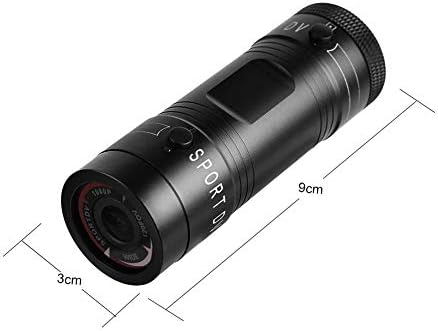
Image 9.1: Physical dimensions of the camera, showing a length of 9cm and a diameter of 3cm.
10. 보증 및 지원
보증 정보 및 기술 지원에 대한 자세한 내용은 구매 시 제공된 설명서를 참조하시거나 판매점/제조업체에 직접 문의해 주십시오. 보증 청구를 위해 구매 증빙 자료를 보관해 주십시오.
Manufacturer: Zerone
For further assistance, you may visit the Zerone Store on Amazon: Zerone Store
