소개
The Insignia NS-SPBTWAVE2-BK Wave 2 Portable Bluetooth Speaker provides high-quality wireless audio streaming from your compatible devices. Designed for versatility, its robust construction and rubberized feet allow for stable placement in both horizontal and vertical orientations. Enjoy hands-free communication with the built-in speakerphone and extended listening sessions thanks to its 12-hour battery life.
This manual provides essential information for setting up, operating, maintaining, and troubleshooting your speaker. Please read it thoroughly before use and retain it for future reference.
패키지 내용
패키지에 모든 품목이 들어 있는지 확인하세요.
- Insignia NS-SPBTWAVE2-BK Wave 2 Portable Bluetooth Speaker
- USB 충전 케이블
- 3.5mm Audio Cable (Auxiliary)
- 빠른 설정 가이드(또는 유사한 문서)
제품 특징
- 무선 연결 : 스마트폰, 태블릿 및 기타 블루투스 지원 기기와 무선으로 연결됩니다.
- 긴 배터리 수명: Features a rechargeable 2,000 mAh battery, providing up to 12 hours of playback on a full charge.
- 내장 마이크: Enables hands-free calling directly through the speaker.
- 보조 오디오 입력: Allows for wired connection to audio devices via a 3.5mm audio cable.
- 다양한 배치: Designed to stand securely in both horizontal and vertical positions.
스피커의 부품
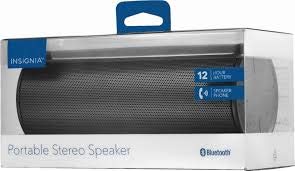
그림 1: 전면 view of the Insignia Wave 2 Speaker in horizontal orientation.

그림 2: 수직 view of the speaker, illustrating the power button, charging port, and auxiliary input port at the bottom.
Refer to the images above for the location of key components such as the power button, volume controls, Bluetooth indicator, charging port, and auxiliary input.
설정
1. 스피커 충전
- Connect the small end of the USB charging cable to the charging port on the speaker (refer to Figure 2).
- Connect the large end of the USB charging cable to a USB power adapter (not included) or a powered USB port on a computer.
- The charging indicator light will illuminate. Allow approximately 12 hours for a full charge before first use. The indicator light will change or turn off once charging is complete.
2. 블루투스 페어링
- Ensure the speaker is fully charged. Press and hold the Power button to turn on the speaker. The Bluetooth indicator light will begin to flash, indicating it is in pairing mode.
- On your Bluetooth-enabled device (smartphone, tablet, etc.), navigate to the Bluetooth settings and ensure Bluetooth is enabled.
- 검색 available devices. Select "Insignia Wave 2" from the list.
- Once paired, the Bluetooth indicator light on the speaker will become solid, and you may hear an audible confirmation.
- 비밀번호를 입력하라는 메시지가 나타나면 "0000"을 입력하세요.
3. Auxiliary (Wired) Connection
- Connect one end of the 3.5mm audio cable to the AUX input port on the speaker (refer to Figure 2).
- 3.5mm 오디오 케이블의 다른 쪽 끝을 오디오 기기의 헤드폰 잭 또는 오디오 출력 포트에 연결하십시오.
- The speaker will automatically switch to auxiliary mode when a cable is detected.
스피커 작동
전원 켜기/끄기
- To turn on: Press and hold the Power button until the indicator lights illuminate.
- To turn off: Press and hold the Power button until the indicator lights turn off.
볼륨 조절
- 스피커의 볼륨 버튼을 사용하여 볼륨을 조절하세요.
- You can also control the volume from your connected Bluetooth device or auxiliary audio source.
핸즈프리 통화
When connected via Bluetooth, the speaker can be used for hands-free calls:
- 전화에 응답: 재생/일시정지/통화 버튼을 한 번 누르세요.
- 통화 종료: 통화 중에 재생/일시정지/통화 버튼을 한 번 누르세요.
- 전화 거부: Press and hold the Play/Pause/Call button.
- Speak clearly towards the speaker's built-in microphone for optimal voice pickup.
유지
- 청소: 스피커 외부를 청소할 때는 부드럽고 마른 천으로 보풀이 없는 천을 사용하세요. 액체 세척제, 에어로졸 또는 용제는 사용하지 마세요.
- 배터리 관리 : To prolong battery life, avoid fully discharging the battery frequently. Recharge the speaker regularly, even if not in use. Avoid exposing the speaker to extreme temperatures (hot or cold).
- 저장: When not in use for extended periods, store the speaker in a cool, dry place away from direct sunlight and moisture.
- 방수 기능: 이 스피커는 아니다 방수 기능이 있습니다. 물이나 과도한 습기에 노출되지 않도록 하십시오.
문제 해결
| 문제 | 가능한 해결책 |
|---|---|
| 스피커가 켜지지 않습니다. | 배터리가 충전되어 있는지 확인하십시오. USB 충전 케이블을 사용하여 스피커를 전원에 연결하십시오. |
| 스피커에서 소리가 나지 않습니다. | Check the volume level on both the speaker and the connected device. Ensure the correct input source (Bluetooth or AUX) is selected. Verify the Bluetooth connection or auxiliary cable. |
| 블루투스로 페어링할 수 없습니다. | Ensure the speaker is in pairing mode (flashing Bluetooth indicator). Turn off and on Bluetooth on your device. Move the speaker closer to your device. Forget the speaker from your device's Bluetooth list and try pairing again. |
| 음질이 좋지 않거나 왜곡됩니다. | Ensure the speaker is within Bluetooth range (approx. 33 ft / 10 m). Reduce the volume on the source device or speaker. Check for interference from other wireless devices. Try a different audio source or file. |
| 통화 중 마이크가 작동하지 않습니다. | Ensure the speaker is properly connected via Bluetooth. Speak directly towards the speaker. Check your phone's call settings to ensure audio is routed to the Bluetooth speaker. |
명세서
- 모델 이름: 2차 웨이브
- 모델 번호: NS-SPBTWAVE2-BK
- 연결 기술 : 블루투스
- 배터리 수명: 최대 12시간
- 배터리 유형: 리튬 이온 1개(포함)
- 충전 시간: 약 12시간
- 제품 크기: 6.8 x 2.8 x 2.8인치(17.3 x 7.1 x 7.1cm)
- 품목 무게: 1kg (0.45 파운드)
- 오디오 출력 모드: 스테레오 재생
- 신호 대 잡음비 : 80데시벨
- 내장 마이크: 예
- 보조 입력: 네 (3.5mm)
- 방수복: 아니요
- 재료: 플라스틱
- 한국어: 600603230455
보증 및 지원
This Insignia NS-SPBTWAVE2-BK Wave 2 Portable Bluetooth Speaker comes with a 한정 보증. For specific terms and conditions of your warranty, please refer to the warranty card included with your purchase or visit the official Insignia web대지.
For technical support, troubleshooting assistance, or warranty claims, please contact Insignia Customer Service. Contact information can typically be found on the Insignia web사이트나 제품 설명서에서 확인하세요.


