SERVO 225 휴대폰 사용 설명서
Model: SERVO 225
1. 서론
This user manual provides comprehensive instructions for the operation and maintenance of your new SERVO 225 mobile phone. Please read this manual carefully before using the device to ensure proper functionality and to maximize its lifespan. The SERVO 225 is a compact and reliable mobile phone featuring dual SIM capability, a 2.4-inch display, and essential functions for daily communication.

그림 1.1: 앞면과 뒷면 view of the SERVO 225 mobile phone, showcasing its compact design and keypad.
2. 안전 정보
- 장치를 분해하거나 개조하지 마세요.
- 장치를 물과 습기로부터 멀리하십시오.
- Use only original or approved accessories.
- 극한의 온도를 피하세요.
- 운전 중에는 전화를 사용하지 마십시오.
- 배터리와 기기는 현지 규정에 따라 책임감 있게 폐기하십시오.
- Before first use, ensure to remove any insulating tape from the battery terminals.
3. 패키지 내용
포장 내용물을 확인해 주세요. 누락된 품목이나 손상된 품목이 있을 경우 판매점에 문의해 주십시오.
- 1 x SERVO 225 Mobile Phone
- 1 x Battery (1400 mAh Li-ion)
- 1 x 충전기
- 1 x 보호 케이스
- 1 x 사용자 매뉴얼(이 문서)

Figure 3.1: The SERVO 225 package contents, including the phone, battery, charger, and protective case.
4. 제품 오버view
The SERVO 225 features a classic candy bar design with a physical keypad and a 2.4-inch display. It supports dual SIM cards for flexible network usage.
4.1. 신체적 특징
- 표시하다: 2.4-inch VGA screen.
- 키패드 : Standard alphanumeric keypad with navigation keys.
- 카메라: 0.3 Megapixel CMOS camera with flash on the rear.
- 뒷면 표지: Features a mechanical back cover, available in various colors like Black, Brown, and Gold.
- 치수: 약 122 x 52 x 11mm(4.80 x 2.05 x 0.43인치).
- 무게: 약 80그램.

Figure 4.1: Close-up of the SERVO 225's rear, highlighting the camera and dual LED flash for improved low-light photography.

Figure 4.2: Various color options for the SERVO 225, demonstrating the 2.4-inch screen size.
5. 설정
5.1. 배터리 설치 및 충전
- 노치 부분을 살살 들어 올려 휴대폰 뒷면 커버를 분리하세요.
- If present, remove the insulating tape from the battery terminals.
- Insert the 1400 mAh Li-ion battery into the battery compartment, ensuring the gold contacts align with the phone's terminals.
- 뒷면 덮개를 다시 씌우고 딸깍 소리가 나면서 제자리에 고정될 때까지 세게 누르십시오.
- Connect the charger to the phone's charging port and plug it into a power outlet. Charge the battery fully before first use.

Figure 5.1: The 1400 mAh battery and the phone's zinc alloy paint shell design.
5.2. SIM 카드 및 메모리 카드 삽입
The SERVO 225 supports dual SIM cards (Dual GSM) and a T-Flash memory card (up to 32GB, not included).
- With the back cover and battery removed, locate the SIM card slots. The phone supports two SIM cards.
- Carefully insert your SIM cards into the designated slots with the gold contacts facing down.
- Locate the T-Flash (microSD) card slot. Insert the memory card until it clicks into place.
- 배터리와 뒷면 덮개를 다시 설치하십시오.
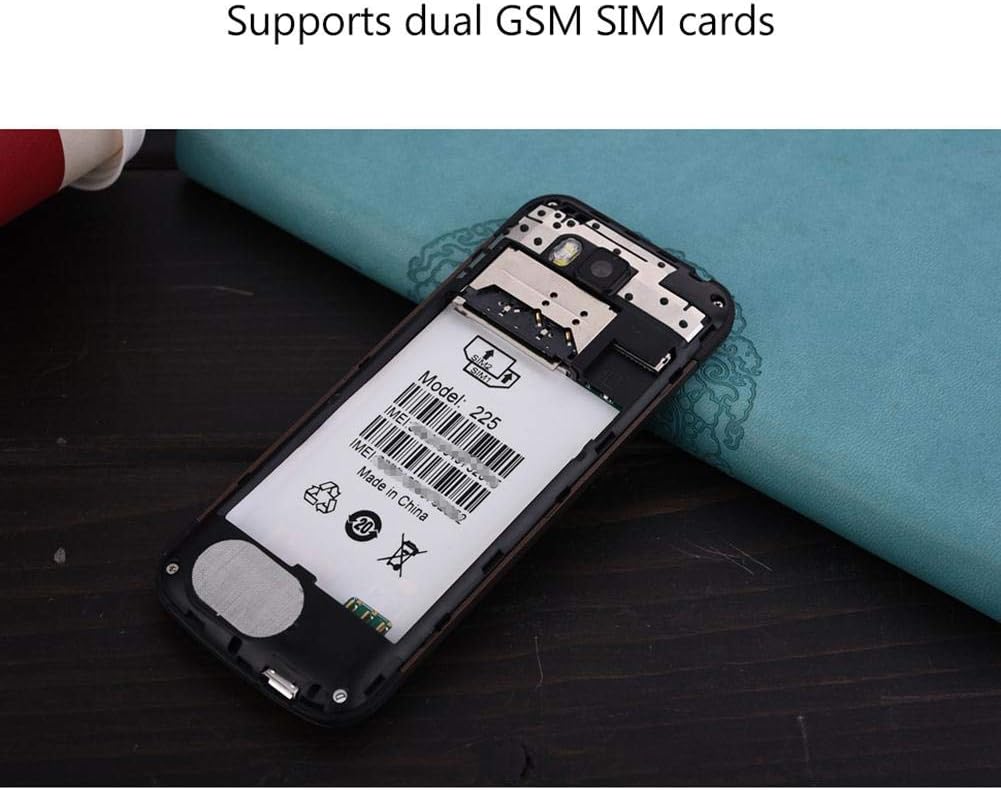
그림 5.2: 내부 view of the SERVO 225, illustrating the dual SIM card slots and the memory card slot.
6. 사용 설명서
6.1. 전원 켜기/끄기
- 전원을 켜려면: 화면이 켜질 때까지 전원/통화 종료 버튼을 길게 누르세요.
- 전원을 끄려면: 전원/통화 종료 버튼을 길게 누르면 전원 끄기 옵션이 나타난 후 "전원 끄기"를 선택하세요.
6.2. 기본 기능
- 전화 걸기: 키패드를 사용하여 전화번호를 입력하고 통화 버튼을 누르세요.
- 전화 받기: 전화벨이 울리면 통화 버튼을 누르세요.
- 메시지 보내기: Navigate to the "Messages" menu, select "Write message", enter your text, and send to the desired recipient.
- 메뉴 탐색: Use the navigation keys (up, down, left, right) to browse through menus and the center key to select.
6.3. 주요 특징
- 블루투스: Connect to other Bluetooth-enabled devices for file 전송 또는 핸즈프리 통신.
- FM 라디오 : Listen to your favorite radio stations. Requires headphones to be plugged in as an antenna.
- MP3/MP4 플레이어: 오디오 및 비디오 재생 file메모리 카드에 저장됩니다.
- GPRS/WAP: Access basic internet services and WAP sites.
- 카메라: Capture photos with the 0.3MP rear camera.
- 추가 도구: Calendar, Sound Recorder, Calculator, World Clock, Alarm.
7. 유지관리
- 청소: 부드럽고 마른 천으로 휴대전화 표면을 닦으세요. 액체 세척제나 스프레이형 세정제는 사용하지 마세요.
- 저장: 장시간 사용하지 않을 때는 휴대전화를 시원하고 건조한 곳에 보관하세요.
- 배터리 관리 : Avoid overcharging or completely draining the battery frequently to prolong its life.
8. 문제 해결
| 문제 | 가능한 원인 | 해결책 |
|---|---|---|
| 전화기의 전원이 켜지지 않습니다. | 배터리가 약하거나 올바르게 설치되지 않았습니다. | Charge the battery. Ensure battery is properly inserted and insulating tape is removed. |
| 네트워크 신호가 없습니다. | SIM card not inserted correctly or out of network coverage. | Reinsert SIM card. Move to an area with better network coverage. |
| 전화를 걸거나 받을 수 없습니다. | No network, SIM card issue, or call barring enabled. | Check network signal. Verify SIM card. Disable call barring if active. |
| 메모리 카드가 감지되지 않습니다. | Memory card not inserted correctly or corrupted. | Reinsert memory card. Try a different memory card. |
9. 사양
| 특징 | 사양 |
|---|---|
| 상표 | 서보 기구 |
| 모델 | 225 |
| 표시하다 | 2.4-inch VGA |
| 플랫폼 | Spreadtrum6531CA |
| SIM 유형 | Dual SIM, Dual Standby (Dual GSM) |
| 네트워크 주파수 | GSM850/900/1800/1900 MHz (2G) |
| 내부 메모리 | 32MB RAM, 32MB ROM |
| 확장 가능한 메모리 | Up to 32GB (T-Flash / microSD card, not included) |
| 카메라 | 0.3 Megapixel CMOS (Rear) with Flash |
| 배터리 | 1400mAh 리튬이온 |
| 통화 시간 | 약 6시간 |
| 치수 | 122 x 52 x 11mm(4.80 x 2.05 x 0.43인치) |
| 무게 | 약 80g |
| 연결성 | 블루투스 |
| 기타 기능 | FM Radio, MP3/MP4 Player, GPRS, WAP, Calendar, Recorder, Calculator, World Clock, Alarm |
10. 보증 및 지원
Your SERVO 225 mobile phone comes with a standard manufacturer's warranty. Please refer to the warranty card included in your package for specific terms and conditions. For technical support, troubleshooting assistance, or warranty claims, please contact your point of purchase or the official SERVO customer service channels.
보증을 위해 구매 증빙서류로 구매 영수증을 보관하세요.


