소개
Welcome to your new MIFA F6 Portable Bluetooth Speaker. This manual provides detailed instructions for the proper setup, operation, and maintenance of your device. Please read this manual thoroughly before using the product to ensure optimal performance and longevity.
안전 정보
To ensure safe and proper use of your MIFA F6 speaker, please observe the following guidelines:
- 스피커를 극한 온도(고온 또는 저온)나 직사광선에 장시간 노출시키지 마십시오.
- While the speaker is IP56 dust-proof and water-resistant, do not submerge it in water or expose it to strong jets of water.
- 스피커를 직접 분해, 수리 또는 개조하지 마십시오. 이는 보증을 무효화하고 손상을 초래할 수 있습니다.
- Keep the speaker away from medical devices, as it contains magnets that may interfere with their operation.
- 충전 시에는 제공된 마이크로 USB 케이블만 사용하십시오.
- 어린이의 손이 닿지 않는 곳에 보관하세요.
패키지 내용
다음 항목에 대한 상자를 체크해 주세요.
- MIFA F6 Portable Bluetooth Speaker
- 마이크로 USB 충전 케이블
- 사용자 설명서
제품 끝view
Familiarize yourself with the components and controls of your MIFA F6 speaker.
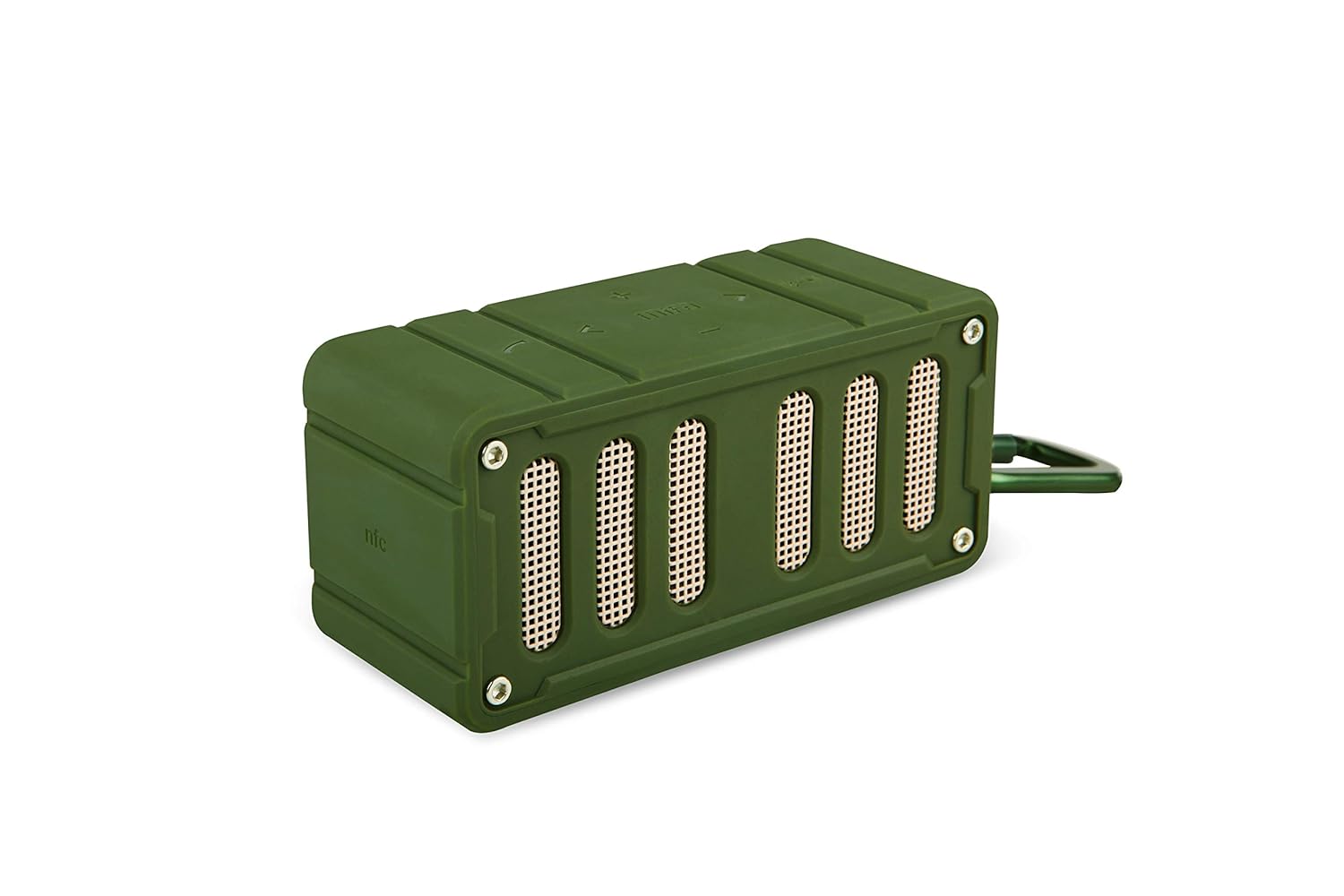
This image displays the MIFA F6 speaker in green, highlighting the front speaker grille and the control buttons located on the side panel.

This image shows the MIFA F6 speaker from a side angle, emphasizing its compact size and the detachable alloy metal loop hook (carabiner) for portability.
컨트롤 및 포트
- 전원 버튼: 길게 누르면 켜거나 끌 수 있습니다.
- 볼륨 높이기/다음 트랙 버튼(+): 볼륨을 높이려면 누르세요. 다음 트랙을 보려면 길게 누르세요.
- 볼륨 낮추기/이전 트랙 버튼(-): 볼륨을 낮추려면 누르세요. 이전 트랙을 보려면 길게 누르세요.
- Play/Pause / Call Answer Button: Press to play/pause music. Press to answer/end calls.
- 마이크로폰: 핸즈프리 통화를 위해.
- 마이크로 USB 충전 포트: 스피커를 충전합니다.
- 마이크로 SD 카드 슬롯: For playing music directly from a Micro SD card (up to 32GB).
설정
스피커 충전하기
Before first use, fully charge your MIFA F6 speaker.
- Micro USB 충전 케이블을 스피커의 충전 포트에 연결합니다.
- 케이블의 다른 쪽 끝을 USB 전원(예: 컴퓨터 USB 포트, USB 벽면 어댑터)에 연결합니다.
- The LED indicator will illuminate to show charging status. It takes approximately 3 hours for a full charge.
전원 켜기/끄기
- 전원을 켜려면: 전원 버튼을 몇 초간 길게 누르면 음성 안내가 나오고 LED 표시등이 켜집니다.
- 전원을 끄려면: 전원 버튼을 몇 초간 길게 누르면 음성 안내가 나오고 LED 표시등이 꺼집니다.
작동 지침
블루투스 페어링
To connect your MIFA F6 speaker to a Bluetooth-enabled device:
- Ensure the speaker is powered on and within 33 feet (10 meters) of your device. The speaker will automatically enter Bluetooth pairing mode, indicated by a flashing LED.
- 스마트폰, 태블릿 또는 기타 Bluetooth 장치에서 Bluetooth를 활성화하고 사용 가능한 장치를 검색하세요.
- Select "MIFA F6" from the list of devices.
- Once successfully paired, the speaker will provide an audible confirmation, and the LED indicator will stop flashing. The speaker will automatically reconnect to the last-used device when powered on, if available.
주악
- 블루투스를 통해: After successful pairing, play music from your connected device. Use the speaker's Play/Pause button or your device's controls.
- 마이크로 SD 카드를 통해: Insert a Micro SD card (up to 32GB) containing audio files into the designated slot. The speaker will automatically detect the card and begin playing music.
호출 함수
The MIFA F6 speaker features a built-in microphone for hands-free calling.
- 전화 받기 : 전화가 걸려오면 재생/일시정지 버튼을 한 번 눌러 전화를 받으세요.
- 통화 종료: 통화 중에 재생/일시 정지 버튼을 한 번 누르면 통화가 종료됩니다.
볼륨 및 트랙 컨트롤
- 볼륨 조절: Press the "+" button to increase volume, and the "-" button to decrease volume.
- 다음 트랙: Press and hold the "+" button to skip to the next track.
- 이전 트랙 : Press and hold the "-" button to go to the previous track.
유지
청소
To keep your speaker in good condition:
- 스피커 외부를 부드럽고 가볍게 닦아주세요.amp 옷감.
- Do not use abrasive cleaners, alcohol, or harsh chemicals, as these can damage the surface.
- 다른 장치를 충전하거나 연결하기 전에 모든 포트가 건조한지 확인하세요.
저장
장시간 사용하지 않을 경우:
- 스피커는 직사광선과 극한의 온도를 피해 서늘하고 건조한 곳에 보관하세요.
- 배터리 수명 유지를 위해 주기적으로 (예: 3개월마다) 배터리를 충전하십시오.
문제 해결
If you encounter issues with your MIFA F6 speaker, refer to the following common problems and solutions:
- 스피커가 켜지지 않습니다: 배터리가 충전되어 있는지 확인하세요. Micro USB 케이블을 사용하여 스피커를 전원에 연결하세요.
- Bluetooth를 통해 페어링할 수 없습니다.
- 스피커가 페어링 모드(LED가 깜빡이는 상태)인지 확인하십시오.
- Ensure Bluetooth is enabled on your device and it's within range (33 feet/10 meters).
- Forget "MIFA F6" from your device's Bluetooth settings and try pairing again.
- 스피커와 장치를 다시 시작하세요.
- 소리가 나지 않거나 볼륨이 낮음:
- 스피커와 연결된 기기의 볼륨 레벨을 확인하세요.
- 스피커가 올바르게 페어링되고 연결되었는지 확인하세요.
- If using a Micro SD card, ensure the audio files are in a compatible format and the card is inserted correctly.
- 음질이 좋지 않음:
- 간섭을 줄이려면 스피커를 Bluetooth 장치에 더 가까이 두세요.
- 스피커와 장치 사이에 장애물이 없는지 확인하세요.
- 오디오 소스의 품질이 높은지 확인하세요.
명세서
Detailed technical specifications for the MIFA F6 Portable Bluetooth Speaker:
| 특징 | 세부 사항 |
|---|---|
| 모델명 | 미파 F6 |
| 스피커 유형 | 3D |
| 특별 기능 | Built-in Microphone, Portable, Micro SD Card Support, USB Port |
| 추천 용도 | Volume control, Music Playback |
| 호환 장치 | 스마트폰, 태블릿 |
| 무선 통신 기술 | 블루투스 4.0 |
| 전원 | 배터리 구동식 (1200mAh 리튬 폴리머 배터리) |
| 방수 등급 | IP56 (Dust-proof & Water-resistant) |
| 노는 시간 | 최대 10시간(75% 볼륨) |
| 충전 시간 | 약 3시간 |
| 치수 | 3.8 x 3.4 x 1.4 인치 |
| 무게 | 5.9 온스 |
| 재료 | 알류미늄 |
| 오디오 출력 모드 | 스테레오 재생 |
| 제어 방법 | 만지다 |
보증 및 지원
보증 정보
This MIFA F6 Portable Bluetooth Speaker comes with a 30-day warranty from the date of purchase. Please retain your proof of purchase for any warranty claims. The warranty covers manufacturing defects under normal use. It does not cover damage caused by misuse, accidents, unauthorized modifications, or normal wear and tear.
고객 지원
For further assistance, technical support, or warranty inquiries, please contact MIFA customer support through the retailer where you purchased the product or visit the official MIFA web연락처 정보 사이트.


