1. 제품 오버view
The CMTECK USB Conference Microphone (Model 7545900577) is a versatile desktop speakerphone designed for clear and efficient communication in various settings, including streaming, VoIP calls, Skype, interviews, and general chatting. It features 360° omnidirectional voice pickup and a built-in speaker, connecting to your computer via a single USB cable for plug-and-play convenience.
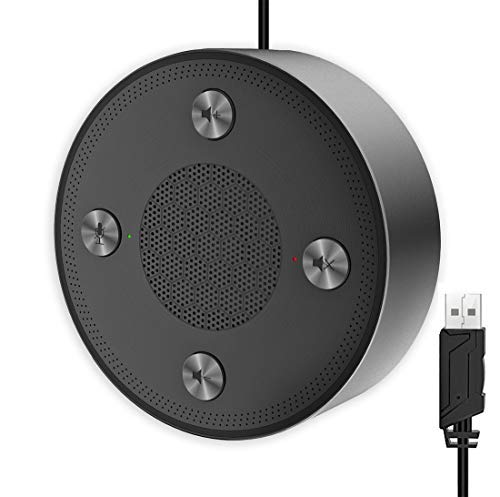
Figure 1: CMTECK USB Conference Microphone
2. 주요 특징
- 뛰어난 음질: Incorporates CCS3.0 Sound Card noise-canceling technology to effectively block noise and eliminate echo, ensuring crystal clear sound pickup.
- 360° 전방향 음성 수음: Equipped with 4 high-sensitivity microphones, allowing for 360° voice pickup within a 4-meter (13-foot) range.
- 원터치 음소거 기능: Features an all-in-one control panel with quick mute buttons for both the microphone and speaker, and volume adjustment.
- LED 표시등: Built-in LED lights indicate the working status (green for active, red for mute).
- 플러그 앤 플레이 연결: Connects to a computer via a USB cable without requiring driver installation. Compatible with Windows (7, 8, 10) and Mac OS. Note: Not compatible with Raspberry Pi/Android.
- 미끄럼 방지 디자인: Constructed with high-quality metal matte material for durability and resistance to abrasions and corrosion. Three anti-slip mats on the base provide stability.
- 휴대성 있는 디자인: Compact and lightweight for effortless portability.
3. 설정 가이드
- 컴퓨터에 연결: Plug the USB cable from the CMTECK Conference Microphone into an available USB port on your Windows or Mac computer.
- 자동 드라이버 설치: The device is plug-and-play; your operating system should automatically detect and install the necessary drivers. No manual driver installation is required.
- 연결 확인: Once connected, the LED indicator on the device should light up, typically green, indicating it is powered on and ready for use.
- 오디오 장치로 선택: In your computer's sound settings or your conferencing software (e.g., Skype, Zoom), select the "CMTECK USB Microphone" as your input (microphone) device and "CMTECK USB Speaker" as your output (speaker) device.
- 최적의 배치: For best 360° voice pickup during meetings, place the microphone in the center of your meeting area or table.
4. 사용 설명서
The CMTECK USB Conference Microphone features intuitive controls located on its top surface.
- 마이크 음소거: Press the dedicated microphone mute button (often indicated by a microphone icon) to toggle the microphone on or off. The LED indicator will change to red when muted and green when active.
- 스피커 음소거: Press the dedicated speaker mute button (often indicated by a speaker icon) to toggle the speaker on or off. The LED indicator will change to red when muted and green when active.
- 볼륨 조절: Use the volume up (+) and volume down (-) buttons to adjust the speaker's output volume.
- 컨퍼런스 콜: Ensure the microphone and speaker are unmuted and the volume is set to an audible level. The omnidirectional pickup will capture voices from all directions around the device.
5. 유지관리
- 청소: Use a soft, dry cloth to clean the exterior of the device. Avoid using liquid cleaners or abrasive materials, which may damage the finish or internal components.
- 저장: 사용하지 않을 때에는 마이크를 직사광선이나 극한 온도를 피해 서늘하고 건조한 곳에 보관하십시오.
- 케이블 관리: 내부 손상을 방지하려면 USB 케이블을 과도하게 구부리거나 비틀지 마세요.
6. 문제 해결
- 소리가 나지 않거나 마이크가 작동하지 않습니다.
- USB 케이블이 마이크와 컴퓨터에 제대로 연결되어 있는지 확인하십시오.
- Check your computer's sound settings to confirm the CMTECK device is selected as the default input and output.
- Verify that the microphone and speaker are not muted using the device's control buttons or your software settings.
- 컴퓨터의 다른 USB 포트에 기기를 연결해 보세요.
- Poor Audio Quality (Speaker):
- While the speaker is optimized for vocals, it may not provide the best range for music or complex audio. Adjust volume levels and consider its primary use for voice.
- Ensure the device is placed on a stable, flat surface to prevent vibrations.
- Poor Audio Quality (Microphone):
- Ensure the microphone is placed centrally in the meeting area.
- Minimize background noise in the environment.
- Avoid placing the microphone too close to noisy computer fans or keyboards, as this can be picked up.
- LED 표시기가 작동하지 않음:
- Check the USB connection to ensure the device is receiving power.
- The LED indicators are small and may be difficult to see from certain angles. View them directly from above.
- 비호환성: The device is not compatible with Raspberry Pi or Android operating systems.
7. 사양
| 특징 | 사양 |
|---|---|
| 상표 | 씨엠텍 |
| 모델명 | 7545900577 |
| 연결 기술 | USB |
| 커넥터 유형 | USB |
| 특징 | 음소거 기능 |
| 호환 장치 | 개인용 컴퓨터, 스피커 |
| 색상 | 찢어진 조각 |
| 포함된 구성 요소 | 마이크 장치 |
| 극성 패턴 | 전방위 |
| 오디오 감도 | 10데시벨 |
| 품목 무게 | 6.6 온스 |
| 마이크 폼 팩터 | 경계 |
| 품목 치수(L x W x H) | 4.72 x 4.72 x 1.26 인치 |
| 전원 | USB 마이크 |
| 재료 | 금속 |
| 신호 대 잡음 비율 | 120데시벨 |
| 하드웨어 플랫폼 | PC, 맥 |
8. 보증 및 지원
For specific warranty information and technical support, please refer to the documentation included with your product or contact CMTECK customer service directly. You may also visit the official CMTECK web최신 지원 자료 및 연락처 정보를 확인할 수 있는 사이트입니다.
CMTECK Official Store: Visit CMTECK Store on Amazon

