1. 서론
This manual provides detailed instructions for the setup, operation, maintenance, and troubleshooting of your Mad Catz R.A.T. Pro X3 Gaming Mouse. Designed for precision and customization, the R.A.T. Pro X3 offers advanced features to enhance your computing and gaming experience.
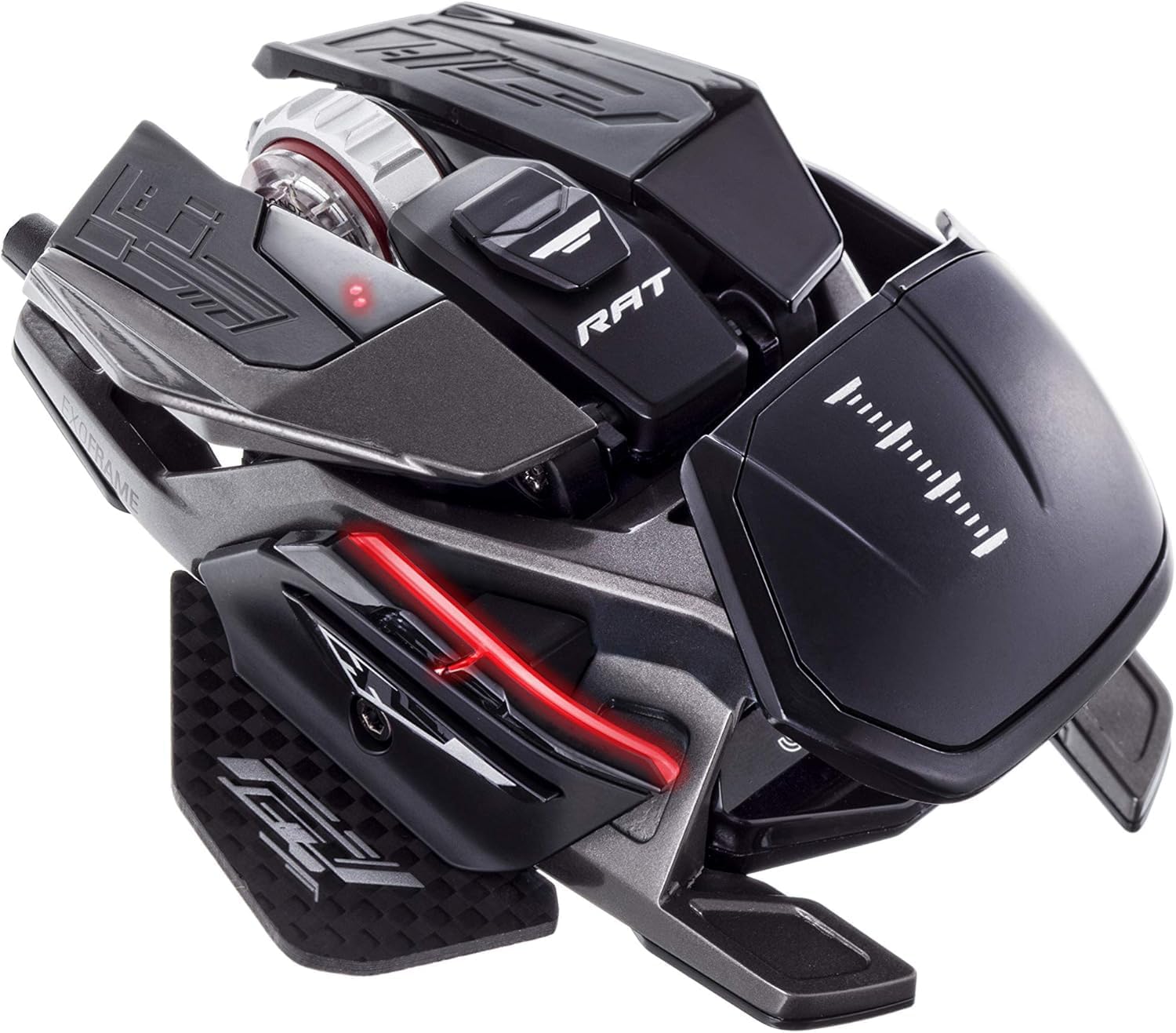
Figure 1: Mad Catz R.A.T. Pro X3 Gaming Mouse
2. 제품 오버view
2.1 주요 특징
- Dynamic Ergonomics: Adjustable components to fit various grip styles and hand sizes.
- Revolution Res Scroll Wheel: Optical technology with analog axis movements for redefined scroll wheel function.
- Pro Slide Technology: Allows adjustment of mouse glide over surfaces.
- Changeable Sensor Modules: Offers flexibility for different performance needs.
- Optical 16,000 DPI Sensor: Provides high precision and tracking accuracy.
- Ultra-Durable OMRON Switches: Rated for 50 million clicks, ensuring longevity and reliable actuation.
2.2 구성 요소 및 디자인
The R.A.T. Pro X3 features a lightweight and strong magnesium alloy chassis, reinforced with titanium screw fittings and a carbon fiber thumb-plate. Super-hydrophobic coatings help maintain grip during intense use.

Figure 2: Key features of the R.A.T. Pro X3
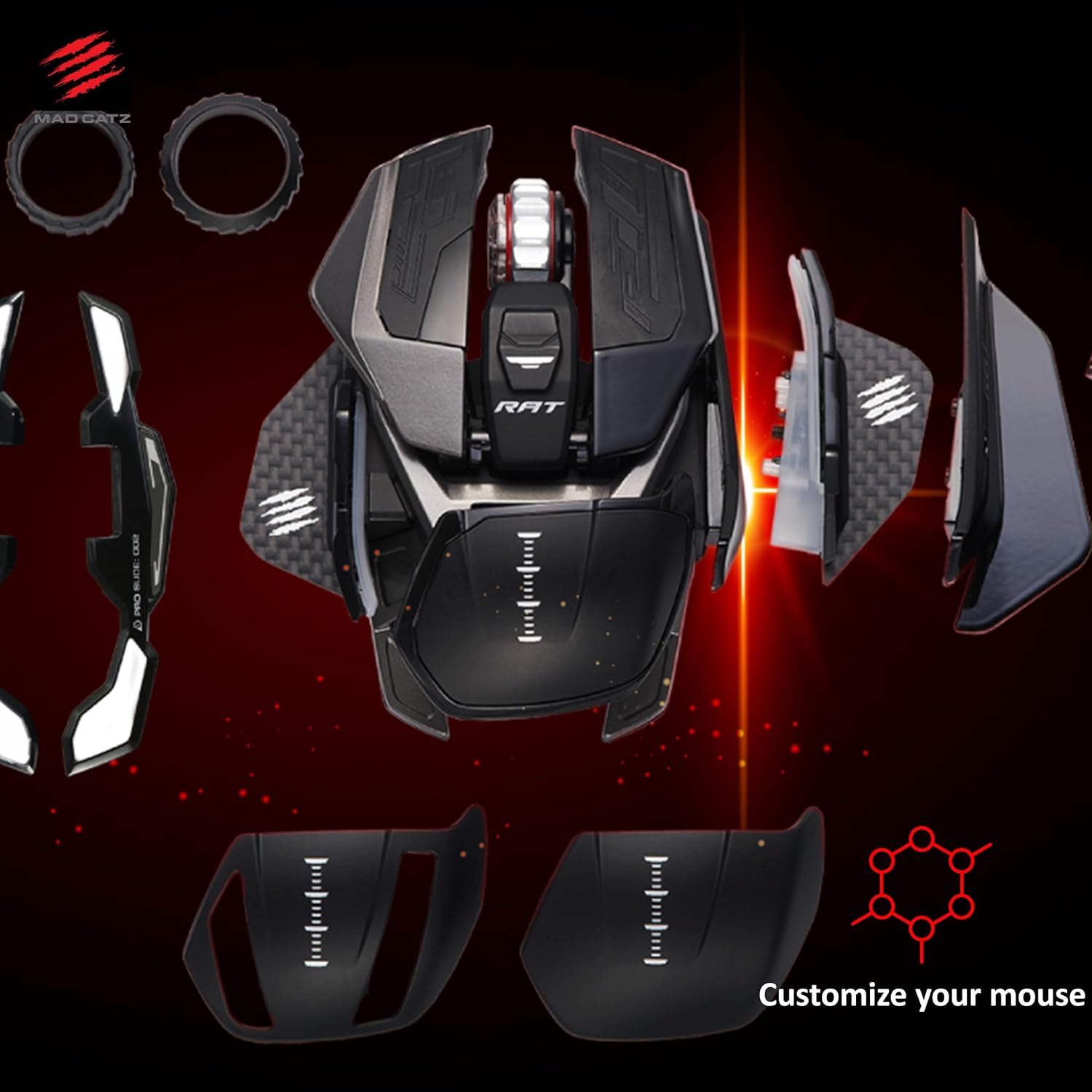
Figure 3: Customizable components of the R.A.T. Pro X3
3. 설정
- 마우스 연결: Plug the USB connector of the R.A.T. Pro X3 into an available USB port on your computer.
- 드라이버 설치: 운영 체제가 자동으로 필요한 드라이버를 감지하고 설치해야 합니다.
- 소프트웨어 설치: 버튼, DPI 설정 및 프로 기능을 완벽하게 사용자 지정하려면files, download and install the official Mad Catz software from the Mad Catz support web대지.
4. 사용자 정의
4.1 인체공학
The R.A.T. Pro X3 is designed with dynamic ergonomics, allowing users to adjust various parts of the mouse to achieve a personalized fit. This includes adjustable palm rests and thumb-plates, which can be swapped or repositioned to suit different grip styles (palm, claw, fingertip) and hand sizes.
4.2개의 프로그래밍 가능한 버튼
The mouse features 10 programmable buttons. These buttons can be assigned various functions, macros, or shortcuts using the Mad Catz software to optimize your workflow or gaming performance.
4.3 DPI 설정
Equipped with an optical 16,000 DPI sensor, the R.A.T. Pro X3 allows for precise control over cursor speed and sensitivity. DPI settings can be adjusted on-the-fly using dedicated buttons on the mouse or fine-tuned through the software to match your preferences and game requirements.

Figure 4: Optical 16,000 DPI sensor for precise tracking
4.4 Revolution Res Scroll Wheel
The Revolution Res scroll wheel utilizes optical technology and analog axis movements, offering enhanced control and functionality beyond traditional scroll wheels. Its tactile feedback can be adjusted for different applications, from precise weapon switching in games to rapid document scrolling.

Figure 5: The Revolution Res scroll wheel
5. 소프트웨어
The Mad Catz R.A.T. Pro X3 is fully supported by the Mad Catz software suite. This software allows you to:
- Program all 10 buttons with custom macros and shortcuts.
- DPI 설정을 조정하고 여러 DPI 프로필을 생성하세요.file다양한 시나리오에 대한 것입니다.
- Fine-tune the Revolution Res scroll wheel's response.
- Manage and save multiple profiles for various games and applications.
Ensure you download the latest version of the software from the official Mad Catz web최적의 성능과 모든 기능에 대한 접근성을 위한 사이트입니다.
6. 유지관리
To ensure the longevity and optimal performance of your R.A.T. Pro X3 mouse, follow these maintenance guidelines:
- 청소: 부드럽고 마른 천으로 마우스를 정기적으로 닦아주세요. 잘 지워지지 않는 얼룩은 약간 건조한 천으로 닦아주세요.amp 천을 사용할 수 있지만, 내부 부품에 습기가 들어가지 않도록 주의하세요. 강한 화학 물질이나 연마재는 사용하지 마세요.
- 센서 관리: Keep the optical sensor area on the underside of the mouse clean and free from dust or debris to prevent tracking issues.
- 케이블 관리 : 손상을 방지하려면 USB 케이블을 급격하게 구부리거나 과도하게 당기지 마세요.
- 저장: When not in use, store the mouse in a clean, dry environment, ideally in its original packaging or a protective case to prevent dust accumulation and physical damage.

Figure 6: Carrying case and customization parts for safe storage and transport
7. 문제 해결
If you encounter any issues with your R.A.T. Pro X3 mouse, refer to the following common troubleshooting steps:
- 마우스가 응답하지 않음: Try plugging the mouse into a different USB port. Ensure the USB cable is securely connected. Test the mouse on another computer to rule out a system-specific issue.
- 추적 문제: Clean the optical sensor on the underside of the mouse. Ensure you are using the mouse on a suitable surface (e.g., a mouse pad). Update or reinstall the mouse drivers and software.
- 버튼이 작동하지 않음: Verify button assignments in the Mad Catz software. Ensure the software is running correctly and profiles가 로드되었습니다.
- 소프트웨어가 마우스를 감지하지 못함: Reinstall the Mad Catz software. Ensure your operating system is up to date. Temporarily disable any antivirus or firewall software that might be interfering.
If problems persist, consult the Mad Catz support web추가 지원이 필요하면 사이트를 방문하거나 고객 서비스에 문의하세요.
8. 사양
| 특징 | 세부 사항 |
|---|---|
| 상표 | 매드 캣츠 |
| 시리즈 | R.A.T. X3 Black |
| 모델 번호 | MR05DCINBL001-0 |
| 하드웨어 플랫폼 | PC |
| 운영 체제 | 리눅스, 윈도우 7, 윈도우 XP |
| 품목 무게 | 4.3 온스 |
| 제품 치수 | 4.31 x 3.44 x 0.1 인치 |
| 색상 | 검은색 |
| 전원 | USB |
| 권tage | 1.5 볼트 |
| 연결 기술 | USB |
| 움직임 감지 기술 | 광학 |
9. 보증 및 지원
Mad Catz products are designed for durability and performance. For information regarding warranty coverage, product registration, and technical support, please visit the official Mad Catz web해당 사이트에서 FAQ, 드라이버 다운로드 및 고객 서비스 연락처 정보를 찾을 수 있습니다.


