제품 끝view
The MIFA X1 True Wireless Earbuds offer a seamless audio experience with Bluetooth 5.0 connectivity, stereo sound, and a portable charging case. Designed for comfort and durability, these earbuds are sweatproof and suitable for various activities.
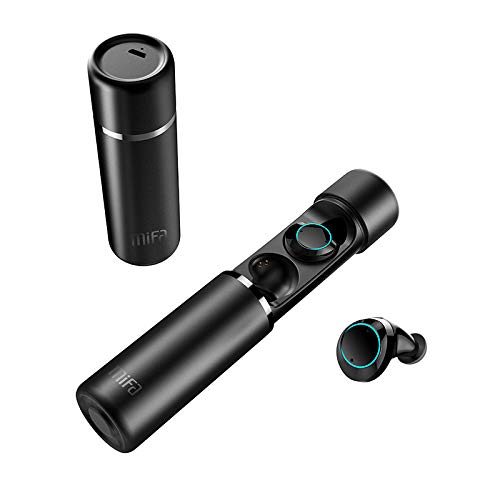
An image displaying the MIFA X1 True Wireless Earbuds. The cylindrical charging case is shown both closed and open, revealing the earbuds inside. One earbud is also shown outside the case.
패키지 내용
- MIFA X1 True Wireless Earbuds
- 휴대용 충전 케이스
- Multi-sized Ear Gels (S, M, L)
- USB 충전 케이블
- 사용 설명서 (본 문서)
설정
1. 초기 충전
Before first use, ensure both the earbuds and the charging case are fully charged. Remove any protective films from the earbud charging contacts if present.
- 이어버드를 충전 케이스에 넣으세요.
- Connect the charging case to a power source using a standard USB charging cable.
- Charging indicators on the case and/or earbuds will show charging status.
2. 장치와 페어링
The MIFA X1 earbuds feature one-step pairing.
- 스마트폰이나 다른 기기에서 블루투스가 활성화되어 있는지 확인하세요.
- 충전 케이스에서 이어버드 두 개를 모두 꺼내세요. 이어버드가 자동으로 켜지고 페어링 모드로 전환됩니다.
- On your device, search for Bluetooth devices and select "MIFA X1" from the list.
- 연결되면 음성 안내로 페어링이 성공적으로 완료되었음을 확인할 수 있습니다.
Note: If only one earbud connects, place both back into the case, then remove them again to re-initiate pairing.
작동 지침
이어버드 착용하기
- Choose the ear gels that provide the most comfortable and secure fit for optimal sound quality and stability.
- Gently insert the earbuds into your ears and rotate them slightly to ensure a snug fit.
기본 컨트롤(터치 컨트롤)
| 기능 | 행동 |
|---|---|
| 전원 켜기 | Take out of charging case (automatic) |
| 전원 끄기 | Place into charging case (automatic) |
| 음악 재생/일시 정지 | 양쪽 이어버드를 한 번 탭하세요. |
| 다음 트랙 | 오른쪽 이어폰을 두 번 탭하세요. |
| 이전 트랙 | 왼쪽 이어버드를 두 번 탭하세요 |
| 전화 받기/종료하기 | 양쪽 이어버드를 한 번 탭하세요. |
| 전화 거부 | 한쪽 이어폰을 2초 동안 길게 누르세요. |
| 음성 어시스턴트 활성화(Siri, Google 어시스턴트) | 양쪽 이어버드를 세 번 탭하세요 |
유지
- 청소: 부드럽고 마른 보풀 없는 천으로 이어버드와 충전 케이스를 정기적으로 닦으세요. 강한 화학 물질이나 연마재는 사용하지 마세요.
- 충전 연락처: 충전이 제대로 되도록 이어버드와 케이스의 충전 접점이 깨끗하고 이물질이 없는지 확인하십시오.
- 저장: 사용하지 않을 때는 이어버드를 충전 케이스에 보관하여 보호하고 충전 상태를 유지하세요.
- 방수 기능: 이어폰은 땀에는 강하지만 완전 방수는 아닙니다. 물에 완전히 담그거나 폭우에 노출시키지 마십시오.
문제 해결
- 이어폰이 서로 페어링되지 않음: Place both earbuds back into the charging case, then remove them simultaneously. This should force them to re-sync.
- 이어버드가 장치에 연결되지 않음:
- 기기에서 Bluetooth가 활성화되어 있는지 확인하세요.
- Forget "MIFA X1" from your device's Bluetooth settings and attempt to pair again.
- 이어폰이 충전되어 있는지 확인하세요.
- 한쪽 이어버드에서 소리가 나지 않습니다.
- 두 개의 이어버드가 모두 충전되었는지 확인하세요.
- 두 개의 이어버드를 케이스에 다시 넣었다가 다시 꺼내보세요.
- Perform a factory reset (if applicable, consult MIFA support for specific instructions if this manual doesn't detail it).
- 충전 문제:
- 충전 케이블이 케이스와 전원에 모두 단단히 연결되어 있는지 확인하세요.
- 이어버드와 케이스 내부의 충전 접점을 청소하세요.
- 다른 USB 충전 케이블과 전원 어댑터를 사용해 보세요.
명세서
| 특징 | 세부 사항 |
|---|---|
| 모델명 | X1 |
| 연결 기술 | 블루투스 5.0 |
| 무선 통신 기술 | 블루투스 |
| 오디오 출력 모드 | 스테레오 재생 |
| 마이크 형식 | 내장형 |
| 제어 방법 | 만지다 |
| 귀 위치 | 귀에 |
| 배터리 수명(이어버드) | 최대 4시간 |
| 총 배터리 수명(충전 케이스 포함) | 최대 12시간 |
| 재료 | 플라스틱 |
| 특별 기능 | 마이크 포함, 방수 |
| 제조업체 | 미파 이노베이션 LLC |
보증 정보
This product typically comes with a manufacturer's warranty. Please refer to the warranty card included in your product packaging or visit the official MIFA website for detailed warranty terms and conditions. A 30-day warranty is generally provided.
고객 지원
For further assistance, technical support, or inquiries regarding your MIFA X1 True Wireless Earbuds, please visit the official MIFA web해당 웹사이트를 방문하거나 고객 서비스 부서에 문의하십시오. 연락처 정보는 일반적으로 제품 포장이나 공식 브랜드 페이지에서 찾을 수 있습니다. web대지.


