1. 서론
The Fujifilm GFX 50R is a mirrorless digital camera featuring a large 51.4MP G format CMOS image sensor and X-Processor Pro image processing engine. This camera delivers superior image quality in a compact and lightweight body, designed for street and documentary photography. It is equipped with a 0.77x 3.69M-dot organic OLED electronic viewfinder for accurate focusing and framing. Weighing approximately 145g less than the GFX 50S, the GFX 50R offers intuitive handling in a rugged, weather-sealed body, meeting the diverse needs of photographers.
2. 설정
2.1 언박싱 및 초기 검사
Upon opening the package, ensure all components are present and undamaged. The box should contain the Camera Body, Battery, Battery Charger, Shoulder Strap, Body Cap, Manual, and U.S.A. Warranty information.
2.2 렌즈 부착
Align the white dot on the lens with the white dot on the camera body's lens mount. Rotate the lens clockwise until it clicks into place. To remove, press the lens release button and rotate counter-clockwise.
2.3 배터리 및 메모리 카드 삽입
Open the battery compartment cover located at the bottom of the camera. Insert the battery with the correct orientation until it locks. Close the cover. Open the memory card slot cover (typically on the side). Insert compatible SDXC memory cards (UHS-II recommended) until they click. Close the cover.
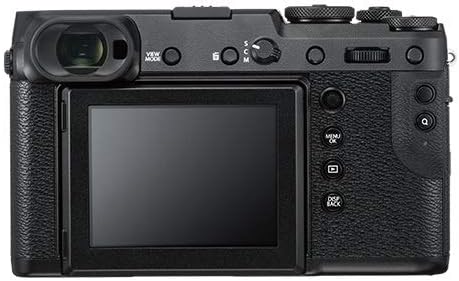
그림 1: 전면 view of the Fujifilm GFX 50R camera with a lens attached. This image highlights the camera's compact design and the lens mount.

그림 2: 후면 view of the Fujifilm GFX 50R camera, showcasing the tilting LCD screen and various control buttons and dials.
3. 카메라 작동
3.1 전원 켜기/끄기
Locate the ON/OFF switch, typically near the shutter button. Slide it to the 'ON' position to power on the camera. Slide it to 'OFF' to power off.
3.2 기본 촬영 모드
The GFX 50R supports various shooting modes including Bulb Mode, Time Mode, Aperture Priority, Manual, Program, and Shutter Priority. These can typically be selected via a mode dial on the camera's top plate.
3.3 이미지 품질 설정
The camera captures images with an effective still resolution of 51.4 MP. Supported file formats include JPEG, Raw, and TIFF. JPEG quality levels can be set to Basic, Fine, or Normal. The bit depth is 14 Bit for rich tonal information.
3.4 포커싱
The GFX 50R utilizes Contrast Detection for autofocus. It features 117 autofocus points. Focus types include Continuous-Servo AF (C), Manual Focus (M), and Single-Servo AF (S). Focus modes are Continuous-Servo AF (AF-C), Manual Focus (MF), and Single-Servo AF (AF-S).
3.5 Exposure and White Balance
Metering methods include Average, Center-Weighted Average, Multi-Zone, and Spot. Exposure control is managed via TTL 256-zone metering. White Balance settings offer Auto, Color Temperature, Custom, Daylight, Fluorescent, Incandescent, Shade, and Underwater options.
3.6 비디오 녹화
The camera supports video recording with a maximum resolution of 1080p and a recording capacity of 30 minutes per clip.
4. 유지관리
To ensure the longevity and optimal performance of your Fujifilm GFX 50R, regular maintenance is recommended:
- 카메라 본체 청소: 부드럽고 마른 천으로 카메라 본체를 닦으세요. 잘 지워지지 않는 얼룩은 약간 거친 천으로 닦아내세요.amp 천으로 닦은 후 마른 천으로 다시 닦아주세요. 강한 화학 약품은 사용하지 마세요.
- 렌즈 청소: 먼지를 제거하려면 렌즈 브러시나 블로어를 사용하십시오. 얼룩이 묻었을 경우에는 렌즈 전용 세척액과 극세사 천을 사용하십시오.
- 센서 청소: Sensor cleaning should be performed by authorized service personnel to avoid damage.
- 저장: Store the camera in a dry, cool place away from direct sunlight and extreme temperatures. Use a desiccant pack if storing in humid environments.
5. 문제 해결
If you encounter issues with your Fujifilm GFX 50R, consider the following general troubleshooting steps:
- 카메라 전원이 켜지지 않음: 배터리가 완전히 충전되어 있고 올바르게 삽입되었는지 확인하세요. 배터리 접점이 깨끗한지 확인하세요.
- 이미지 품질 문제: Verify lens cleanliness. Check shooting mode and exposure settings. Ensure sufficient lighting.
- 자동 초점 문제: Ensure the lens is properly attached. Check the focus mode setting. Ensure there is enough contrast in the scene for the autofocus system.
- 메모리 카드 오류: Reinsert the memory card. Try a different, compatible memory card. Ensure the card is not full or corrupted.
For persistent issues, refer to the detailed troubleshooting section in the full user manual or contact Fujifilm customer support.
6. 사양
| 특징 | 사양 |
|---|---|
| 호환 가능한 마운팅 | Fujifilm G |
| 종횡비 | 4시 3분 |
| 포토 센서 기술 | CMOS |
| 지원됨 File 체재 | JPEG, Raw, TIFF |
| 이미지 안정화 | 광학 |
| 광학 줌 | 1 개 |
| 최대 조리개 | 3.5 밀리미터 |
| 확장된 ISO 최소 | 50 |
| 계량 설명 | Average, Center-Weighted Average, Multi-Zone, Spot |
| 모델명 | GFX 50R |
| 배터리가 포함되어 있습니까? | 예 |
| 모델 번호 | GFX 50R Body |
| 원격 포함 | 아니요 |
| 모델 시리즈 | 지엑스에프에스 |
| 한국어: | 074101040128 |
| 연결 기술 | 2.5mm Sub-Mini, 3.5mm Headphone, 3.5mm Microphone, DC Input, HDMI D (Micro), USB Type-C (USB 3.0) |
| 하드웨어 인터페이스 | AV 포트 |
| 무선 기술 | 와이파이, 블루투스 |
| HDMI 타입 | Type D Micro HDMI |
| 비디오 출력 | 마이크로 HDMI |
| Total USB 3.0 Ports | 1 |
| 총 USB 포트 | 1 |
| 총 비디오 출력 포트 수 | 1 |
| 촬영 모드 | Bulb Mode, Time Mode, Aperture Priority, Manual, Program, Shutter Priority |
| 디지털-스틸 | 예 |
| 영화 모드 | 예 |
| 이미지 캡처 유형 | 사진 및 비디오 |
| 야간 투시경 | 아니요 |
| 자동 초점 기술 | 대비 감지 |
| 초점 기능 | 자동 초점 |
| 자동 초점 포인트 | 117 |
| 초점 유형 | Continuous-Servo AF (C), Manual Focus (M), Single-Servo AF (S) |
| 초점 모드 | Continuous-Servo AF (AF-C), Manual Focus (MF), Single-Servo AF (AF-S) |
| 자동 초점 | 아니요 |
| File 체재 | JPEG, Raw, TIFF |
| 효과적인 스틸 해상도 | 51.4 MP |
| JPEG 품질 수준 | 기본, 고급, 보통 |
| 지원되는 이미지 형식 | JPEG, Raw, TIFF |
| 최대 이미지 크기 | 36.5메가바이트 |
| 비트 깊이 | 14비트 |
| 전체 정지 해상도 | 51 MP |
| 렌즈 유형 | G-mount lens |
| 렌즈 구성 | G Mount |
| 측정 방법 | Average, Center-Weighted Average, Multi-Zone, Spot |
| 노출 제어 | TTL 256-zone metering Multi, Spot, Average, Center-Weighted |
| 화이트 밸런스 설정 | Auto, Color Temperature, Custom, Daylight, Fluorescent, Incandescent, Shade, Underwater |
| 셀프 타이머 | 10초 |
| 화면 크기 | 3.2 인치 |
| 디스플레이 유형 | 액정표시장치 |
| 화면당 점 수 | 872742 |
| 디스플레이 고정 장치 유형 | 기울이기 |
| 터치스크린 타입 | 터치 없음 |
| 디스플레이 해상도 최대 | 2,360,000 |
| 컬러 화면이 있습니다 | 예 |
| 플래시 메모리 유형 | 에스디엑스씨 |
| 기록 용량 | 30분 |
| 쓰기 속도 | > 250 MB/s |
| 플래시 메모리 속도 클래스 | UHS-II |
| 플래시 메모리 버스 인터페이스 유형 | SD (Secure Digital) card interface |
| 플래시 메모리 설치 크기 | 2000GB (XNUMX기가바이트) |
| 센서 유형 | CMOS |
| 이미지 안정화 | 광학 |
| 지원되는 미디어 유형 | ProductImage, Video |
| 사진 센서 해상도 | 51 MP |
| 포토 센서 크기 | Medium Format (>35mm) |
| 최소 셔터 속도 | 1/4000초 |
| 폼 팩터 | 미러리스 |
| 특징 | 인터벌 기록 |
| 색상 | 검은색 |
| 빛 민감도 | ISO 50부터 ISO 102400까지 |
| 비디오 해상도 | 1080p |
| View파인더 | 전자 |
| ISO 범위 | 50-12800 |
| 플래시 모드 | 시간 |
| 카메라 플래시 | Hot Shoe, PC Terminal |
| 셀프타이머 있음 | 예 |
| 호환 장치 | Fujifilm G mount devices |
| 연속 촬영 | 6프레임 |
| Aperture modes | 조리개 우선 모드, 수동 모드 |
| View파인더 배율 | 0.77배 |
7. 보증 및 지원
Your Fujifilm GFX 50R comes with a U.S.A. Warranty. Please refer to the warranty card included in your product packaging for specific terms and conditions. For technical support, service, or further inquiries, please visit the official Fujifilm support web사이트를 방문하거나 고객 서비스에 문의하세요.


