1. 서론
This manual provides essential information for the safe and efficient operation of your Zerone 10.8V-12V Lithium Battery Charger. This charger is designed for use with 10.8V to 12V Lithium-Ion batteries, offering quick and reliable charging. Please read this manual thoroughly before first use and retain it for future reference.

Image 1: The Zerone 10.8V-12V Lithium Battery Charger, showing its compact design and universal compatibility label.
2. 안전 지침
Always observe the following safety precautions to reduce the risk of electric shock, fire, or serious injury:
- 모든 지침을 읽으십시오. 충전기를 사용하기 전에 충전기, 배터리 및 배터리를 사용하는 제품에 대한 모든 지침과 주의 사항을 읽으십시오.
- 실내에서만 사용 : 충전기를 비나 습한 환경에 노출시키지 마십시오.
- 적절한 볼륨tage: 전원 공급 장치 볼륨을 확인하십시오.tage는 vol과 일치합니다tag충전기 정격 명판에 명시되어 있습니다.
- 손상을 방지하세요: 충전기가 강한 충격을 받거나 떨어뜨리거나 기타 손상을 입은 경우 작동하지 마십시오. 자격을 갖춘 서비스 센터에 가져가십시오.
- 통풍: Do not block any ventilation openings. Ensure adequate airflow around the charger during operation.
- 사용하지 않을 때는 플러그를 뽑아두세요: Always unplug the charger from the power outlet before attempting any maintenance or cleaning, and when not in use.
- 지정된 배터리를 사용하십시오. Only charge batteries specifically designed for this charger. Charging other battery types may cause them to burst, leading to personal injury and damage.
- 단락시키지 마십시오: 배터리 단자를 절대로 단락시키지 마십시오.
- 어린이의 손이 닿지 않는 곳에 보관: 본 기기는 신체적, 감각적 또는 정신적 능력이 저하된 사람(어린이 포함)이나 경험 및 지식이 부족한 사람이 사용하도록 의도된 것이 아니며, 안전을 책임질 사람으로부터 기기 사용에 관한 감독이나 지시를 받은 경우에만 사용할 수 있습니다.
3. 패키지 내용
모든 품목이 존재하고 양호한 상태인지 확인하세요.
- 1 x Zerone 10.8V-12V Lithium Battery Charger
- 1 x 사용자 설명서
4. 제품 특징
The Zerone 10.8V-12V Lithium Battery Charger offers the following key features:
- 보편적 인 호환성 : Specifically designed for 10.8V to 12V Lithium-Ion batteries.
- LED 표시등: Built-in LED display provides intuitive monitoring of battery status.
- 스마트 충전 관리: Utilizes a 'first in, first charged' system and protects against overload.
- 빠른 충전: Capable of charging a 12V Lithium-Ion 1.5Ah battery in approximately 50 minutes.
- Wide Model Compatibility: Compatible with models such as DC10WD, DC10SB, DC10WC, BL1015, BL1016, BL1021B, and BL1041B.

Image 2: The charger displaying its compatibility with various battery models, including DC10WD, DC10SB, DC10WC, BL1015, BL1016, BL1021B, and BL1041B.
5. 설정
배터리 충전기를 설정하려면 다음 단계를 따르십시오.
- 충전기 풀기: Carefully remove the charger and all components from the packaging.
- 전원에 연결: Plug the charger's power cord into a standard 100V-260V AC electrical outlet. The charger's LED indicator will flash green once to confirm power connection.
- 배터리 준비: Ensure the battery to be charged is clean and free from debris.
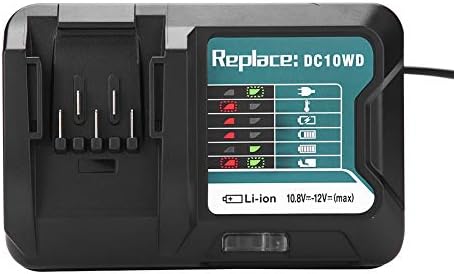
Image 3: The Zerone charger with its integrated power cord, ready for connection to an electrical outlet.
6. 사용 설명서
배터리를 충전하려면:
- 배터리 삽입: 배터리를 충전기 슬롯에 맞춰 딸깍 소리가 나면서 제자리에 단단히 고정될 때까지 밀어 넣으세요.
- 모니터 충전: The LED indicator will show the charging status. Refer to the "LED Indicator Guide" section for detailed explanations of the light patterns.
- 충전 완료: Once the battery is fully charged, the LED indicator will show a solid green light.
- 배터리 제거: Press the release button on the battery (if applicable) and slide it out of the charger.
- 충전기를 뽑으세요: 사용하지 않을 때는 충전기를 전원 콘센트에서 분리하십시오.

Image 4: The Zerone charger with a compatible lithium-ion battery inserted, ready for charging.
7. LED 표시 가이드
The charger features an LED display to communicate the battery's status:
| 표시등 | 상태 |
|---|---|
| 녹색 깜박임 | Charger is plugged in and ready. |
| 빨간색 깜박임 | Battery is in cooling mode. Charging will begin once the battery temperature is within the optimal range. |
| Red Sustained Light | Battery is currently charging (0-100%). |
| Green Sustained Light | Charging is completed. The battery is fully charged. |
| Red and Green Flashing | Indicates a defective battery pack or charger. |

이미지 5: 클로즈업 view of the charger's LED indicator panel, detailing the meaning of each light pattern for battery status.
8. 유지관리
적절한 유지 관리는 충전기의 수명과 성능을 보장합니다.
- 청소: Disconnect the charger from the power supply before cleaning. Use a dry, soft cloth to wipe the exterior of the charger. Do not use water or chemical cleaners.
- 저장: 충전기는 직사광선과 습기를 피해 건조하고 서늘한 곳에 보관하십시오.
- 정기적으로 검사하세요: Periodically inspect the charger and its cord for any signs of damage. If damage is found, discontinue use and seek professional repair.
9. 문제 해결
충전기에 문제가 발생하면 다음의 일반적인 문제와 해결 방법을 참조하세요.
- 충전기 전원이 켜지지 않음:
- 전원 코드가 충전기와 작동하는 콘센트에 제대로 꽂혀 있는지 확인하십시오.
- 다른 기기를 사용하여 전원 콘센트가 정상적으로 작동하는지 확인하십시오.
- Battery not charging (Red Flashing LED):
- The battery may be too hot or too cold. Allow the battery to reach room temperature before attempting to charge again. Charging will automatically resume once the temperature is optimal.
- Battery not charging (Red and Green Flashing LED):
- This indicates a defective battery or charger. Try charging a different, known-good battery. If the issue persists, the charger may be faulty. If only the original battery causes this, the battery is likely defective.
- 느린 충전:
- Ensure the battery is fully seated in the charger.
- Verify that the battery is compatible with this charger.
이러한 단계를 거쳐도 문제가 해결되지 않으면 고객 지원팀에 문의하세요.
10. 사양
| 사양 | 세부 사항 |
|---|---|
| 모델 번호 | Zeronegfvetp6dn8-01 |
| 입력 Voltage | 100V-260V 교류, 50-60Hz |
| 출력 볼륨tage | 10.8V-12V(직류) |
| 제품 치수 | 4.72 x 1.97 x 5.91 인치 |
| 품목 무게 | 11.6온스(0.33킬로그램) |
| 제조업체 | 제론 |
| 호환 배터리 유형 | 10.8V-12V Lithium-Ion (e.g., BL1015, BL1016, BL1021B, BL1041B) |
| Compatible Charger Models | DC10WD, DC10SB, DC10WC |

Image 6: The bottom view of the Zerone charger, showing its input/output specifications and model number.
11. 보증 및 지원
For warranty information or technical support, please refer to the documentation provided with your purchase or contact Zerone customer service through the retailer where the product was purchased. Keep your purchase receipt as proof of purchase.


