소개
Thank you for choosing the LENRUE A38S Computer Speakers. This manual provides essential information for setting up, operating, and maintaining your speakers to ensure optimal performance. The A38S speakers are designed to deliver clear audio for your desktop, laptop, and tablet, featuring a plug-and-play design with USB power and 3.5mm auxiliary audio input, complemented by dynamic RGB lighting.
설정
Follow these steps to connect your LENRUE A38S speakers to your device.
- 전원 연결: Insert the USB-A plug into an available USB port on your computer or a USB power adapter. If your device has a USB-C port, use the provided USB-A to Type-C adapter. The speakers are powered via USB and contain an internal battery for portable use.
- 오디오 연결: Plug the 3.5mm audio jack into the headphone or audio output port of your computer, laptop, or tablet.
- 전원 켜기: Rotate the main knob on the speaker clockwise to turn it on. The RGB lights will illuminate.
- Select Playback Device: On your computer, navigate to your sound settings and select "Speaker (4-USB Audio 2.0)" or a similar option as the output device. Adjust the volume to approximately 90% on your computer for optimal control via the speaker knob.
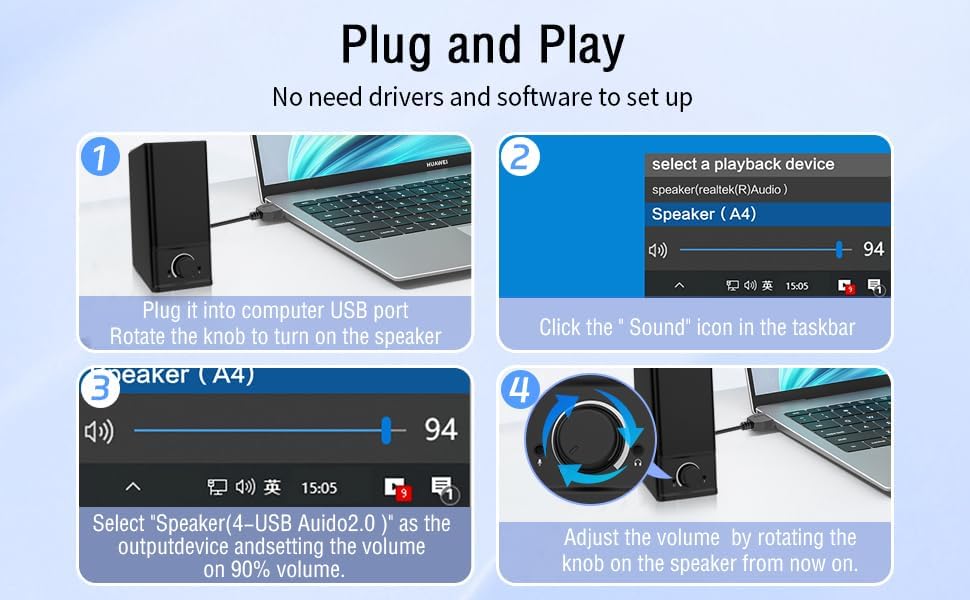
작업
The LENRUE A38S speakers feature a multi-function knob for easy control.
- 전원 켜기/끄기: Rotate the knob clockwise to turn on the speakers. Rotate counter-clockwise until it clicks to turn off.
- 볼륨 조절: 볼륨을 높이려면 다이얼을 시계 방향으로 돌리고, 볼륨을 낮추려면 시계 반대 방향으로 돌리세요.
- RGB 조명 모드: Double-click the knob to cycle through the three dynamic RGB lighting modes.
- Turn Off RGB Lights: Triple-click the knob to turn off all RGB lighting.

유지
Proper care ensures the longevity of your speakers.
- 청소: 스피커 표면은 부드럽고 마른 천으로 닦아주세요. 액체 세척제나 연마성 재질은 사용하지 마세요.
- 저장: 스피커는 직사광선과 극한의 온도를 피해 서늘하고 건조한 곳에 보관하세요.
- 방수 기능: The speakers are waterproof. However, avoid prolonged submersion or exposure to high-pressure water jets to prevent damage. Ensure all ports are dry before connecting cables.
문제 해결
문제가 발생하면 다음의 일반적인 해결책을 참조하세요.
| 문제 | 해결책 |
|---|---|
| 스피커에서 소리가 나지 않음 |
|
| RGB 조명이 작동하지 않습니다 |
|
| 왜곡된 오디오 |
|
명세서
Detailed technical specifications for the LENRUE A38S Computer Speakers.
- 모델 이름: A38S
- 스피커 유형: 같은 축의
- 오디오 출력: Dual 5W drivers (10W RMS total), 18W Max Output
- 서라운드 사운드 채널 구성: 2.0 스테레오
- 연결성: USB (for power), 3.5mm Aux-in (for audio)
- 전원: USB Powered with internal Lithium Ion Battery
- 호환 장치: Desktops, PCs, Laptops, Mac, Tablets, Phones, Projectors, PS4, MP3 players
- 특징: Dynamic RGB Lighting, Plug-n-Play, Waterproof
- 제품 크기: 2.1인치(깊이) x 16인치(너비) x 2.5인치(높이)
- 품목 무게: 286그램(10.1온스)
- 케이블 길이: Approximately 47.3 inches (USB and 3.5mm audio)
- 포함된 구성 요소: LENRUE A38S Speaker Unit, USB-A to Type-C Adapter, USB Power Cable, 3.5mm Audio Cable


보증 및 지원
LENRUE는 고품질 제품 제공과 고객 만족을 위해 최선을 다하고 있습니다.
- 보증: Your LENRUE A38S speakers come with a 12-month worry-free replacement service from the date of purchase. This limited warranty covers manufacturing defects.
- 고객 서비스: We offer lifetime customer service for any questions or issues you may encounter. For support, please refer to the contact information provided with your purchase or visit the official LENRUE web대지.


