소개
This manual provides detailed instructions for the installation, setup, and operation of your JVC KD-X260BT Digital Media Receiver. This unit is designed to provide high-quality audio playback and hands-free communication in your vehicle, featuring Bluetooth connectivity, USB input, and a 13-band equalizer. Please note, this unit does not play CDs. Read this manual thoroughly before use to ensure proper operation and to prevent damage.

이미지: 앞면 view of the JVC KD-X260BT Digital Media Receiver, showing the display and control buttons.
안전 정보
- Do not operate the unit in a way that distracts you from driving. Always keep your attention on the road.
- Ensure proper wiring connections to prevent short circuits or damage to the vehicle's electrical system.
- 장치를 습기나 극한 온도에 노출시키지 마십시오.
- 장치를 분해하거나 개조하지 마십시오. 모든 정비는 자격을 갖춘 기술자에게 맡기십시오.
- Use only accessories specified by JVC.
패키지 내용
패키지에 모든 품목이 들어 있는지 확인하세요.
- JVC KD-X260BT 디지털 미디어 수신기
- 배선 마구
- External Wired Microphone
- 장착 하드웨어
- 사용 설명서(본 문서)
설치
Professional installation is recommended for this product. Incorrect installation can lead to damage to the unit or vehicle. The KD-X260BT features a short body design, which facilitates easier installation in various vehicle dashboards.
배선 연결:
- Connect the wiring harness according to your vehicle's wiring diagram.
- 모든 연결 부분이 안전하고 절연되어 있는지 확인하여 단락을 방지하세요.
- Connect the external microphone to the designated input for hands-free calling. Position the microphone in a location that provides clear voice pickup.
- 안테나 케이블을 연결합니다.
- 외부를 사용하는 경우 amplifiers, connect the 2.5V preamp outputs (rear/subwoofer selectable).
설치:
- 대시보드 구멍에 장착 슬리브를 설치하십시오.
- 수신기를 마운팅 슬리브에 딸깍 소리가 나면서 제자리에 고정될 때까지 밀어 넣으십시오.
- 트림 링을 부착합니다.
설정
초기 전원 켜기:
설치 후 차량의 시동을 켜십시오. 기기에 전원이 켜질 것입니다. 언어 선택과 같은 초기 설정은 화면에 나타나는 안내에 따라 진행하십시오.
블루투스 페어링 :
The KD-X260BT supports Bluetooth 3.0+EDR and allows for two phones to be connected full-time. This enables receiving calls from either phone with a push of a key.
- 수신기에서 블루투스 메뉴로 이동하세요.
- "페어링" 또는 "기기 검색"을 선택하세요.
- 스마트폰에서 Bluetooth를 활성화하고 사용 가능한 기기를 검색하세요.
- Select "KD-X260BT" from the list on your phone.
- 메시지가 표시되면 두 기기 모두에서 페어링 코드를 확인하세요.
- Once paired, the unit will display a confirmation.
The unit supports Bluetooth profiles HFP (Hands-Free Profile 1.6 for wideband speech), HSP (Headset Profile), PBAP (Phone Book Access Profile), A2DP(고급 오디오 분배 프로file) 및 AVRCP(오디오/비디오 원격 제어 프로file 1.5).
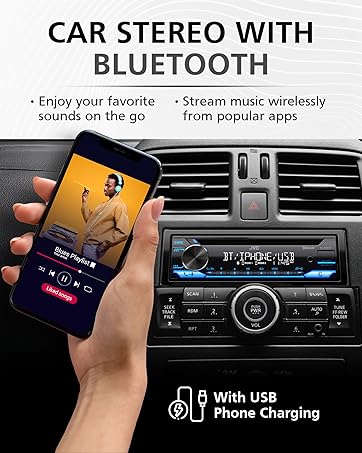
Image: JVC KD-X260BT display indicating Bluetooth connection, with a smartphone showing music playback, illustrating wireless audio streaming.
JVC Remote 앱:
Download the "JVC Remote" app (available for iOS and Android) to control the receiver's source directly from your smartphone using simple finger gestures.
작동 지침
기본 컨트롤:
- 전원 버튼: 기기를 켜거나 끕니다.
- 볼륨 노브: Rotate to adjust the volume level. Press to access menu options.
- 소스 버튼 : 사용 가능한 오디오 소스(튜너, USB, 블루투스 오디오, AUX)를 순환하려면 누릅니다.
- 디스플레이 버튼: Changes display information (e.g., clock, track title).
라디오 튜너:
- Press the Source button to select "Tuner" (AM/FM).
- 탐색 버튼을 사용하여 라디오 방송국을 찾으세요.
- Press and hold a preset button (1-6) to store a station.
USB 재생 :
Connect a USB device to the front USB port. The unit supports MP3/WMA/WAV/FLAC playback. The USB port also provides high current 1.5A charging for smartphones.
- Insert the USB device. The unit will automatically switch to USB source and begin playback.
- Use the track buttons to skip tracks.
- Use the folder buttons to navigate through folders.
- MP3 ID3 Tag Display (title/artist/album) is supported.
- Android music playback (AOA 2.0) is supported for Android phones (version 4.1 or later).
Bluetooth 오디오 스트리밍:
Once a Bluetooth device is paired, select "Bluetooth Audio" as the source to stream music wirelessly. Use the receiver's controls or the paired device to manage playback (play, pause, skip, search via AVRCP 1.5).
핸즈프리 통화:
When a call comes in on a paired phone, the unit will display the caller ID. Press the call button to answer, and the end call button to hang up. The external microphone ensures clear communication.
오디오 설정(이퀄라이저):
The unit features a 13-Band Graphic Equalizer with 10 preset EQ settings and 1 user-customizable setting. Access the audio menu to adjust:
- 이퀄라이저 : Select from preset curves or customize your own.
- 베이스 부스트 : 저주파수를 증폭시킵니다.
- 음량 : Compensates for perceived loss of bass and treble at low volumes.
- 밸런스/페이더: Adjusts sound distribution between left/right and front/rear speakers.
- 서브우퍼 제어: Adjust subwoofer output level and frequency if connected.
Internet Radio/Digital Radio Control:
Control Pandora, iHeartRadio, and Spotify directly from the receiver when connected to a compatible Android device via Bluetooth.
Steering Wheel Remote Control:
Factory steering wheel control functions can be retained with a third-party adapter (sold separately).
유지
- 장치 청소: 부드럽고 마른 천으로 전면 패널을 닦으십시오. 연마성 세척제나 용제를 사용하지 마십시오.
- USB 포트: USB 포트에 먼지나 이물질이 없도록 하세요.
- 펌웨어 업데이트: Check the JVC web성능 및 기능 향상을 위한 펌웨어 업데이트가 있는지 정기적으로 사이트를 확인하십시오.
문제 해결
| 문제 | 해결책 |
|---|---|
| 전원이 없습니다 | Check vehicle's fuse. Ensure wiring harness is correctly connected. |
| 소리가 나지 않습니다 | Check speaker connections. Verify volume level. Ensure correct source is selected. |
| 블루투스가 연결되지 않습니다 | Ensure Bluetooth is enabled on both devices. Delete previous pairing and re-pair. Move devices closer. |
| USB 장치가 인식되지 않습니다 | Ensure USB device is formatted correctly (FAT16/32). Check for compatible file 유형이 다릅니다. 다른 USB 장치를 사용해 보세요. |
| 라디오 수신 불량 | Check antenna connection. Ensure antenna is fully extended (if applicable). |
명세서
| 특징 | 세부 사항 |
|---|---|
| 모델 번호 | KD-X260BT |
| 전력 출력(피크) | 50와트 x 4채널 |
| 전원 출력 (RMS) | 22와트 x 4채널 |
| 표시하다 | VA LCD Display, Spanish Text Display |
| USB 입력 | Front USB, 1.5A Charging, MP3/WMA/WAV/FLAC Playback, Android AOA 2.0 |
| 보조 입력 | 3.5mm Front Audio Auxiliary Input |
| 블루투스 버전 | 3.0+EDR Certified |
| 블루투스 프로files | HFP 1.6, HSP, PBAP, A2DP, AVRCP 1.5 |
| 평형 장치 | 13-Band Graphic Equalizer (10 Preset x 1 User) |
| 사전amp 출력 | 1 Set of 2.5V (Rear/Subwoofer Selectable) |
| 인터넷 라디오 제어 | Pandora, Spotify, iHeartRadio (for Android) |
| 치수(제품) | 4 x 9 x 8 인치 |
| 품목 무게 | 1.79파운드 |
보증 및 지원
This JVC KD-X260BT Digital Media Receiver comes with a 1-Year Manufacturer's Warranty. For warranty claims, technical support, or service inquiries, please contact JVC customer support or visit the official JVC web사이트. 보증 확인을 위해 구매 증빙 자료를 보관하세요.
JVC 고객 지원: Refer to the contact information provided with your product packaging or on the official JVC web대지.


