1. 서론
The Snakebyte GAME:PAD 4S Wireless controller is designed to provide a seamless and immersive gaming experience on your PlayStation 4 console. This manual provides essential information on setting up, operating, maintaining, and troubleshooting your new gamepad.

그림 1: 전면 view of the Snakebyte GAME:PAD 4S Wireless Controller in blue camo.
2. 주요 특징
- Lag-Free Wireless Connectivity: Utilizes Bluetooth technology for a responsive and uninterrupted gaming experience on Sony PlayStation 4.
- Immersive Dual Vibration: Equipped with dual vibration motors that provide haptic feedback, making in-game actions feel more realistic.
- 정확한 제어: Features twin analog joysticks and responsive trigger buttons for accurate and precise gameplay.
- Integrated Audio Jack: Includes a 3.5mm headphone jack for connecting headsets, allowing for in-game audio and communication.
- LED Status Home Button: A central LED-illuminated home button indicates controller status.
- 인체공학적 디자인: Crafted for comfort during extended gaming sessions, reducing hand fatigue.
- 모션 센서: Built-in accelerometer and gyroscope enable motion-sensing gameplay for enhanced immersion.
3. 설정 및 연결
3.1 Initial Pairing with PlayStation 4
- 플레이스테이션 4 콘솔의 전원이 켜져 있는지 확인하십시오.
- Connect the Snakebyte GAME:PAD 4S Wireless controller to the PS4 using the supplied micro-USB cable.
- 컨트롤러의 PS 버튼(홈 버튼)을 누르세요. 컨트롤러가 콘솔과 자동으로 페어링됩니다.
- Once paired, you can disconnect the USB cable, and the controller will maintain its wireless connection.

Figure 2: Controller connected via micro-USB for initial pairing and charging.
3.2 컨트롤러 충전
To charge the controller, connect it to your PlayStation 4 console or a USB power adapter using the provided micro-USB cable. The LED on the home button will indicate charging status. A full charge typically takes approximately 2 hours and provides about 7-8 hours of playtime.
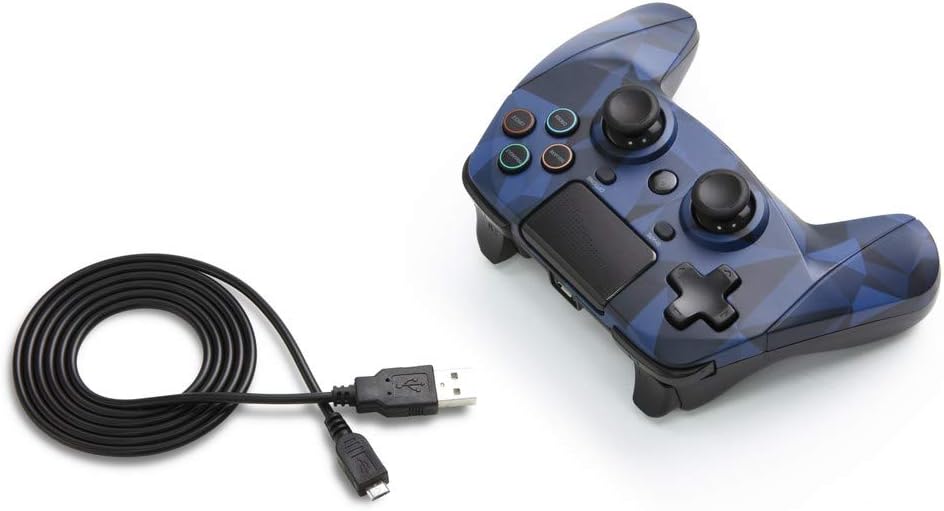
Figure 3: The Snakebyte GAME:PAD 4S Wireless Controller shown with its included micro-USB charging cable.
4. 사용 설명서
4.1 버튼 레이아웃 및 기능
The controller features a familiar layout with dual analog sticks, a D-pad, action buttons (Triangle, Square, Circle, Cross), Share, Options, and a Home button. The action buttons are labeled with their names rather than symbols, but are color-coded similarly to standard PlayStation controllers.

그림 4: 각도 view highlighting the button layout and ergonomic design.
4.2 Touchpad and Motion Sensors
The integrated touchpad is fully functional and can be used for navigation and specific in-game interactions. The highly sensitive built-in accelerometer and gyroscope detect motion, tilt, and rotation, providing an immersive gaming experience for titles that utilize motion controls.
4.3 오디오 잭
Connect any standard 3.5mm headset to the controller's audio jack for private listening of game audio and voice chat. Ensure your headset is properly inserted for optimal sound quality.
5. 관리 및 유지 보수
- 부드럽고 마른 천으로 닦아 컨트롤러를 깨끗하게 유지하세요. 강한 화학 물질이나 연마재는 사용하지 마세요.
- 컨트롤러는 직사광선과 극한의 온도를 피해 서늘하고 건조한 곳에 보관하세요.
- 컨트롤러를 떨어뜨리거나 강한 충격을 주지 마세요. 내부 구성 요소가 손상될 수 있습니다.
- 컨트롤러를 분해하려고 시도하지 마십시오. 분해하면 보증이 무효화됩니다.
6. 문제 해결
6.1 연결 문제
- If the controller does not connect, ensure it is fully charged.
- Try re-pairing the controller by connecting it via USB cable and pressing the PS button.
- 주변에 강한 간섭을 일으키는 요소(예: 다른 블루투스 기기, Wi-Fi 라우터)가 없는지 확인하십시오.
6.2 Button Unresponsiveness
- If buttons are unresponsive, try resetting the controller. Locate the small reset button on the back of the controller (often near the L2 shoulder button) and press it with a thin object like a paperclip.
- Ensure the controller's firmware is up to date (check the Snakebyte support web(업데이트는 해당 사이트를 참조하세요).
7. 기술 사양
| 특징 | 사양 |
|---|---|
| 상표 | 스네이크바이트 |
| 모델명 | GAME:PAD 4 S WIRELESS |
| 품목 모델 번호 | SB912726 |
| 호환 장치 | 플레이스테이션 4 |
| 연결 기술 | 무선(블루투스) |
| 컨트롤러 유형 | 게임패드 |
| 전원 | 배터리 구동(리튬 폴리머 배터리 1개 포함) |
| 권tage | 3.7 볼트 |
| 품목 무게 | 11.2 온스 |
| 제품 크기(LxWxH) | 4.53 x 2.95 x 6.1 인치 |
| 색상 | Blue Camo |
8. 보증 및 지원
The Snakebyte GAME:PAD 4S Wireless controller is covered by a 5년 제한 제조업체 보증. For warranty claims or technical support, please refer to the contact information provided on the product packaging or visit the official Snakebyte web대지.


