1. 서론
This manual provides comprehensive instructions for the Came ZBK Electronic Control Board, model 88001-0063. This control board is designed for use with Came BK series sliding gate motors, specifically compatible with BK800, BK1200, and BK1800 models. It serves as a direct replacement for the older 3199ZBK generation control board. Please read this manual thoroughly before installation and operation to ensure proper function and safety.
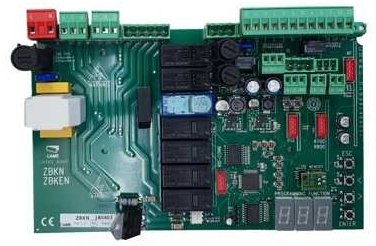
Image showing the Came ZBK Electronic Control Board, model 88001-0063, a replacement part for gate automation systems.
2. 안전 정보
중요한: Installation and maintenance of this electronic control board should only be performed by qualified personnel. Failure to follow these safety guidelines may result in serious injury or damage to property.
- Always disconnect the main power supply to the gate motor before performing any installation, maintenance, or troubleshooting.
- Ensure all electrical connections comply with local electrical codes and regulations.
- Protect the control board from moisture, dust, and extreme temperatures.
- Do not attempt to modify the control board. Use only genuine Came replacement parts.
- Keep children and unauthorized persons away from the gate area during installation and operation.
3. 설정 및 설치
3.1 패키지 내용
- 1 x Came ZBK Electronic Control Board (Model 88001-0063)
3.2 호환성
This control board is compatible with Came BK series sliding gate motors: BK800, BK1200, and BK1800. It is designed as a direct replacement for the previous generation 3199ZBK control board.
3.3 설치 단계
- 전원 분리: Ensure the main power supply to the gate motor is completely disconnected at the circuit breaker. Verify with a voltag전자 테스터.
- 접근 제어 상자: Open the gate motor's control box cover.
- 문서 연결: Carefully photograph or sketch the existing wiring connections on the old control board (if replacing). This will be crucial for correct re-connection.
- 오래된 보드 제거: Disconnect all wires from the old 3199ZBK control board and carefully remove it from its mounting.
- 새 보드 설치: Mount the new Came ZBK 88001-0063 control board in the same position.
- 배선 연결: Reconnect all wires to the new control board according to your documentation from step 3. Refer to the specific wiring diagram provided with your Came BK series motor for detailed connection points. Pay close attention to power, motor, safety device, and accessory connections.
- 보안 연결: Ensure all terminal connections are tight and secure.
- 닫기 제어 상자: Securely close the control box cover, ensuring no wires are pinched.
- 복원력 : Reconnect the main power supply to the gate motor.
Note: For detailed wiring diagrams and specific motor configurations, always refer to the original instruction manual for your Came BK800, BK1200, or BK1800 motor.
4. 운영
After successful installation, the Came ZBK control board will manage the operation of your sliding gate motor. Initial setup and programming typically involve:
- 모터 방향 : Verifying and setting the correct motor rotation direction.
- 리미트 스위치: Adjusting and programming the open and close limit switches for precise gate positioning.
- 원격 제어: Pairing and programming remote control transmitters.
- 안전 장치 : Testing and configuring safety photocells and other safety devices.
- 작동 매개변수: Setting parameters such as opening/closing speed, pause time, and force.
Consult the specific programming guide for your Came BK series motor for detailed instructions on configuring these settings. The ZBK board's functionality is integrated with the motor's overall system.
5. 유지관리
Regular maintenance ensures the longevity and reliable operation of your Came ZBK control board and gate system.
- 시각적 검사: 제어 보드에 손상, 부식 또는 느슨한 연결부가 있는지 주기적으로 점검하십시오.
- 청결: Keep the control box interior clean and free from dust, insects, and debris. Use a soft, dry brush or compressed air.
- 배선 점검: Ensure all wiring connections remain secure and free from wear or damage.
- 전문가 확인: It is recommended to have the entire gate automation system, including the control board, inspected by a qualified technician at least once a year.
유지관리를 수행하기 전에는 항상 전원을 분리하세요.
6. 문제 해결
If you encounter issues with your gate system, refer to the following common troubleshooting steps. For complex problems, contact a qualified technician.
| 문제 | 가능한 원인 | 해결책 |
|---|---|---|
| 문이 명령에 반응하지 않습니다. | No power to the control board. 리모컨 배터리가 방전되었습니다. Safety devices (photocells) obstructed or faulty. | 주전원 공급장치와 회로 차단기를 확인하세요. 리모콘 배터리를 교체하십시오. Clear obstruction from photocells; check their alignment and wiring. |
| 문은 열리지만 닫히지 않습니다. | Safety devices (photocells) obstructed or faulty. Close limit switch not registering. | Check photocells for obstructions or malfunction. Inspect and adjust the close limit switch. |
| 모터는 작동하지만 문이 움직이지 않습니다. | Motor clutch disengaged. Mechanical issue with the gate or motor. | Check if the motor's manual release is engaged. Re-engage clutch. Inspect gate for obstructions or damage to gears/rack. |
| Control board LEDs are off. | No power supply to the board. | Verify main power supply and check fuses on the board (if present). |
내부 부품을 점검하기 전에 항상 전원을 차단하십시오.
7. 사양
| 특징 | 세부 사항 |
|---|---|
| 모델 번호 | 88001-0063 |
| 상표 | 왔다 |
| 호환성 | Came BK800, BK1200, BK1800 series sliding gate motors |
| 대체합니다 | Came 3199ZBK control board |
| ASIN | B07FW83F4Y |
| 제조업체 | 왔다 |
| 첫 번째 이용 가능 날짜 | 25년 2018월 XNUMX일 |
| 예비 부품 가용성 | 정보를 사용할 수 없습니다 |
8. 보증 및 지원
For information regarding the warranty period and terms for your Came ZBK Electronic Control Board, please refer to the documentation provided at the time of purchase or contact your authorized Came dealer. For technical support, installation assistance, or spare parts inquiries, please contact Came customer service or an authorized service center.
You can typically find contact information on the official Came web사이트나 제품 공급업체를 통해 구매할 수 있습니다.


