소개
The VAIS Technology GSR-MZ01 adapter kit allows seamless integration of SiriusXM Satellite Radio into your compatible factory Mazda radio system. This adapter eliminates the need for additional mounts or FM modulation adapters, preserving your vehicle's original aesthetic and functionality. Enjoy a vast array of music, sports, news, and entertainment channels directly through your existing car stereo controls.
무엇이 포함됩니까?
패키지에 모든 구성품이 들어 있는지 확인하세요.
- GSR 인터페이스 어댑터
- GSR USB Cable
- 파워 하네스
- 차량용 안테나
- SiriusXM Tuner SXV300 (Note: Vehicle Antenna and SiriusXM Tuner SXV300 are included in GSR-TKIT only)
- OBD II 커넥터

제품 끝view: GSR Connectors and Ports
Familiarize yourself with the connectors and ports on the GSR Interface Adapter:

- Brown USB Interface Connector: Connects to the factory USB data port in your vehicle.
- Interface Connector for SiriusXM SXV300 Tuner: Connects to the SiriusXM tuner module.
- 전원 커넥터 : Connects to the provided power harness.
- LED : 장치 상태를 나타내는 표시기.
- 마이크로 USB 커넥터: 펌웨어 업데이트에 사용됩니다.
호환성
The VAIS Technology GSR-MZ01 is specifically designed for select Factory Mazda models. Please refer to the table below to ensure compatibility with your specific vehicle model and year:

호환 모델:
- Yaris / Yaris iA (2018-2019) - With factory USB
- iA (2017) - With factory USB
- Spider (2017-2019) - With Factory USB
- Mazda 3 (2015-2017) - With USB A
- Mazda 6 (2016-2017) - With USB A
- CX3 (2016-2017) - With USB A
- CX5 (2016-2017) - With USB A
- CX9/CX90 (2016-2017) - With USB A
- Miata/MX5 (2017) - With USB A
설치
성공적인 설치를 위해 다음 단계를 따르십시오.
- Connect OBD II Connector: Connect the provided OBD II connector to your vehicle's OBD II port for power.
- Connect GSR to Factory USB Port: Plug the VAIS adapter into the factory USB data port to send SiriusXM data to the radio. This port is typically found on the dashboard or in the center console.
- 지붕에 안테나 설치: For optimal Satellite Radio reception, install the antenna on the highest point of the vehicle's roof. It must be mounted outside the vehicle with a clear view of the sky. Avoid placing it near other antennas or under roof racks.
- 패널 뒤에 모든 것을 장착: Secure the GSR and the SiriusXM tuner module behind the dash panels to keep them hidden and prevent clutter.

Antenna Installation Video Guide
Video 1: This video demonstrates the proper installation of a SiriusXM antenna, including recommended mounting locations and cable routing techniques.
작업
Once installed, activating and using your SiriusXM Satellite Radio is straightforward:
- 구독 활성화: After connecting the adapter, activate your SiriusXM subscription.
- Select SiriusXM Source: Turn on your vehicle and select SiriusXM from the source menu on your factory radio.
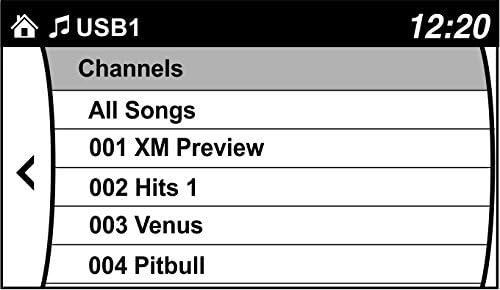
- Browse Channels: Use your factory radio controls and steering wheel controls to browse and enjoy SiriusXM channels. You can also save up to 36 presets.

제품 끝view 비디오
Video 2: This video highlights the benefits of adding SiriusXM to your factory original radio with the VAIS Technology adapter, showcasing seamless integration and control.
Video 3: This video demonstrates how to quickly add SiriusXM to your factory radio using a GSR adapter, emphasizing the ease of installation and use.
문제 해결
문제가 발생하면 다음 사항을 고려하세요.
- 신호 없음: Ensure the antenna is correctly positioned on the vehicle's roof with an unobstructed view of the sky. Check all cable connections.
- 전원 없음: Verify the OBD II connector is securely plugged into the vehicle's OBD II port.
- No Audio/Channels: Confirm the USB connection to the factory radio is secure. Ensure your SiriusXM subscription is active.
- 간헐적 신호: Re-evaluate antenna placement for optimal reception. Avoid areas with tall buildings or dense foliage.
For further assistance, please contact VAIS Technology customer support.
명세서
| 모델 번호 | GSR-MZ01 Interface Tuner Kit |
| 상표 | VAIS 기술 |
| 연결 기술 | USB |
| 튜너 기술 | 위성 |
| 전원 | 차량 동력 |
| 포함된 구성 요소 | Antenna, OBD II connector, SXV300V1 SiriusXM tuner module |
| 품목 무게 | 1파운드(16온스) |
| 패키지 크기 | 9.4 x 5.9 x 2.3 인치 |
보증 정보
For detailed warranty information regarding your VAIS Technology GSR-MZ01 adapter kit, please refer to the warranty card included with your product or visit the official VAIS Technology web사이트. 보증 청구를 위해 구매 증빙 자료를 보관하세요.
고객 지원
Should you require technical assistance, have questions about installation, or need to troubleshoot an issue, please contact VAIS Technology customer support. Contact information can typically be found on the product packaging or the official VAIS Technology web대지.


