1. 서론
The Cisco SG500-28MPP-K9 is a 28-port Gigabit Max PoE+ stackable managed switch designed to provide high availability, scalability, and performance for small to medium-sized businesses. This manual provides essential information for the proper installation, configuration, and maintenance of your device, ensuring optimal network performance and reliability.
2. 설정 지침
2.1. 패키지 내용
패키지에 다음 품목이 포함되어 있는지 확인하십시오.
- Cisco SG500-28MPP-K9 28-Port Gigabit Max PoE+ Managed Switch
- 전원 코드
- 랙 마운트 키트
- 콘솔 케이블(RJ-45 - DB-9)
- 문서 CD (또는 온라인 자료 링크)
2.2. 물리적 설치
스위치는 데스크탑에 설치하거나 표준 19인치 장비 랙에 장착할 수 있습니다.
- 데스크탑 설치: 스위치를 평평하고 안정적인 표면에 놓으세요. 기기 주변에 충분한 통풍이 되도록 하세요.
- Rack-mount Installation: Attach the provided rack-mount brackets to the sides of the switch using the included screws. Secure the switch into the equipment rack.
2.3. 스위치 연결
Follow these steps to connect your switch:
- 전원 코드를 스위치의 전원 입력 단자에 연결한 다음 접지된 콘센트에 연결하십시오.
- Connect your network devices (computers, IP phones, wireless access points) to the switch's Gigabit Ethernet ports using standard Ethernet cables. The switch supports Power over Ethernet Plus (PoE+) on its ports.
- For initial configuration, connect a computer to the switch's console port using the provided console cable, or connect a computer to any Ethernet port and configure its IP address to be in the same subnet as the switch's default IP address (typically 192.168.1.254).
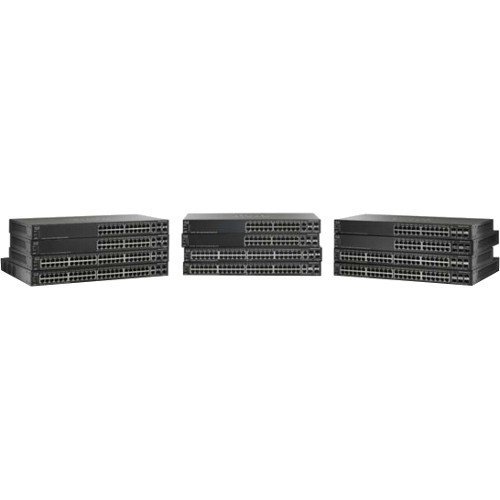
정면을 보여주는 이미지 view of the Cisco SG500-28MPP-K9 28-Port Gigabit Max PoE+ Managed Switch, highlighting its 28 ports and status indicators.
3. 스위치 작동
3.1. 초기 전원 켜기
Once connected to power, the switch will automatically power on. Observe the system LED indicators. The 'System' LED should turn green, indicating normal operation. Port LEDs will illuminate when a device is connected and active.
3.2. 기본 구성
The Cisco SG500-28MPP-K9 is a managed switch, offering extensive configuration options via a web그래픽 사용자 인터페이스(GUI) 또는 명령줄 인터페이스(CLI) 기반.
- Web GUI 액세스: 열기 web browser and enter the switch's default IP address (e.g., http://192.168.1.254). Log in using the default credentials (refer to the documentation for specific defaults, often 'cisco' for both username and password).
- CLI 액세스: Use a terminal emulation program (e.g., PuTTY) to connect via the console port. Configure the serial connection settings (e.g., 115200 baud, 8 data bits, no parity, 1 stop bit, no flow control).
It is highly recommended to change default passwords immediately after initial access for security purposes.
3.3. 주요 기능view
- 기가비트 이더넷 포트: Provides high-speed connectivity for network devices.
- Max PoE+: Delivers Power over Ethernet Plus to connected devices, simplifying deployment of IP phones, wireless access points, and IP cameras.
- 쌓을 수있는 : Allows multiple switches to be managed as a single unit, increasing network scalability and simplifying management.
- Managed Features: Supports advanced features such as VLANs, QoS, security, and IPv6 routing for robust network control.
4. 유지관리
4.1. 펌웨어 업데이트
정기적으로 Cisco 지원을 확인하세요 website for the latest firmware updates. Keeping your switch's firmware up-to-date ensures access to new features, performance improvements, and critical security patches. Follow the instructions provided with the firmware update package carefully.
4.2. 청소
To maintain proper airflow and prevent overheating, periodically clean the switch. Use a soft, dry cloth to wipe the exterior. For dust accumulation in ventilation openings, use compressed air. Ensure the switch is powered off and disconnected from the power source before cleaning.
4.3. 환경 고려 사항
Operate the switch within its specified environmental ranges for temperature and humidity to ensure longevity and stable performance. Avoid placing the switch in direct sunlight, near heat sources, or in areas with excessive dust or moisture.
5. 문제 해결
5.1. 일반적인 문제 및 해결 방법
- 전원 없음:
징후: 전원 LED가 꺼져 있습니다.
해결책: 스위치와 콘센트에 연결된 전원 코드를 확인하십시오. 콘센트가 제대로 작동하는지 확인하십시오. - 네트워크 연결 없음:
징후: Devices connected to the switch cannot access the network.
해결책: Verify that Ethernet cables are securely connected to both the switch and the devices. Check port status LEDs; a solid green or blinking green indicates a link. Ensure the switch has a valid IP configuration and is connected to your router/gateway. - PoE 장치가 켜지지 않음:
징후: PoE-powered device (e.g., IP phone) does not receive power.
해결책: Ensure the device is PoE-compatible. Check the switch's PoE status LEDs for the specific port. Verify PoE settings in the switch's management interface. Ensure the total PoE budget of the switch is not exceeded. - 접근할 수 없습니다 Web 그래픽 사용자 인터페이스:
징후: Browser cannot reach the switch's IP address.
해결책: Verify your computer's IP address is in the same subnet as the switch. Ping the switch's IP address to confirm network reachability. Clear browser cache or try a different browser.
If issues persist after attempting these solutions, refer to the comprehensive troubleshooting guide on the Cisco support web사이트 또는 기술 지원팀에 문의하세요.
6. 기술 사양
| 특징 | 사양 |
|---|---|
| 모델 | SG500-28MPP-K9 |
| 포트 수 | 28기가비트 이더넷 |
| 인터페이스 유형 | 포에버+ |
| 제품 치수 | 21.5 x 18.7 x 4.3 인치 |
| 품목 무게 | 15.31파운드 |
| 상표 | 시스코 |
| 한국어: | 748926547055 |
7. 보증 정보
This Cisco product is typically covered by a limited hardware warranty. For detailed information regarding the terms, conditions, and duration of your specific warranty, please refer to the warranty documentation included with your purchase or visit the official Cisco website. Warranty coverage may vary based on region and reseller.
8. 지원
For further assistance, technical support, or to download the latest drivers and firmware, please visit the official Cisco support website. You can also find extensive documentation, FAQs, and community forums there.
시스코 지원 Web대지: https://www.cisco.com/go/support


