1. 서론
This manual provides instructions for the setup, operation, and maintenance of your BESTISAN S6520 80W 34-Inch Soundbar. This soundbar is designed to enhance your audio experience for televisions, offering various connectivity options and sound modes.
2. 패키지 내용
아래 나열된 모든 품목이 패키지에 포함되어 있는지 확인하세요.
- 베스티산 S6520 사운드바
- 전원 어댑터
- 디지털 광 케이블
- 스테레오 RCA-3.5mm 오디오 케이블
- 리모컨(AAA 배터리 2개 포함)
- 사용자 설명서
- 서비스 카드

Image: Contents of the BESTISAN S6520 Soundbar package, including the soundbar, remote control, power adapter, optical cable, RCA cable, user manual, and service card.
3. 제품 오버view
The BESTISAN S6520 is an 80W 34-inch soundbar designed for home audio systems. It features multiple connectivity options and sound modes to optimize your listening experience.
3.1 사운드바 구성 요소
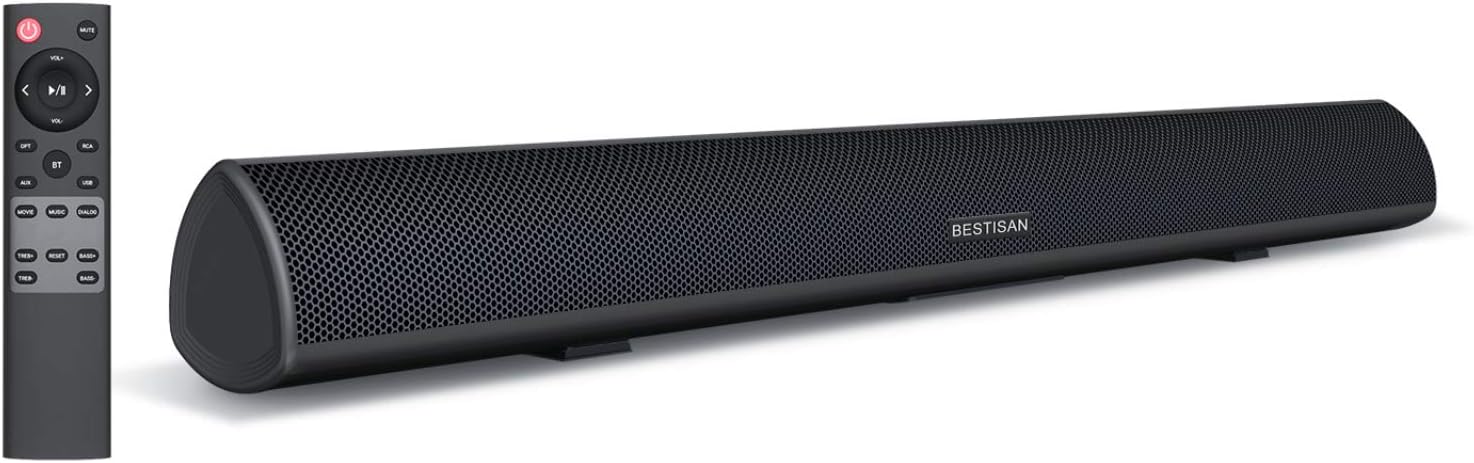
Image: The BESTISAN S6520 Soundbar shown alongside its remote control. The soundbar is black with a mesh grille, and the remote has various function buttons.

이미지: 폭발된 view of the soundbar's internal components, highlighting two bass reflex tubes, two 25W range drivers, and two 15W tweeter drivers.
3.2 Remote Control and On-Unit Buttons
The soundbar can be controlled using the included remote or the buttons located on the unit's side panel.

이미지: 자세한 view of the remote control and the right-side control panel of the soundbar, showing buttons for power, volume, input selection (USB, AUX, ARC, OPT, BT), and sound modes (Movie, Music, Dialog).
4. 설정
4.1 배치
The soundbar can be placed on a flat surface in front of your television or wall-mounted. Ensure the soundbar is positioned centrally for optimal audio distribution. The product dimensions are 4"D x 34"W x 4"H.
4.2 연결
The soundbar supports various audio input methods:
- HDMI-ARC: Connect an HDMI cable (not supplied) from the soundbar's HDMI-ARC port to your TV's HDMI-ARC port.
- 광학: Use the included optical cable to connect the soundbar to your TV's optical audio output.
- 보조: Connect devices using a 3.5mm audio cable (not supplied) to the AUX input.
- RCA : Use the included Stereo RCA to 3.5mm audio cable to connect devices with RCA outputs.
- USB: 오디오 재생을 위해 USB 드라이브를 삽입하세요.
- 블루투스: 블루투스 지원 기기와의 무선 연결을 위해.
5. 사용 설명서
5.1 전원 켜기/끄기
Press the power button on the remote control or the soundbar's side panel to turn the unit on or off.
5.2 입력 선택
Press the 'Input' button on the remote or the corresponding input button on the soundbar (e.g., OPT, ARC, BT, USB, AUX) to switch between audio sources. The LED indicator on the soundbar will change color to reflect the selected input mode.
5.3 볼륨 조절
Use the 'VOL+' and 'VOL-' buttons on the remote control or the soundbar's side panel to adjust the volume level.
5.4가지 사운드 모드
The soundbar features three distinct sound modes optimized for different content:
- 영화 모드 : Provides an expansive audio experience suitable for films.
- 음악 모드: 음악 재생 시 균형 잡힌 오디오를 제공합니다.
- 대화 모드: Enhances vocal clarity for TV shows and news.
리모컨의 전용 버튼을 사용하여 이러한 모드를 선택하십시오.

Image: Visual representation of the three distinct sound modes: Music, Movie, and Dialogue, available on the soundbar.

Image: A television displaying content with the soundbar below, illustrating the Clear Voice function which clarifies dialogue and commentary.
5.5 블루투스 페어링
블루투스 장치를 연결하려면:
- Press the 'BT' button on the remote control or soundbar to enter Bluetooth pairing mode. The LED indicator will flash.
- On your device (e.g., smartphone, tablet), enable Bluetooth and search for 'BESTISAN S6520'.
- Select the soundbar from the list of available devices to pair. Once connected, the LED indicator will glow solid blue.

Image: A smartphone displaying a music player interface, with sound waves emanating towards the BESTISAN S6520 Soundbar, indicating a Bluetooth 5.0 wireless connection.
6. 유지관리
사운드바의 수명과 최적의 성능을 보장하려면 다음 유지 관리 지침을 따르세요.
- 청소: 부드럽고 마른 천으로 사운드바 표면을 닦으십시오. 액체 세척제나 연마성 재질은 사용하지 마십시오.
- 놓기: Keep the soundbar away from direct sunlight, heat sources, and moisture. Ensure adequate ventilation around the unit.
- 손질: 사운드바를 떨어뜨리거나 강한 충격을 가하지 마십시오.
- 힘: Disconnect the power adapter during electrical storms or when the unit will be unused for extended periods.
7. 문제 해결
사운드바에 문제가 발생하면 다음의 일반적인 문제와 해결 방법을 참조하세요.
| 문제 | 가능한 해결책 |
|---|---|
| 전원이 없습니다 | 전원 어댑터가 사운드바와 작동하는 전원 콘센트에 단단히 연결되어 있는지 확인하세요. |
| 소리가 나지 않습니다 | Check that the correct input source is selected. Verify all audio cables are securely connected. Ensure the soundbar and TV volume are not muted or set too low. |
| 블루투스가 연결되지 않습니다 | Ensure the soundbar is in Bluetooth pairing mode. Turn off and on Bluetooth on your device. Move your device closer to the soundbar (within 10 meters). |
| 리모컨이 작동하지 않습니다 | Check if the batteries are correctly inserted and not depleted. Ensure there are no obstructions between the remote and the soundbar's sensor. |
| 왜곡된 소리 | Reduce the volume level. Check audio cable connections for damage. Try a different audio source or input mode. |
8. 사양
| 특징 | 세부 사항 |
|---|---|
| 모델명 | S6520 |
| 스피커 유형 | 사운드바 |
| 스피커 최대 출력 전력 | 80 와트 |
| 제품 치수 | 4인치 깊이 x 34인치 너비 x 4인치 높이 |
| 품목 무게 | 6.6 파운드 |
| 연결 기술 | Bluetooth, RCA, Optical, HDMI-ARC, AUX, USB |
| 무선 통신 기술 | 블루투스 5.0 |
| 블루투스 범위 | 10미터(33피트) |
| 오디오 출력 모드 | 둘러싸다 |
| 서라운드 사운드 채널 구성 | 2.1 |
| 주파수 응답 | 10200Hz |
| 제어 방법 | 원격 |
| 장착 유형 | 벽걸이형 |
| 전원 | 코드식 전기 |
| 한국어: | 656699979280, 702940163509 |
9. 보증 및 지원
The BESTISAN S6520 Soundbar comes with a limited warranty. For specific warranty terms and conditions, please refer to the service card included in your package.
For technical support, troubleshooting assistance, or any inquiries regarding your product, please contact BESTISAN customer service:
- 이메일: service@bestisan.com
- 페이스북: Visit the official BYL Facebook page and send a direct message.
A 90-day home trial period is offered for this product. Please contact customer service if you experience any dissatisfaction or defects during this period.


