소개
This manual provides essential information for the safe and effective operation of your Altec Lansing IMW478s Mini LifeJacket-3 Bluetooth Speaker. The Mini LifeJacket-3 is a rugged, compact, and waterproof portable speaker designed for various environments. It features Bluetooth wireless connectivity, True Wireless Stereo Plus pairing, an onboard microphone for hands-free communication, and a built-in power bank.
Please read this manual thoroughly before using the speaker and retain it for future reference.
패키지 내용
- Altec Lansing IMW478s Mini LifeJacket-3 Bluetooth Speaker
- USB 충전 케이블
- 보조(AUX) 케이블
- 장착 브래킷
- 빠른 시작 가이드(이 설명서에는 포함되지 않음)
제품 끝view
스피커 레이아웃

그림 1: 전면 view of the Altec Lansing IMW478s Mini LifeJacket-3 Bluetooth Speaker, showcasing its rugged design and speaker grilles.
제어 및 표시기

그림 2: 상단 view of the speaker, illustrating the control buttons. These typically include Power, Bluetooth Pairing, Volume Up/Next Track, Volume Down/Previous Track, and Play/Pause/Call Answer buttons.
- 전원 버튼: 스피커를 켜거나 끄려면 길게 누르세요.
- 블루투스 버튼: 블루투스 페어링 모드로 들어가려면 누르세요.
- Volume Up (+)/Next Track Button: Press to increase volume; press and hold to skip to the next track.
- Volume Down (-)/Previous Track Button: Press to decrease volume; press and hold to go to the previous track.
- 재생/일시정지/통화 버튼: Press to play or pause audio; press to answer or end a call.
- LED 표시등: 전원 상태, 충전 상태, 블루투스 페어링 상태를 표시합니다.
포트
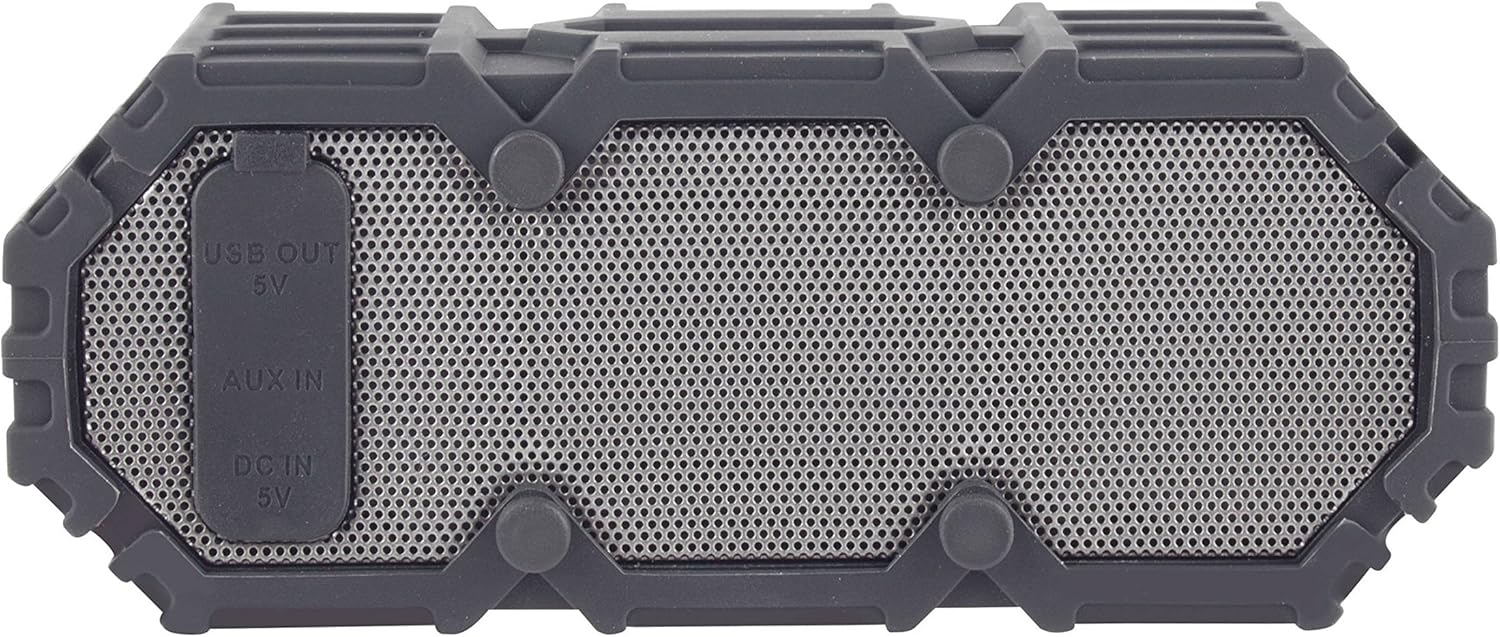
그림 3: 측면 view of the speaker revealing the protective flap covering the USB OUT (5V), AUX IN, and DC IN (5V) ports.
- DC IN (5V) Port: 제공된 USB 케이블을 사용하여 스피커를 충전하십시오.
- AUX IN 포트: For connecting external audio devices via a 3.5mm auxiliary cable.
- USB OUT (5V) Port: Functions as a power bank to charge other portable devices.
설정
초기 충전
- 처음 사용하기 전에 스피커를 완전히 충전하세요.
- 스피커 측면의 보호 플랩을 엽니다.
- Connect the small end of the USB charging cable to the DC IN (5V) port on the speaker.
- USB 케이블의 큰 쪽 끝을 USB 전원 어댑터(포함되지 않음)나 컴퓨터의 USB 포트에 연결합니다.
- The LED indicator will show charging status (e.g., solid red while charging, off when fully charged). Charging typically takes a few hours.
- Once fully charged, disconnect the cable and securely close the protective flap to maintain waterproofing.
전원 켜기/끄기
- To power on: Press and hold the Power button until the LED indicator lights up and you hear an audible prompt.
- To power off: Press and hold the Power button until the LED indicator turns off and you hear an audible prompt.
작동 지침
블루투스 페어링
- Ensure the speaker is powered on and within 30 feet (10 meters) of your Bluetooth device.
- The speaker will automatically enter Bluetooth pairing mode when powered on for the first time, or if no device is connected. The LED indicator will flash blue. If already connected, press the Bluetooth button to enter pairing mode.
- 장치(스마트폰, 태블릿, 컴퓨터)에서 Bluetooth를 활성화합니다.
- 검색 "Mini LifeJacket 3" in your device's Bluetooth settings.
- Select "Mini LifeJacket 3" to connect. Once paired, the LED indicator will turn solid blue, and you will hear a confirmation tone.
- 페어링에 실패하면 스피커와 기기의 Bluetooth를 끄고 단계를 반복하세요.
오디오 재생
- 재생/일시 중지: 재생/일시 정지 버튼을 누르세요.
- 볼륨 조절: 볼륨 높이기(+) 또는 볼륨 낮추기(-) 버튼을 누르세요.
- 다음 트랙: 볼륨 높이기(+) 버튼을 길게 누릅니다.
- 이전 트랙 : 볼륨 낮추기(-) 버튼을 길게 누릅니다.
통화 관리
- 전화 받기/종료: Press the Play/Pause/Call button.
- 전화 거부: Press and hold the Play/Pause/Call button.
True Wireless Stereo Plus Pairing (TWS)
The Mini LifeJacket-3 supports TWS pairing, allowing you to connect two Mini LifeJacket-3 speakers for a stereo audio experience.
- Ensure both Mini LifeJacket-3 speakers are powered on and not connected to any Bluetooth device.
- On one speaker (this will be the primary speaker), press and hold the Bluetooth button for 3 seconds until you hear a tone indicating TWS pairing mode.
- 1차 발언자는 자동으로 2차 발언자를 검색합니다.
- Once connected, you will hear a confirmation tone, and the LED indicators on both speakers will show a solid blue light.
- 이제 "블루투스 페어링" 섹션에 설명된 대로 블루투스 장치를 기본 스피커에 연결하세요. 오디오는 두 스피커를 통해 스테레오로 재생됩니다.
보조 입력(AUX)
블루투스 기능이 없는 기기에서 오디오를 재생하려면:
- 스피커 측면의 보호 플랩을 엽니다.
- Connect one end of the 3.5mm auxiliary cable to the AUX IN port on the speaker.
- 케이블의 다른 쪽 끝을 장치의 헤드폰 잭이나 오디오 출력에 연결합니다.
- 스피커가 자동으로 AUX 모드로 전환됩니다.
- 연결된 기기에서 재생과 볼륨을 제어하세요.
- Remember to close the protective flap when not in use.
파워뱅크 기능
The Mini LifeJacket-3 can be used to charge other USB-powered devices.
- 스피커 측면의 보호 플랩을 엽니다.
- Connect your device's USB charging cable to the USB OUT (5V) port on the speaker.
- 스피커의 내장 배터리가 기기 충전을 시작합니다.
- Note that using the power bank function will deplete the speaker's battery.
- Remember to close the protective flap when not in use.
스피커 충전하기
The Mini LifeJacket-3 provides up to 16 hours of battery life on a full charge. When the battery is low, the LED indicator may flash, or you may hear an audible low battery warning.
To charge the speaker, follow the steps outlined in the "Initial Charging" section under Setup. Ensure the protective flap is securely closed after charging to maintain the speaker's waterproof integrity.
Waterproofing and Care
The Altec Lansing IMW478s Mini LifeJacket-3 is rated IP67 Waterproof, Dustproof, and Shockproof, and it floats. This means it can be submerged in water up to 1 meter (3.3 feet) for up to 30 minutes.

Figure 4: The Mini LifeJacket-3 speaker floating on the surface of water, demonstrating its waterproof and buoyant design.
Important Waterproofing Notes:
- Always ensure the protective flap covering the charging and AUX ports is securely closed before exposing the speaker to water or dust.
- Do not submerge the speaker in water deeper than 1 meter or for longer than 30 minutes.
- Rinse the speaker with fresh water after exposure to saltwater or chlorinated water, then dry thoroughly.
- 스피커를 극한의 온도에 노출시키지 마십시오.
유지
- 청소: 부드러운 d를 사용하세요amp 스피커를 닦을 때는 천을 사용하십시오. 독한 화학 약품이나 연마성 세척제를 사용하지 마십시오.
- 저장: 스피커는 직사광선과 극한 온도 변화를 피해 서늘하고 건조한 곳에 보관하십시오. 장기간 보관할 경우 배터리 수명 유지를 위해 주기적으로 충전하십시오.
- 포트 케어: Ensure the charging and AUX ports are free of debris before connecting cables. Always close the protective flap when not in use.
문제 해결
| 문제 | 가능한 원인 | 해결책 |
|---|---|---|
| 스피커가 켜지지 않습니다. | 배터리가 소진되었습니다. | 스피커를 완전히 충전하세요. |
| Bluetooth 장치와 페어링할 수 없습니다. | 스피커가 페어링 모드가 아닙니다. 기기의 블루투스가 꺼져 있습니다. 스피커와 기기 사이의 거리가 너무 멀습니다. | Ensure speaker is in pairing mode (flashing blue LED). Turn Bluetooth on your device. Move speaker closer to device (within 30 ft/10m). Forget "Mini LifeJacket 3" on your device and try pairing again. |
| 스피커에서 소리가 나지 않습니다. | 볼륨이 너무 작습니다. 스피커가 연결되어 있지 않습니다. 입력 모드가 잘못되었습니다. | Increase volume on both speaker and connected device. Ensure speaker is successfully paired or AUX cable is properly connected. Check if speaker is in the correct mode (Bluetooth or AUX). |
| 소리가 왜곡됩니다. | Volume is too high; low battery; interference. | 볼륨을 낮추세요. 스피커를 충전하세요. 스피커를 다른 전자 기기에서 멀리 두세요. |
| Cannot charge external device using power bank. | 스피커 배터리가 너무 부족합니다. 케이블에 문제가 있는 것 같습니다. | 스피커 배터리가 충분히 충전되어 있는지 확인하세요. 다른 USB 케이블을 사용해 보세요. |
명세서
| 특징 | 세부 사항 |
|---|---|
| 상표 | 알텍랜싱 |
| 모델 | IMW478s (Mini LifeJacket-3) |
| 연결 기술 | 블루투스 |
| 무선 범위 | 최대 30피트(10미터) |
| 배터리 수명 | 최대 16시간 |
| 방수 등급 | IP67 (방수, 방진, 충격 방지, 부력) |
| 오디오 출력 모드 | 스테레오 (TWS 페어링 포함) |
| 전원 | 배터리 구동 |
| 제품 크기(D x W x H) | 2.76" x 7.87" x 1.57"(7.01cm x 19.99cm x 3.99cm) |
| 품목 무게 | 15.8 온스(447.9그램) |
| 특별 기능 | Built-in Microphone, Power Bank (USB OUT 5V), True Wireless Stereo Plus Pairing |

Figure 5: The Mini LifeJacket-3 speaker mounted on an ATV handlebar, demonstrating its versatility and the use of the included mounting bracket.
보증 및 지원
The Altec Lansing IMW478s Mini LifeJacket-3 Bluetooth Speaker comes with a Limited Warranty. For specific warranty terms and conditions, please refer to the warranty card included with your product or visit the official Altec Lansing web대지.
For technical support, troubleshooting assistance, or to inquire about replacement parts, please contact Altec Lansing customer service or visit their official support page. Contact information can typically be found on the product packaging or the manufacturer's web대지.
공식적인 Web대지: https://alteclansing.com/


