소개
Thank you for choosing the Cygnett FreePlay Bluetooth Earbuds. These truly wireless earbuds are designed to provide a seamless audio experience with comfort and convenience. This manual will guide you through the setup, operation, and maintenance of your new earbuds.
The FreePlay earbuds feature a secure fit with ultra-comfortable silicone ear tips, a lightweight design, and a 10-meter wireless range. They come with an integrated microphone and a portable charging case for extended use.
패키지 내용
패키지에 모든 품목이 들어 있는지 확인하세요.
- Cygnett FreePlay Bluetooth Earbuds (Left and Right)
- 충전 케이스
- 마이크로 USB 충전 케이블
- 실리콘 이어팁 (소형, 중형, 대형)
제품 끝view
Familiarize yourself with the components of your Cygnett FreePlay Bluetooth Earbuds and how they fit.

영상: A man wearing a Cygnett FreePlay earbud, demonstrating its discreet and secure fit.

영상: A woman wearing a Cygnett FreePlay earbud, illustrating its comfortable placement for active use.

영상: Close-up of a single Cygnett FreePlay earbud, showing the speaker mesh and silicone ear tip.
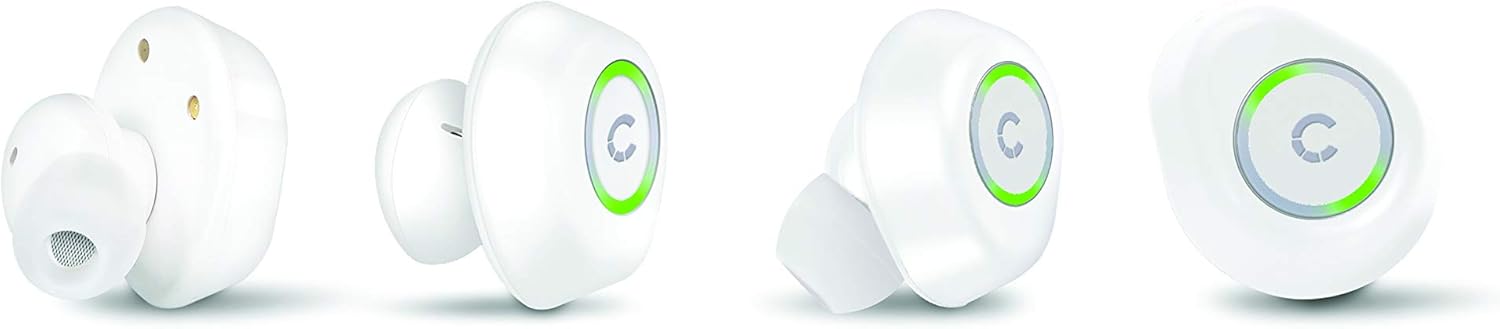
영상: Various angles of the Cygnett FreePlay earbuds, highlighting their compact design and the illuminated 'C' logo.

영상: The Cygnett FreePlay earbuds placed inside their open charging case, showing the charging contacts and the Cygnett branding.
설정
1. 이어버드와 케이스 충전
처음 사용하기 전에 이어버드와 충전 케이스를 완전히 충전하세요.
- 이어버드를 충전 케이스에 넣으세요. 왼쪽 이어버드는 해당 슬롯에, 오른쪽 이어버드는 해당 슬롯에 올바르게 장착되었는지 확인하세요.
- Connect the Micro USB cable to the charging port on the case and the other end to a USB power source (e.g., computer, wall adapter).
- The indicator lights on the earbuds and/or case will show charging status.
- Once fully charged, disconnect the charging cable. The case provides approximately 6 hours of additional playback time for the earbuds.
2. 블루투스 페어링
To connect your Cygnett FreePlay earbuds to your device:
- Ensure the earbuds are charged and removed from the charging case. They should automatically enter pairing mode, indicated by a flashing LED light (color/pattern may vary).
- 스마트폰, 태블릿 또는 기타 Bluetooth 지원 기기에서 Bluetooth 설정으로 이동합니다.
- 블루투스를 켜세요.
- 검색 available devices. You should see "Cygnett FreePlay" or a similar name appear in the list.
- Select "Cygnett FreePlay" to connect. Once connected, the earbud LED light will typically stop flashing or change to a solid color.
- 이어버드를 케이스에서 꺼내 범위 내에 놓으면 마지막으로 페어링된 기기에 자동으로 다시 연결됩니다.
메모: 페어링에 실패하면 이어버드를 끄고, 기기의 블루투스를 비활성화한 후 단계를 반복하세요.
이어버드 작동하기
The Cygnett FreePlay earbuds feature a simple single-button control for managing calls and music playback.
음악 제어
- 재생/일시 중지: 이어버드 중 한쪽의 버튼을 한 번 누르세요.
- 다음 트랙: 오른쪽 이어버드의 버튼을 두 번 누르세요.
- 이전 트랙 : 왼쪽 이어버드의 버튼을 두 번 누르세요.
- 볼륨 업: 오른쪽 이어버드의 버튼을 세 번 누르세요.
- 볼륨 작게 : 왼쪽 이어버드의 버튼을 세 번 누르세요.
통화 제어
- 전화 받기/종료: 이어버드 중 한쪽의 버튼을 한 번 누르세요.
- 전화 거부: Press and hold the button for approximately 2 seconds on either earbud.
- 음성 어시스턴트 : 통화 중이 아닐 때 버튼을 약 2초 동안 길게 누르면 기기의 음성 비서(예: Siri, Google Assistant)가 활성화됩니다.
전원 켜기/끄기
- 전원 켜기: Remove earbuds from the charging case. They will power on automatically. Alternatively, press and hold the button on each earbud for 3 seconds.
- 전원 끄기 : Place earbuds back into the charging case. They will power off automatically. Alternatively, press and hold the button on each earbud for 5 seconds.
유지
Proper care will extend the life of your Cygnett FreePlay earbuds.
- 청소: Regularly clean the silicone ear tips with a soft, dry cloth. If necessary, use a slightly damp 순한 비누를 묻힌 천으로 닦은 후 완전히 말리십시오. 강한 화학 약품이나 연마제를 사용하지 마십시오.
- 저장: 이어버드를 사용하지 않을 때는 항상 충전 케이스에 넣어 먼지, 오염 및 손상으로부터 보호하십시오.
- 습기를 피하세요: Keep the earbuds and charging case away from water and excessive moisture. While designed for active lifestyles, they are not waterproof.
- 온도: 기기를 극한 온도(고온 또는 저온)에 노출시키지 마십시오. 배터리 수명이 단축되고 성능에 영향을 미칠 수 있습니다.
문제 해결
이어버드에 문제가 발생하면 다음 해결 방법을 시도해 보세요.
| 문제 | 해결책 |
|---|---|
| 이어폰이 기기와 페어링되지 않습니다. |
|
| 이어폰에서 소리가 나지 않습니다. |
|
| 한쪽 이어버드가 작동하지 않습니다. |
|
| 충전 케이스가 충전되지 않습니다. |
|
명세서
| 모델명 | Cy2496Frepl |
| 모델 번호 | CY2496FREPL |
| 상표 | Cygnett |
| 연결 기술 | 무선 전화 |
| 무선 통신 기술 | 블루투스 |
| 무선 범위 | 10 미터 |
| 폼 팩터 | 인이어 |
| 재료 | 실리콘 |
| 색상 | 하얀색 |
| 배터리 유형 | 1 리튬 금속 (포함) |
| 통화 시간 | 3시간 |
| 대기 시간 | 100시간 |
| Additional Playback from Case | 6시간 |
| 제어 유형 | 버튼 제어 |
| 호환 장치 | 스마트폰, 태블릿 |
| 포함된 구성 요소 | 마이크로 USB 케이블 |
| 충전 포트 | USB |
보증 및 지원
For warranty information and customer support, please refer to the documentation provided with your purchase or visit the official Cygnett web대지.
If you require further assistance or have questions not covered in this manual, please contact Cygnett customer service.


