1. 서론
The Marantz NR1609 is a slim-profile 7.2 channel AV Surround Receiver designed to deliver exceptional audio and video performance in a compact form factor. It supports the latest audio formats like Dolby Atmos and DTS:X, along with 4K Ultra HD video pass-through, HDR, and Dolby Vision. With built-in HEOS multi-room audio technology, Bluetooth, and AirPlay 2, the NR1609 offers versatile connectivity for all your entertainment needs.
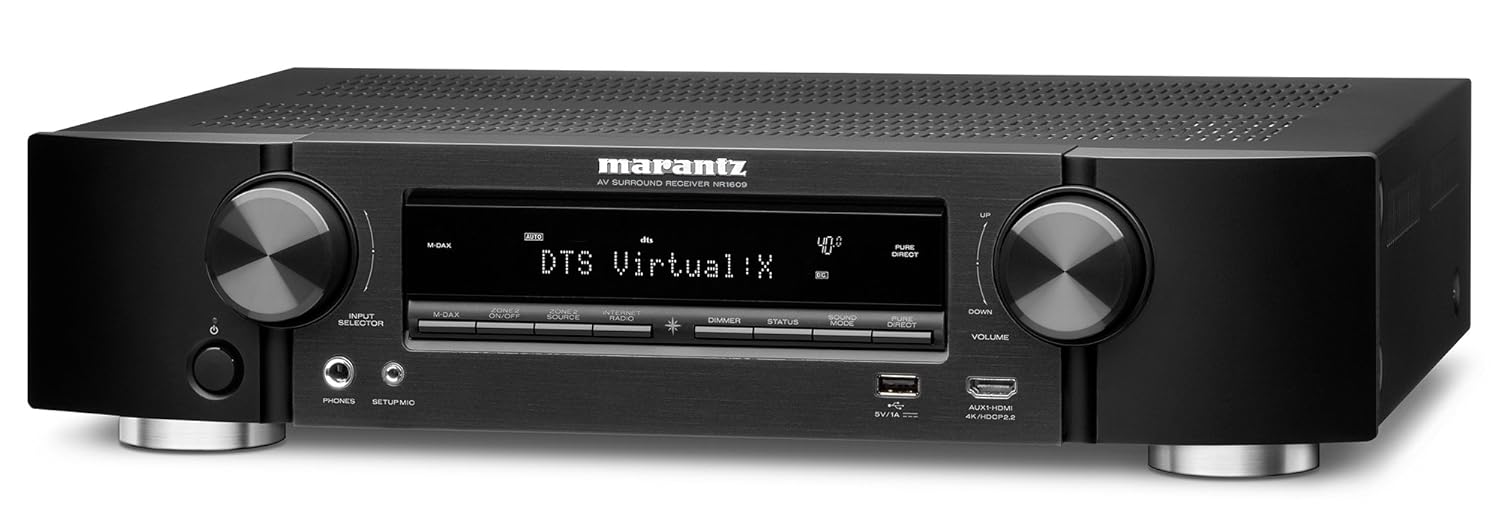
그림 1: 전면 view of the Marantz NR1609 AV Surround Receiver, showcasin세련된 디자인과 전면 패널 컨트롤이 특징입니다.
2. 안전 정보
Please read these safety instructions carefully before operating the unit. Failure to comply may result in fire, electric shock, or other injury.
- 통풍: 제품 주변에 적절한 환기를 위한 충분한 공간을 확보하십시오. 환기구를 막지 마십시오.
- 전원: 본 기기는 볼륨의 AC 콘센트에만 연결하십시오.tage는 후면 패널에 지정되어 있습니다.
- 수분: 제품을 비나 습기에 노출시키지 마십시오. 꽃병 등 액체가 담긴 물건을 제품 위에 올려놓지 마십시오.
- 놓기: Place the unit on a flat, stable surface away from direct sunlight, heat sources, and excessive dust.
- 서비스: 제품을 직접 수리하려고 하지 마십시오. 모든 수리는 자격을 갖춘 서비스 담당자에게 맡기십시오.
3. 주요 특징
The Marantz NR1609 offers a range of advanced features for an immersive home theater experience:
- 슬림 프로file 설계: Half the height of traditional AV receivers, ideal for space-constrained setups.
- 7채널 분리형 전원 Amp정수기: Delivers 90W per channel for dynamic sound.
- Advanced HDMI Connectivity: 8 HDMI inputs (including 1 front) and 1 ARC output, all with HDCP 2.2 support.
- 4K 울트라 HD 지원: 4K/60 Hz full-rate pass-through, 4:4:4 color resolution, HDR, BT.2020, Dolby Vision, and HLG.
- Object-Based Audio: Supports Dolby Atmos, DTS:X, and DTS Virtual:X processing for three-dimensional sound.
- 고해상도 오디오: Decodes ALAC, FLAC, WAV (up to 24-bit/192-kHz), and DSD (2.8MHz/5.6MHz) files.
- HEOS 내장형: Wireless multi-room audio technology for streaming music throughout your home.
- 음성 제어: Compatible with Amazon Alexa via the HEOS Home Entertainment skill.
- 스트리밍 서비스: Access popular music services like Spotify, TuneIn, and Deezer via Bluetooth, AirPlay 2, or the HEOS app.
4. 설정 가이드
4.1 포장 풀기 및 배치
Carefully remove the NR1609 from its packaging. Ensure all accessories, including the remote control, power cord, setup microphone, and antennas, are present. Place the receiver on a sturdy, level surface with adequate ventilation space around it (at least 10 cm on sides and top).
4.2 연결
연결하기 전에 수신기 및 연결된 모든 장치의 전원이 꺼져 있고 AC 콘센트에서 플러그가 뽑혀 있는지 확인하십시오.
- HDMI 연결: Connect your video sources (Blu-ray player, game console, set-top box) to the HDMI IN ports. Connect your TV or projector to the HDMI OUT (ARC) port.
- 스피커 연결: Connect your speakers to the corresponding speaker terminals on the rear panel. Pay attention to polarity (+/-). The NR1609 supports 7.2 channel configurations.
- 네트워크 연결 : For internet radio, firmware updates, and HEOS functionality, connect an Ethernet cable to the LAN port or attach the Wi-Fi antennas and configure wireless settings.
- 오디오 입력 : Connect external audio devices using analog RCA cables or digital optical/coaxial cables. A dedicated PHONO input is available for turntables.
- 힘: Once all connections are made, connect the power cord to the receiver and then to an AC outlet.

Figure 2: Rear panel of the Marantz NR1609, illustrating the various input and output ports for comprehensive connectivity.
4.3 Initial Setup Wizard and Audyssey Calibration
Upon first power-on, the NR1609 will guide you through an on-screen setup wizard. Follow the prompts to configure your language, network settings, and speaker setup. The Audyssey MultEQ XT calibration system will optimize your speaker settings for your room's acoustics using the included setup microphone. This process is crucial for achieving optimal sound quality.
5. 사용 설명서
5.1 기본 작업
- 전원 켜기/끄기: Use the POWER button on the front panel or remote control.
- 입력 선택: Use the INPUT SELECTOR knob on the front panel or dedicated input buttons on the remote to choose your desired source (e.g., Blu-ray, TV Audio, Game).
- 볼륨 조절: Adjust the VOLUME knob on the front panel or the VOLUME +/- buttons on the remote.
5.2 Audio Modes and Surround Sound
The NR1609 supports various audio modes, including advanced object-based formats:
- 돌비 애트모스: Creates a three-dimensional sound field with overhead effects.
- DTS:X: Similar to Dolby Atmos, offering flexible speaker layouts and immersive sound.
- DTS 버추얼:X: Provides a virtual height and surround effect without dedicated height or surround speakers.
- Stereo/Direct Modes: For pure two-channel audio playback.
Use the "SOUND MODE" buttons on the remote to cycle through available audio modes for the current input.
5.3 네트워크 및 스트리밍 기능
- HEOS Multi-Room Audio: Download the HEOS app to control music playback across multiple HEOS-enabled devices in your home.
- 블루투스: Pair your smartphone or tablet to stream audio wirelessly.
- 에어플레이 2: Stream audio from Apple devices to the receiver and other AirPlay 2 compatible speakers.
- 음악 서비스: Access integrated services like Spotify Connect, TuneIn Internet Radio, and Deezer directly through the HEOS app or receiver interface.
5.4 아마존 알렉사를 이용한 음성 제어
The Marantz NR1609 supports Amazon Alexa voice control via the HEOS Home Entertainment skill. Enable the skill in your Alexa app and link your HEOS account to control basic functions like power, volume, input selection, and music playback using voice commands.
6. 유지관리
- 청소: 부드럽고 마른 천을 사용하여 기기 외부를 닦으세요. 연마성 세제나 용제를 사용하지 마세요.
- 펌웨어 업데이트: Periodically check for and install firmware updates via the network connection to ensure optimal performance and access to new features. This can usually be done through the receiver's setup menu.
7. 문제 해결
If you encounter issues with your Marantz NR1609, refer to the following common troubleshooting steps:
| 문제 | 가능한 원인 / 해결책 |
|---|---|
| 소리가 나지 않습니다 |
|
| 사진 없음 |
|
| 네트워크 연결 문제 |
|
| 리모컨이 작동하지 않음 |
|
If the problem persists, please refer to the official Marantz support web사이트를 방문하거나 고객 서비스에 문의하세요.
8. 사양
Detailed technical specifications for the Marantz NR1609 AV Surround Receiver:
| 특징 | 세부 사항 |
|---|---|
| 모델 | NR1609 |
| 채널 | 7.2 |
| 전력 출력(채널당) | 90W (6 ohms, 1 kHz, 1% THD, 1ch Driven) / 50W (8 ohms, 20 Hz - 20 kHz, 0.08% THD, 2ch Driven) |
| HDMI 입력/출력 | 8 In (1 Front) / 1 Out (ARC) |
| HDCP 버전 | HDCP 2.2 support on all HDMI ports |
| 비디오 패스스루 | 4K/60Hz, 4:4:4 Pure Color, HDR, Dolby Vision, HLG, BT.2020 |
| 오디오 포맷 | Dolby Atmos, DTS:X, DTS Virtual:X, Dolby TrueHD, DTS-HD Master Audio |
| 고해상도 오디오 지원 | ALAC, FLAC, WAV (up to 24-bit/192kHz), DSD (2.8/5.6MHz) |
| 무선 연결 | Wi-Fi (2.4GHz/5GHz), Bluetooth, AirPlay 2, HEOS Built-in |
| 음성 제어 | Amazon Alexa 호환 |
| 치수(폭 x 깊이 x 높이) | 440 x 368 x 105mm(17.3 x 14.5 x 4.1인치) |
| 무게 | 8.4kg(18.5파운드) |
| 전력 소비 | 250W (Operational) |

그림 3: 내부 view of the Marantz NR1609, showing the main circuit board and heat sinks.

그림 4: 또 다른 내부 view of the Marantz NR1609, illustrating the overall component layout and wiring.
9. 보증 및 지원
The Marantz NR1609 is covered by a standard manufacturer's warranty. For specific warranty terms and conditions, please refer to the warranty card included with your product or visit the official Marantz web대지.
For technical support, frequently asked questions, and additional resources, please visit the official Marantz support page:


