1. 서론
This manual provides essential information for the safe and efficient installation, operation, and maintenance of your Urmet 926/3 Electronic Intercom Power Supply Unit. Please read this manual thoroughly before attempting any installation or use. Keep this manual for future reference.
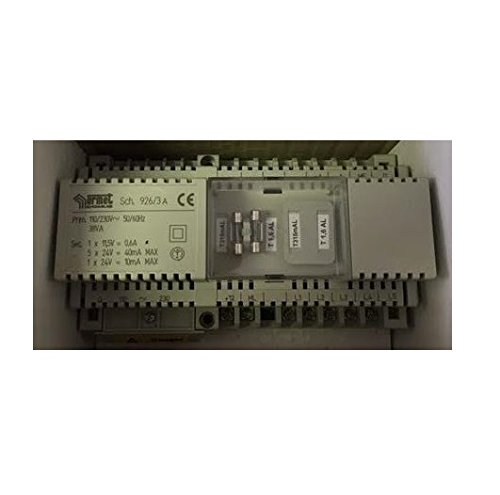
Figure 1: Urmet 926/3 Electronic Intercom Power Supply Unit. This image shows the compact design of the power supply, typically housed in a grey or white plastic casing with connection terminals visible.
2. 안전 정보
Always observe the following safety precautions to prevent injury and damage to the unit or connected equipment.
- 전기적 위험: 설치는 모든 지역 및 국가 전기 규정에 따라 자격을 갖춘 전기 기술자가 수행해야 합니다.
- 전원 차단: Ensure the main power supply is disconnected before commencing any installation, wiring, or maintenance work.
- 권tage 호환성: 입력 볼륨을 확인하세요tage matches the specifications of the power supply unit.
- 환경 조건: Do not expose the unit to moisture, extreme temperatures, or direct sunlight. Install in a dry, well-ventilated area.
- 적절한 배선: Use appropriate gauge wiring for all connections to prevent overheating and ensure stable operation.
- 사용자가 수리할 수 없는 부품: 제품을 직접 열거나 수리하려고 하지 마십시오. 모든 서비스는 자격을 갖춘 전문가에게 맡기십시오.
3. 패키지 내용
상자를 조심스럽게 풀고 모든 품목이 들어 있고 손상되지 않았는지 확인하세요. 품목이 없거나 손상된 경우 즉시 공급업체에 문의하세요.
- Urmet 926/3 Electronic Intercom Power Supply Unit (1x)
- 사용 설명서(본 문서)
4. 설정 및 설치
Installation should only be carried out by a qualified professional. Ensure all power is disconnected before proceeding.
- 설치: Select a suitable, dry, and well-ventilated location for mounting the power supply unit. Use appropriate fasteners to secure the unit to a wall or electrical panel.
- 입력 전원 연결: Connect the main AC power supply to the designated input terminals on the Urmet 926/3 unit. Refer to the wiring diagram provided with your intercom system for specific terminal assignments. Ensure correct polarity and secure connections.
- Output Connection to Intercom: Connect the output terminals of the Urmet 926/3 to the intercom system's power input. This unit provides 38VA power, which is suitable for compatible Urmet electronic intercom systems. Double-check the wiring diagram for your specific intercom model to ensure proper connection.
- 접지: Ensure the unit is properly grounded according to local electrical regulations.
- 최종 확인: Before restoring power, visually inspect all connections to ensure they are secure, correctly wired, and free from any short circuits.
- 전원 켜기: Restore power to the circuit. The intercom system should now receive power from the Urmet 926/3 unit.
Note: A detailed wiring diagram specific to your intercom system is crucial for correct installation. If you do not have one, consult your intercom system's manual or a qualified technician.
5. 사용 설명서
The Urmet 926/3 is a dedicated power supply unit designed to provide stable power to compatible Urmet electronic intercom systems. Once correctly installed and connected, the unit operates automatically when power is supplied to the circuit.
- 자동 작동: The power supply unit will provide the necessary 38VA power to the intercom system as long as it receives input power.
- 사용자 제어 없음: This unit does not feature user-adjustable controls or switches. Its function is solely to convert and supply power.
- 인터콤 기능: Refer to your specific Urmet intercom system's manual for instructions on its operation, as the power supply unit only facilitates its function.
6. 유지관리
The Urmet 926/3 power supply unit requires minimal maintenance. Regular inspection can help ensure its longevity and reliable performance.
- 전원 차단: Always disconnect the main power supply before performing any maintenance.
- 청소: 주기적으로 부드럽고 마른 천으로 제품 외부를 닦아주십시오. 액체 세척제나 용제를 사용하지 마십시오.
- 점검: Annually inspect the wiring connections for any signs of loosening, corrosion, or damage. Ensure the unit's casing는 손상되지 않았으며 균열이 없습니다.
- 통풍: Ensure that the area around the unit remains clear to allow for proper ventilation and prevent overheating.
- 전문가 확인: For any concerns regarding internal components or electrical performance, consult a qualified electrician.
7. 문제 해결
If your intercom system is not functioning correctly, perform the following basic troubleshooting steps. Always disconnect power before inspecting connections.
| 문제 | 가능한 원인 | 해결책 |
|---|---|---|
| Intercom system has no power. | No main AC power to the Urmet 926/3 unit. | Check the circuit breaker or fuse for the power supply circuit. Ensure the main power switch is ON. |
| Intercom system has no power. | Loose or incorrect wiring connections to the Urmet 926/3. | Disconnect power, then inspect and secure all input and output wiring connections. Refer to the installation section. |
| Intercom system has no power. | Faulty Urmet 926/3 unit. | If power is confirmed at the input terminals and connections are correct, the unit may be faulty. Contact a qualified technician for diagnosis and replacement. |
| Intercom system functions intermittently. | Unstable power supply or loose connections. | Check all wiring connections for tightness. Ensure the input power is stable. Consult an electrician if the issue persists. |
If these steps do not resolve the issue, do not attempt further repairs. Contact a qualified electrician or Urmet customer support.
8. 사양
Key technical specifications for the Urmet 926/3 Electronic Intercom Power Supply Unit:
- 모델: 926/3
- 제조업체: 우르멧
- 출력 전력: 38VA (Volt-Amp에레스)
- 호환성: Designed for Urmet electronic intercom systems
- ASIN: B07D3XMHKV
- Batteries/Piles: Not included, not required
- 예비 부품의 가용성: 정보를 사용할 수 없습니다
9. 보증 및 지원
For warranty information and customer support, please refer to the documentation provided at the time of purchase or contact your Urmet distributor or reseller. Keep your proof of purchase for warranty claims.
제조업체: 우르멧
Web대지: www.urmet.com (Note: This is a general Urmet web사이트, 특정 지역 지원은 다를 수 있습니다.)


