소개
The DigiTech Multi-Function LCD Wall Clock (Model XC0225) is a versatile device designed to provide convenient time display along with additional environmental information. This clock features a large LCD screen displaying time, date, day of the week, indoor temperature, and humidity. It also includes alarm and snooze functions, making it suitable for various settings, whether mounted on a wall or placed on a desktop.
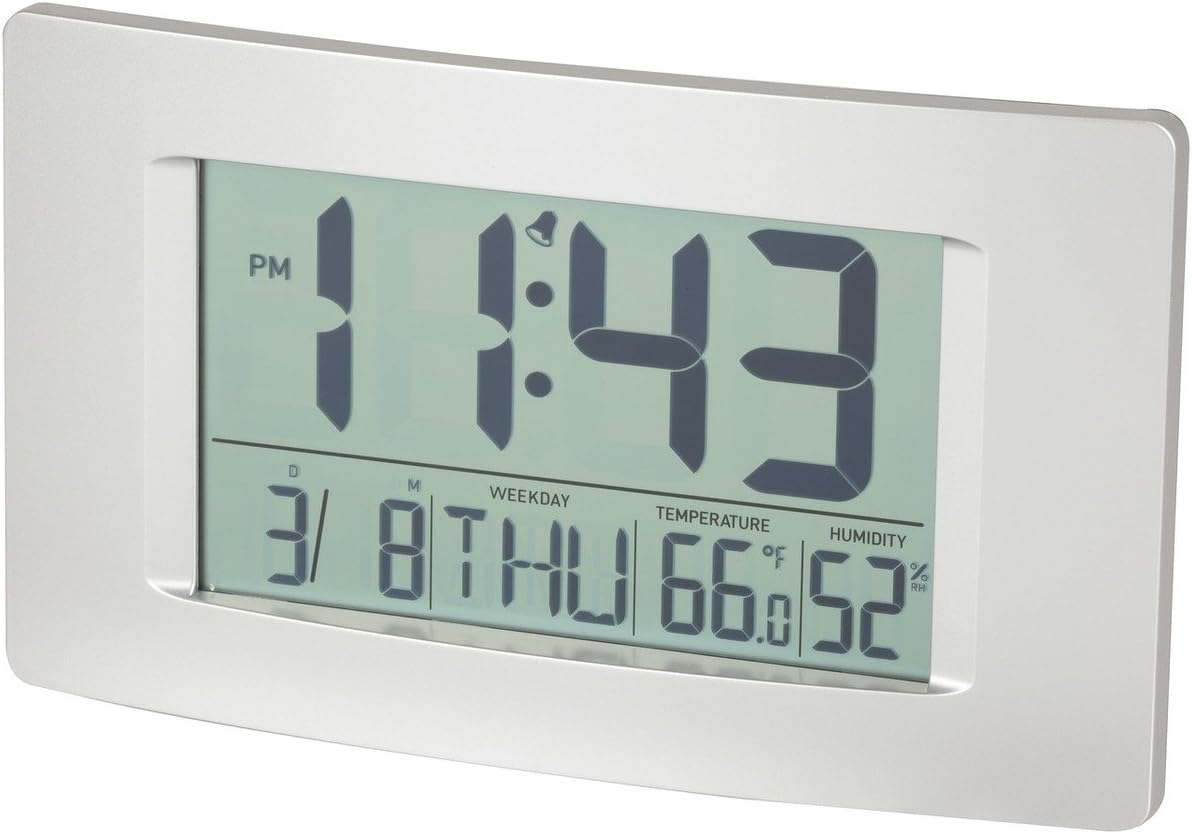
그림 1: 전면 view of the Multi-Function LCD Wall Clock.
패키지 내용
- DigiTech Multi-Function LCD Wall Clock (Model XC0225)
- 사용 설명서 (본 문서)
메모: 본 제품 작동에는 AA 배터리 3개가 필요하며, 패키지에는 포함되어 있지 않습니다.

Figure 2: Product packaging illustrating the clock and its features.
설정
1. 배터리 설치
- 시계 뒷면에서 배터리 칸을 찾으세요.
- 배터리 덮개를 엽니다.
- Insert 3 x AA batteries, ensuring correct polarity (+ and -) as indicated inside the compartment.
- 배터리 덮개를 단단히 닫으세요.
2. 초기 전원 켜기
Upon battery installation, the clock will power on automatically and display default settings. You may need to adjust the time, date, and other settings as described in the "Operating Instructions" section.
3. 장착 옵션
- 데스크탑 배치: Utilize the integrated stand on the back of the clock to place it on any flat surface.
- 벽면 장착: Use the integrated hang-hole on the back of the clock to mount it securely on a wall using a suitable screw or hook (not included).
작동 지침
The clock features several buttons on the back for setting and adjusting functions. Refer to the labels next to each button for their specific functions (e.g., MODE, UP, DOWN, ALARM, SNOOZE/LIGHT).
1. 시간 및 날짜 설정
- 를 누르세요 방법 button repeatedly until the time display starts flashing.
- 사용하세요 UP or 아래에 버튼으로 시간을 조정합니다.
- 누르다 방법 again to move to minutes, then use UP or 아래에 조정하다.
- 계속 누르기 방법 연도, 월, 일 설정을 순환하며 각각을 조정합니다. UP or 아래에.
- 누르다 방법 설정 모드를 종료하려면 마지막으로 한 번 더 누르세요.
2. 알람 설정
- 를 누르세요 경보 버튼을 한 번 누르면 현재 알람 시간이 표시됩니다.
- 를 누르고 계세요 경보 알람 시간이 깜빡이기 시작할 때까지 버튼을 누르세요.
- 사용하세요 UP or 아래에 알람 시간을 조정하는 버튼입니다.
- 누르다 경보 again to move to alarm minutes, then use UP or 아래에 조정하다.
- 누르다 경보 알람 설정 모드를 확인하고 종료하려면 마지막으로 한 번 더 클릭하세요.
- 알람을 활성화/비활성화하려면 다음을 누르세요. 경보 button briefly when not in setting mode. An alarm icon will appear/disappear on the display.
3. 스누즈 기능
알람이 울리면 버튼을 누르세요. 스누즈 / 라이트 button to activate the snooze function. The alarm will temporarily stop and sound again after the set snooze interval (1-60 minutes, adjustable in settings).
4. 온도 단위 선택(°C/°F)
짧게 누르세요 UP button (or a dedicated °C/°F button if present) to toggle between Celsius (°C) and Fahrenheit (°F) temperature display.
5. 12/24시간 형식
짧게 누르세요 아래에 button (or a dedicated 12/24H button if present) to switch between 12-hour and 24-hour time formats.
유지
1. 청소
- 부드럽고 마른 천으로 시계 표면을 닦으세요.
- 연마성 세척제, 용제 또는 화학 스프레이를 사용하지 마십시오. 이러한 제품은 디스플레이나 케이스를 손상시킬 수 있습니다.asing.
2. 배터리 교체
When the display becomes dim or functions become erratic, it is time to replace the batteries. Follow the "Battery Installation" steps in the Setup section to replace the 3 x AA batteries. Always replace all batteries at the same time with new ones.
문제 해결
| 문제 | 가능한 원인 | 해결책 |
|---|---|---|
| 디스플레이가 비어 있거나 어둡습니다. | 배터리가 소진되었거나 올바르게 설치되지 않았습니다. | 배터리를 새 AA 배터리 3개로 교체하고 극성이 올바른지 확인하세요. |
| 시간/날짜가 올바르지 않습니다. | Not set correctly after battery installation or power interruption. | "시간 및 날짜 설정" 지침에 따라 재설정하십시오. |
| 알람이 울리지 않습니다. | Alarm is not activated or alarm time is incorrect. | Ensure the alarm icon is displayed. Verify the alarm time setting. |
| 온도/습도 측정값이 정확하지 않은 것 같습니다. | Clock placed near heat sources, vents, or in direct sunlight. | Relocate the clock to an area with stable ambient temperature and humidity. Allow time for readings to stabilize. |
명세서
| 특징 | 세부 사항 |
|---|---|
| 모델 | 엑스씨0225 |
| 디스플레이 유형 | 디지털 LCD |
| LCD 크기 | 194mm(폭) x 110mm(높이) |
| 기능 | Time, Date, Day of Week, Alarm, Snooze, Indoor Temperature, Indoor Humidity |
| 시간 형식 | 12 Hour / 24 Hour selectable |
| 온도 범위 | -9.9°C ~ +50°C(14.1°F ~ 122.0°F) |
| 습도 범위 | 20% ~ 95% 상대 습도(RH) |
| 다시 알림 시간 | 1분~60분 (조절 가능) |
| 전원 | AA 배터리 3개(포함되지 않음) |
| Dimensions (Overall, W x H x D) | 306mm x 176mm x 36mm(대략) |
| 무게 | 540g (without batteries) / 660g (shipping weight) |
| 장착 옵션 | Integrated Stand, Wall Hang-hole |

Figure 3: Main display area dimensions of the clock for reference.
보증 및 지원
This DigiTech product comes with a 1년 보증 구매일로부터. 이 보증은 정상적인 사용 하에서 재료 및 제조상의 결함을 포함합니다.
For technical support, warranty claims, or further assistance, please contact your retailer or the DigiTech customer service department. Please have your model number (XC0225) and proof of purchase ready when contacting support.


