소개
This manual provides essential information for the safe and efficient operation of your Behringer EUROPORT MPA200BT portable PA system. Please read these instructions thoroughly before using the device to ensure proper setup, usage, and maintenance. Retain this manual for future reference.
The Behringer EUROPORT MPA200BT is an all-in-one portable PA system designed for various applications, featuring 200 watts of power, Bluetooth connectivity for audio streaming, and a wireless microphone for vocal performances or presentations. Its battery operation allows for use in locations without direct power access.
중요 안전 지침
전기 장비를 사용할 때는 항상 다음 기본 안전 예방 조치를 따르십시오.
- 제품을 작동하기 전에 모든 지침을 읽으십시오.
- Do not use this product near water or in wet environments.
- 마른 천으로만 닦으십시오.
- 환기구를 막지 마십시오. 제조업체의 지침에 따라 설치하십시오.
- 라디에이터, 난방 조절기, 스토브 또는 기타 장치(다음을 포함)와 같은 열원 근처에 설치하지 마십시오. amp열을 생성하는 발전기.
- 극성 또는 접지형 플러그의 안전 목적을 저버리지 마십시오. 극성 플러그에는 두 개의 날이 있으며, 하나는 다른 하나보다 넓습니다. 접지형 플러그에는 두 개의 날과 세 번째 접지 갈래가 있습니다. 넓은 날 또는 세 번째 갈래는 안전을 위해 제공됩니다. 제공된 플러그가 콘센트에 맞지 않으면 전기 기술자에게 문의하여 오래된 콘센트를 교체하십시오.
- 전원 코드가 밟히거나 끼지 않도록 보호하세요. 특히 플러그, 편의용 콘센트 및 기기에서 나오는 부분은 보호하세요.
- 제조사가 지정한 부속품/액세서리만 사용하세요.
- 번개 폭풍 시 또는 장기간 사용하지 않을 때는 기기의 플러그를 뽑아두세요.
- 모든 서비스는 자격을 갖춘 서비스 담당자에게 의뢰하십시오. 전원 코드나 플러그가 손상되었거나, 액체가 쏟아졌거나, 물체가 기기에 떨어졌거나, 기기가 비나 습기에 노출되었거나, 정상적으로 작동하지 않거나, 떨어졌을 때와 같이 기기가 어떤 식으로든 손상된 경우 서비스가 필요합니다.
패키지 내용
Upon unpacking your Behringer EUROPORT MPA200BT, please verify that all components are present and in good condition:
- Behringer EUROPORT MPA200BT Portable PA System
- Wireless Microphone (ULM300M)
- USB Receiver for Wireless Microphone (ULM300USB)
- 전원 케이블
- 사용 설명서 (본 문서)

Image: The Behringer EUROPORT MPA200BT portable PA system shown with its accompanying wireless microphone.
제품 끝view: 제어 및 연결
Familiarize yourself with the various controls and connection points on your MPA200BT unit.

Image: Rear panel of the MPA200BT, highlighting the main control interface, inputs, and outputs.

이미지: 상세 view of the MPA200BT's control panel, including display, rotary encoder, and buttons.
제어판 기능:
- 디스플레이 화면: Shows current settings, input levels, and Bluetooth status.
- 로터리 인코더: Used to navigate menus and adjust parameters. Press to confirm selections.
- 진행 버튼: Activates or deactivates sound processing effects.
- 설정 버튼: 시스템 설정 메뉴로 들어갑니다.
- 종료 버튼: 현재 메뉴 또는 설정을 종료합니다.
- 입력 버튼: 메뉴 내에서 선택 사항을 확인합니다.
- 블루투스 버튼: 블루투스 페어링 모드를 시작합니다.
입력/출력 연결:
- INPUT 1 & 2 (XLR/TRS Combo Jacks): 마이크 또는 라인 레벨 악기를 연결하는 데 사용합니다.
- WIRELESS SYSTEM (USB Port): For connecting the ULM300USB wireless microphone receiver.
- MP3 Input (3.5mm Stereo Jack): 외부 오디오 플레이어 연결용입니다.
- 믹스 출력(XLR): For sending the mixed audio signal to another PA system or recording device.
- AC 전원 인렛: 전원 케이블을 연결합니다.
설정
- 전원 연결:
Connect the supplied power cable to the AC Power Inlet on the rear of the MPA200BT and then to a suitable power outlet. The unit can also operate on its internal battery.
- 초기 전원 켜기:
Press the power switch to turn on the unit. The display will illuminate.
- 위치:
Place the MPA200BT on a stable, flat surface or mount it on a speaker stand (sold separately). Ensure proper ventilation around the unit.
- 입력 연결:
- Wired Microphones/Instruments: Connect to INPUT 1 or INPUT 2 using XLR or 1/4" TRS cables.
- 외부 오디오 플레이어: Connect to the MP3 Input using a 3.5mm stereo cable.
작동 지침
블루투스 오디오 스트리밍

Image: The Bluetooth logo, representing wireless audio streaming capability.
- Ensure the MPA200BT is powered on.
- 를 누르세요 블루투스 button on the control panel. The Bluetooth icon on the display will flash, indicating pairing mode.
- On your smartphone or Bluetooth-enabled device, navigate to the Bluetooth settings and select "BEHRINGER MPA200BT" from the list of available devices.
- Once paired, the Bluetooth icon on the MPA200BT display will stop flashing and remain solid.
- You can now stream audio from your device to the MPA200BT. Adjust the volume using your device's controls and the MPA200BT's master volume.
Wireless Microphone Usage (ULM300M/ULM300USB)
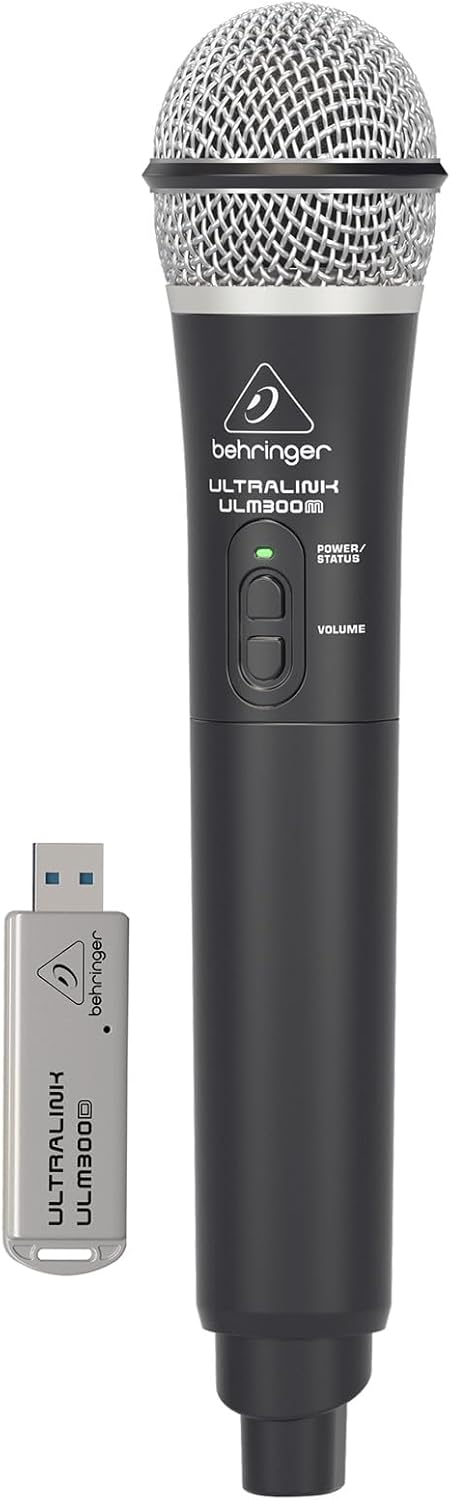
Image: The Behringer ULM300M wireless microphone shown with its USB receiver, the ULM300USB.
- Insert the ULM300USB receiver into the 무선 시스템 USB port on the MPA200BT.
- Ensure the ULM300M wireless microphone has fresh batteries installed.
- Power on the wireless microphone. The status LED on both the microphone and the receiver should indicate a successful connection (usually a solid green light).
- Adjust the microphone's volume using the controls on the microphone itself and the MPA200BT's input gain settings.
스마트폰 앱을 통한 원격 제어

Image: A smartphone screen showing the graphical user interface of the Behringer remote control application, used to manage the PA system settings.
The MPA200BT can be controlled remotely using a dedicated smartphone application. This allows for adjustments to volume, EQ, and effects from a distance.
- Download the official Behringer MPA200BT control app from your device's app store (iOS/Android).
- Ensure your smartphone is connected to the MPA200BT via Bluetooth (as described in the "Bluetooth Audio Streaming" section).
- Open the app. It should automatically detect and connect to your MPA200BT unit.
- Use the app's interface to control various parameters of the PA system.
배터리 작동
The MPA200BT features an internal rechargeable battery for portable use.
- The battery charges automatically when the unit is connected to AC power.
- A battery level indicator on the display shows the remaining charge.
- For optimal battery life, fully charge the unit before its first use and periodically when not in use for extended periods.
유지
- 청소: 부드럽고 마른 천을 사용하여 기기 외부를 닦으세요. 연마성 세제나 용제를 사용하지 마세요.
- 저장: When not in use, store the MPA200BT in a cool, dry place, away from direct sunlight and extreme temperatures.
- 배터리 관리 : If storing for extended periods, ensure the battery is partially charged (around 50%) and recharge it every few months to prevent deep discharge.
- 통풍: Ensure that the ventilation openings are not obstructed during operation to prevent overheating.
문제 해결
| 문제 | 가능한 원인 | 해결책 |
|---|---|---|
| 전원이 없습니다 | Power cable not connected; unit not switched on; battery depleted. | Check power cable connection; ensure power switch is ON; charge battery. |
| 사운드 출력이 없습니다 | Volume too low; input source not connected or selected; faulty cable; microphone off. | Increase master volume and input gain; check input connections; test cables; ensure microphone is powered on and paired. |
| 블루투스 페어링 실패 | MPA200BT not in pairing mode; device too far; interference. | Press Bluetooth button to enter pairing mode; move device closer; restart both devices. |
| 무선 마이크가 작동하지 않습니다 | USB receiver not connected; microphone off; depleted batteries in microphone; interference. | Ensure ULM300USB is fully inserted; power on microphone; replace microphone batteries; ensure clear line of sight. |
| Squealing/Feedback | 마이크가 스피커에 너무 가깝거나 마이크 게인이 너무 높습니다. | Move microphone further from speaker; reduce microphone input gain. |
명세서
| 특징 | 세부 사항 |
|---|---|
| 모델 | 유로포트 MPA200BT |
| 출력 와트tage | 200 와트 |
| 전원 | 배터리 전원 / AC 전원 |
| 연결 기술 | 블루투스 |
| 채널 수 | 2 |
| 품목 무게 | 12.1kg(26.6파운드) |
| 제품 크기(L x W x H) | 11.02 x 10.11 x 16.53 인치 |
| 장착 유형 | 테이블탑 |
| 호환 장치 | 스마트폰 |
| 제조업체 | 뮤직 트라이브 US |
보증 및 지원
자세한 보증 정보 및 기술 지원은 베링거 공식 웹사이트를 참조하십시오. web해당 사이트를 방문하거나 고객 서비스에 문의하세요. 구매 증빙 자료로 구매 영수증을 보관하세요.
온라인 리소스: www.behringer.com
제조업체: 뮤직 트라이브 US
공식 제품 영상
No relevant official product videos from the seller were found in the provided data for embedding.


