1. 이상view
This manual provides instructions for the Compustar 1WG15R-FM 1-Way Replacement Remote. This remote control is designed to replace an existing 1WG15R-FM 2-Way Remote and is compatible with Compustar ANT-2WFMX antenna systems. It enables remote functions such as locking, unlocking, trunk release, and remote engine start, depending on the features installed in your vehicle's system.
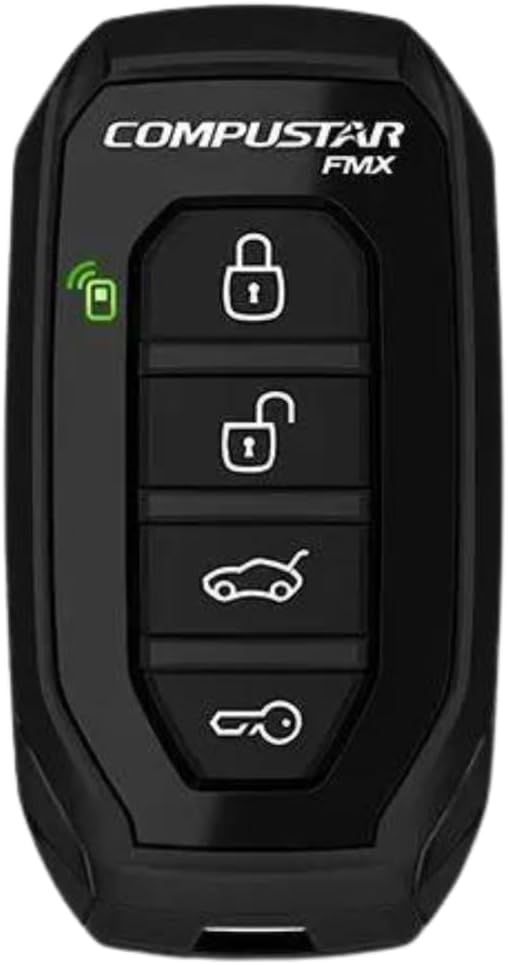
그림 1: 전면 view of the Compustar 1WG15R-FM remote control.
2. 호환성
It is crucial to verify compatibility before purchasing and attempting to use this replacement remote. This remote is specifically designed to replace a Compustar Model 1WG15R-FM 2-Way Remote. It is ~ 아니다 compatible with the 1WG15R-AM model, even if they appear visually similar. This remote requires a compatible Compustar ANT-2WFMX antenna system to function correctly.
- Required Existing Remote: Compustar Model 1WG15R-FM 2-Way Remote
- Required Antenna System: Compustar ANT-2WFMX
- 호환되지 않는 모델: Compustar 1WG15R-AM
3. 설정
The Compustar 1WG15R-FM remote typically requires programming to your vehicle's Compustar system. The exact programming steps may vary depending on your vehicle and the specific Compustar system installed. It is highly recommended to consult a professional installer or refer to the detailed programming guide for your specific Compustar system.
3.1. General Programming Information
While specific steps are best obtained from your installer or the system's manual, general programming often involves placing the vehicle in a programming mode and then pressing buttons on the new remote. If you are replacing an existing remote, all existing remotes may need to be reprogrammed at the same time.
3.2. Flashing the iDatalink BLADE Module (If Applicable)
If your Compustar system utilizes an iDatalink BLADE remote start/security bypass module, it may require flashing or updating its firmware for proper operation or to enable specific features. This process typically involves connecting the module to a computer with internet access and using the iDatalink Weblink Updater software.
Video 1: This video demonstrates how to flash and update an iDatalink BLADE module and Compustar controller. This process is typically performed by a professional installer to ensure compatibility and proper functionality of the remote start system.
4. 사용 설명서
The Compustar 1WG15R-FM remote features a simple four-button layout for controlling your vehicle's functions. The specific actions performed by each button may vary slightly based on your vehicle's system configuration. Always ensure you are within the remote's operating range (up to 3000 feet) for reliable communication.

그림 2: 측면 view of the Compustar 1WG15R-FM remote control, highlighting the four function buttons.
4.1. 기본 기능
- 잠그다: 를 누르세요 잠그다 button (usually the top button with a closed padlock icon) once to lock your vehicle's doors.
- 터놓다: 를 누르세요 터놓다 button (usually the second button with an open padlock icon) once to unlock your vehicle's doors.
- 트렁크 해제: 를 누르고 계세요 트렁크 button (usually the third button with a car trunk icon) for approximately 3 seconds to open your vehicle's trunk or hatch.
- 원격 시작/정지: 를 누르고 계세요 원격 시작 button (usually the bottom button with a key icon or car icon) for approximately 3 seconds to remotely start or stop your vehicle's engine.
4.2. Remote Start Operation Details
When using the remote start function, the vehicle's engine will typically run for a preset duration (e.g., 15 or 25 minutes) as configured by your installer. To drive the vehicle after remote starting:
- 를 누르세요 터놓다 button on your remote to unlock the doors.
- Enter the vehicle and insert your key into the ignition.
- Turn the key to the "ON" or "RUN" position (do not turn to "START").
- Press the brake pedal. The remote start system will disengage, and the vehicle will transfer to key control.
If the brake pedal is pressed before the key is turned to the "ON" position, the engine may shut off. In this case, simply start the vehicle with the key as you normally would.
Video 2: This video illustrates the benefits of using Compustar long-range remote starters for warming up or cooling down your vehicle. It highlights the convenience of starting your vehicle remotely to achieve a comfortable cabin temperature before entry.
Video 3: This video demonstrates the basic operation of a Compustar remote, including locking, unlocking, trunk release, and remote engine start. While the remote shown is a Compustar Prime T9, the fundamental button presses and functions are generally applicable to other Compustar remotes like the 1WG15R-FM.
5. 유지관리
The Compustar 1WG15R-FM remote control is designed for durability. To ensure its longevity and optimal performance:
- 배터리 교체: The remote uses a standard coin-cell battery. When the remote's range decreases or it becomes unresponsive, replace the battery. Refer to your system's full manual for specific battery type and replacement instructions.
- 청소: 리모컨을 부드럽고 마른 천으로 닦으세요. 독한 화학 약품이나 연마성 세척제는 사용하지 마세요.
- 보호: Protect the remote from extreme temperatures, direct sunlight, and moisture. Avoid dropping the remote or subjecting it to strong impacts.
6. 문제 해결
If you experience issues with your Compustar 1WG15R-FM remote, consider the following troubleshooting steps:
- 원격 응답 없음:
- 배터리를 점검하십시오. 필요하면 교체하십시오.
- Ensure you are within the remote's operating range (up to 3000 feet). Obstacles and interference can reduce range.
- Verify the vehicle's main Compustar system is powered and functioning.
- Vehicle Does Not Remote Start:
- Ensure all doors, hood, and trunk are securely closed.
- Check if the vehicle's parking brake is engaged (if required by your system).
- Confirm the vehicle is in park (for automatic transmissions) or in reservation mode (for manual transmissions).
- If the remote start was previously working, try reprogramming the remote to the system.
- 일관성 없는 작업:
- Environmental factors (e.g., strong radio interference, large metal structures) can affect performance. Try operating the remote in a different location.
- Ensure the antenna on your vehicle is not obstructed or damaged.
For persistent issues, it is recommended to contact a certified Compustar installer or technical support.
7. 사양
| 특징 | 세부 사항 |
|---|---|
| 모델 번호 | 1WG15R-FM (also referred to as 1WG15RFM) |
| 상표 | Compustar |
| 유형 | 1-Way Frequency Modulation (FMX) Replacement Remote Control Transmitter |
| 작동 범위 | 최대 3000피트 |
| 호환 안테나 | Compustar ANT-2WFMX |
| 치수 | 4.75 x 2.5 x 1.5 인치 |
| 무게 | 1.44 온스 |
| 색상 | 검은색 |
| 특징 | 인체공학적 디자인 |
| 최대 지원 장치 | 1 (리모컨당) |
8. 보증 및 지원
For detailed warranty information and technical support, please refer to the official Compustar website or contact your authorized Compustar dealer. Warranty terms typically cover manufacturing defects and may vary. Keep your proof of purchase for warranty claims.
공식적인 Web대지: www.compustar.com
기술 지원: Consult your product packaging or the official web최신 연락처 정보는 사이트에서 확인하세요.


