1. Introduction to the AUTO-VOX X2 Mirror Dash Cam
The AUTO-VOX X2 is a sophisticated mirror dash cam designed to enhance driving safety and provide comprehensive recording capabilities. It features a 9.88-inch full touch streaming media display, offering a clear, real-time view of traffic conditions. The system includes both a front camera for forward recording and a 720P AHD waterproof backup camera for reverse assistance.
Key functionalities include G-Sensor for collision detection, loop recording to manage storage efficiently, parking monitoring for 24-hour surveillance, Lane Departure Warning System (LDWS), and GPS tracking for route and speed data.

이미지 1.1: 이상view of AUTO-VOX X2 features, including parking monitoring, dual views, night vision, emergency lock, touch screen, loop recording, GPS tracking, and LDWS.
Video 1.1: An official AUTO-VOX video demonstrating the features and functionality of the X2 9.88" Rear View 미러 대시캠.
2. 설정 및 설치
Proper installation is crucial for the optimal performance of your AUTO-VOX X2 Mirror Dash Cam. Follow these steps carefully.
2.1 패키지 내용
시작하기 전에 모든 구성 요소가 있는지 확인하세요.
- AUTO-VOX X2 Mirror Dash Cam Unit
- 후방 카메라
- 차량용 충전기 (전원 케이블)
- 후방 카메라용 비디오 케이블
- GPS 모듈
- Two Sets of Mounting Straps
- 사용 설명서 (본 문서)
- 빠른 설명
- 보증 카드
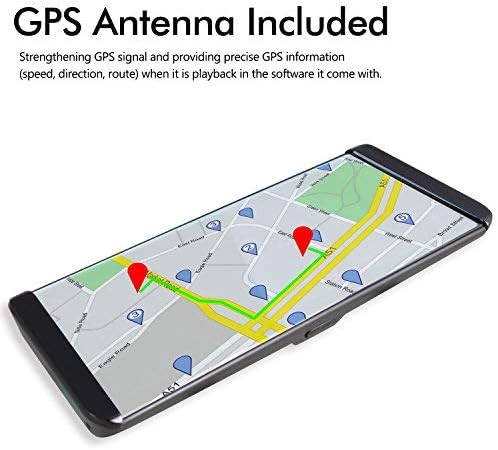
Image 2.1: The complete set of components included with the AUTO-VOX X2 Mirror Dash Cam.
2.2 미러 대시캠 장착
- Secure the AUTO-VOX X2 unit over your vehicle's existing rearview 제공된 고무 스트랩을 사용하여 거울을 고정하십시오. 거울이 단단히 고정되어 시야를 가리지 않는지 확인하십시오. view.
- 전방 카메라 렌즈의 각도를 조정하여 앞쪽 도로가 선명하게 촬영되도록 하십시오.
2.3 Connecting Power and GPS
- Connect the car charger cable to the USB port on the dash cam unit.
- 차량 충전기의 다른 쪽 끝을 차량의 시가 라이터 소켓에 꽂습니다.
- Connect the GPS module to the designated GPS port on the dash cam unit. Position the GPS module on your dashboard or windshield where it has a clear view 최적의 신호 수신을 위해 하늘을 살펴보세요.
2.4 후방 카메라 설치
- 후방 카메라는 차량 후면, 일반적으로 번호판 위 또는 뒷유리에 장착하십시오. 카메라가 장애물 없이 깨끗한 시야를 확보할 수 있도록 하십시오. view.
- Route the video cable from the rear camera to the AV (backup camera) port on the main dash cam unit.
- Connect the red wire from the rear camera's video cable to your vehicle's reversing light power supply (+12V). This enables automatic display of the rear view 후진 기어로 변속할 때.

Image 2.2: Detailed wiring diagram illustrating the connections for the rear camera, GPS, and power supply.
3. 사용 설명서
The AUTO-VOX X2 is designed for intuitive operation via its touch screen interface.
3.1 터치스크린 조작
The 9.88-inch full touch screen allows for easy navigation and control. Swipe your fingers across the screen to access different menus and settings, or to adjust display brightness and camera views.
3.2 Front Camera Recording
The front camera records in 1296P Full HD, capturing a wide 140-degree field of view. Recording starts automatically when the device powers on. The display can show the front view, 뒤쪽 view, or a split view.

이미지 3.1: Example of the clear, wide-angle view provided by the front camera on the X2 display.
3.3 Rear Camera and Reverse Assistance
When the vehicle is shifted into reverse gear, the rearview camera automatically activates, displaying a wide 140-degree view with parking guidelines on the screen. This assists in safe parking by showing a closer backup image and reducing blind spots.

Image 3.2: The rear camera display with active parking guidelines for easy maneuvering.
3.4 G-센서 및 루프 녹화
- G-센서: In the event of a collision or sudden impact, the built-in G-Sensor automatically locks the current video footag즉, 덮어쓰기를 방지합니다.
- 루프 녹음: When the storage card is full, the system automatically overwrites the oldest unlocked video segments. This ensures continuous recording without manual deletion.

Image 3.3: Illustration of the loop recording function, ensuring continuous video capture.
3.5 Parking Monitor and LDWS
- 주차 모니터: When enabled, the dash cam will automatically begin recording if an impact is detected while the vehicle is parked. This feature provides 24-hour surveillance. A hardwire kit (5V/2A) is required for continuous 24-hour parking monitoring and must be purchased separately.
- 차선 이탈 경고 시스템(LDWS): This system provides an audible alert if the vehicle unintentionally drifts from its lane, promoting safer driving.

Image 3.4: The parking monitoring feature capturing an event while the vehicle is stationary.
3.6 GPS 재생
The integrated GPS tracking system records precise speed, direction, and route information. This data can be reviewed on a PC using the included player software, which requires an internet connection for map display. This feature is valuable for documenting journeys and providing evidence in case of an incident.

Image 3.5: Visual representation of GPS tracking and route playback.
4. 유지관리
To ensure the longevity and optimal performance of your AUTO-VOX X2 Mirror Dash Cam, regular maintenance is recommended.
- 청소: Gently wipe the screen and camera lenses with a soft, lint-free cloth. Avoid using abrasive cleaners or solvents.
- SD 카드 관리 : Regularly format the microSD card (at least once a month) to prevent data corruption and ensure smooth recording. Use a high-quality Class 10 or higher microSD card.
- 배터리 관리 : If using the parking monitor feature, ensure your vehicle's battery is in good condition and consider checking its charge frequently, especially in cold weather or if the vehicle is parked for extended periods. For continuous parking monitoring, a dedicated hardwire kit is recommended to prevent draining the car battery.
- 펌웨어 업데이트: Check the official AUTO-VOX web성능 향상 및 새로운 기능 추가를 위해 사용 가능한 펌웨어 업데이트가 있는지 정기적으로 사이트를 확인하십시오.
5. 문제 해결
If you encounter issues with your AUTO-VOX X2, refer to the following common troubleshooting tips:
- 장치 전원이 켜지지 않음: 차량용 충전기가 블랙박스와 차량 전원 소켓에 제대로 연결되어 있는지 확인하십시오. 차량 전원 소켓이 정상적으로 작동하는지 확인하십시오.
- 녹음 문제: Verify that a compatible microSD card is inserted and formatted correctly. If the card is full, loop recording should automatically manage space; however, frequent manual formatting can resolve issues.
- 후방 카메라가 표시되지 않음: Check all cable connections between the rear camera and the main unit. Ensure the red wire for reverse assistance is correctly connected to the reversing light's +12V power.
- GPS 신호 문제: Ensure the GPS module is placed in an area with a clear view 아무런 방해물 없이 펼쳐진 하늘.
- 화면 눈부심: Adjust the screen brightness settings via the touch screen. Consider using a screen protector designed to reduce glare.
- LDWS Alerts Constantly: The Lane Departure Warning System may be sensitive. Adjust its sensitivity settings in the menu if available, or disable it for city driving if preferred.
If problems persist, please contact AUTO-VOX customer support for further assistance.
6. 사양
| 특징 | 사양 |
|---|---|
| 모델명 | X2 |
| 화면 크기 | 9.88인치 (터치스크린) |
| 전면 카메라 해상도 | 1296P FHD |
| 후면 카메라 해상도 | 720P AHD |
| 분야 View | 140도 |
| 특별 기능 | Built-In GPS, Parking Monitor, G-Sensor, LDWS, Loop Recording, WDR |
| 연결 기술 | USB |
| 장착 유형 | Windshield Mount (Mirror Clip-on) |
| 배터리 | 1 리튬 이온 배터리 필요 |
| 품목 무게 | 2.64파운드 |
| 패키지 크기 | 12.5 x 4.7 x 2.6 인치 |
7. 보증 및 지원
The AUTO-VOX X2 Mirror Dash Cam comes with a manufacturer's warranty. Please refer to the included Warranty Card for specific terms and conditions. For technical support, troubleshooting assistance, or warranty claims, please contact AUTO-VOX customer service through their official web사이트 또는 제품 포장에 제공된 연락처 정보를 참조하세요.
For additional resources and frequently asked questions, visit the official AUTO-VOX support page: www.auto-vox.com/support


