1. 제품 오버view
The ELECOM DEFT PRO Trackball Mouse is a high-performance input device designed for superior accuracy and ergonomic comfort. It offers versatile connectivity options and customizable functions to enhance productivity.
- 광학 추적 기술: Provides precise cursor movement with less hand movement.
- 기능성 버튼 8개: Assign favorite functions using the "ELECOM Mouse Assistant" software.
- DPI Cursor: Easily switch between 500, 1000, and 1500 DPI for customized cursor speed.
- 쉬운 유지관리: Features three 2.5 mm artificial ruby ball bearings for smooth rolling and easy cleaning.
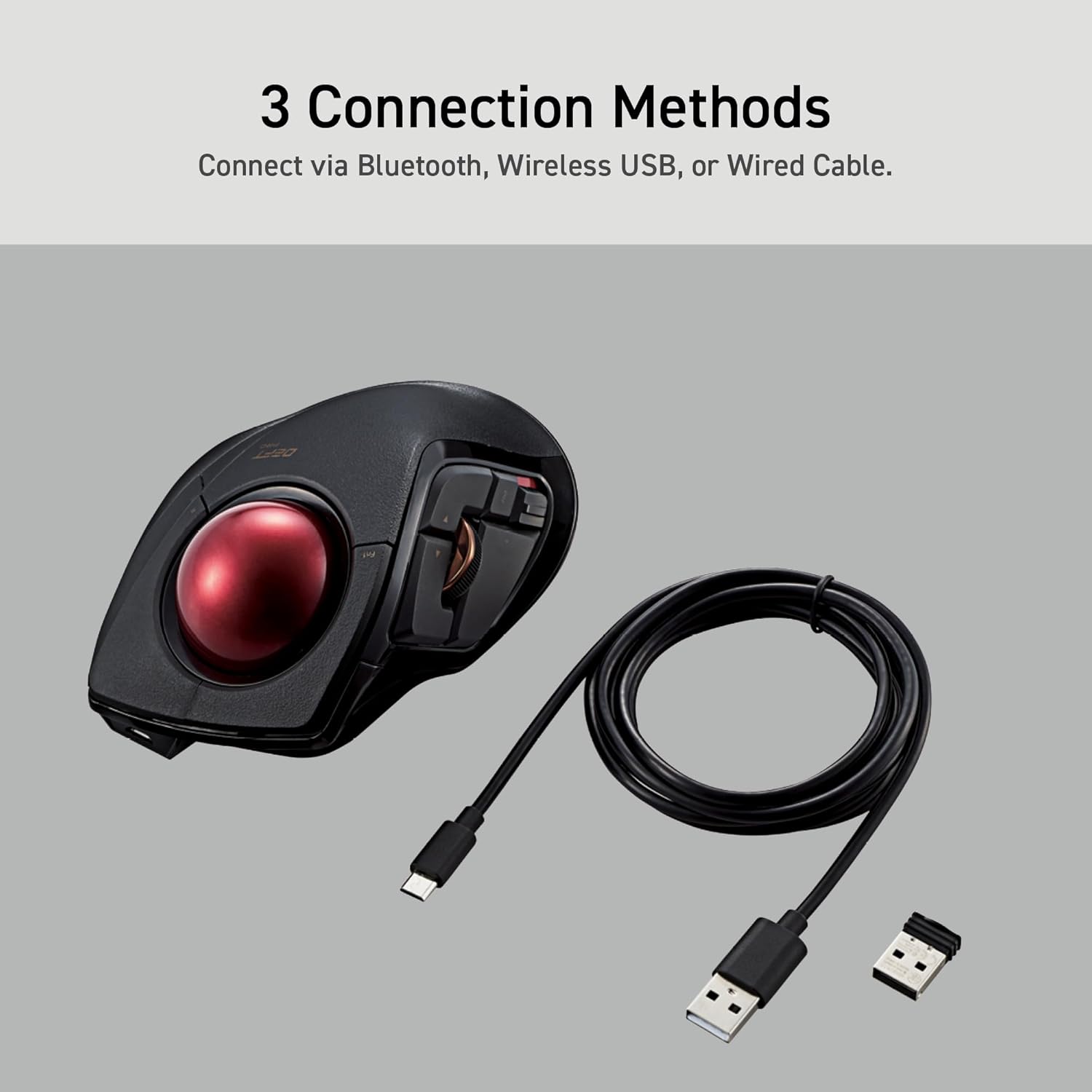
- 다중 연결: Supports wired, wireless (2.4GHz USB receiver), and Bluetooth connections.

2. 설정 가이드
2.1. 상자 안에 무엇이 들어있나요?
시작하기 전에 모든 구성 요소가 있는지 확인하세요.
- ELECOM DEFT PRO Trackball Mouse
- AA 배터리 1개
- USB 케이블 (유선 연결용)
- USB Receiver (for wireless 2.4GHz connection)
- 사용 설명서 (본 문서)

2.2. 배터리 설치
- 마우스 밑면에서 배터리 칸을 찾으세요.
- 배터리 덮개를 엽니다.
- 제공된 AA 배터리를 올바른 극성(+/-)에 맞춰 삽입하세요.
- 배터리 덮개를 단단히 닫으세요.
2.3. 마우스 연결
The DEFT PRO offers three connection methods:
- 유선 연결: 제공된 USB 케이블을 사용하여 마우스를 컴퓨터에 직접 연결하십시오.
- Wireless (2.4GHz) Connection:
- USB 수신기를 컴퓨터의 사용 가능한 USB 포트에 삽입합니다.
- Slide the connection switch on the underside of the mouse to the "Wireless" (W) position.
- 블루투스 연결 :
- Slide the connection switch on the underside of the mouse to the "Bluetooth" (B) position.
- Press the pairing button on the underside of the mouse until the indicator light flashes.
- On your computer, go to Bluetooth settings and select "ELECOM DEFT PRO" to pair.

3. 사용 설명서
3.1. Ergonomic Design and Control
The DEFT PRO is designed to position your hand and wrist in a natural, comfortable position, reducing strain during extended use. Its index-finger control allows for precise cursor manipulation.


The extra-large 44mm trackball allows you to span the full screen with speed and accuracy.

3.2. Programmable Buttons and DPI Settings
The mouse features 8 programmable buttons, allowing you to assign various functions for a personalized workflow. The DPI button enables quick adjustments between 500, 1000, and 1500 DPI to suit your preference for cursor speed.
3.3. Mouse Assistant Software
To fully utilize the programmable features, download the "ELECOM Mouse Assistant" software from the ELECOM NET website. This software allows for enhanced customization, including presentation mode and gesture creation.

4. 유지관리
Regular maintenance ensures optimal performance and longevity of your trackball mouse.
4.1. 트랙볼 청소
The trackball is designed for easy removal and cleaning. The ball rolls on three 2.5 mm large artificial ruby ball bearings, which are smooth and resistant to dust accumulation. However, occasional cleaning is recommended.
- Locate the hole on the underside of the mouse.
- Gently push the trackball through this hole to pop it out.
- Use a soft, lint-free cloth to wipe the trackball and the ball bearings clean.
- Reinsert the trackball into its slot, ensuring it clicks into place.

5. 문제 해결
If you encounter any issues with your ELECOM DEFT PRO Trackball Mouse, please refer to the following common solutions:
- 커서 이동 없음:
- 마우스의 전원이 켜져 있고 배터리가 올바르게 설치되었는지 확인하세요.
- Check the connection method switch (wired/wireless/Bluetooth) is in the correct position.
- For wireless/Bluetooth, ensure the USB receiver is properly inserted or the device is paired.
- Clean the trackball and its bearings as described in the Maintenance section.
- 버튼이 응답하지 않음:
- Verify that the Mouse Assistant software is correctly installed and configured.
- 컴퓨터와 마우스를 재시작하세요.
- 간헐적인 연결:
- Move the mouse closer to the computer to reduce interference.
- Avoid using the mouse on metallic surfaces that may interfere with wireless signals.
For further assistance, please refer to the official user guides linked in the Support section.
6. 제품 사양
| 특징 | 세부 사항 |
|---|---|
| 상표 | 엘레콤 |
| 시리즈 | Deft Pro |
| 모델 번호 | M-DPT1MRXBK |
| 하드웨어 플랫폼 | 노트북, PC |
| 운영 체제 | Windows 8, Windows 10, Windows 11 or later, macOS 10.13 or later |
| 품목 무게 | 5.7온스(배터리 제외) |
| 제품 치수 | W3.6"(91.4mm) X L5.3"(133.4mm) X H2.3"(57.3mm) |
| 색상 | Black / Red ball |
| 전원 | 배터리 구동(AA 배터리 1개 포함) |
| DPI 설정 | 500/1000/1500 count (switchable) |
| 연결성 | Wired, Wireless (2.4GHz), Bluetooth |
| 특징 | Programmable Buttons, Ergonomic Design |
7. 공식 제품 영상
제품 끝view
이 영상은 일반적인 내용을 제공합니다.view of the ELECOM DEFT PRO Trackball Mouse, highlighting its key features and design.
Boost Your Creative Mind
Discover how the ELECOM DEFT PRO Trackball Mouse can enhance your creative workflow and productivity.
8. 지원 및 보증
For detailed information, troubleshooting, and warranty claims, please refer to the official documents:
Warranty information is typically provided within the official user manual or product packaging. Please retain your proof of purchase for warranty service.


