1. 서론
This manual provides essential information for the safe and efficient operation of your Digi International WR21-L52A-DE1-TB Cellular Wireless Router. Please read this manual thoroughly before installation and use, and retain it for future reference. This device is designed to provide reliable cellular connectivity for various applications.
2. 안전 정보
- 전원 공급 장치: Use only the power adapter supplied with the device. Using an incorrect adapter may damage the device and void the warranty.
- 통풍: Ensure adequate ventilation around the router. Do not block ventilation openings.
- 환경: Avoid exposing the device to extreme temperatures, humidity, direct sunlight, or corrosive environments.
- 서비스: 기기를 직접 열거나 수리하지 마십시오. 모든 정비는 자격을 갖춘 기술자에게 맡기십시오.
- 안테나 : Ensure antennas are securely connected before powering on the device.
3. 패키지 내용
패키지에 모든 품목이 들어 있는지 확인하세요.
- Digi International WR21-L52A-DE1-TB Cellular Wireless Router
- 전원 어댑터
- Antennas (quantity may vary)
- 이더넷 케이블
- 빠른 시작 가이드(포함된 경우)
품목이 누락되었거나 손상된 경우 즉시 공급업체에 문의하세요.
4. 제품 오버view
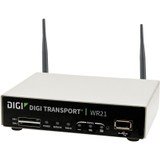
이미지: 앞면 view of the Digi International WR21-L52A-DE1-TB Cellular Wireless Router. This image displays the compact form factor of the device, likely showing ports for antennas, power, and network connections.
The Digi International WR21-L52A-DE1-TB is a robust cellular wireless router designed for reliable and secure connectivity. It features multiple connectivity options and is suitable for various industrial and enterprise applications requiring remote access and data transfer over cellular networks.
5. 설정
5.1. SIM 카드 설치
- 라우터의 전원이 꺼져 있고 전원에서 분리되어 있는지 확인하세요.
- Locate the SIM card slot(s) on the device. Refer to the device's physical markings for exact location.
- Insert the activated cellular SIM card into the slot with the gold contacts facing down and the notched corner oriented correctly. Push until it clicks into place.
- If applicable, secure the SIM card tray or cover.
5.2. 안테나 연결
- Identify the cellular antenna ports (typically labeled 'MAIN' and 'DIV' or similar).
- Screw the provided cellular antennas onto the corresponding ports until finger-tight. Do not overtighten.
- 최적의 신호 수신을 위해 안테나를 배치하십시오.
5.3. 전원 연결
- 전원 어댑터를 라우터의 전원 입력 포트에 연결하세요.
- 전원 어댑터를 적합한 전기 콘센트에 연결하십시오.
- The router will power on automatically or may require pressing a power button. Observe the LED indicators for power status.
5.4. 네트워크 연결 (선택 사항)
- To connect a device via Ethernet, plug one end of an Ethernet cable into an available LAN port on the router.
- Plug the other end of the Ethernet cable into the network port of your computer or other network device.
6. 사용 설명서
6.1. 전원 켜기 / 끄기
- 전원 켜기: Connect the power adapter. The device will typically power on automatically. Observe the power LED.
- 전원 끄기 : Disconnect the power adapter from the electrical outlet. For controlled shutdown, refer to the device's web interface or specific documentation for a software shutdown procedure if available.
6.2. 액세스 Web 인터페이스
- Ensure your computer is connected to the router via Ethernet or Wi-Fi (if enabled).
- 열기 web 브라우저(예: Chrome, Firefox, Edge).
- Enter the router's default IP address (e.g., 192.168.1.1 or 192.168.0.1) into the address bar and press Enter. Refer to the Quick Start Guide or device label for the exact default IP address.
- Enter the default username and password when prompted. These are typically found on a label on the device or in the Quick Start Guide.
- Upon successful login, you will access the router's configuration interface.
6.3. 기본 구성
내에서 web 인터페이스에서 다양한 설정을 구성할 수 있습니다.
- 셀룰러 설정: Verify APN settings, signal strength, and connection status.
- 네트워크 설정: Configure LAN IP address, DHCP server, and port forwarding.
- 보안: Change default login credentials, configure firewall rules, and VPN settings.
- 펌웨어 업데이트 : Check for and apply firmware updates to ensure optimal performance and security.
7. 유지관리
- 청소: 라우터 외부를 닦을 때는 부드럽고 마른 천을 사용하십시오. 액체 세척제나 스프레이형 세척제는 사용하지 마십시오.
- 펌웨어 업데이트: 정기적으로 제조업체를 확인하세요 web펌웨어 업데이트 사이트입니다. 펌웨어를 최신 상태로 유지하면 최신 기능, 보안 패치 및 성능 향상을 이용할 수 있습니다.
- 환경 조건: Ensure the router is operating within its specified temperature and humidity ranges to prevent overheating or damage.
8. 문제 해결
8.1. No Cellular Connection
- Verify the SIM card is correctly inserted and activated with your cellular provider.
- Check antenna connections and ensure they are positioned for optimal signal.
- 로그인하세요 web interface to check cellular signal strength and connection status.
- 라우터를 다시 시작합니다.
8.2. 접근 불가 Web 인터페이스
- 컴퓨터가 이더넷 케이블을 통해 라우터에 직접 연결되어 있는지 확인하십시오.
- Verify your computer's IP address is in the same subnet as the router (e.g., if router is 192.168.1.1, computer should be 192.168.1.x).
- 브라우저 캐시를 지우거나 다른 브라우저를 사용해 보세요.
- If you forgot the password, a factory reset might be necessary (refer to specific device documentation for this procedure, as it will erase all configurations).
8.3. 느린 연결 속도
- Check cellular signal strength in the web interface. Weak signal can lead to slow speeds.
- 안테나가 올바른 위치에 설치되어 있고 장애물이 없는지 확인하십시오.
- Verify your cellular data plan has not reached its data cap or is being throttled.
- 라우터와 연결된 장치를 재시작하세요.
9. 사양
| 특징 | 설명 |
|---|---|
| 모델 | WR21-L52A-DE1-TB |
| 상표 | 디지 인터내셔널 |
| 연결 프로토콜 | 셀룰러 |
| 연결 기술 | USB |
| 제어 방법 | 원격 |
| 특징 | 뉴스 |
| 호환 장치 | 개인용 컴퓨터 |
| 추천 용도 | 집 |
| 한국어: | 747356312219 |
10. 보증 및 지원
자세한 보증 정보는 제품에 동봉된 보증 카드를 참조하거나 Digi International 공식 웹사이트를 방문하십시오. website. Technical support is available through the manufacturer's support channels. Please have your product model number (WR21-L52A-DE1-TB) and serial number ready when contacting support.


