1. 서론
Thank you for choosing the ASAKUKI Smart Wi-Fi Essential Oil Diffuser. This device combines aromatherapy with smart technology, allowing you to control it via a mobile application or voice commands. It is designed to humidify and purify the air, creating a relaxing atmosphere in your home or office.
This manual provides detailed instructions for the safe and efficient use of your diffuser. Please read it thoroughly before operation and retain it for future reference.

Image: The ASAKUKI Smart Wi-Fi Essential Oil Diffuser is versatile for various environments, including nurseries, family rooms, bedrooms, yoga studios, and workspaces.
2. 안전수칙
안전한 작동을 보장하고 손상을 방지하려면 다음 사항을 준수하세요.
- 디퓨저는 항상 평평하고 안정적인 표면에 놓으십시오.
- Do not exceed the maximum water fill line (500ml).
- Use only clean tap water or distilled water. Avoid using hot water.
- Add essential oils carefully to avoid spilling on the exterior of the unit.
- 디퓨저는 어린이나 애완동물의 손이 닿지 않는 곳에 보관하세요.
- 작동 중에는 안개 배출구를 덮지 마십시오.
- Unplug the device from the power outlet before cleaning or refilling.
- 장치를 물이나 다른 액체에 담그지 마십시오.
- If the unit is damaged, do not attempt to repair it yourself. Contact customer support.
- The diffuser features an automatic shut-off when water runs out, but it is recommended to monitor water levels.
3. 패키지 내용
패키지에 모든 품목이 들어 있는지 확인하세요.
- ASAKUKI Smart Wi-Fi Essential Oil Diffuser (Model DF010)
- 전원 어댑터
- 사용자 설명서
- 계량컵 (포함될 수 있음)
4. 제품 오버view
Familiarize yourself with the main components of your diffuser:

Image: The ASAKUKI Smart Wi-Fi Essential Oil Diffuser, showing its sleek design and the accompanying mobile app for control.
- 뚜껑: 디퓨저의 윗면 커버.
- 안개 배출구: 안개가 방출되는 곳.
- 수조: Holds up to 500ml of water.
- 최대 수위선: 최대 충전량을 나타냅니다.
- Ultrasonic Plate: Located at the bottom of the water tank, responsible for mist generation.
- 공기 배출구: Located on the base.
- Drain Side: Indicated for proper water drainage.
- 라이트 버튼: LED 조명 기능을 제어합니다.
- Mist/Wi-Fi Button: Controls mist output and initiates Wi-Fi pairing.
- 전원 잭 : 전원 어댑터를 연결합니다.
5. 설정 지침
초기 설정을 위해 다음 단계를 따르세요.
- 디퓨저를 놓으세요: Position the diffuser on a flat, stable, and water-resistant surface.
- 뚜껑을 제거하세요: Gently lift the top lid off the diffuser.
- 물 추가: Using a measuring cup, fill the water tank with clean tap water or distilled water up to the maximum water line (500ml). Do not overfill.
- 에센셜 오일을 추가하세요: 물탱크에 원하는 에센셜 오일 3~5방울을 직접 떨어뜨려 주세요. 개인적인 취향과 방 크기에 따라 양을 조절하시면 됩니다.
- 뚜껑 교체: Securely place the lid back onto the diffuser.
- 전원 연결: Plug the power adapter into the power jack at the base of the diffuser, then plug the adapter into a wall outlet.
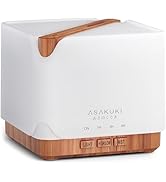
Image: Simple setup guide illustrating connecting power, app pairing, and wireless control.
6. 사용 설명서
6.1 수동 제어
- 안개 제어: 를 누르세요 Mist/Wi-Fi button once for continuous mist. Press again for intermittent mist (30 seconds on, 30 seconds off). Press a third time to turn off the mist.
- 조명 제어: 를 누르세요 빛 button once to turn on the LED light with automatic color cycling. Press again to fix the light to a specific color. Continue pressing to cycle through colors. Press and hold the Light button to turn off the light.
6.2 Smart Wi-Fi and App Control
The diffuser can be controlled remotely using the TuyaSmart app.
- 앱 다운로드: 검색 "TuyaSmart" in your smartphone's app store (iOS or Android) and download it.
- 등록/로그인: 앱을 열고 새 계정을 등록하거나 이미 계정이 있다면 로그인하세요.
- 페어링 모드 시작: With the diffuser plugged in, press and hold the Mist/Wi-Fi button for 5 seconds until the indicator light flashes rapidly. This indicates the diffuser is in pairing mode.
- 장치 추가: In the TuyaSmart app, tap "Add Device" or the "+" icon. Select "Small Home Appliance" > "Diffuser" (Wi-Fi).
- Wi-Fi에 연결: Follow the in-app instructions to connect the diffuser to your 2.4GHz Wi-Fi network. Ensure your phone is also connected to the same 2.4GHz network during setup.
- 제어: Once successfully paired, you can control the mist, light, set timers, and create schedules directly from the TuyaSmart app.

Image: The mobile app allows for convenient control of the diffuser's functions.
6.3 Alexa를 통한 음성 제어
The diffuser is compatible with Amazon Alexa for voice control.
- 기술 활성화: In the Alexa app, search for and enable the "TuyaSmart" skill.
- 계정 연결: Link your TuyaSmart account to your Alexa account.
- 장치 검색: Ask Alexa to "Discover devices" or manually discover them in the Alexa app.
- 음성 명령: 일단 발견되면 다음과 같은 명령어를 사용할 수 있습니다.
- "알렉사, 디퓨저 켜줘."
- "Alexa, turn off the diffuser."
- "Alexa, set the diffuser to red."
- "Alexa, set diffuser brightness to 50%."

Image: Voice control with Alexa allows hands-free operation of the diffuser.
7. 유지관리
정기적으로 청소하면 디퓨저의 성능을 최적화하고 수명을 연장하는 데 도움이 됩니다.
7.1 청소
디퓨저는 5~6회 사용 후 또는 3~5일마다 청소해 주세요. 특히 에센셜 오일을 교체할 때 청소하는 것이 좋습니다.
- 플러그를 뽑다: Disconnect the diffuser from the power outlet.
- 빈 물: Remove the lid and carefully pour out any remaining water from the drain side of the water tank.
- 깨끗이 닦아내세요: Use a soft cloth or cotton swab with a small amount of mild dish soap to gently wipe the inside of the water tank and the ultrasonic plate.
- 헹구기: Rinse the water tank with clean water, being careful not to get water into the air outlet.
- 마른: Wipe all parts dry with a clean, soft cloth.
- Deep Clean (Optional): For stubborn residue, add a small amount of white vinegar to the water tank and let it sit for 10-15 minutes before wiping and rinsing.
7.2 보관
장시간 사용하지 않을 때는 디퓨저를 깨끗하고 완전히 건조시켜 주세요. 직사광선을 피해 서늘하고 건조한 곳에 보관하세요.
8. 문제 해결
문제가 발생하면 다음의 일반적인 문제와 해결 방법을 참조하세요.
| 문제 | 가능한 원인 | 해결책 |
|---|---|---|
| 안개 없음 또는 안개 출력 낮음 |
|
|
| Diffuser does not power on |
|
|
| Wi-Fi/앱에 연결할 수 없습니다 |
|
|
| 물 누출 |
|
|
9. 사양
| 특징 | 세부 사항 |
|---|---|
| 상표 | 아사쿠키 |
| 모델 번호 | DF010 |
| 용량 | 500밀리리터 |
| 치수 | 6인치 길이 x 6인치 너비 x 7인치 높이 |
| 재료 | 아크릴로니트릴 부타디엔 스티렌(ABS), 폴리프로필렌(PP) |
| 전원 | 코드식 전기 |
| 왓tage | 10 와트 |
| 적용 범위 | 최대 323평방피트 |
| 특별 기능 | App Control, Automatic Shut-Off, Multiple Light Settings, Multiple Mist Settings, Voice Control (Alexa) |
| 소음 수준 | 35dB 미만 |
| Runtime (Full Capacity) | Up to 16 hours (on weak mist setting) |
10. 보증 및 지원
The ASAKUKI Smart Wi-Fi Essential Oil Diffuser comes with a 1-year technical support warranty이 보증은 제조상의 결함 및 정상적인 사용으로 인해 발생하는 문제에 적용됩니다.
For technical assistance, troubleshooting, or warranty claims, please contact ASAKUKI customer support through the retailer where you purchased the product or visit the official ASAKUKI web연락처 정보 사이트.
Please have your model number (DF010) and proof of purchase ready when contacting support.


