1. 서론
This manual provides essential information for the safe and efficient operation, installation, and maintenance of your Carrier Estrella Pro 2018 1.0 Ton 3 Star Window Air Conditioner. Please read this manual thoroughly before using the appliance and retain it for future reference. This air conditioner is designed to provide comfortable cooling for your indoor environment, featuring a 1.0 ton capacity and a 3-star energy rating.
2. 안전 정보
사용자 또는 다른 사람의 부상 및 재산상의 손해를 방지하기 위해 다음 지침을 따라야 합니다. 지시 사항을 무시하여 잘못된 작동으로 인해 부상을 입거나 파손될 수 있습니다.
- 전원 공급 장치가 장치의 정격 라벨과 일치하는지 확인하세요.
- 젖은 손으로 에어컨을 작동하지 마세요.
- 공기 흡입구 또는 배출구에 손가락이나 이물질을 넣지 마십시오.
- 인화성 물질을 장치에서 멀리 두십시오.
- 기기를 청소하거나 정비하기 전에 항상 전원을 차단하십시오.
- 설치는 해당 지역의 전기 규정에 따라 자격을 갖춘 인력이 수행해야 합니다.
- 직접 수리하려고 하지 마십시오. 공인 서비스 담당자에게 문의하세요.
3. 제품 특징
Your Carrier Estrella Pro 2018 air conditioner is equipped with several features designed for enhanced comfort and efficiency:
- Vitamin C Filter: Disperses minute particles of Vitamin C into the air, which may help soften skin and reduce stress.
- 간편한 청소: Extra sensors built into the remote control inform the unit of the temperature in various parts of the room, ensuring optimal temperature delivery.
- 스마트 진단: In case of a fault, this function diagnoses the issue immediately, turns off the AC to protect it, and indicates a protection or error code for faster service.
- 수면 모드 : An energy-saving mode that gradually increases the temperature while you sleep, maintaining comfort while reducing energy consumption.
- Exhaust Command: Ensures a constant supply of fresh and healthy air in your room.
- 자동 재시작: Retains settings and temperature levels during unexpected power outages, restarting with previous settings automatically when power resumes.
- 자동 스윙: Evenly cools or heats every part of the room by automatically rotating/swinging the air deflector.
- Nexgen Dehumidifier: Reduces humidity in a specific room while retaining cooling capability, maintaining a comfortable temperature and preventing mold/mildew.
- LED 디스플레이: Bright LED display included in the control panel.
- Built-in Slinger: Condensed water is absorbed and recycled by the heat condenser for minimum energy use and zero drainage problems.
- Hydrophilic Blue Fins: Improve heat exchange by absorbing and spreading water on their surface, preventing droplet formation. The anti-corrosive epoxy coating improves heat transfer and prevents corrosion.
- 24hr Timer: Allows the unit to run on automatic mode, programming it to start and stop at a pre-assigned time.
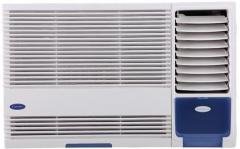
그림 3.1: 전면 view of the Carrier Estrella Pro 2018 Window Air Conditioner, showcasin컴팩트한 디자인입니다.
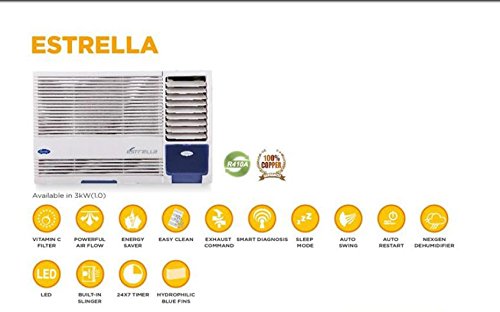
그림 3.2: 오버view of the Estrella Pro's key features, including Vitamin C filter, powerful airflow, energy saver, easy clean, exhaust command, smart diagnosis, sleep mode, auto swing, auto restart, Nexgen dehumidifier, LED, built-in slinger, 24x7 timer, and hydrophilic blue fins.
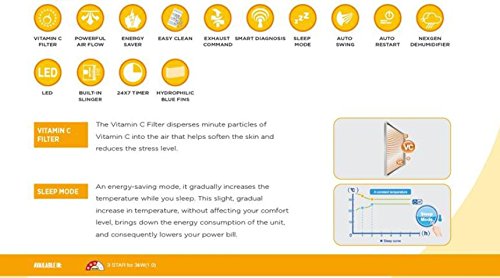
Figure 3.3: Detailed explanation of the Vitamin C Filter and Sleep Mode functionalities, including a graph illustrating temperature changes during Sleep Mode.
4. 설정
Proper installation is crucial for the performance and longevity of your air conditioner. It is recommended that installation be carried out by a certified technician.
4.1 위치 선택
- Select a window that can support the weight of the unit.
- Ensure there are no obstructions to airflow both inside and outside the room.
- The unit should be installed with a slight downward tilt towards the outside to allow for proper condensate drainage.
4.2 전기적 요구 사항
- Connect the unit to a dedicated power outlet with the correct voltage와 amp제품 라벨에 명시된 대로 사용하십시오.
- 연장 코드나 다중 콘센트 어댑터를 사용하지 마세요.
- 전원 콘센트가 올바르게 접지되어 있는지 확인하세요.
4.3 설치 단계(일반)
- Prepare the window opening, ensuring it is clean and free of debris.
- Carefully lift and place the air conditioner into the window opening.
- 제공된 장착 브래킷과 나사를 사용하여 장치를 고정하십시오.
- Install the side panels to seal the gap between the unit and the window frame.
- Ensure all seals are tight to prevent air leakage.
5. 사용 설명서
Your air conditioner can be operated using the control panel on the unit or the provided remote control.
5.1 기본 작업
- 전원 켜기/끄기: 를 누르세요 힘 버튼을 눌러 장치를 켜거나 끕니다.
- 모드 선택: 를 누르세요 방법 사용 가능한 모드를 순환하는 버튼: 냉방, 선풍기, 건조(제습기).
- 온도 조절: 사용하세요 UP 그리고 아래에 화살표 버튼을 사용하여 원하는 온도를 설정하세요.
- 팬 속도: 를 누르세요 팬 속도 팬 속도 조절 버튼 (낮음, 중간, 높음, 자동).
5.2 특수 기능
- 수면 모드 : Activate this mode for quiet, energy-efficient operation during sleep. The temperature will gradually increase over time.
- 타이머 기능: 사용하세요 시간제 노동자 button to set a specific time for the unit to turn on or off automatically within a 24-hour period.
- 자동 스윙: 를 누르세요 SWING button to activate or deactivate the automatic louver movement for even air distribution.
- Dehumidifier (Dry) Mode: Select this mode to reduce humidity in the room without significant cooling.
6. 유지관리
정기적인 유지관리를 통해 최적의 성능을 보장하고 에어컨의 수명을 연장할 수 있습니다.
6.1 에어 필터 청소
- 빈도: Clean the air filter every two weeks, or more often if the unit is used frequently or in dusty environments.
- 단계:
- 장치의 전원을 분리합니다.
- 전면 패널을 열고 공기 필터를 제거하세요.
- 필터를 미지근한 물과 순한 세제로 세척하십시오.
- Rinse thoroughly and allow it to air dry completely before reinstalling.
6.2. 외부 청소
- 부드러운 천으로 기기 외부를 닦아주세요.amp 옷감.
- 강한 화학 물질, 연마제 또는 용제를 사용하지 마십시오.
6.3 계절별 유지 관리
- Before long periods of non-use (e.g., winter), run the unit in fan-only mode for a few hours to dry the internal components.
- Clean the air filter and cover the unit to protect it from dust.
7. 문제 해결
If you encounter issues with your air conditioner, refer to the following common problems and solutions. For more complex issues, utilize the 스마트 진단 feature or contact customer support.
| 문제 | 가능한 원인 | 해결책 |
|---|---|---|
| 장치가 켜지지 않습니다 | No power supply; Power cord unplugged; Blown fuse/tripped breaker | Check power connection; Reset breaker/replace fuse. |
| 냉각이 부족합니다 | 공기 필터가 더럽습니다. 방이 너무 큽니다. 문/창문이 열려 있습니다. 온도 설정이 너무 높습니다. | Clean air filter; Close doors/windows; Lower temperature setting. |
| 과도한 소음 | Loose installation; Fan hitting obstruction; Unit not level | Ensure secure installation; Check for obstructions; Level the unit. |
| 물 누출 | Unit not tilted correctly; Drain pan clogged | Adjust unit tilt; Clear drain pan. |
If the problem persists after attempting these solutions, please contact Carrier customer service for assistance. The Smart Diagnosis feature can provide error codes to help service technicians identify the issue quickly.
8. 사양
The following table outlines the key specifications for the Carrier Estrella Pro 2018 1.0 Ton 3 Star Window Air Conditioner:
| 특징 | 세부 사항 |
|---|---|
| 상표 | 담체 |
| 에너지 효율성 | 3성 평가 |
| 용량 | 1톤 |
| 설치 유형 | 창문 |
| 특별 기능 | Auto Restart, Dehumidifier, Sleep Mode, Vitamin C Filter, Easy Clean, Smart Diagnosis, Exhaust Command, Auto Swing, Nexgen Dehumidifier, LED, Built-in Slinger, Hydrophilic Blue Fins, 24hr Timer |
| 색상 | 하얀색 |
| 제어 콘솔 | 원격 제어 |
| 인증 | 에너지 스타 |
| 냉각제 | R-32 |
| ASIN | B07BFXPZ2T |
| 첫 번째 이용 가능 날짜 | 13년 2018월 XNUMX일 |
9. 보증 및 지원
Your Carrier Estrella Pro 2018 air conditioner comes with a comprehensive warranty:
- 제품 보증: 전체 제품에 대해 1년의 보증 기간이 적용됩니다.
- 압축기 보증: 압축기를 사용한 지 5년이 되었습니다.
For warranty claims, technical support, or service requests, please contact Carrier customer service. Ensure you have your product model number and purchase date available when contacting support.
You can find contact information for Carrier customer support on the official Carrier web사이트 또는 제품 포장에 포함되어 있습니다.