1. 서론
This user manual provides comprehensive instructions for the installation, operation, maintenance, and troubleshooting of the IP-COM G3224P 24-Port Managed PoE Switch. Please read this manual thoroughly before using the device to ensure proper and safe operation.
The IP-COM G3224P is a high-performance managed Power over Ethernet (PoE) switch designed for small to medium-sized businesses and enterprise networks. It offers 24 Gigabit Ethernet ports with PoE+ capabilities and additional SFP ports for fiber uplinks, providing flexible and scalable network solutions.
2. 제품 오버view
2.1 패키지 내용
- IP-COM G3224P 24-Port Managed PoE Switch
- 전원 코드
- 랙마운트 키트(브래킷 및 나사)
- 고무 발(데스크탑 배치용)
- 빠른 설치 가이드
2.2 전면 패널 설명
The front panel of the IP-COM G3224P switch features various ports and LED indicators for status monitoring.
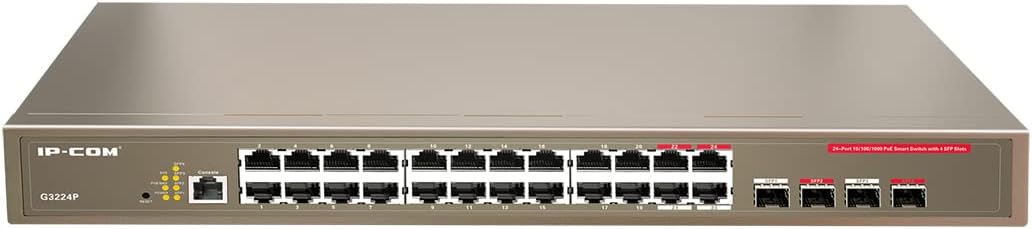
Figure 2.1: IP-COM G3224P Front Panel Layout
This image displays the front panel of the IP-COM G3224P switch. On the left, the IP-COM logo and model number G3224P are visible. To the right, there are LED indicators for SYS, PoE MAX, and individual port status. A console port is also present. The main section features 24 Gigabit Ethernet RJ45 ports, arranged in two rows, with port numbers 1 through 24. On the far right, there are four SFP ports labeled SFP1, SFP2, SFP3, and SFP4, which are used for fiber optic uplinks.
2.3 LED 표시등
| LED 표시등 | 상태 | 설명 |
|---|---|---|
| 시스템 | 녹색(단색) | 시스템이 정상적으로 작동하고 있습니다. |
| 시스템 | 녹색(깜박임) | System is booting up or firmware is being upgraded. |
| PoE 최대 | 빨간색 (단색) | PoE power budget is nearing or exceeding its limit. |
| 링크/액트(포트별) | 녹색(단색) | 포트가 연결되어 있습니다. |
| 링크/액트(포트별) | 녹색(깜박임) | Port is transmitting or receiving data. |
| PoE(포트당) | 노란색(단색) | 연결된 장치에 PoE 전원이 공급되고 있습니다. |
3. 설정 및 설치
3.1 안전 예방 조치
- 전원 공급 장치 볼륨을 확인하십시오.tage matches the switch's requirements (240V as per specifications).
- 환기구를 막지 마십시오.
- 기기를 물, 불, 고온으로부터 멀리 두십시오.
- 장치를 직접 열거나 수리하려고 시도하지 마십시오.
3.2 랙마운트 설치
- 동봉된 나사를 사용하여 제공된 랙 마운트 브래킷을 스위치 측면에 부착하십시오.
- 스위치를 적절한 랙 나사(별도 구매)를 사용하여 표준 19인치 장비 랙에 고정하십시오.
- Ensure adequate airflow around the switch for proper cooling.
3.3 데스크탑 설치
- 제공된 고무발을 스위치 바닥에 부착합니다.
- Place the switch on a flat, stable surface with sufficient ventilation.
3.4 스위치 연결
- 전원 연결: Connect the power cord to the power inlet on the rear panel of the switch and then to a grounded power outlet.
- 네트워크 장치: Connect network devices (e.g., computers, servers, IP cameras, VoIP phones) to the RJ45 ports (1-24) on the front panel using standard Ethernet cables.
- PoE 장치: For PoE-powered devices, simply connect them to any of the RJ45 ports. The switch will automatically detect and provide power if the device is PoE compliant.
- 업링크 연결: Use the SFP ports (SFP1-SFP4) for fiber optic uplinks to other network devices or the core network. Insert compatible SFP transceivers into the SFP slots before connecting fiber optic cables.
- 콘솔 연결(선택 사항): For initial configuration or advanced management, connect a console cable from your computer to the console port on the switch.
4. 사용 설명서
4.1 초기 전원 켜기
After connecting the power cord, the switch will automatically power on. Observe the SYS LED indicator. It will blink during boot-up and turn solid green once the system is ready.
4.2 기본 네트워크 연결
Once powered on, the switch will automatically detect connected devices. The Link/Act LED for each connected port will illuminate solid green, indicating a successful link. It will blink when data is being transmitted or received.
4.3 PoE 작동
When a PoE-compatible device is connected to a port, the switch will negotiate power delivery. The PoE LED for that port will turn yellow, indicating that power is being supplied. Monitor the PoE MAX LED; if it turns red, the total PoE power budget is being approached or exceeded, and you may need to reduce the number of PoE devices or use a higher-capacity power source.
4.4 관리 액세스
The IP-COM G3224P is a managed switch, offering various configuration options via a web-based GUI, CLI (Command Line Interface) via the console port, or SNMP. Refer to the detailed management guide (usually available on the manufacturer's website) for advanced configuration, including VLANs, QoS, port mirroring, and security settings.
- Web 그래픽 사용자 인터페이스: 스위치에 액세스하세요 web interface by typing its default IP address (check the Quick Installation Guide or manufacturer's documentation) into a web 브라우저.
- CLI: Connect via the console port using a terminal emulator (e.g., PuTTY) with appropriate serial port settings.
5. 유지관리
5.1 청소
- Regularly clean the exterior of the switch with a soft, dry cloth.
- 액체 또는 에어로졸 세척제를 사용하지 마십시오.
- 환기구에 먼지나 방해물이 없는지 확인하세요.
5.2 펌웨어 업데이트
Periodically check the IP-COM official web펌웨어 업데이트 사이트입니다. 펌웨어를 최신 상태로 유지하면 최적의 성능, 보안 및 새로운 기능에 대한 액세스를 보장할 수 있습니다. 펌웨어 업데이트 패키지와 함께 제공된 지침을 주의 깊게 따르세요.
5.3 환경 고려 사항
Ensure the switch operates within its specified environmental conditions (temperature, humidity) to prevent damage and ensure longevity.
6. 문제 해결
| 문제 | 가능한 원인 | 해결책 |
|---|---|---|
| No power / SYS LED off | 전원 코드가 연결되지 않았거나 전원 콘센트에 결함이 있습니다. | 전원 코드 연결 상태를 확인하십시오. 다른 콘센트에 연결해 보십시오. |
| 포트에 링크가 없습니다 (링크/액티브 LED 꺼짐) | Cable issue, device off, or incorrect port. | Check Ethernet cable. Ensure connected device is powered on. Try a different port or cable. |
| PoE device not powering on (PoE LED off) | Device not PoE compliant, cable issue, or power budget exceeded. | Verify device is PoE compliant. Check cable. Check PoE MAX LED; if red, reduce PoE load. |
| 네트워크 성능 문제 | Cable quality, network congestion, or incorrect configuration. | Use high-quality Ethernet cables. Check for network loops. Review switch configuration (VLANs, QoS). |
| 접근할 수 없습니다 web 관리 인터페이스 | Incorrect IP address, network settings, or firewall. | Verify the switch's IP address. Ensure your computer is on the same subnet. Disable temporary firewalls. |
If problems persist, consult the full product documentation or contact IP-COM technical support.
7. 사양
| 특징 | 세부 사항 |
|---|---|
| 모델 | G3224P |
| 포트 | 24 x 10/100/1000Base-T (RJ45) with PoE+, 4 x 1000Base-X (SFP) |
| 스위칭 용량 | 56Gbps |
| 전달 속도 | 41.66메가피에스 |
| PoE 표준 | IEEE 802.3af / at |
| 입력 Voltage | 240볼트 |
| 치수(길이 x 너비 x 높이) | 29 x 44 x 44cm |
| 무게 | 15 킬로그램 |
| 랙 마운트 | 예 |
| 관리 | 관리됨(Web GUI, CLI, SNMP) |
참고: 사양은 사전 통지 없이 변경될 수 있습니다.
8. 보증 및 기술 지원
8.1 보증 정보
IP-COM products typically come with a limited warranty. Please refer to the warranty card included with your product or visit the official IP-COM web해당 지역과 구매일자에 대한 자세한 보증 약관 및 조건은 해당 사이트에서 확인하세요.
8.2 기술 지원
For technical assistance, product inquiries, or troubleshooting beyond the scope of this manual, please contact IP-COM technical support. Support contact information can usually be found on the official IP-COM web사이트 또는 제품 포장에 표시되어 있습니다.
IP-COM Official Web대지: www.ip-com.com.cn


